In Hestia CP version 1.98 SMTP Relay per domain isn't working

The smtp relay only accepts PLAIN and Exim is configured to use LOGIN.

Edit /etc/exim4/exim4.conf.template and replace this:

smtp_relay_login:
  driver = plaintext
  public_name = LOGIN
  hide client_send = : SMTP_RELAY_USER : SMTP_RELAY_PASS

with this:

smtp_relay_login:  
  driver = plaintext  
  public_name = PLAIN  
  hide client_send = ^SMTP_RELAY_USER^SMTP_RELAY_PASS

Once modified, restart exim and try again.

systemctl restart exim4
Received Email:

2026-08-04 22:43:30 1wrIEj-00000001ZyA-3xNX <= [email protected] H=(webmail.swift.telnet.net.bd) [127.0.0.1] P=esmtpa A=dovecot_login:[email protected] S=575 id=a53ac1bdef8e798e71919bcbeb9f8f60@swift.telnet.net.bd2026-08-04 22:43:30 1wrIEj-00000001ZyA-3xNX H=swift.telnet.net.bd [120.50.18.186] TLS error on connection (recv): The TLS connection was non-properly terminated.2026-08-04 22:43:30 1wrIEj-00000001ZyA-3xNX => [email protected] R=send_via_smtp_relay T=smtp_relay_smtp H=swift.telnet.net.bd [120.50.18.186] X=TLS1.3:ECDHE_SECP256R1__ECDSA_SECP256R1_SHA256__AES_256_GCM:256 CV=no A=smtp_relay_login C="250 OK ids=9fa1ee57902311f1ba18bc24118997d0"2026-08-04 22:43:30 1wrIEj-00000001ZyA-3xNX Completed

but i have to allow in passwd.client file for authentication details. My Question is now what is the use of SMTP_Relay in domain. 

Sorry, I don’t know what you mean.

As per your suggestion edit the authentication::

smtp_relay_login:  
  driver = plaintext  
  public_name = PLAIN  
  hide client_send = ^SMTP_RELAY_USER^SMTP_RELAY_PASS

But still same mail issue.

then apply below:

Then list all relay hosts with their credentials in /etc/exim4/passwd.client:


swift.telnet.net.bd:[email protected]:NoReply$ecure
smtp.gmail.com:[email protected]:your_app_password

Now mail sending works. 

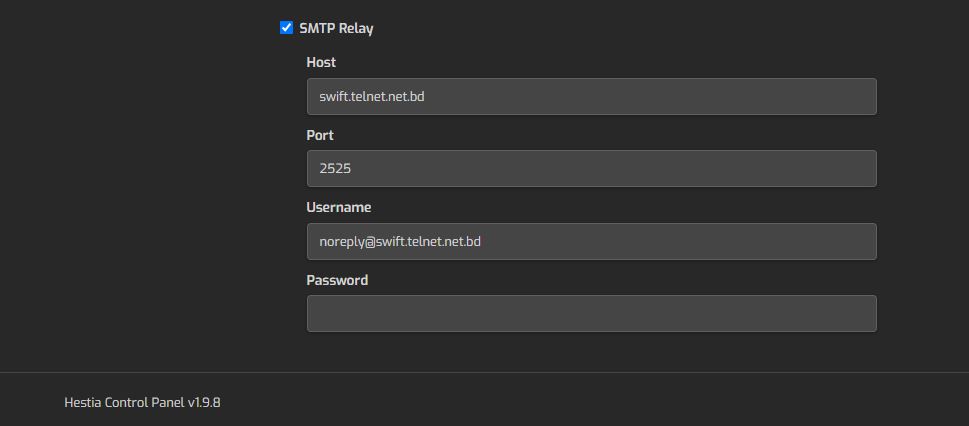
So My Question is if i have checked SMTP_Relay 


why i have to add password into the client.passwd file 


Yes, you need to enable the smtp relay and add the user and password allowed to use the smtp relay.

yes  i have done this. 

but mail not sending. 

 so i have to put authentication details into the /etc/exim4/passwd.client file manually. 

its working.  

So, What is the default process. 

You don’t need to use Ctrl+e every time you write something, only for outputs.

Then I don’t know what conf you are using but it’s not the one used by Hestia, looks like you have modified more things in the Exim conf.

Dear brother

nope i have google it and took the chance. So far you are kind enough to solve the problem since beginning feeling blessed. Again THANKS A LOT.

Bro a request if possible share a guide line how to configure SMTP_Relay for specific domains.

When you set SMTP Relay for a specific domain via web panel, it launchs this command:

v-add-mail-domain-smtp-relay USER DOMAIN HOST [USERNAME] [PASSWORD] [PORT]

that fills this file with the information passed:

/etc/exim4/domains/DOMAIN/smtp_relay.conf

Then, inside /etc/exim4/exim4.conf.template, it is retrieved in these lines:

SMTP_RELAY_FILE = ${if exists{/etc/exim4/domains/${lookup{$sender_address_domain}dsearch{/etc/exim4/domains}}/smtp_relay.conf}{/etc/exim4/domains/${lookup{$sender_address_domain}dsearch{/etc/exim4/domains}}/smtp_relay.conf}{/etc/exim4/smtp_relay.conf}}
SMTP_RELAY_HOST = ${lookup{host}lsearch{SMTP_RELAY_FILE}}
SMTP_RELAY_PORT = ${lookup{port}lsearch{SMTP_RELAY_FILE}}
SMTP_RELAY_USER = ${lookup{user}lsearch{SMTP_RELAY_FILE}}
SMTP_RELAY_PASS = ${lookup{pass}lsearch{SMTP_RELAY_FILE}}

and then, based in @sahsanu explanations, seems it is used in this authenticator:

smtp_relay_login:  
  driver = plaintext  
  public_name = PLAIN  
  hide client_send = ^SMTP_RELAY_USER^SMTP_RELAY_PASS

Review that I said above to know if you have everything to use correctly the SMTP Relay by domain. Maybe something is wrong when creating the smtp_relay.conf file, or your exim4.conf.template misses that SMTP_RELAY_ lines, or are different for any reason.
Thanks a lot.