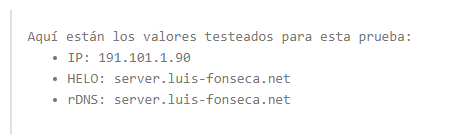
Sure, here it comes:

The other 2 commands:
Exim is getting the right server name, did you restart exim?
Check this too: grep server01 /etc/exim4/exim4.conf.template
Hi again, I was out working hehe, so I have not restart exim exactlky but I do have restart the full server few times before.
the output of the script is empty:
Edit:
I have also run again command proposed by @masterguru host
and now shows it correctly:
Now it’s showing the correct server name:
❯ telnet server.luis-fonseca.net 25
Trying 191.101.1.90...
Connected to server.luis-fonseca.net.
Escape character is '^]'.
220 server.luis-fonseca.net ESMTP
Well looks, it was just a matter of dns update from provider to properly propagate dns updated, I have sent a new email using mail tester and now everything matches properly for them too.
@sahsanu by any change, so just to clarify, I will remove server01 A record in few days, later on I will get new VPS and set under server01.luis-fonseca.net, once everthing is setup again I will do backup of all users at hostinger server and if not mistaken, after this I have to change all records that points to old hostinger server IP to a TTL of 5 minutes for example, and after this once all backups are restored, I will have to change all records in hestiacp, cloudflare, domain provider to new IP and after this just wait a few before setting back TTL to automatic or default and finally delete old server ? Is that the process step by step ?
The change is practically instant, there’s no “propagation”. The issue wasn’t your provider, but rather the cached record being used by your dns resolver.
The migration plan sounds good to me. If you use any custom web, mail, dns or other templates, you should back those up as well. Hestia doesn’t include templates when backing up users.
Set the TTL to the lowest value you can. That’s what people usually refer to as dns “propagation”, the lower the TTL, the less time dns resolvers will cache your records. When you replace the old IP address with the new one, resolvers will start using the new IP faster.
Great, so everything sounds good as planned, yeah actually I don’t use custom templates or so, not an expert so most of the time I keep everything by hestiacp default values for everything, so should not be a problem, actually in the past I’ve done almost the same, but on same server, meaning make hestia backups, download them and I have fully reinstall debian and set hestiacp on new server with my own steps and restored backups without any issues 
I recently moved most of my contabo servers to digitalocean servers with much less specs but about the same cost and the performance is way better. I still use contabo for a few. My recommendation for ALL of these is to have automated backups to two or more cloud sources or other servers, etc.. For me I could use a s01.domainname for one s02.domainname for the next one, migrate stuff to it and never need to mess around with changing the server hostname just recycle the s01 sometime if need be. I found changing server names and ip addresses is ok if one needs to restore a backup due to a failure but there are a lot of places where the old ip’s get saved and must be deleted in order for apache2/nginx to start up and so forth, MUCH easier to just migrate sites (backup user, restore user).