Hello, I had HestiaCP setup and working perfectly for few of my websites, including SSL and everything on Ubuntu server. Unfortunately I ran Ubuntu update & upgrade earlier today and now I’m getting the mentioned error: “500 Internal Server Error”. Hestia CP itself runs fine but all websites are showing the site with yellow exclamation mark:

I admit I was a bit careless during the update, there were some updates regarding apache2 and other.
This is the complete list of all updates:
Start-Date: 2023-01-30  19:09:30
Commandline: apt-get upgrade
Requested-By: ubuntu (1001)
Upgrade: openssh-client:arm64 (1:8.9p1-3, 1:8.9p1-3ubuntu0.1), php8.0-soap:arm64 (1:8.0.26-1+ubuntu22.04.1+deb.sury.org+1, 1:8.0.27-2+ubuntu22.04.1+deb.sury.org+1), kbd:arm64 (2.3.0-3ubuntu4, 2.3.0-3ubuntu4.22.04), libsasl2-modules:arm64 (2.1.27+dfsg2-3ubuntu1, 2.1.27+dfsg2-3ubuntu1.1), libsasl2-2:arm64 (2.1.27+dfsg2-3ubuntu1, 2.1.27+dfsg2-3ubuntu1.1), php8.0-common:arm64 (1:8.0.26-1+ubuntu22.04.1+deb.sury.org+1, 1:8.0.27-2+ubuntu22.04.1+deb.sury.org+1), php8.0-curl:arm64 (1:8.0.26-1+ubuntu22.04.1+deb.sury.org+1, 1:8.0.27-2+ubuntu22.04.1+deb.sury.org+1), php8.0-imap:arm64 (1:8.0.26-1+ubuntu22.04.1+deb.sury.org+1, 1:8.0.27-2+ubuntu22.04.1+deb.sury.org+1), php8.0-intl:arm64 (1:8.0.26-1+ubuntu22.04.1+deb.sury.org+1, 1:8.0.27-2+ubuntu22.04.1+deb.sury.org+1), php8.0:arm64 (1:8.0.26-1+ubuntu22.04.1+deb.sury.org+1, 1:8.0.27-2+ubuntu22.04.1+deb.sury.org+1), openssh-server:arm64 (1:8.9p1-3, 1:8.9p1-3ubuntu0.1), libsasl2-modules-db:arm64 (2.1.27+dfsg2-3ubuntu1, 2.1.27+dfsg2-3ubuntu1.1), php8.0-opcache:arm64 (1:8.0.26-1+ubuntu22.04.1+deb.sury.org+1, 1:8.0.27-2+ubuntu22.04.1+deb.sury.org+1), apache2-suexec-custom:arm64 (2.4.54-1+ubuntu22.04.1+deb.sury.org+1, 2.4.55-1+ubuntu22.04.1+deb.sury.org+2), python-apt-common:arm64 (2.3.0ubuntu2.1, 2.4.0), apache2-data:arm64 (2.4.54-1+ubuntu22.04.1+deb.sury.org+1, 2.4.55-1+ubuntu22.04.1+deb.sury.org+2), php8.0-gd:arm64 (1:8.0.26-1+ubuntu22.04.1+deb.sury.org+1, 1:8.0.27-2+ubuntu22.04.1+deb.sury.org+1), apache2-bin:arm64 (2.4.54-1+ubuntu22.04.1+deb.sury.org+1, 2.4.55-1+ubuntu22.04.1+deb.sury.org+2), open-vm-tools:arm64 (2:11.3.5-1ubuntu4.1, 2:12.1.0-1~ubuntu0.22.04.1), update-manager-core:arm64 (1:22.04.9, 1:22.04.10), python3-apt:arm64 (2.3.0ubuntu2.1, 2.4.0), systemd-hwe-hwdb:arm64 (249.11.1, 249.11.2), php8.0-mbstring:arm64 (1:8.0.26-1+ubuntu22.04.1+deb.sury.org+1, 1:8.0.27-2+ubuntu22.04.1+deb.sury.org+1), apache2-utils:arm64 (2.4.54-1+ubuntu22.04.1+deb.sury.org+1, 2.4.55-1+ubuntu22.04.1+deb.sury.org+2), grub2-common:arm64 (2.06-2ubuntu7, 2.06-2ubuntu7.1), php8.0-mysql:arm64 (1:8.0.26-1+ubuntu22.04.1+deb.sury.org+1, 1:8.0.27-2+ubuntu22.04.1+deb.sury.org+1), php8.0-pspell:arm64 (1:8.0.26-1+ubuntu22.04.1+deb.sury.org+1, 1:8.0.27-2+ubuntu22.04.1+deb.sury.org+1), openssh-sftp-server:arm64 (1:8.9p1-3, 1:8.9p1-3ubuntu0.1), php8.0-readline:arm64 (1:8.0.26-1+ubuntu22.04.1+deb.sury.org+1, 1:8.0.27-2+ubuntu22.04.1+deb.sury.org+1), grub-common:arm64 (2.06-2ubuntu7, 2.06-2ubuntu7.1), php8.0-bcmath:arm64 (1:8.0.26-1+ubuntu22.04.1+deb.sury.org+1, 1:8.0.27-2+ubuntu22.04.1+deb.sury.org+1), python3-update-manager:arm64 (1:22.04.9, 1:22.04.10), apache2:arm64 (2.4.54-1+ubuntu22.04.1+deb.sury.org+1, 2.4.55-1+ubuntu22.04.1+deb.sury.org+2), php8.0-bz2:arm64 (1:8.0.26-1+ubuntu22.04.1+deb.sury.org+1, 1:8.0.27-2+ubuntu22.04.1+deb.sury.org+1), php8.0-cli:arm64 (1:8.0.26-1+ubuntu22.04.1+deb.sury.org+1, 1:8.0.27-2+ubuntu22.04.1+deb.sury.org+1), php8.0-ldap:arm64 (1:8.0.26-1+ubuntu22.04.1+deb.sury.org+1, 1:8.0.27-2+ubuntu22.04.1+deb.sury.org+1), php8.0-fpm:arm64 (1:8.0.26-1+ubuntu22.04.1+deb.sury.org+1, 1:8.0.27-2+ubuntu22.04.1+deb.sury.org+1), php8.0-xml:arm64 (1:8.0.26-1+ubuntu22.04.1+deb.sury.org+1, 1:8.0.27-2+ubuntu22.04.1+deb.sury.org+1), libpq5:arm64 (14.5-0ubuntu0.22.04.1, 14.6-0ubuntu0.22.04.1), php8.0-zip:arm64 (1:8.0.26-1+ubuntu22.04.1+deb.sury.org+1, 1:8.0.27-2+ubuntu22.04.1+deb.sury.org+1)
End-Date: 2023-01-30  19:13:03
So yes, some misconfiguration has happened and I cannot figure out what happened, why and where to fix it.
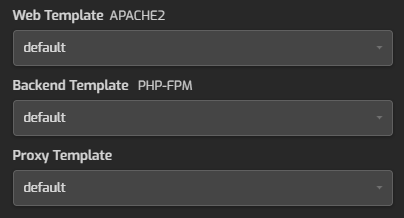
Following is the setting same for all websites in Hestia CP:
nginx log showed this after the update but no more:
2023/01/30 19:23:59 [emerg] 1190#1190: bind() to 10.0.0.227:80 failed (98: Address already in use)
2023/01/30 19:23:59 [emerg] 1190#1190: bind() to 10.0.0.227:443 failed (98: Address already in use)
2023/01/30 19:23:59 [emerg] 1190#1190: still could not bind()
Error log for one of the websites shows (in Hestia CP - binoculars - Error.log):
2023/01/30 21:01:34 [error] 8327#8327: *568 connect() failed (111: Connection refused) while connecting to upstream, client: 216.179.117.119, server: mywebsite.com, request: "GET /en/ HTTP/1.1", upstream: "https://10.0.0.227:8443/en/", host: "mywebsite.com"
2023/01/30 21:02:39 [error] 8327#8327: *575 connect() failed (111: Connection refused) while connecting to upstream, client: 38.97.137.99, server: mywebsite.com, request: "GET /en/ HTTP/1.1", upstream: "https://10.0.0.227:8443/en/", host: "mywebsite.com"
2023/01/30 21:03:17 [error] 8327#8327: *578 connect() failed (111: Connection refused) while connecting to upstream, client: 216.144.248.20, server: mywebsite.com, request: "GET / HTTP/1.1", upstream: "https://10.0.0.227:8443/", host: "mywebsite.com", referrer: "https://mywebsite.com"
2023/01/30 21:03:19 [error] 8327#8327: *580 connect() failed (111: Connection refused) while connecting to upstream, client: 37.143.116.232, server: mywebsite.com, request: "GET / HTTP/2.0", upstream: "https://10.0.0.227:8443/", host: "www.mywebsite.com"
systemctl status apache2 shows:
 apache2.service - The Apache HTTP Server
     Loaded: loaded (/lib/systemd/system/apache2.service; enabled; vendor preset: enabled)
     Active: failed (Result: exit-code) since Mon 2023-01-30 19:41:30 CET; 1h 27min ago
       Docs: https://httpd.apache.org/docs/2.4/
    Process: 1138 ExecStart=/usr/sbin/apachectl start (code=exited, status=1/FAILURE)
        CPU: 67ms

Jan 30 19:41:30 hcp.mydomain.com apachectl[1199]: AH00558: apache2: Could not reliably determine the server's fully qualified domain name, using hcp.mydomain.com. Set the 'ServerName' directive globally to suppress this message
Jan 30 19:41:30 hcp.mydomain.com apachectl[1199]: (98)Address already in use: AH00072: make_sock: could not bind to address [::]:80
Jan 30 19:41:30 hcp.mydomain.com apachectl[1199]: (98)Address already in use: AH00072: make_sock: could not bind to address 0.0.0.0:80
Jan 30 19:41:30 hcp.mydomain.com apachectl[1199]: no listening sockets available, shutting down
Jan 30 19:41:30 hcp.mydomain.com apachectl[1199]: AH00015: Unable to open logs
Jan 30 19:41:30 hcp.mydomain.com apachectl[1138]: Action 'start' failed.
Jan 30 19:41:30 hcp.mydomain.com apachectl[1138]: The Apache error log may have more information.
Jan 30 19:41:30 hcp.mydomain.com systemd[1]: apache2.service: Control process exited, code=exited, status=1/FAILURE
Jan 30 19:41:30 hcp.mydomain.com systemd[1]: apache2.service: Failed with result 'exit-code'.
Jan 30 19:41:30 hcp.mydomain.com systemd[1]: Failed to start The Apache HTTP Server.
Could you please help me and advise what should I check and what to fix?
I am already considering reinstalling the whole server, use Hestia backup and restore the data, as the last resort.
Many thanks!
