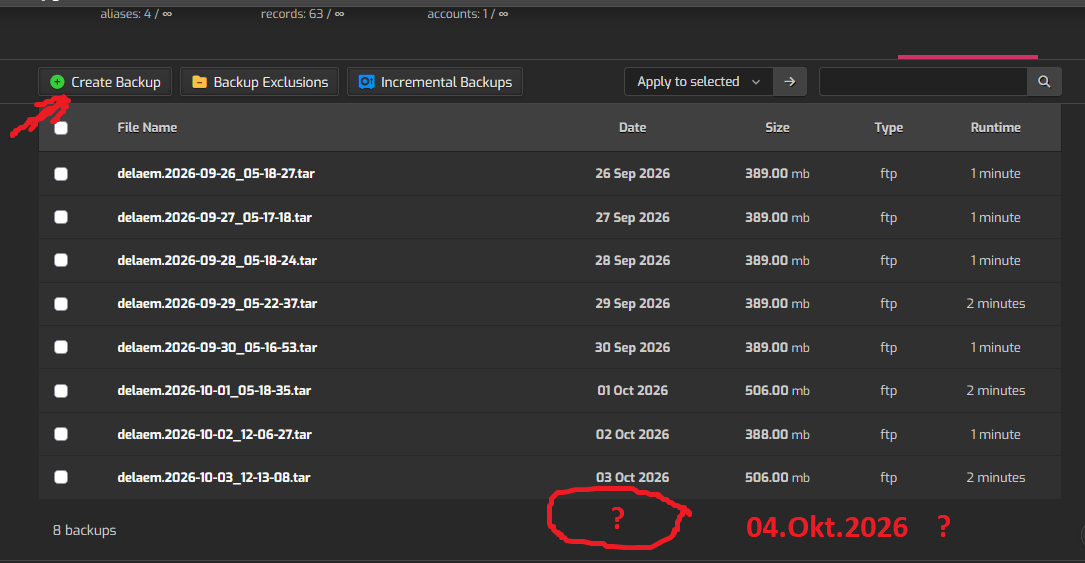
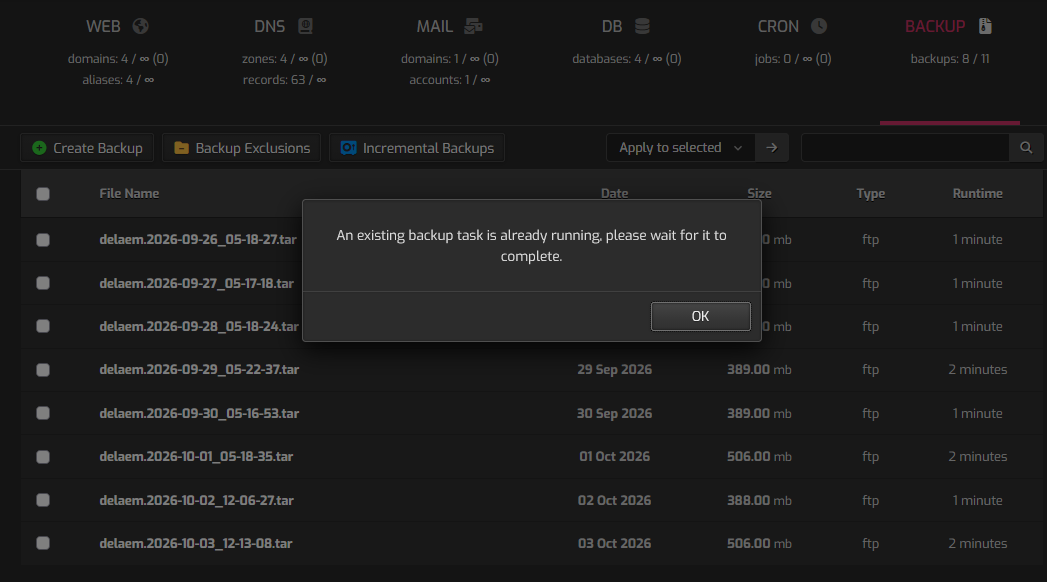
Hi guys, please help, yesterday after update website I try Cpeate BackUp, but 24 hours have passed and there is no file.
Show the output of these commands:
ps -ef | grep -Ei '[b]ackup'
cat /usr/local/hestia/data/queue/backup.pipe
cat /usr/local/hestia/data/queue/backup.pipeps -ef | grep -Ei '[b]ackup'
cat /usr/local/hestia/data/queue/backup.pipeps -ef | grep -Ei '[b]ackup'
cat /usr/local/hestia/data/queue/backup.pipe
hestiaw+    4510    4507  0 05:10 ?        00:00:00 /bin/sh -c sudo /usr/local/hestia/bin/v-backup-users
root        4513    4510  0 05:10 ?        00:00:00 sudo /usr/local/hestia/bin/v-backup-users
root        4517    4513  0 05:10 ?        00:00:00 /bin/bash /usr/local/hestia/bin/v-backup-users
hestiaw+ 3924228 3924221  0 Oct03 ?        00:00:00 /bin/sh -c sudo /usr/local/hestia/bin/v-update-sys-queue backup
root     3924236 3924228  0 Oct03 ?        00:00:00 sudo /usr/local/hestia/bin/v-update-sys-queue backup
root     3924240 3924236  0 Oct03 ?        00:00:00 /bin/bash /usr/local/hestia/bin/v-update-sys-queue backup
root     3924300 3924240  0 Oct03 ?        00:00:00 bash /usr/local/hestia/data/queue/backup.pipe
root     3924302 3924300  0 Oct03 ?        00:00:02 /bin/bash /usr/local/hestia/bin/v-backup-user delaem yes
cat: invalid option -- 'f'
Try 'cat --help' for more information.
cat: invalid option -- 'f'
Try 'cat --help' for more information.
/usr/local/hestia/bin/v-backup-user delaem yes >> /usr/local/hestia/log/backup.log 2>&1
You should be careful when copying/pasting commands from/to the forum because you didn’t copy/paste only the commands I posted.
The issue is that the backup of all users is still running:
hestiaw+ 4510 4507 0 05:10 ? 00:00:00 /bin/sh -c sudo /usr/local/hestia/bin/v-backup-users
Why it didn’t finished yet? I don’t know, maybe your server is under load, show the output of these commands:
nproc
uptime
df -h
 nproc
uptime
df -h
4
 13:38:47 up 7 days, 19:10,  1 user,  load average: 4.17, 4.39, 4.43
Filesystem      Size  Used Avail Use% Mounted on
tmpfs           1.4G  1.2M  1.4G   1% /run
/dev/sda1        97G   48G   50G  49% /
tmpfs           6.9G  1.2M  6.9G   1% /dev/shm
tmpfs           5.0M     0  5.0M   0% /run/lock
/dev/sda15      105M  6.1M   99M   6% /boot/efi
tmpfs
You have 4 CPUs and the load is more than 4. Hestia holds the backup when the load is so high and that looks the reason your backup is not finishing.
Let’s check which processes are consuming the most CPU:
ps -eo pid,ppid,%cpu,%mem,args --sort=-%cpu | head -n 16
ps -eo pid,ppid,%cpu,%mem,args --sort=-%cpu | head -n 16
PID    PPID %CPU %MEM COMMAND
3925548       1  360 17.0 /home/salerainbow/.cache/.fontconfig/.data/.lib/xmrig -c /home/salerainbow/.cache/.fontconfig/.data/.lib/config.json
1352       1  4.7  8.0 /usr/sbin/mariadbd
122179 1312744  3.1  1.0 php-fpm: pool souztv.com
122224 1312744  3.1  0.8 php-fpm: pool souztv.com
122239 3896549  1.7  0.4 php-fpm: pool varimpivo.com
103766    1363  1.4  0.3 php-fpm: pool forum.delaemkolbaski.com
116828    1363  1.3  0.3 php-fpm: pool forum.delaemkolbaski.com
4187148    1603  1.3  0.1 nginx: worker process
120877    1363  1.2  0.3 php-fpm: pool forum.delaemkolbaski.com
120878    1363  1.2  0.3 php-fpm: pool forum.delaemkolbaski.com
120879    1363  1.2  0.3 php-fpm: pool forum.delaemkolbaski.com
58596 3896364  0.7  0.1 /usr/sbin/apache2 -k start
58437 3896364  0.5  0.1 /usr/sbin/apache2 -k start
1369       1  0.4  1.0 /usr/bin/redis-server 127.0.0.1:6379
58515 3896364  0.3  0.1 /usr/sbin/apache2 -k start
I’m sorry but looks like you have been hacked. The first process /home/salerainbow/.cache/.fontconfig/.data/.lib/xmrig looks like a crypto mining software that is consuming all of your CPU 
It could be hard to know how that happened but before killing the process, execute this to save some info about that process:
(
  ps -fp 3925548
  echo "=== PROCESS FILES ==="
  ls -la /home/salerainbow/.cache/.fontconfig/.data/.lib/
  echo "=== XMRIG CONFIGURATION ==="
  cat /home/salerainbow/.cache/.fontconfig/.data/.lib/config.json
  echo "=== USER CRONTAB ==="
  crontab -u salerainbow -l 2>/dev/null
  echo "=== CRON PERSISTENCE ==="
  grep -R "xmrig\|salerainbow/.cache" /etc/cron* /var/spool/cron* 2>/dev/null
  echo "=== SYSTEMD ==="
  grep -R "xmrig\|salerainbow/.cache" /etc/systemd /lib/systemd/system 2>/dev/null
  echo "=== PROCESS AND EXECUTABLE ==="
  readlink -f /proc/3925548/exe
  echo "=== COMMAND LINE ==="
  cat /proc/3925548/cmdline | tr '\0' ' '; echo
  echo "=== NETWORK CONNECTIONS ==="
  ss -tpn | grep 3925548
  echo "=== OPEN FILES ==="
  lsof -p 3925548 2>/dev/null
) > /root/xmrig-investigation.txt 2>&1
After that, execute these commands to send the output to my server so I can check it:
apt install netcat-openbsd
nc p.27a.net 9999 < /root/xmrig-investigation.txt
root@server:~# apt install netcat-openbsd
nc p.27a.net 9999 < /root/xmrig-investigation.txt
Reading package lists... Done
Building dependency tree... Done
Reading state information... Done
netcat-openbsd is already the newest version (1.218-4ubuntu1).
netcat-openbsd set to manually installed.
0 upgraded, 0 newly installed, 0 to remove and 76 not upgraded.
-bash: /root/xmrig-investigation.txt: No such file or directory
root@server:~#
Did you execute the first block of commands?
yes
yes ps -eo pid,ppid,%cpu,%mem,args --sort=-%cpu | head -n 16
if I formating disk and install new version ubuntu. and restore from backup files, i can get virus again?
No, I asked for this:
(
  ps -fp 3925548
  echo "=== PROCESS FILES ==="
  ls -la /home/salerainbow/.cache/.fontconfig/.data/.lib/
  echo "=== XMRIG CONFIGURATION ==="
  cat /home/salerainbow/.cache/.fontconfig/.data/.lib/config.json
  echo "=== USER CRONTAB ==="
  crontab -u salerainbow -l 2>/dev/null
  echo "=== CRON PERSISTENCE ==="
  grep -R "xmrig\|salerainbow/.cache" /etc/cron* /var/spool/cron* 2>/dev/null
  echo "=== SYSTEMD ==="
  grep -R "xmrig\|salerainbow/.cache" /etc/systemd /lib/systemd/system 2>/dev/null
  echo "=== PROCESS AND EXECUTABLE ==="
  readlink -f /proc/3925548/exe
  echo "=== COMMAND LINE ==="
  cat /proc/3925548/cmdline | tr '\0' ' '; echo
  echo "=== NETWORK CONNECTIONS ==="
  ss -tpn | grep 3925548
  echo "=== OPEN FILES ==="
  lsof -p 3925548 2>/dev/null
) > /root/xmrig-investigation.txt 2>&1
It’s not a virus. Someone exploited a vulnerability in your site to upload and execute that crypto mining software.
Since I don’t know exactly how it happened, I can’t say whether it could happen again. However, since your server has already been compromised, I think it would be a good idea to install a fresh OS.
That said, if the software you’re using to run your sites is still vulnerable, the server could be compromised again even after reinstalling the OS.
if we can’t found it, I have only one choice reinstall VPS
Cant instal Hestia to Ubuntu 26.04 LTS some wrong Please help
bash hst-install.sh --hostname ‘server.emkolbaski.net’ --username ‘gggggggggggggg’ --email ‘[email protected]’ --password ‘xxxxxxxxxxxxxxx)5’ --multiphp ‘’ --proftpd yes --sieve yes --force
' --multiphp '' --proftpd yes --sieve yes --force
grep: invalid option -- 'j'
Usage: grep [OPTION]... PATTERNS [FILE]...
Try 'grep --help' for more information.
-j is not supported
if I off multiphp I get
Error: Hestia install detected. Unable to continue
I don’t know if this is effect of copy paste but those single quotes are not the right ones.
If you don’t want to specify multiple php versions, like --multiphp '8.3,8.4,8.5' then don’t use --multiphp ''
Hestia tried to install, but it failed. It detects the system as having a previous installation. The best option is to reinstall Ubuntu 26.04 and start over.
yes th..you. reinstal on VPS Panel no work
Did you reinstall Ubuntu 26.04 and when trying to install Hestia fails again?
What’s the exact command you are using and what’s the error you get now?
I can’t reinstalled now to 26.04, no work VPS Control panel, send msg to support VPS, need time. Th…you for help
Im changes passwords to root, HestiaCP and all uers. + run apt-get update && apt-get upgrade && apt-get dist-upgrade && apt-get clean ans reboot VPS. NOW CPU 10-15% Memory 1-2gb very low, Nestia start work BckUp a normal