Hello,
I created a standard user in HestiaCP, I added SSH Key, I can connect to SSH console with this user, but I can’t connect to SFTP.
I already red some topics here, but I don’t understand where is the issue.
User: stefano
I granted bash access on user:
I checked /home/stefano/.ssh/authorized_keys:
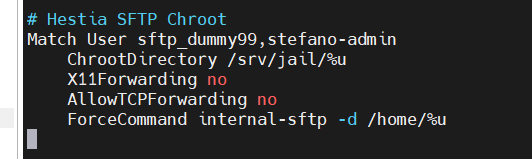
I checked /etc/ssh/sshd_config (where I didn’t change anything) and I noticed this:
there isn’t “stefano” user.
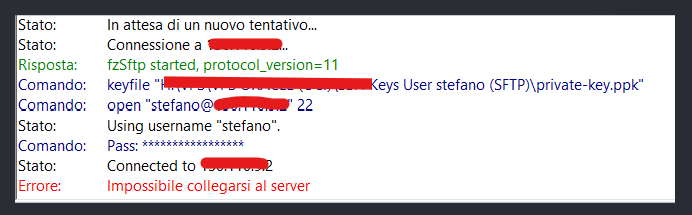
Connecting to SFTP using Filezilla:
Please Can you help me?
Thanks
sahsanu
December 5, 2025, 12:42pm
2
Hi,
Run these commands and try again:
sed -i -E 's/(^Sub.*internal-sftp)(.*)/\1/' /etc/ssh/sshd_config
systemctl restart ssh
What does this command do? I don’t want to break compatibility with HestiaCP. Why do I need this command? Shouldn’t SFTP work by default?
Thanks
It’s a bug in Hestia that incorrectly adds the -server suffix to the directive Subsystem sftp internal-sftp. The sed command I posted removes that suffix.
I tried now before apply your modify and now it works!
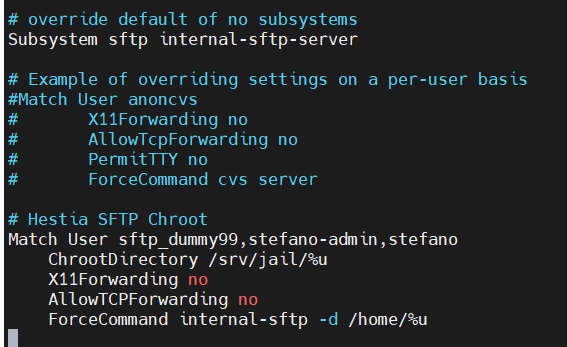
I checked /etc/ssh/sshd_config and now I can see my user “stefano“:
is there a cron that edit this file? However keeping -server suffix on Subsystem sftp internal-sftp-server, it works fine.
That’s because you added the user to be jailed but the Subsystem directive must be fixed, you must remove -server
I didn’t add any user in /etc/ssh/sshd_config manually….
I didn’t say you did it manually
Did you say that I added the user to be jailed.. when? how? I don’t understand sorry
Anyway I fixed it
sahsanu
December 5, 2025, 4:45pm
10
stefacchio:
how?
Using command v-add-user-sftp-jail stefano or rebuilding the user (via command line or from Web UI).
Wonder
December 6, 2025, 12:26am
12
I ran into this problem and, sure enough, this solution was perfect. It worked fine via SSH, but I had the same problem via SFTP. This fixed it.
Thanks
sahsanu
December 6, 2025, 12:44am
13
Wonder:
This fixed it.
Keep in mind that this only fixes the outcome but does not solve the underlying problem. It could happen again, so until a new Hestia version is released, you can patch the current installation:
cd /usr/local/hestia/bin/
mv v-add-sys-sftp-jail v-add-sys-sftp-jail.ori
curl -sSL https://raw.githubusercontent.com/hestiacp/hestiacp/b7b2f3b10cbfd5b727bb8cb835bc236bdfbc6660/bin/v-add-sys-sftp-jail -o v-add-sys-sftp-jail
chmod +x v-add-sys-sftp-jail
Wonder
December 6, 2025, 11:12am
14
As always, thank you.
I thought it was a permanent fix, but indeed, it can happen in a Hestia update.
I signed up to this forum just to thank you sahsanu.
You saved the day
thank you. this saved my day about SFTP problem with Filezilla