I am using M365 for our emails DNS configured to use 365 template.
When i send emails to myself i get this reject ERROR CODE :550 - relay not permitted
I am using M365 for our emails DNS configured to use 365 template.
When i send emails to myself i get this reject ERROR CODE :550 - relay not permitted
Can you try and rebuild the mail domains once.
Also check if the dovecot configs are as per Hestia and not the default ones.
Also show the output of this once:
v-list-sys-dovecot-config
Update -
Typically have no problems with Hestia when creating users that want to use 365. In fact i have a few others who i have created prior to this without issues.
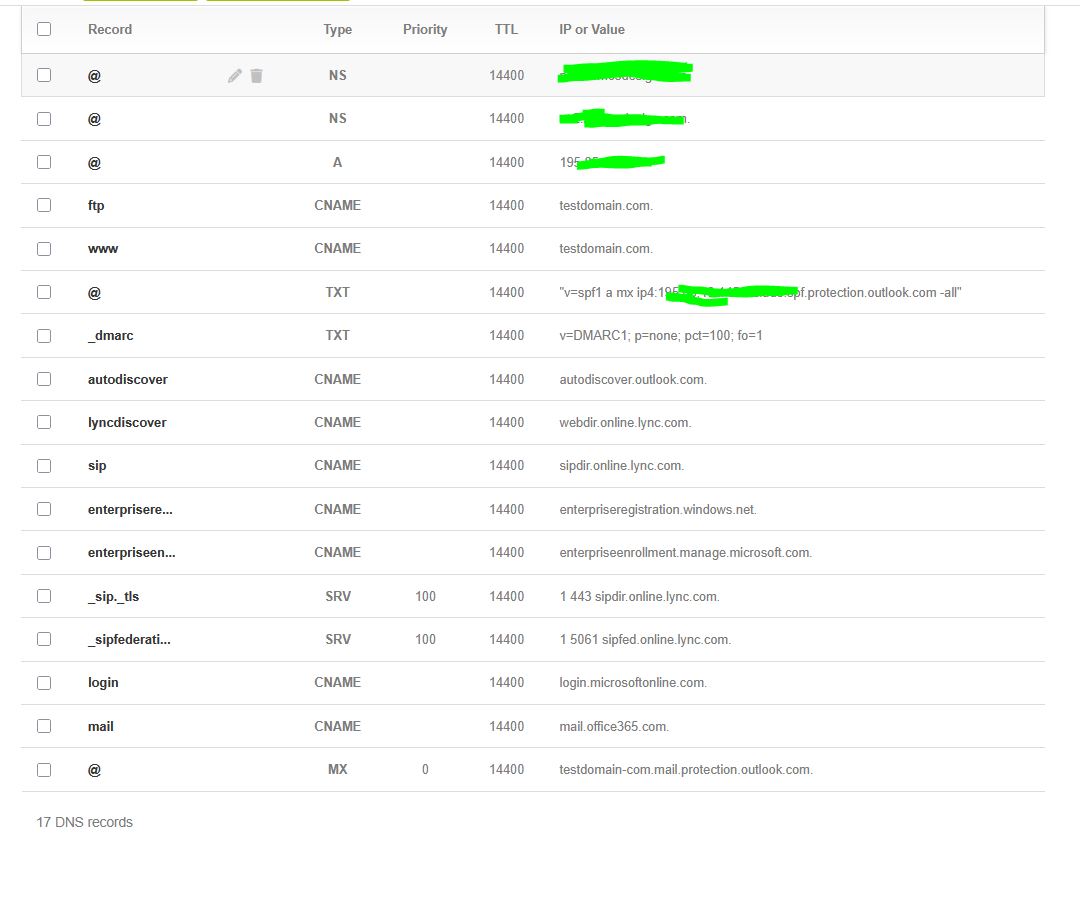
Anyway i looked into the DNS and noticed the MX record was missing, this is odd because normally the template would add an MX record too.. And it didn’t. Even after i deleted the DNS domain and recreated it, still did not create the MX record.
Must be a new bug?
I think this is where the bug happen - Create a domain with 365 template but when creating domain if you accidentally enable mail domain it will not create the MX. So when i realized i made the mistake of mail domain, i removed the mail domain and rebuild the DNS. Unknowing to me there was no MX record created although the SPF and other microsoft dns entries were created.
So i deleted the dns domain and web domain. Created again and the results were still same .. no mx record. I ended up just manually adding the MX record.
Checking the history of the DNS template office365.tpl, it hasn’t added an MX record for several years. I’ve never used M365, so I’m not sure whether you need to add a custom MX record, if so, that would explain why Hestia doesn’t include one.
thats odd because ive never had the need to add the MX record before it always seem to include it. This is the first time ive had to.. ill test on another server and see what happens.
@sahsanu i tested on another server and it created the dns with MX automatically.
Checking the script v-change-dns-domain-tpl… it detects if you are using the dns template office365 and adds the MX record:
# Set correct domain name formatting for Office 365/Microsoft 365 MX records
if [ "$template" = "office365" ]; then
        check_dns_domain=$(is_object_valid 'dns' 'DOMAIN' "$domain")
        if [ "$?" -eq 0 ]; then
                record='@'
                formatted_domain=$(echo "$domain" | sed 's/\./-/g')
                $BIN/v-add-dns-record "$user" "$domain" "$record" MX "${formatted_domain}.mail.protection.outlook.com." '0' '' "$restart"
        fi
fi
If I create a DNS domain using the office365 template, it creates the correct MX record. After that, I create the web domain with mail support, and the DNS records are also correct.
If I create a new web domain adding support for DNS and mail, it creates the records using the default template, and the MX record is the standard one. Then I edit the DNS domain and change the template to office365, and the MX record is updated to the correct one for Microsoft 365.
I can’t reproduce the “bug.” If you find steps to reproduce it, please let me know.
I reproduced the bug, i actually did not do much. All i did was create a new user with a package that uses template 365. I add webdomain - and include DNS Support only. After that i checked the DNS tab and i don’t see any MX record. Could my copy of hestia be broken?
Because on my other server this not the same as it does 100% create the MX record.
The issue occurs when the office365 template is added to the package. Since the template is not changed afterward, the v-change-dns-domain-tpl script is not executed, and the logic that adds the MX record is never applied.
I’m not sure why the MX record isn’t included directly in the template. In any case, since I either don’t use this setup or don’t know exactly which records should be added, I don’t think I should attempt to fix it.
I tested what you just said, i edit the dns domain → change template from 365 to default → save → change template back to 365 → and then it added the MX record.
But this issue is only present on 1 server and my other server can add MX via the package without these extra steps, which lead me to believe maybe theres something missing in my template?
Where are the bind9 templates stored i can compare it with my other server.
I tested it on a fresh install and the MX is not created when using office365 from the package.
Here /usr/local/hestia/data/templates/dns/