Can't Run Incremental Backups

My tone is constructive criticism, not anger, fwiw. The first part is more feedback for the docs and the second is my plea for assistance:

Feedback

I used the documentation instructions to set up incremental backups, but much of it is VERY unclear. Ultimately, while following the instructions as closely as possible, I’m now in a state where every time I run v-backup-user-restic [user] I get Error: incremental backups are disabled even tho the web ui clearly shows the configuration I set with v-add-backup-host-restic:
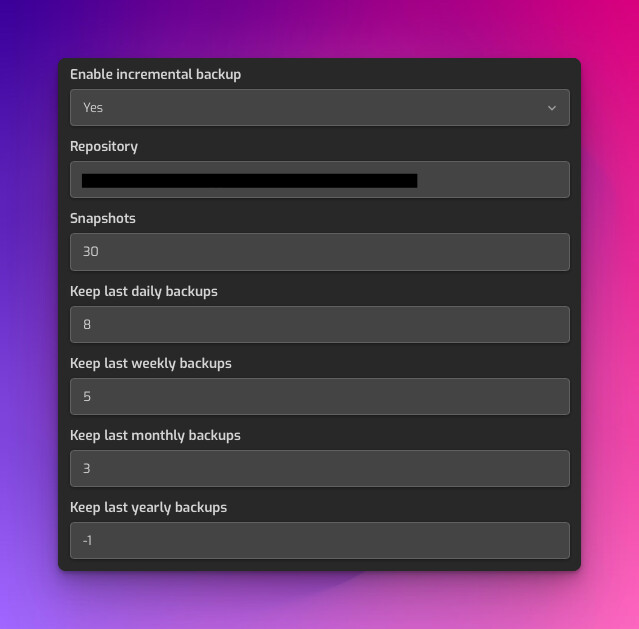
(this screenshot is not pre-save, it is after I’ve done setup with the command line and reloaded the page)

So, documentation issues first:
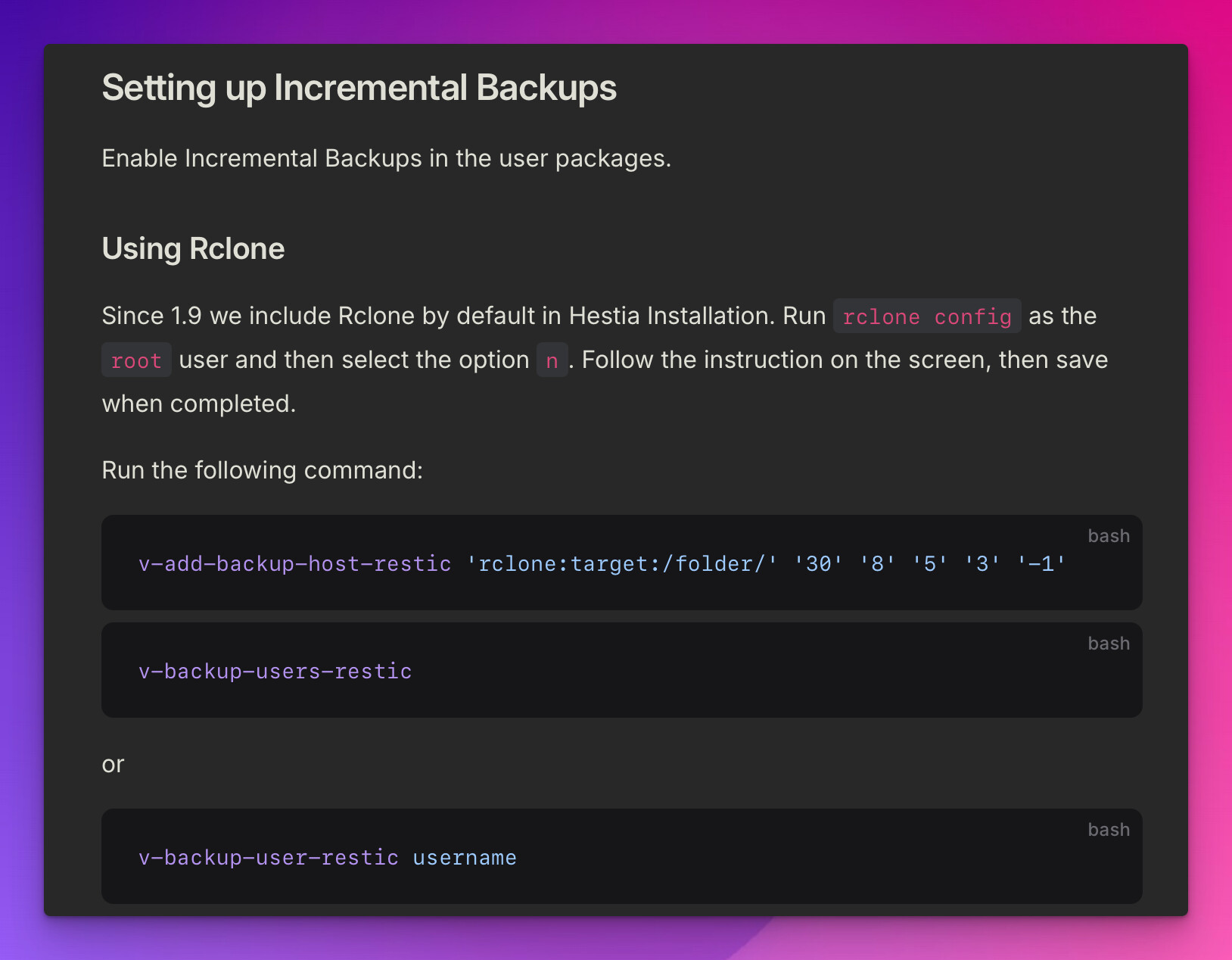
Setting up Incremental Backups

Enable Incremental Backups in the user packages.

Using Rclone

Since 1.9 we include Rclone by default in Hestia Installation. Run rclone config as the root user and then select the option n. Follow the instruction on the screen, then save when completed.

First, this section immediately follows the rclone backup section. It then proceeds to talk about rclone immediately before showing commands that have no connection to rclone at all (apart from the string rclone being a literal argument in a followup command

This is very confusing. Are we using rclone to setup incremental backups? Or are we using restic? Why do you mention that you include rclone by default when we need to be using restic here? That would be a useful point of information in the previous section about rclone, but in this section it’s just confusing.

Another extreme point of confusion is the line for adding the backup location:

v-add-backup-host-restic ‘rclone:target:/folder/’ ‘30’ ‘8’ ‘5’ ‘3’ ‘-1’

sepcifically the rclone:target:/folder/ part. What DOES rclone represent here? Is it a schema, like http and it should be a literal part of every implementation? Or is it a standin for the rclone remote we will be backing up to? And target - again, the rclone remote or the remote directory/bucket? Does folder need to include the bucket for s3? And it’s not unique to this example, but the following positional arguments have no explanation in the documentation either.

So, my final understanding of this section is that “maybe restic uses rclone as a dependency? Maybe? I’ll try a few different variations of leaving rclone: as a literal prefix to my remote, bucket and path in the argument, a couple without, try using : as a separator for bucket→path and remote→bucket as well as/, but alas, nothing worked.

Plea for help

In the end, every time I made a change and tried running, I got Error: incremental backups are disabled which is demonstrably false - misconfigured? Sure, if not definitely.

root@controlpanel:~# v-backup-user-restic admin
Error: incremental backups are disabled

P.S. - As much as I might sound like a cranky, entitled Karen, I really love this project and greatly respect the effort people have put into it. I’m just tired and can only provide direct feedback without the energy to be more tactful.
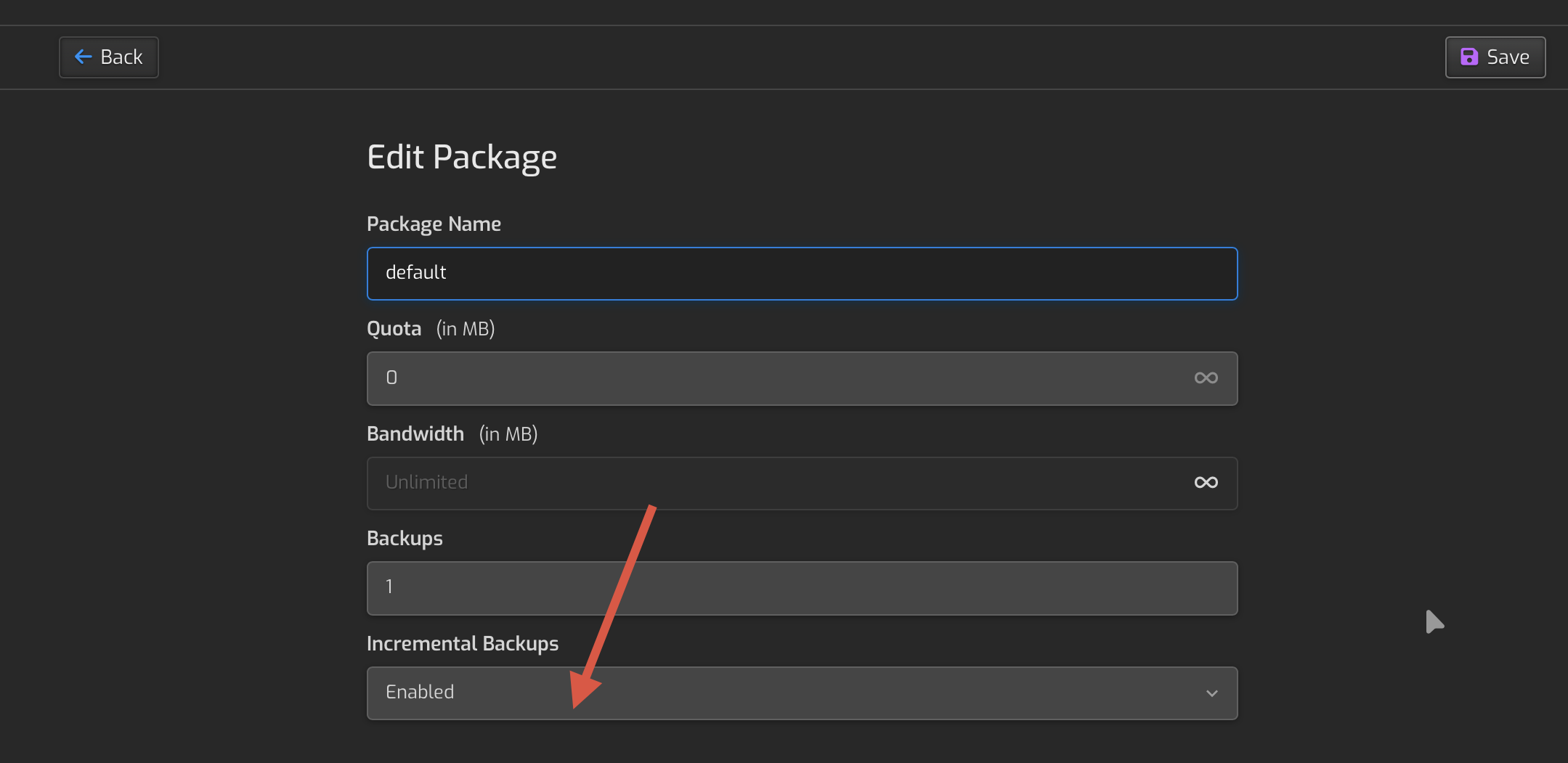
I’m new to Hestia and I ran into the same issue… I found I had to enable incremental backups in the package settings assigned to my user (and admin) accounts:

Once I did that, I was able to see the Incremental Backup button in the backup section. I also added this to my panel cron jobs to run incremental backups once a day:

10 05 * * * sudo /usr/local/hestia/bin/v-backup-users-restic

I set the regular “v-backup-users” to run once a week, and the incremental backups to run daily. I sync everything to a Backblaze S3 bucket via rclone. Hope that helps!

2 Likes

I think you dislodged me! I’m still troubleshooting, but I’ll mark as solution once I can be sure. Thank you so much!

1 Like

Any hints for how to format the repository string? My latest error is that the repository

I’m now getting the error Fatal: repository does not exist: unable to open config file: does not exist\nIs there a repository at the following location?\n[repo string I provided]which I assume is because the string is invalid somehow

I used “rclone:[rclone config name]:[s3 bucket name]/

For example… If my rclone config was called “backblaze” and my backblaze s3 bucket was called “mybucket” then my repository string would be:

rclone:backblaze:mybucket/

I’m not sure if the trailing “/“ is required but that is how I have mine and it is working. This requires rclone to be pre-configured for your s3 storage provider per the instructions in the documentation.

2 Likes

Okay, I had to resolve a couple other things that I believe are bugs.

It appears that @csmyrnos ‘s string is the correct setup, combined with the discovery that we have to enable it in the package, so major credit there!

Doing my best to recall everything, here’s what I ended up doing:

  1. Create an rclone config

    1. mine ended up looking like

      [MyS3Backup]
      type = s3
      provider = Wasabi
      endpoint = s3.wasabisys.com
      acl = private
      bucket_acl = private
      chunk_size = 20Mi
      access_key_id = ***
      secret_access_key = ***
      
    2. located in ~/.config/rclone/rclone.conf

    3. test via rclone ls MyS3Backup:[bucket-name-no-brackets] - it should show you contents of the bucket.

  2. Now, let’s say my bucket is named foobucket, the repo string for restic should be rclone:MyS3Backup:foobucket/[optional-path]/- the trailing slash appears to be required.

    1. Using this string, run v-add-backup-host-restic ‘rclone:MyS3Backup:foobucket/[optional-path]/’ 30 8 5 3 -1
  3. CRITICAL - the docs explicitly state

    A new restic repository is initiated on the first time you run this command.

    But it did not! Instead, when I ran v-backup-user-restic admin it gave me a semi cryptic error like

    1. {"message_type":"exit_error","code":10,"message":"Fatal: repository does not exist: unable to open config file: \u003cconfig/\u003e does not exist\nIs there a repository at the following location?\nrclone:MyS3Backup:foobucket/incremental/admin"}
      Error: Unable to access restic repo
      
    2. (incremental is what I used for my [optional-path])

    3. To resolve this, I had to manually create the repo:

      1. export RESTIC_PASSWORD_FILE="/usr/local/hestia/data/users/[username]/restic.conf"
        export RESTIC_REPOSITORY='rclone:MyS3Backup:foobucket/incremental/[username]'
        restic init
        
  4. Now when I run v-backup-user-restic admin it uses the actually created repo to run the backup!

  5. Unfortunately, step 3 will need to be repeated for each user you want to backup

Hopefully this will help someone out there who was having similar issues as I was!

P.S. - don’t forget to back up EVERY /usr/local/hestia/data/users/[username]/restic.conf file! Use a password manager or something to do so - it’d be pointless to store it alongside the repo itself.

2 Likes

This topic was automatically closed 30 days after the last reply. New replies are no longer allowed.