Can't send or receive e-mails messages in new Hestia Installation

After installing new Hestia CP, i had restored a backup from another hosting vps server. My vps runs Ubuntu 24, exim and dovecot services are up and running.

When someone sends e-mails from an external domain it just never arrive and when i try to send e-mails i got this error “The message could not be delivered because the SMTP server connection has failed”.

My only domain name is epsmoyobamba.com.pe

Thanks in advance for your help..

What included that backup?

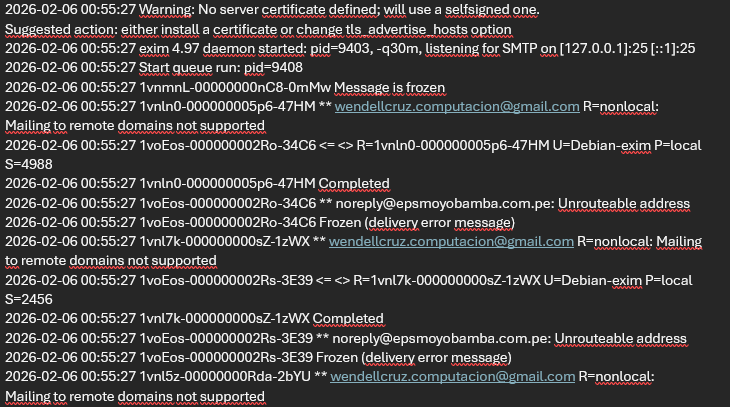
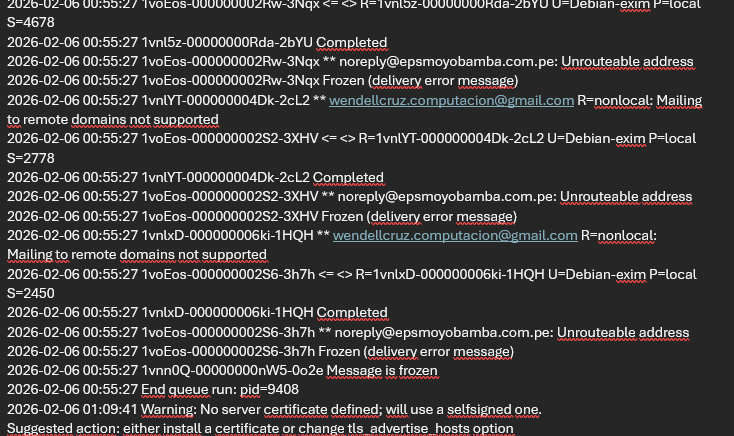
Could you please show any relevant Exim log (/var/log/exim4/mainlog)?

Also, show the output of these commands:

dpkg -l | grep exim
grep -Ev '^#|^$' /etc/exim4/update-exim4.conf.conf
head -n20 /etc/exim4/exim4.conf.template
grep -Ev '^#|^$' /etc/dovecot/dovecot.conf
exim -bp

Hi sahsanu, thank you for your help ,

What included that backup?

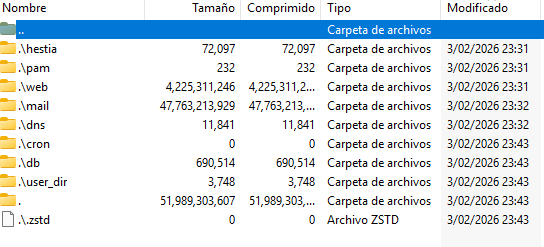
a complete hestia cpanel backup: webs, dns, users, databases, etc., here is a screen schot

the past vps was on hostinger and the actual vps was restored on interserver.net

Also, show the output of these commands:

dpkg -l | grep exim
rc  exim4                                            4.97-4ubuntu4.3                                           all          metapackage to ease Exim MTA (v4) installation
ii  exim4-base                                       4.97-4ubuntu4.3                                           amd64        support files for all Exim MTA (v4) packages
ii  exim4-config                                     4.97-4ubuntu4.3                                           all          configuration for the Exim MTA (v4)
ii  exim4-daemon-heavy                               4.97-4ubuntu4.3                                           amd64        Exim MTA (v4) daemon with extended features, including exiscan-acl
rc  exim4-daemon-light                               4.97-4ubuntu4.3                                           amd64        lightweight Exim MTA (v4) daemon
grep -Ev '^#|^$' /etc/exim4/update-exim4.conf.conf
dc_eximconfig_configtype=‘internet’
dc_other_hostnames=‘epsmoyobamba.com.pe’
dc_local_interfaces=‘’
dc_readhost=‘’
dc_relay_domains=‘’
dc_minimaldns=‘false’
dc_relay_nets=‘’
dc_smarthost=‘’
CFILEMODE=‘644’
dc_use_split_config=‘false’
dc_hide_mailname=‘’
dc_mailname_in_oh=‘true’
dc_localdelivery=‘mail_spool’
head -n20 /etc/exim4/exim4.conf.template
#####################################################

### main/01_exim4-config_listmacrosdefs

#####################################################
######################################################################

# Runtime configuration file for Exim 4 (Debian Packaging)

######################################################################

######################################################################

# /etc/exim4/exim4.conf.template is only used with the non-split

# configuration scheme.

# /etc/exim4/conf.d/main/01_exim4-config_listmacrosdefs is only used

# with the split configuration scheme.

# If you find this comment anywhere else, somebody copied it there.

# Documentation about the Debian exim4 configuration scheme can be

# found in /usr/share/doc/exim4-base/README.Debian.gz.

######################################################################

######################################################################

# MAIN CONFIGURATION SETTINGS

######################################################################
grep -Ev '^#|^$' /etc/dovecot/dovecot.conf
protocols = imap pop3
listen = *, ::
base_dir = /run/dovecot/
login_greeting = Mail Delivery Agent
!include conf.d/*.conf
!include_try conf.d/domains/\*.conf
service stats {
unix_listener stats-writer {
group = mail
mode = 0660
user = dovecot
}
}
namespace {
type = private
separator = /
inbox = yes
list = yes
mailbox Archive {
auto = subscribe
special_use = \\Archive
}
mailbox Drafts {
auto = subscribe
special_use = \\Drafts
}
mailbox Trash {
auto = subscribe
special_use = \\Trash
}
mailbox “Deleted Messages” {
auto = no
special_use = \\Trash
}
mailbox Spam {
auto = subscribe
special_use = \\Junk
}
mailbox Junk {
auto = no
special_use = \\Junk
}
mailbox Sent {
auto = subscribe
special_use = \\Sent
}
mailbox “Sent Mail” {
auto = no
special_use = \\Sent
}
mailbox “Sent Messages” {
auto = no
special_use = \\Sent
}
}

exim -bp

root@epsmoyobamba:\~# exim -bp
root@epsmoyobamba:\~#
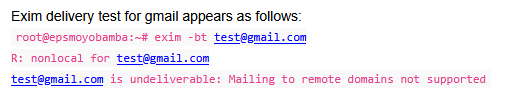
Could you please show any relevant Exim log (/var/log/exim4/mainlog)? (Part 1)

Could you please show any relevant Exim log (/var/log/exim4/mainlog)? (Part 2)

Could you please show any relevant Exim log (/var/log/exim4/mainlog)? (Part 3)

2026-02-06 01:09:41 exim 4.97 daemon started: pid=2144, -q30m, listening for SMTP on [127.0.0.1]:25 [::1]:25
2026-02-06 01:09:41 Start queue run: pid=2288
2026-02-06 01:09:41 1voEos-000000002S6-3h7h Message is frozen
2026-02-06 01:09:41 1voEos-000000002S2-3XHV Message is frozen
2026-02-06 01:09:41 1voEos-000000002Rw-3Nqx Message is frozen

Your Exim conf is not the conf used by Hestia, looks like you uninstalled Exim and installed it again. Hestia could do this during install but in that case the conf should be the right one.

Could you please tell me what you did to mess the Exim conf? I need to understand what happened to be able to help you to fix it.

Also, did you install Hestia with Sieve, Antivirus and/or Spamassassin support?

Thanks again sahsanu,

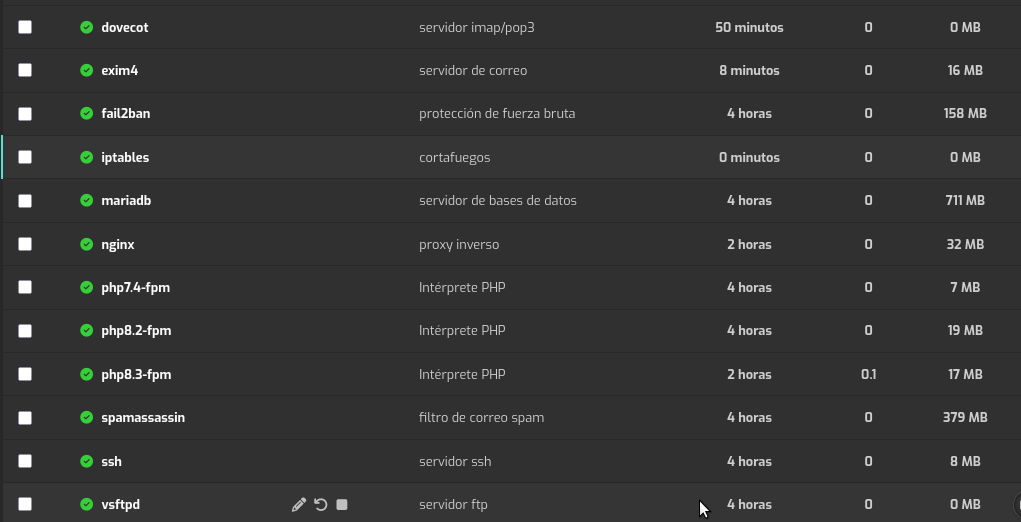
yes i have uninstalled exim because on hestia cpanel it appeared as inactive (RED) , i tried to delete and add again from Hestia CP but it seems to do no nothing. So I installed again by ssh. After that on Hesia CP now it appears active (GREEN).

But in “mail domain name “ antivirus and spam appears as inactive (RED)

I had made some changes on configuration and now i could send emails to external domains but and can not still receive any message, when i send a message from an external domain i got this returning message:

This message was created automatically by mail delivery software.

A message that you sent could not be delivered to one or more of its
recipients. This is a permanent error. The following address(es) failed:

  "[email protected]"
    host "mail.epsmoyobamba.com.pe" "[69.169.109.49]"
    SMTP error from remote mail server after RCPT TO:<"[email protected]>":
    550 Unrouteable address 

Show the output of these commands:

curl -fsSLm10 https://7j.gg/hcpver | bash -s --
v-list-sys-config json | jq | grep -i anti
dpkg -l | grep -E '^ii\s*(dovecot|spam|clam)'

I really appreciate your help sahsanu,

root@epsmoyobamba:~# curl -fsSLm10 https://7j.gg/hcpver | bash -s –
Software Version


OS Ubuntu 24.04.3 LTS
Hestia 1.9.4
Hestia-nginx 1.27.4
Hestia-php 8.3.17
FileGator 7.13.0
Nginx 1.29.5
Apache2 2.4.58
PHP8.3 8.3.30
PHP8.2 8.2.30
PHP7.4 7.4.33
Awstats 7.9
Dovecot 2.3.21
Spamassassin 4.0.0
Clamav 1.4.3
Roundcube 1.6.11
Vsftpd 3.0.5
Bind9 9.18.39
Mariadb 11.4.10
phpMyAdmin 5.2.2
Fail2ban 1.0.2

root@epsmoyobamba:~# v-list-sys-config json | jq | grep -i anti
“ANTISPAM_SYSTEM”: “spamassassin”,
“ANTIVIRUS_SYSTEM”: “clamav-daemon”,

root@epsmoyobamba:~# dpkg -l | grep -E ‘^ii\s*(dovecot|spam|clam)’
ii clamav 1.4.3+dfsg-0ubuntu0.24.04.1 amd64 anti-virus utility for Unix - command-line interface
ii clamav-base 1.4.3+dfsg-0ubuntu0.24.04.1 all anti-virus utility for Unix - base package
ii clamav-daemon 1.4.3+dfsg-0ubuntu0.24.04.1 amd64 anti-virus utility for Unix - scanner daemon
ii clamav-freshclam 1.4.3+dfsg-0ubuntu0.24.04.1 amd64 anti-virus utility for Unix - virus database update utility
ii clamdscan 1.4.3+dfsg-0ubuntu0.24.04.1 amd64 anti-virus utility for Unix - scanner client
ii dovecot-core 1:2.3.21+dfsg1-2ubuntu6.1 amd64 secure POP3/IMAP server - core files
ii dovecot-imapd 1:2.3.21+dfsg1-2ubuntu6.1 amd64 secure POP3/IMAP server - IMAP daemon
ii dovecot-pop3d 1:2.3.21+dfsg1-2ubuntu6.1 amd64 secure POP3/IMAP server - POP3 daemon
ii spamassassin 4.0.0-8ubuntu5 all Perl-based spam filter using text analysis
ii spamc 4.0.0-8ubuntu5 amd64 Client for SpamAssassin spam filtering daemon
ii spamd 4.0.0-8ubuntu5 all Server for SpamAssassin spam filtering daemon

Let’s try to fix the mess.

First backup:

mkdir -p /root/backup_hestia
cp -a /etc /root/backup_hestia
cp -a /usr/local/hestia /root/backup_hestia

Now execute this script:

curl -fsSLm30 https://deve.dev/scripts/i/install_exim_daniel | sudo bash -s --

After that, show me the output of these commands:

grep -Ev '^#|^$' /etc/exim4/update-exim4.conf.conf
systemctl restart exim4
systemctl status exim4 --no-pager -l

Hi sahsanu, just a question , does the script take long time to complete?, because i have tried 2 times and it had been there for many minutes:

No, it should finish in less than one minute.

Launch it this way so we can see where it gets stuck.

curl -fsSLm30 https://deve.dev/scripts/i/install_exim_daniel | sudo bash -x -s --

It seems that it has finished ok —–>

* \[\[ 0 -ne 0 \]\]
* export PATH=/usr/local/sbin:/usr/local/bin:/usr/sbin:/usr/bin:/sbin:/bin:/snap/bin:/sbin
* PATH=/usr/local/sbin:/usr/local/bin:/usr/sbin:/usr/bin:/sbin:/bin:/snap/bin:/sbin
* HESTIA=/usr/local/hestia
* HESTIA_BIN=/usr/local/hestia/bin
* HESTIA_INSTALL_DIR=/usr/local/hestia/install/deb
* HESTIA_COMMON_DIR=/usr/local/hestia/install/common
  ++ lsb_release -s -r
* release=24.04
* exim=yes
* dovecot=no
* spamd=yes
* clamd=yes
* sieve=no
* /usr/local/hestia/bin/v-list-sys-config json
* grep DB_SYSTEM
* grep -q mysql
* mysql=yes
* echo ‘\[ \* \] Removing Exim4 packages’
  \[ \* \] Removing Exim4 packages
* apt purge -q -y ‘exim4\*’
* echo ‘\[ \* \] Installing Exim4 packages’
  \[ \* \] Installing Exim4 packages
* apt install -q -y exim4 exim4-daemon-heavy
* ‘\[’ yes = yes ‘\]’
* /usr/local/hestia/bin/v-change-sys-config-value MAIL_SYSTEM exim4
* ‘\[’ yes = yes ‘\]’
* /usr/local/hestia/bin/v-change-sys-config-value ANTIVIRUS_SYSTEM clamav-daemon
* ‘\[’ yes = yes ‘\]’
* /usr/local/hestia/bin/v-change-sys-config-value ANTISPAM_SYSTEM spamd
* ‘\[’ no = yes ‘\]’
* ‘\[’ yes = yes ‘\]’
* echo ‘\[ \* \] Configuring Exim mail server’
  \[ \* \] Configuring Exim mail server
* gpasswd -a Debian-exim mail
  ++ exim4 --version
  ++ head -1
  ++ cut -f -2 -d .
  ++ awk ‘{print $3}’
* exim_version=4.97
* version_ge 4.94 4.97
  ++ printf ‘%s\\n’ 4.94 4.97
  ++ sort -V
  ++ head -n 1
* test 4.94 ‘!=’ 4.94 -o -n 4.94 -a 4.94 = 4.97
* cp -f /usr/local/hestia/install/deb/exim/exim4.conf.4.95.template /etc/exim4/exim4.conf.template
* cp -f /usr/local/hestia/install/deb/exim/dnsbl.conf /etc/exim4/
* cp -f /usr/local/hestia/install/deb/exim/spam-blocks.conf /etc/exim4/
* cp -f /usr/local/hestia/install/deb/exim/limit.conf /etc/exim4/
* cp -f /usr/local/hestia/install/deb/exim/system.filter /etc/exim4/
* touch /etc/exim4/white-blocks.conf
* ‘\[’ yes = yes ‘\]’
* sed -i s/#SPAM/SPAM/g /etc/exim4/exim4.conf.template
* ‘\[’ yes = yes ‘\]’
* sed -i s/#CLAMD/CLAMD/g /etc/exim4/exim4.conf.template
  ++ gen_pass
  ++ matrix=
  ++ length=
  ++ ‘\[’ -z ‘’ ‘\]’
  ++ matrix=A-Za-z0-9
  ++ ‘\[’ -z ‘’ ‘\]’
  ++ length=16
  ++ head /dev/urandom
  ++ tr -dc A-Za-z0-9
  ++ head -c16
* srs=FDXVFHyL0dRJSJKv
* echo FDXVFHyL0dRJSJKv
* chmod 640 /etc/exim4/srs.conf
* chmod 640 /etc/exim4/exim4.conf.template
* chown root:Debian-exim /etc/exim4/srs.conf
* mkdir -p /etc/exim4/domains
* rm -f /etc/alternatives/mta
* ln -s /usr/sbin/exim4 /etc/alternatives/mta
* update-rc.d -f sendmail remove
* update-rc.d -f postfix remove
* systemctl stop postfix
* update-rc.d exim4 defaults
* systemctl start exim4
* check_result 0 ‘exim4 start failed’
* ‘\[’ 0 -ne 0 ‘\]’
* ‘\[’ no = yes ‘\]’
* ‘\[’ yes == yes ‘\]’
* ‘\[’ no == yes ‘\]’
* ‘\[’ no = yes ‘\]’
* ‘\[’ yes = yes ‘\]’
* echo ‘\[ \* \] Installing SpamAssassin…’
  \[ \* \] Installing SpamAssassin…
* apt install -q -y spamassassin
* ‘\[’ 24.04 = 24.04 ‘\]’
* spamd_srvname=spamd
* echo ‘\[ \* \] Configuring SpamAssassin…’
  \[ \* \] Configuring SpamAssassin…
* update-rc.d spamd defaults
* sed -i s/ENABLED=0/ENABLED=1/ /etc/default/spamd
* systemctl start spamd
* check_result 0 ‘spamd start failed’
* ‘\[’ 0 -ne 0 ‘\]’
  ++ systemctl list-unit-files
  ++ grep spamassassin
* unit_files=‘spamassassin-maintenance.service              static          -
  spamassassin-maintenance.timer                disabled        enabled’
* \[\[ spamassassin-maintenance.service              static          -
  spamassassin-maintenance.timer                disabled        enabled =\~ disabled \]\]
* systemctl enable spamd
* sed -i s/#CRON=1/CRON=1/ /etc/default/spamd
* /usr/local/hestia/bin/v-change-sys-config-value ANTISPAM_SYSTEM spamassassin
* echo ‘\[ \* \] Done!’
  \[ \* \] Done!
root@epsmoyobamba:\~# grep -Ev ‘^#|^$’ /etc/exim4/update-exim4.conf.conf
dc_eximconfig_configtype=‘local’
dc_other_hostnames=‘epsmoyobamba.com.pe’
dc_local_interfaces=‘127.0.0.1 ; ::1’
dc_readhost=‘’
dc_relay_domains=‘’
dc_minimaldns=‘false’
dc_relay_nets=‘’
dc_smarthost=‘’
CFILEMODE=‘644’
dc_use_split_config=‘false’
dc_hide_mailname=‘’
dc_mailname_in_oh=‘true’
dc_localdelivery=‘mail_spool’
root@epsmoyobamba:\~# systemctl restart exim4
root@epsmoyobamba:\~# systemctl status exim4 --no-pager -l
● exim4.service - exim Mail Transport Agent
Loaded: loaded (/usr/lib/systemd/system/exim4.service; enabled; preset: enabled)
Active: active (running) since Fri 2026-02-06 16:36:48 -05; 14s ago
Docs: man:exim(8)

https://exim.org/docs.html


Process: 8756 ExecStartPre=/usr/sbin/update-exim4.conf $UPEX4OPTS (code=exited, status=0/SUCCESS)
Main PID: 8999 (exim4)
Tasks: 1 (limit: 19095)
Memory: 17.8M (peak: 32.4M)
CPU: 423ms
CGroup: /system.slice/exim4.service
└─8999 /usr/sbin/exim4 -bdf -q30m

Feb 06 16:36:48 epsmoyobamba.com.pe systemd\[1\]: Starting exim4.service - exim Mail Transport Agent…
Feb 06 16:36:48 epsmoyobamba.com.pe systemd\[1\]: Started exim4.service - exim Mail Transport Agent.

Ok, that looks good. Now try to send/receive some mails.

Hi sahsanu, sorry, i can still send or receive

Even logging by webmail o thunderbird client

Now when i try to loggin by “webmail.epsmoyobamba.com.pe” or thunderbird client i got the error:

“Wrong password or user name”

And when sending from an external domain to my domain [email protected] i got this error:

This message was created automatically by mail delivery software.

A message that you sent could not be delivered to one or more of its
recipients. This is a permanent error. The following address(es) failed:

  [email protected]
    host mail.epsmoyobamba.com.pe [69.169.109.49]
    SMTP error from remote mail server after RCPT TO:<[email protected]>:
    550 relay not permitted
  [email protected]
    host mail.epsmoyobamba.com.pe [69.169.109.49]
    SMTP error from remote mail server after RCPT TO:<[email protected]>:
    550 relay not permitted

Reporting-MTA: dns; pcmarketperu.com

Action: failed
Final-Recipient: rfc822;[email protected]
Status: 5.0.0
Remote-MTA: dns; mail.epsmoyobamba.com.pe
Diagnostic-Code: smtp; 550 relay not permitted

Action: failed
Final-Recipient: rfc822;[email protected]
Status: 5.0.0
Remote-MTA: dns; mail.epsmoyobamba.com.pe
Diagnostic-Code: smtp; 550 relay not permitted

I’m going to send you a private message.

1 Like

Just for the record.

We also had to rebuild the mail domains and fix the Dovecot configuration, as it was using the default config instead of the one required by Hestia.

1 Like