Felix
January 5, 2026, 1:08am
1
Hello all and happy new year! ✧˚ ༘⋆2026✧˚ ༘ ⋆
I was looking at the post SpamHaus test failed - #4 by sahsanu and I can’t figure out how to correctly configure Exim for DBL and ZRD.
I have already:
Created my Spamhaus Data Query Service (DQS) key
Configured /etc/exim4/dnsbl.conf with [key].zen.dq.spamhaus.net
Made the configuration change mentioned at Email and mail server | Hestia Control Panel
Restarted exim4 service
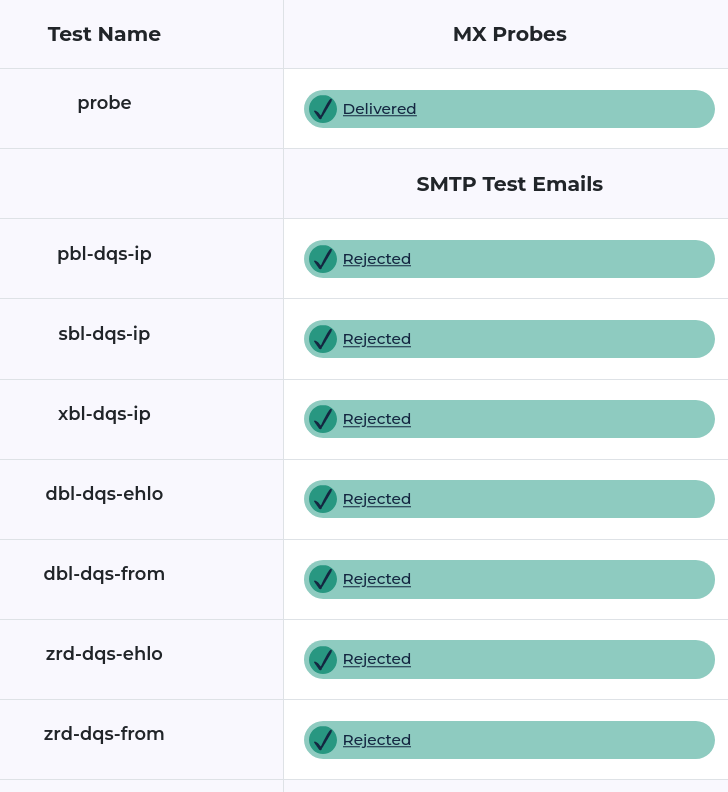
But I only get to 3 greens and sadly 4 reds, like below:
Nowhere near @sahsanu all green result
According to Help – Blocklist Tester | Spamhaus
DBL and ZRD are domain listings that are only meaningful if you have configured your mail server to apply domain-based (or RHSBL) tests.
So I understand that I need to configure something more in Exim and/or Spamassasin. But I can’t figure out what!
Hestia Control Panel v1.9.4 (Installed on 2026-01-04)
Operating System Debian 12.12 (aarch64)
SpamAssassin version 4.0.1 running on Perl version 5.36.0
Exim version 4.96 #2 built 22-Mar-2025 10:25:14
Hi @Felix ,
You must add support for Spamhaus DQS to SpamAssassin. Here is the repo with the instructions , but I have also included just the needed steps below:
Note: replace abcdefghijklmnop0123456789 with your actual DQS Key.
cd /usr/local/src/
git clone https://github.com/spamhaus/spamassassin-dqs
cd spamassassin-dqs/4.0.0+/
sed -i -e 's/your_DQS_key/abcdefghijklmnop0123456789/g' sh.cf
cp sh.cf /etc/spamassassin/
cp sh_scores.cf /etc/spamassassin/
To check that there are no errors:
spamassassin --lint
If all is ok (no output), restart the service:
systemctl restart spamd
Just in case, I also did some changes to the sh_scores.cf file:
@@ -29,23 +29,23 @@
   score        URIBL_SBL_A             0.1
   score        URIBL_ZRD               6

-  score        SH_DBL_BODY             8
+  score        SH_DBL_BODY             10
   score        SH_DBL_HEADERS          8
   score        SH_DBL_HEADERS_ABUSED   0.001
-  score        SH_ZRD_HEADERS_VERY_FRESH       8
+  score        SH_ZRD_HEADERS_VERY_FRESHi      10
   score        SH_ZRD_HEADERS_FRESH            6
-  score        SH_REVERSE_ZRD_VERY_FRESH       8
+  score        SH_REVERSE_ZRD_VERY_FRESH       10
   score        SH_REVERSE_ZRD_FRESH            6
   score        SH_REVERSE_DBL          8
   score        SH_REVERSE_DBL_ABUSED   0.001

-  score        SH_HELO_ZRD_VERY_FRESH  8
+  score        SH_HELO_ZRD_VERY_FRESH  10
   score        SH_HELO_ZRD_FRESH       6
-  score        SH_HELO_DBL             8
+  score        SH_HELO_DBL             10
   score        SH_HELO_DBL_ABUSED      0.001
   score SH_AUTHBL_AND_DBL_ABUSED       6
-  score SH_ZRD_BODY_FRESH      6
-  score SH_ZRD_BODY_VERY_FRESH 8
+  score SH_ZRD_BODY_FRESH      8
+  score SH_ZRD_BODY_VERY_FRESH 10

   # DQS wont block queries for open dns usage
   score URIBL_DBL_BLOCKED_OPENDNS      0
And in Exim, I’ve configured SPAM_REJECT_SCORE to 80. Remember that you must have enabled the option reject spam for your mail domain.
With this conf I still have all green:
Just in case someone is wondering where we are doing these tests (you must have a DQS key provided by Spamhaus): https://blt.spamhaus.com
Felix
January 5, 2026, 7:56am
3
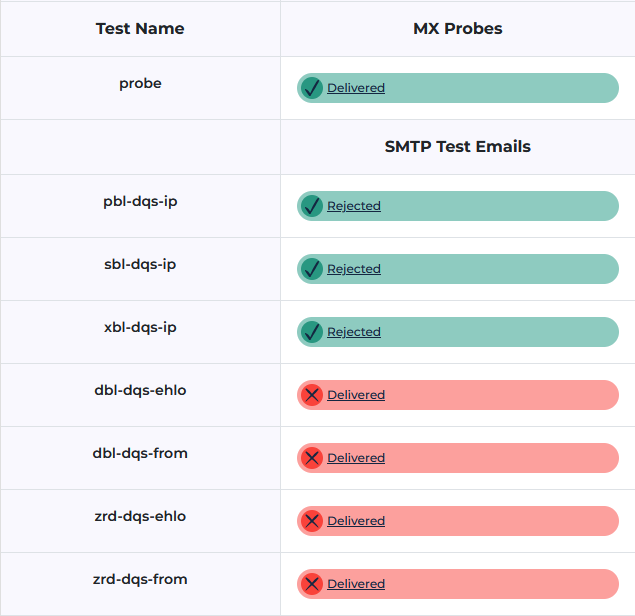
Now it all makes sense. Thank you very much!! zrd-dqs-ehlo test. Maybe I need to do something more?
I can’t remember whether I made any other change but doesn’t seem so. Check the spamassassin report in the headers of the mail you received to see the scores of zrd-ehlo test.
Felix
January 5, 2026, 12:16pm
5
Your guidance was of paramount help. Thank you again!! I tracked the issue down and here is my resolution…
Looking at the headers of the email message that should have been blocked based on zrd-dqs-ehlo I noticed those two lines that were messing with the spam score by adding a -5 to the total score:
 -2.0 RCVD_IN_VALIDITY_SAFE  RBL: Sender in Validity Safe - Contact
                             [email protected]
 [Excessive Number of Queries | <https://knowledge.validity.com/hc/en-us/articles/20961730681243>]
 -3.0 RCVD_IN_VALIDITY_CERTIFIED RBL: Sender in Validity Certification -
                             Contact [email protected]
 [Excessive Number of Queries | <https://knowledge.validity.com/hc/en-us/articles/20961730681243>]
I am not interested in Validity’s RBL so I decided to disable these checks by following the instructions here .
Copying below for reference:
Create the file custom.cf by running touch /etc/mail/spamassassin/custom.cf (or open it if it exists)
Add the following content to the new file:
dns_query_restriction deny sa-trusted.bondedsender.org
dns_query_restriction deny sa-accredit.habeas.com
dns_query_restriction deny bl.score.senderscore.com
Check for any errors with spamassassin --lint and restart service with systemctl restart spamd
After solving my issue, I started searching for “is validity’s RBL of any use?” and guess what I found ?
By the way, a lot of people on the internet seem to suggest to disable checks to Validity RBL

 Can anyone help please?