Hi guys! please help no work Cron
/usr/bin/php8.3 /home/wellesley/web/wellesleystreeteast.com/public_html/artisan cache:clear
PHP Warning:  PHP Startup: Unable to load dynamic library 'php_mysql.dll' (tried: /usr/lib/php/20230831/php_mysql.dll (/usr/lib/php/20230831/php_mysql.dll: cannot open shared object file: No such file or directory), /usr/lib/php/20230831/php_mysql.dll.so (/usr/lib/php/20230831/php_mysql.dll.so: cannot open shared object file: No such file or directory)) in Unknown on line 0
PHP Warning:  PHP Startup: Unable to load dynamic library 'php_gd2.dll' (tried: /usr/lib/php/20230831/php_gd2.dll (/usr/lib/php/20230831/php_gd2.dll: cannot open shared object file: No such file or directory), /usr/lib/php/20230831/php_gd2.dll.so (/usr/lib/php/20230831/php_gd2.dll.so: cannot open shared object file: No such file or directory)) in Unknown on line 0

   ERROR  Failed to clear cache. Make sure you have the appropriate permissions.
Hi,
You already opened a couple of posts about this issue and the main issue is that in your conf you are trying to load Windows extensions, and obviously, that doesn’t work.
Show the output of this command:
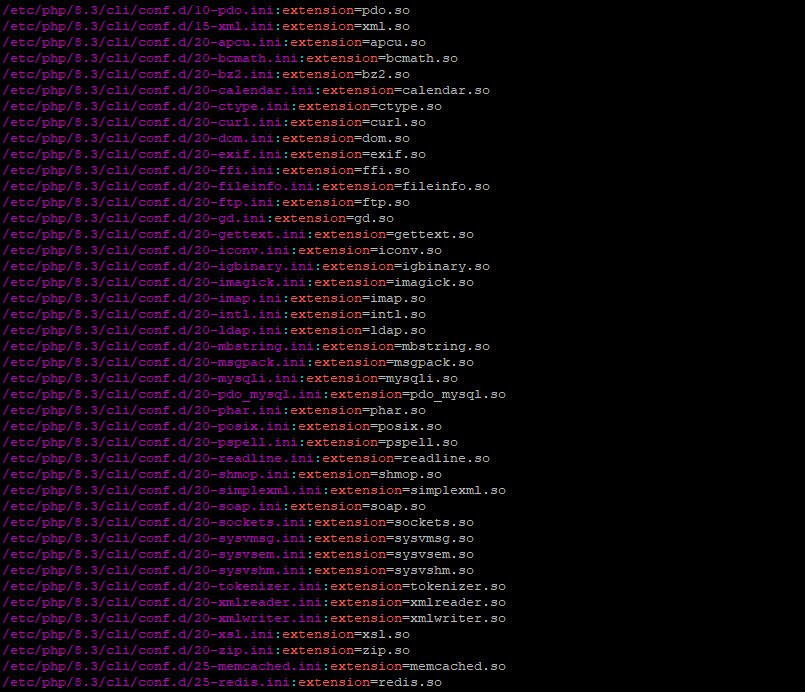
grep '^extension' /etc/php/8.3/cli/php.ini /etc/php/8.3/cli/conf.d/*
Show also the output of these commands:
 ls -la /home/wellesley/web/wellesleystreeteast.com/public_html/storage
 ls -la /home/wellesley/web/wellesleystreeteast.com/public_html/bootstrap/cache
root@server:~# grep ‘^extension’ /etc/php/8.3/cli/php.ini /etc/php/8.3/cli/conf.d/*
/etc/php/8.3/cli/php.ini:extension = php_mysql.dll
/etc/php/8.3/cli/php.ini:extension = php_gd2.dll
/etc/php/8.3/cli/conf.d/10-mysqlnd.ini:extension=mysqlnd.so
/etc/php/8.3/cli/conf.d/10-pdo.ini:extension=pdo.so
/etc/php/8.3/cli/conf.d/15-xml.ini:extension=xml.so
/etc/php/8.3/cli/conf.d/20-apcu.ini:extension=apcu.so
/etc/php/8.3/cli/conf.d/20-bcmath.ini:extension=bcmath.so
/etc/php/8.3/cli/conf.d/20-bz2.ini:extension=bz2.so
/etc/php/8.3/cli/conf.d/20-calendar.ini:extension=calendar.so
/etc/php/8.3/cli/conf.d/20-ctype.ini:extension=ctype.so
/etc/php/8.3/cli/conf.d/20-curl.ini:extension=curl.so
/etc/php/8.3/cli/conf.d/20-dom.ini:extension=dom.so
/etc/php/8.3/cli/conf.d/20-exif.ini:extension=exif.so
/etc/php/8.3/cli/conf.d/20-ffi.ini:extension=ffi.so
/etc/php/8.3/cli/conf.d/20-fileinfo.ini:extension=fileinfo.so
/etc/php/8.3/cli/conf.d/20-ftp.ini:extension=ftp.so
/etc/php/8.3/cli/conf.d/20-gd.ini:extension=gd.so
/etc/php/8.3/cli/conf.d/20-gettext.ini:extension=gettext.so
/etc/php/8.3/cli/conf.d/20-iconv.ini:extension=iconv.so
/etc/php/8.3/cli/conf.d/20-igbinary.ini:extension=igbinary.so
/etc/php/8.3/cli/conf.d/20-imagick.ini:extension=imagick.so
/etc/php/8.3/cli/conf.d/20-imap.ini:extension=imap.so
/etc/php/8.3/cli/conf.d/20-intl.ini:extension=intl.so
/etc/php/8.3/cli/conf.d/20-ldap.ini:extension=ldap.so
/etc/php/8.3/cli/conf.d/20-mbstring.ini:extension=mbstring.so
/etc/php/8.3/cli/conf.d/20-msgpack.ini:extension=msgpack.so
/etc/php/8.3/cli/conf.d/20-mysqli.ini:extension=mysqli.so
/etc/php/8.3/cli/conf.d/20-pdo_mysql.ini:extension=pdo_mysql.so
/etc/php/8.3/cli/conf.d/20-phar.ini:extension=phar.so
/etc/php/8.3/cli/conf.d/20-posix.ini:extension=posix.so
/etc/php/8.3/cli/conf.d/20-pspell.ini:extension=pspell.so
/etc/php/8.3/cli/conf.d/20-readline.ini:extension=readline.so
/etc/php/8.3/cli/conf.d/20-shmop.ini:extension=shmop.so
/etc/php/8.3/cli/conf.d/20-simplexml.ini:extension=simplexml.so
/etc/php/8.3/cli/conf.d/20-soap.ini:extension=soap.so
/etc/php/8.3/cli/conf.d/20-sockets.ini:extension=sockets.so
/etc/php/8.3/cli/conf.d/20-sysvmsg.ini:extension=sysvmsg.so
/etc/php/8.3/cli/conf.d/20-sysvsem.ini:extension=sysvsem.so
/etc/php/8.3/cli/conf.d/20-sysvshm.ini:extension=sysvshm.so
/etc/php/8.3/cli/conf.d/20-tokenizer.ini:extension=tokenizer.so
/etc/php/8.3/cli/conf.d/20-xmlreader.ini:extension=xmlreader.so
/etc/php/8.3/cli/conf.d/20-xmlwriter.ini:extension=xmlwriter.so
/etc/php/8.3/cli/conf.d/20-xsl.ini:extension=xsl.so
/etc/php/8.3/cli/conf.d/20-zip.ini:extension=zip.so
/etc/php/8.3/cli/conf.d/25-memcached.ini:extension=memcached.so
/etc/php/8.3/cli/conf.d/25-redis.ini:extension=redis.so
root@server:~#
Edit the file /etc/php/8.3/cli/php.ini and remove these lines:
extension = php_mysql.dll
extension = php_gd2.dll
Remember to show also the output of these commands (please, just text, no screenshots  ):
):
ls -la /home/wellesley/web/wellesleystreeteast.com/public_html/storage
ls -la /home/wellesley/web/wellesleystreeteast.com/public_html/bootstrap/cache
;extension = php_mysql.dll
;extension = php_gd2.dll
root@server:~# ls -la /home/wellesley/web/wellesleystreeteast.com/public_html/storage
total 32
drwxrwxr-x 8 wellesley wellesley 4096 Mar 9 20:00 .
drwxr-x–x 17 wellesley www-data 4096 Dec 1 15:13 ..
drwxr-xr-x 7 wellesley wellesley 4096 Nov 30 12:59 app
drwx------ 2 wellesley wellesley 4096 Mar 9 20:00 backups
drwxr-xr-x 4 wellesley wellesley 4096 Oct 17 05:42 database
drwxr-xr-x 2 wellesley wellesley 4096 Oct 17 05:42 debugbar
drwxr-xr-x 7 wellesley wellesley 4096 Oct 17 05:42 framework
-rw-r–r-- 1 wellesley wellesley 0 Nov 30 13:25 installed
drwxr-xr-x 2 wellesley wellesley 4096 Mar 9 19:00 logs
root@server:~#
root@server:~# ls -la /home/wellesley/web/wellesleystreeteast.com/public_html/bootstrap/cache
total 48
drwxrwxr-x 2 wellesley wellesley 4096 Nov 30 13:25 .
drwxr-xr-x 3 wellesley wellesley 4096 Oct 17 05:42 ..
-rw-r–r-- 1 wellesley wellesley 14 Oct 17 05:42 .gitignore
-rwxr-xr-x 1 wellesley wellesley 5556 Nov 30 13:25 packages.php
-rwxr-xr-x 1 wellesley wellesley 26155 Nov 30 13:25 services.php
root@server:~#
Ok, now try this command:
sudo runuser -u wellesley -- /usr/bin/php8.3 /home/wellesley/web/wellesleystreeteast.com/public_html/artisan cache:clear
TH..YOU VERY MUCH
Last login: Mon Mar  9 20:41:08 2026 from 66.220.206.5
root@server:~# sudo runuser -u wellesley -- /usr/bin/php8.3 /home/wellesley/web/wellesleystreeteast.com/public_html/artisan cache:clear

   INFO  Application cache cleared successfully.

root@server:~#
Great! Now test it using the cron job you already have.
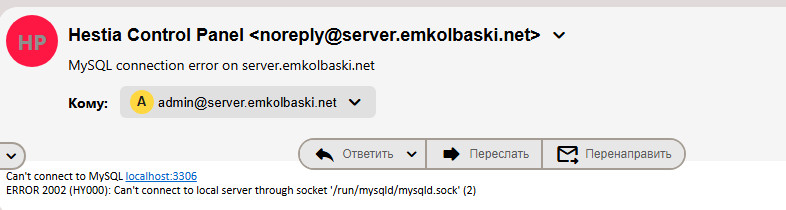
YES Cron work, but i get email
And is MariaDB running?
systemctl status mariadb --no-pager -l
If you didn’t get any new mail, all is fine.
ok, no see more emails, Th…you very much.