Hi,
I need to be able to add / delete crons for a user for a script I’m writing. I need to run it as the user obviously. I’m trying to do it via the API (as the cli for crons doens’t work for non-root). Anyway, I have created:
/usr/local/hestia/data/api/cron_user
With:
ROLE=‘user’
COMMANDS=‘v-add-cron-job,v-delete-cron-job,v-list-cron-jobs’
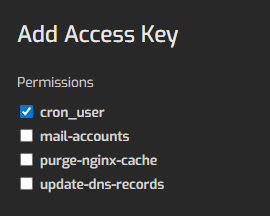
Restarted hestia. Then I add the access key:
#!/usr/bin/perl

use strict;

use warnings;


use LWP::UserAgent;

use HTTP::Request::Common qw(POST);


# ---- CONFIG ----

my $host   = '127.0.0.1';          # safest if the script runs on the same server

my $port   = 9183;

my $hash   = 'key:secret';  # store outside webroot in real usage

my $user   = 'newby';


my $cmd_to_run = 'foobar test command'; # no sudo

# --------------


# compute cron fields for +1 minute

my $run_at = time() + 60;

my @t = localtime($run_at);


my ($min,$hour,$mday,$mon,$wday) = ($t[1],$t[2],$t[3],$t[4] + 1,$t[6]);


my $api_url = "https://x.newbyhost.com:$port/api/";


my %post = (

  hash       => $hash,

  returncode => 'yes',          # returns 0/errcode

  cmd        => 'v-add-cron-job',


  arg1 => $user,

  arg2 => $min,

  arg3 => $hour,

  arg4 => $mday,

  arg5 => $mon,

  arg6 => $wday,

  arg7 => $cmd_to_run,

);


my $ua = LWP::UserAgent->new( timeout => 15 );

$ua->ssl_opts( verify_hostname => 0 ); # self-signed panels; ideally install a valid cert


my $res = $ua->request(POST $api_url, \%post);


print "Status: " . $res->status_line . "\n";

print "Response body: " . $res->decoded_content . "\n";


if (!$res->is_success) {

  die "HTTP error: " . $res->status_line . "\nBody:\n" . $res->decoded_content . "\n";

}


print "API response: " . $res->decoded_content . "\n";

print "Scheduled for: $min $hour $mday $mon $wday\n";
But I get a permission denied when trying to run it:
perl add-cron.cgi
Status: 401 Unauthorized
Response body: 10
HTTP error: 401 Unauthorized
Body:
10
Am I missing a step?
UPDATE: Ok, I ended up doing it another way withou the CLI
#!/usr/bin/perl

use strict;

use warnings;


# Command you want to run once

my $script = '/home/newby/path/to/run-once.sh';

# Unique tag so we can remove exactly this cron line after it runs

my $tag = "RUNONCE_" . time();


# Compute cron fields for +1 minute

my $run_at = time() + 60;

my @t = localtime($run_at);

my ($min,$hour,$mday,$mon) = ($t[1],$t[2],$t[3],$t[4] + 1);


# Cron line: run script, then delete lines containing our tag

# NOTE: we only specify min/hour/day/month; weekday is '*'

my $cron_line = sprintf(

  "%d %d %d %d * %s; crontab -l | grep -v %s | crontab -\n",

  $min, $hour, $mday, $mon, $script, $tag

);


# Read existing crontab (if none, treat as empty)

my $existing = `crontab -l 2>/dev/null`;

$existing = '' if $? != 0;


# Don’t add duplicates if script is run twice quickly

if ($existing =~ /\Q$tag\E/) {

  print "Already scheduled ($tag)\n";

  exit 0;

}


# Install new crontab

open(my $CRON, '|-', 'crontab', '-') or die "Can't run crontab: $!";

print $CRON $existing;

print $CRON "# $tag\n";

print $CRON $cron_line;

close($CRON) or die "crontab install failed: $?";


print "Scheduled one-shot cron: $min $hour $mday $mon * ($tag)\n";
