DNS... Warms up?

I’ve got hestiacp host on a VPS with OVHCloud.

I’ve noticed that if I try to visit my website, I often get an error like:

DNS address could not be found. Diagnosing the problem.

DNS_PROBE_POSSIBLE

However, trying again a minute later it works. It feels like the initial request sort of “wakes up” the server or something. I don’t see anything in the logs to help, so hoping someone might be able to point me in the right direction.

You probaly want to share, how your dns is running? Do you run your own dns servers using hestia? Hosted external? Cloudflare?

1 Like

Hosted with Hestia on the same server I’m running Hestia as a web server. So all together.

I know that’s not ideal, and I’m looking at options to host DNS elsewhere. But I’d still like to understand what’s happening.

No CloudFlare involved on my end. One of my domains is dgredd.net and looking at DNS lookups etc, I can’t see any problems. They seem to load the info fine.

It doesn’t seem to affect emails, also hosted with Hestia on the same server.

You didn’t configure the records properly.

First, you must create two A records for your ns servers pointing to the public ip of your server.

Righ now, when requesting the ns servers for your domain, you get this… a NS record pointing to your public ip and that’s wrong:

❯ dig @139.99.199.214 dgredd.net ns +noall +ans
dgredd.net.             14400   IN      NS      139.99.199.214.

You should get this:

❯ dig @139.99.199.214 dgredd.net ns +noall +ans
dgredd.net.             14400   IN      NS      ns1.dgredd.net.
dgredd.net.             14400   IN      NS      ns2.dgredd.net.

So, once you have added the A records for your nsX subdomains, you must create two NS records pointing to your nsX subdomains.

In Hestia the records should look like this:

Thanks I’ll try this out now.

But why would this fix it? The way I had it points directly to the IP, so isn’t that cutting out the middleman?

Because that’s how DNS works. Unfortunately, what you did doesn’t work.

Sorry, I’m just trying to understand. How did the website ever load if my way didn’t work?

It depends on the DNS resolver you use. Some resolvers only rely on the IPs provided by the glue records, while others may skip broken NS records. In some cases, it might work if the correct response was previously cached by the resolver.

So, just follow the method I suggested and you shouldn’t have issues with any resolver.
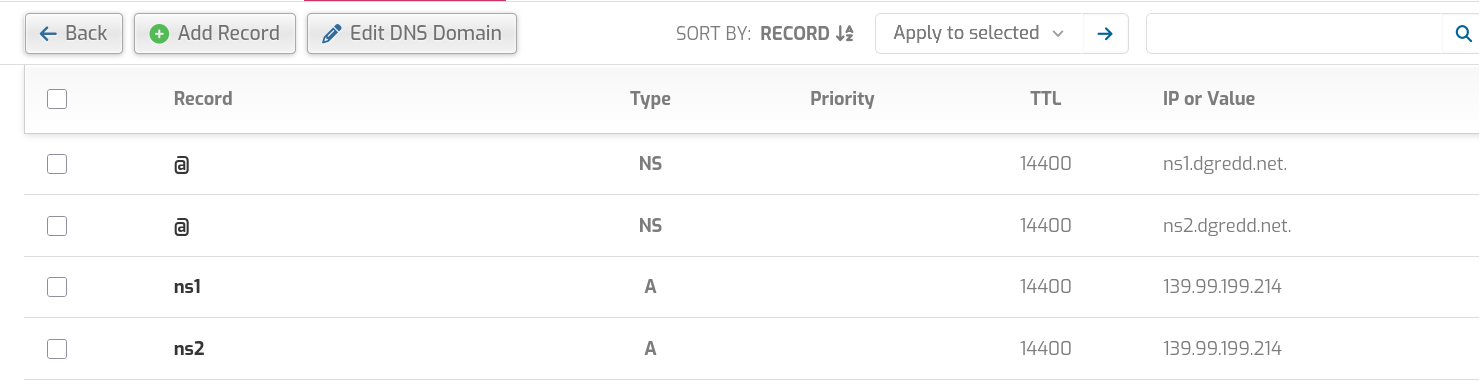
Thanks, man. I’ve made the changes.

1 Like

This topic was automatically closed 30 days after the last reply. New replies are no longer allowed.