DOC: How to update Roundcube to version 1.6.14 (fixes 8 security vulnerabilities)

Hi,

Today, March 18h, 2026 has been released Roundcube 1.6.14 and it fixes eight security vulnerabilities.

Security fixes

  • Fix pre-auth arbitrary file write via unsafe deserialization in redis/memcache session handler, reported by y0us.
  • Fix bug where a password could get changed without providing the old password, reported by flydragon777.
  • Fix IMAP Injection + CSRF bypass in mail search, reported by Martila Security Research Team.
  • Fix remote image blocking bypass via various SVG animate attributes, reported by nullcathedral.
  • Fix remote image blocking bypass via a crafted body background attribute, reported by nullcathedral.
  • Fix fixed position mitigation bypass via use of !important, reported by nullcathedral.
  • Fix XSS issue in a HTML attachment preview, reported by aikido_security.
  • Fix SSRF + Information Disclosure via stylesheet links to a local network hosts, reported by Georgios Tsimpidas (aka Frey), Security Researcher at https://i0.rs/.

More info about the release:

I’ve created this PR to bump Roundcube version to 1.6.14:


If you want to update Roundcube now, you can do it manually using below steps.

Disclaimer: it should work fine BUT use this procedure at your own risk!

Note: I assume your Roundcube current installed version is 1.6.13.


0.- BACKUP, always backup… just in case :wink:

Note: If you use MySQL instead of MariaDB, replace mariadb-dump with mysqldump.

mariadb-dump --defaults-file=/usr/local/hestia/conf/.mysql.localhost --single-transaction --routines -B roundcube > /tmp/roundcube_1.6.13.sql
tar zcf /tmp/roundcube_1.6.13_backup_before_upgrade_1.6.14.tar.gz /etc/roundcube /var/lib/roundcube /tmp/roundcube_1.6.13.sql
rm /tmp/roundcube_1.6.13.sql

Now save to another place the backup file located here /tmp/roundcube_1.6.13_backup_before_upgrade_1.6.14.tar.gz

Example:

mv /tmp/roundcube_1.6.13_backup_before_upgrade_1.6.14.tar.gz /backup/

1.- Modify upgrade.conf file so the Roundcube version is 1.6.14 instead of 1.6.13:

sed -E -i "s/^rc_v='1.*/rc_v='1.6.14'/" /usr/local/hestia/install/upgrade/upgrade.conf

2.- Upgrade roundcube using below Hestia’s command. It will detect that roundcube is installed, will detect the new version and will update it:

If you have disabled php functions system and proc_open in PHP CLI, you won’t receive errors but Roundcube won’t update to version 1.6.13, it will remain in version 1.6.11 so to avoid this problem, before continue, remove both functions for your current PHP CLI version. These two commands will remove the functions from your current PHP CLI version (version is detected automatically).

sed -i -E 's/(^disable_functions.*),proc_open(.*$)/\1\2/' /etc/php/$(php -v | head -n1 | grep -o '[0-9]\.[0-9]')/cli/php.ini
sed -i -E 's/(^disable_functions.*),system(.*$)/\1\2/' /etc/php/$(php -v | head -n1 | grep -o '[0-9]\.[0-9]')/cli/php.ini

Now you can proceed with the upgrade;

v-add-sys-roundcube

3.- Update composer packages used by roundcube:

cd /var/lib/roundcube/
COMPOSER_ALLOW_SUPERUSER=1 composer -n update

If composer is not in your path, you should use the full path to composer utility, if you don’t know even whether you have it installed or how to install it, just install it for admin user.

v-add-user-composer admin

If it is not installed, the command will install it for the admin user and if you had it already installed, you will be informed. So, now that it is installed you can update composer packages using the full path to composer.

cd /var/lib/roundcube/
COMPOSER_ALLOW_SUPERUSER=1 /home/admin/.composer/composer -n update

Hope it helps. Take care.

3 Likes

Thanks for this. I’m using rc_v=ā€˜1.6.11’ - I assume its the same process, but just replace .13 wirh .11? Weirdly I had an email from [email protected] , saying that they had found we were using this version:

Hello,

On behalf of the National Cyber Security Centre (NCSC), we have identified software on your network that may be vulnerable and require remedial action.

The NCSC's mission is to make the UK the safest place to live and work online and as part of its Proactive Notification service, we are writing to alert you to a potential security issue that could be exploited by malicious actors.

This notification is based on our scanning of open-source information, such as publicly available software versions. The service was launched to responsibly report vulnerabilities to system owners to help them protect their services. If you are not the owner of this site, please ensure every effort is made to forward this email onto the webmaster.

The presence of this vulnerability may result in a criminal gaining unauthorised access to, leaking data from or otherwise disrupting your servers. Please follow the remediation steps listed below to address the vulnerability as soon as possible.

* Cross site scripting (XSS) vulnerability in Roundcube Webmail via SVG animate tag (CVE-2025-68461)

xxx

Your Roundcube Webmail instance has a cross site scripting vulnerability.

I’m not sure when they started goign around doing that - but I thought it was a scam /phishing to start with!

2 Likes

Yes, it should work fine from version 1.6.11, as you said, just replace .13 with .11.

1 Like

Hi, thank you for all the work!!

I have a question:
If I have installed (and exposed to internet) roundcube in the server, but nobody is using it (everyone uses thunderbird as mail client).
it’s kind-of safe wait until the normal auto-update?

I don’t understand what implies the first vulnerability of the list
ā€pre-auth arbitrary file write via unsafe deserialization in redis/memcache session handlerā€, but the rest seems to need a loged in user.
What do you think?

& as usual to check the version:

grep RCMAIL_VERSION /var/lib/roundcube/program/include/iniset.php | cut -d "'" -f 4

What I am aware is: Roundcube stores session data in Redis or Memcached instead of files, where the session data is often serialized, i.e., it is converted into a string format. This means from a session, a attacker can make use of the cache stored in redis/memcache to gain access, without actually having to login. The deserialisation can be dangerous at times. The attacker maybe able to write files anywhere on the server.

Best to upgrade manually to be safe.

I will wait for @sahsanu to confirm if my understanding and explanation is correct or not.

Ditto. (different response address though…).

Can someone confirm if this will be updated automatically (I have auto update enabled in hestia) and if so, what we think the lead time will be?

I’m happy to update manually this weekend if I need to but if it will roll automatically in the next week or so then I won’t mess with things.

If nobody is currently logging in, the only security bug that could affect you is this:

  • Fix pre-auth arbitrary file write via unsafe deserialization in redis/memcache session handler, reported by y0us.

But Hestia doesn’t configure Roundcube to use either Redis or Memcache so you should be ā€œsafeā€. That said, you should update as soon as possible.

As I said above, Hestia doesn’t configure Roundcube to use Redis/Mencache.

1 Like

I came back to the forum to report this but not only was it already reported, an update method was provided. @sahsanu Thanks so much. The Doc worked perfectly

2 Likes

Thanks. That seemed to work. What is the composor stuff for? The upgrade seems to have worked, so I’m not too sure what that is for?

COMPOSER_ALLOW_SUPERUSER=1 composer -n update
Command ā€˜composer’ not found, but can be installed with:
apt install composer

1 Like

That’s to update the dependencies used by Roundcube,

Ah ok. How does it do it if we don’t have Composer installed? Do I need to install Composer and then run the update? Is it a new requirement with RC?

In my post I explin how to install it.

Yes, but the composer update, not again the roundcube update.

No, it has always been there.

1 Like

Ah ok thanks. I’m logged in as root - maybe thats why its not showing? Would I run:

v-add-user-composer root

Or do I need to login as ā€œadminā€ to run these?

1 Like

No, root is not an Hestia user.

Logged in as root, execute this command:

v-add-user-composer admin

And after that, also as root:

cd /var/lib/roundcube/
COMPOSER_ALLOW_SUPERUSER=1 /home/admin/.composer/composer -n update
2 Likes

Hmm so as root, I’m doing:

root@japan2026:/home# v-add-user-composer admin_japan26
Composer already available
root@japan2026:/home# cd /var/lib/roundcube/
COMPOSER_ALLOW_SUPERUSER=1 /home/admin/.composer/composer -n update
bash: /home/admin/.composer/composer: No such file or directory

(admin_japan26 is the admin user, as it lets you decide what to use when installing)

Change in the path admin by admin_japan26

OMG I can’t believe I missed that! I need more coffee :rofl: Thanks!

1 Like

Hi,

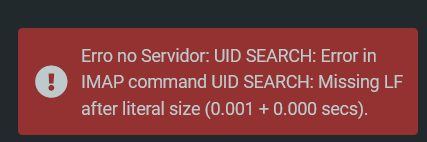
After updating Roundcube to the latest version, I’m getting the following error when searching for terms with accented characters (e.g. ā€œinformaçãoā€, ā€œprefeituraā€):

Searching without accented characters works fine.

log

C: A0004 UID SORT (DATE) UTF-8 ALL OR HEADER SUBJECT {12} informação HEADER FROM {12} informação
S: + OK
S: A0004 BAD Error in IMAP command UID SORT: Missing LF after literal size

2 Likes

Looks like a bug in file /var/lib/roundcube/program/actions/mail/search.php after trying to solve one of the security issues.

        // We pass the filter as-is into IMAP SEARCH command. A newline could be used
        // to inject extra commands, so we remove these.
        $search_str = preg_replace('/[\r\n]+/', ' ', $search_str);

Removing that \r\n causes a problem with how bytes are count later and the way LITERALS are passed to IMAP.

Until they fix it, you can try this workaround (at your own risk):

sed -i.bak 's/\[\\r\\n\\x00\\x80-\\xFF\]/[\\r\\n\\x00]/' /var/lib/roundcube/program/lib/Roundcube/rcube_imap_generic.php
2 Likes