Domain redirection via GUI causes apache2 failed to restart after 5+ minutes

So, under the web ui, when I select Redirect visitors to a custom domain or web address 301 or even 302 apache2 fails to restart after 5+ minutes of trying. This does not happen if I am using the .htaccess or apache domain config file (/home/user/domain/conf/web/)

I have email setup, to receive any such issues, which gives me this:

panel.domain: : apache2 restart failed
[Fri Mar 07 14:52:59.982586 2025] [core:error] [pid 117041:tid 117041] (EAI 3)Temporary failure in name resolution: AH00547: Could not resolve host name **git.domain** -- ignoring!
[Fri Mar 07 14:18:07.968882 2025] [core:error] [pid 103805:tid 103805] (EAI 2)Name or service not known: AH00547: Could not resolve host name https -- ignoring!
[Fri Mar 07 14:18:07.986833 2025] [core:error] [pid 103805:tid 103805] (EAI 2)Name or service not known: AH00547: Could not resolve host name https -- ignoring!
Syntax OK

Although apache2 seems to have restarted, but to avoid any issues, I manually reboot it again, which causes no issues and happens in 30 or so seconds.

This only happens over UI and not otherwise if done manually over CLI/SFTP.

Apache2 logs also show only the above error, but as I mentioned, restart does happen, only that the UI buffers for 5+ minutes and goes out with the error of apache2 failure.

FYI, I keep getting one error over and over in every domain log:
Something like this:

[Sun Mar 09 01:44:57.673434 2025] [proxy_fcgi:error] [pid 27831:tid 27870] [client 194.26.192.169:0] AH01071: Got error 'Primary script unknown'

The client ips are not static, but this error message comes for every domain, and numerous times.

All of a sudden I have started getting it again, and apache2 is not working again:

Temporary failure in name resolution: AH00547: Could not resolve host name https – ignoring!

Due to this all sites are now internal server error.

Internal Server Error

Oops! Something went wrong.

The server encountered an internal error or misconfiguration and was unable to complete your request.

Error Code: 500

Failed to start apache2.service - The Apache HTTP Server.

Show the output of apache2ctl configtest

apache2ctl configtest
[Mon Dec 22 22:17:22.950456 2025] [core:error] [pid 6441:tid 6441] (EAI 3)Temporary failure in name resolution: AH00547: Could not resolve host name https – ignoring!
[Mon Dec 22 22:18:02.992559 2025] [core:error] [pid 6441:tid 6441] (EAI 3)Temporary failure in name resolution: AH00547: Could not resolve host name git.domain.tld – ignoring!
[Mon Dec 22 22:18:43.034009 2025] [core:error] [pid 6441:tid 6441] (EAI 3)Temporary failure in name resolution: AH00547: Could not resolve host name https – ignoring!
Syntax OK

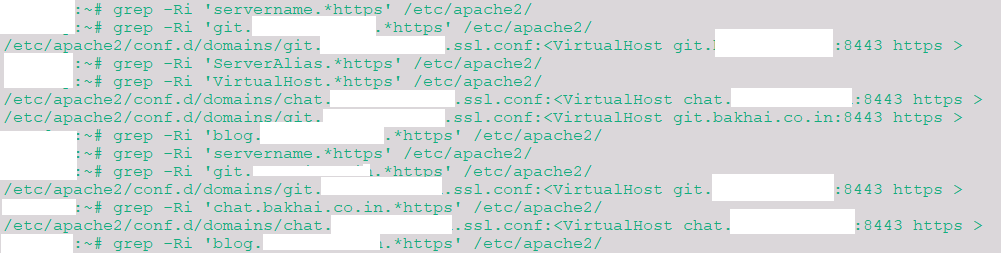
grep -Ri 'servername.*https' /etc/apache2/

Sorry..

/etc/apache2/conf.d/domains/git.domain.tld.ssl.conf:

grep -Ri 'ServerAlias.*https' /etc/apache2/
grep -Ri 'VirtualHost.*https' /etc/apache2/
/etc/apache2/conf.d/domains/chat.domain.tld.ssl.conf:<VirtualHost chat.bakhai.co.in:8443 https >

/etc/apache2/conf.d/domains/git.domain.tld.ssl.conf:<VirtualHost git.bakhai.co.in:8443 https >

Also, for the earlier servername one:

/etc/apache2/conf.d/domains/git.domain.tld.ssl.conf:

grep -Ri ‘chat.domain.tld.*https’ /etc/apache2/

/etc/apache2/conf.d/domains/chat.domain.tld.ssl.conf:

grep -Ri ‘blog.domain.tld.*https’ /etc/apache2/

response is blank

Why you have https at the end?

servername is literally servername.

I only see the conf file but not the output.

Also, why are you using the domain name in VirtualHost instead of the ip?

When I gave only the servername, it came up blank.

I thought I did incorrectly and you meant to type my actual server fqdn, so I did that. That was the full output.

I have made no changes. I have not touched any files. Where do I need to check and update/correct?

First you should check the Apache template you are using for those domains and then check that template.

v-list-web-domain YourUser YourDomain json | jq -r '.[].BACKEND'

If the template is for example default:

cat /usr/local/hestia/data/templates/web/apache2/php-fpm/default.tpl
cat /usr/local/hestia/data/templates/web/apache2/php-fpm/default.stpl

PHP-8_3 which shows to be in: /usr/local/hestia/data/templates/web/php-fpm

The cat for that is:

; origin-src: deb/php-fpm/multiphp.tpl
;#=========================================================================#
;# Default Web Domain Template                                             #
;# DO NOT MODIFY THIS FILE! CHANGES WILL BE LOST WHEN REBUILDING DOMAINS   #
;# https://hestiacp.com/docs/server-administration/web-templates.html      #
;#=========================================================================#

[%domain%]
listen = /run/php/php%backend_version%-fpm-%domain%.sock
listen.owner = %user%
listen.group = www-data
listen.mode = 0660

user = %user%
group = %user%

pm = ondemand
pm.max_children = 8
pm.max_requests = 4000
pm.process_idle_timeout = 10s
pm.status_path = /status

php_admin_value[upload_tmp_dir] = /home/%user%/tmp
php_admin_value[session.save_path] = /home/%user%/tmp
php_admin_value[open_basedir] = /home/%user%/.composer:/home/%user%/web/%domain%/public_html:/home/%user%/web/%domain%/private:/home/%user%/web/%domain%/public_shtml:/home/%user%/tmp:/tmp:/var/www/html:/bin:/usr/bin:/usr/local/bin:/usr/share:/opt
php_admin_value[sendmail_path] = /usr/sbin/sendmail -t -i -f admin@%domain%

env[PATH] = /usr/local/bin:/usr/bin:/bin
env[TMP] = /home/%user%/tmp
env[TMPDIR] = /home/%user%/tmp
env[TEMP] = /home/%user%/tmp

Sorry, I wrote the wrong option, it is TPL instead of BACKEND.

v-list-web-domain YourUser YourDomain json | jq -r '.[].TPL'

Git.stpl & Git.tpl

Turns out, you were right. Somehow the ip%port got replaced with idn%domain:

<VirtualHost %domain_idn%:%web_ssl_port% https >

instead of

<VirtualHost %ip%:%web_ssl_port%>

I have changed it, and rebooting now.

Reload failed for apache2.service - The Apache HTTP Server.
[core:error] [pid 5458:tid 5458] (EAI 3)Temporary failure in name resolution: AH00547: Could not resolve host name https – ignoring!

Does not reload at all. This is happening when I am trying to change the tpl, either via web or cli command.
got it working. I realized, the “https” was still there in the virtual host. I removed it, and applied manually as well (cli was not allowing it).

Apache restart works. But not sure how that got changed, as the file modified date and time shows from a year and half ago.

Now the only trouble I am facing is, connecting for apt updates, or any such domain. :frowning:

These are stuck at 0%. :frowning:

0% [Connecting to deb.debian.org] [Connecting to security.debian.org] [Connecting to packages.sury.org] [Connecting to download.docker.com] [Connecting to apt.hestiacp.com] [Connecting to deb.mariad.......
0% [Connecting to deb.debian.org] [Connecting to security.debian.org] [Connecting to packages.sury.org] [Connecting to download.docker.com] [Connecting to apt.hestiacp.com] [Connecting to deb.mariad....


Ign:1 http://deb.debian.org/debian bookworm InRelease
Ign:2 https://packages.sury.org/apache2 bookworm InRelease
Ign:3 https://deb.mariadb.org/11.8/debian bookworm InRelease
Ign:4 https://packages.microsoft.com/debian/12/prod bookworm InRelease
Ign:5 https://nginx.org/packages/mainline/debian bookworm InRelease
Ign:6 https://deb.nodesource.com/node_20.x nodistro InRelease
Ign:7 https://download.onlyoffice.com/repo/debian squeeze InRelease
Ign:8 http://security.debian.org/debian-security bookworm-security InRelease
Ign:9 https://download.docker.com/linux/debian bookworm InRelease
Ign:10 https://apt.hestiacp.com bookworm InRelease
Ign:11 https://apt.postgresql.org/pub/repos/apt bookworm-pgdg InRelease
Ign:12 https://mediaarea.net/repo/deb/debian bookworm InRelease
0% [Connecting to deb.debian.org] [Connecting to security.debian.org] [Connecting to packages.sury.org] [Connecting to download.docker.com] [Connecting to apt.hestiacp.com] [Connecting to deb.mariadb.org] [Connecting to mediaarea.net] [Connecting to pa