Hestia 1.10.0-rc1 problem

Hello
Started testing Hestia 1.10.0-rc1 on debain 13.
I’m doing a clean install.

The first error that I encountered during installation:

Thank you for downloading Hestia Control Panel! In a few moments,
we will begin installing the following components on your server:

  • NGINX Web / Proxy Server
  • Apache Web Server (as backend)
  • PHP-FPM Application Server
  • Bind DNS Server
  • Exim Mail Server + SpamAssassin
  • Dovecot POP3/IMAP Server+ Sieve
  • MariaDB Database Server
  • Vsftpd FTP Server
  • Web terminal
  • Firewall (iptables) + Fail2Ban Access Monitor

========================================================================

Would you like to continue with the installation? [y/N]: y
Installation backup directory: /root/hst_install_backups/100820261343
Installation log file: /root/hst_install_backups/hst_install-100820261343.log

Adding required repositories to proceed with installation:

[ * ] NGINX
gpg: no valid OpenPGP data found.
[ * ] PHP
[ * ] Apache2
[ * ] MariaDB 11.8
[ * ] Hestia Control Panel
[ * ] Node.js 24

Updating currently installed packages, please wait… W: OpenPGP signature verification failed: Index of /packages/mainline/debian/ trixie InRelease: Sub-process /usr/bin/sqv returned an error code (1), error message is: Missing key 8540A6F18833A80E9C1653A42FD21310B49F6B46, which is needed to verify signature.

E: The repository ’ Index of /packages/mainline/debian/ trixie InRelease’ is not signed.

The installer is now downloading and installing all required packages.
NOTE: This process may take 10 to 15 minutes to complete, please wait…

I fixed it like this:

curl -fsSL https://nginx.org/keys/nginx_signing.key \
| gpg --dearmor -o /usr/share/keyrings/nginx-archive-keyring.gpg

In the installer, there is no possibility to immediately install cgroup (resource limitation)

There is no translation into Russian or Ukrainian.

The version with the installation of mysql 8 also does not work:

Thank you for downloading Hestia Control Panel! In a few moments,
we will begin installing the following components on your server:

  • NGINX Web / Proxy Server
  • Apache Web Server (as backend)
  • PHP-FPM Application Server
  • Bind DNS Server
  • Exim Mail Server + SpamAssassin
  • Dovecot POP3/IMAP Server+ Sieve
  • MySQL8 Database Server
  • Vsftpd FTP Server
  • Web terminal
  • Firewall (iptables) + Fail2Ban Access Monitor

========================================================================

Would you like to continue with the installation? [y/N]: y
Installation backup directory: /root/hst_install_backups/100820261408
Installation log file: /root/hst_install_backups/hst_install-100820261408.log

Adding required repositories to proceed with installation:

[ * ] NGINX
[ * ] PHP
[ * ] Apache2
[ * ] Mysql 8
[ * ] Hestia Control Panel
[ * ] Node.js 24

Updating currently installed packages, please wait… W: OpenPGP signature verification failed: Index of /232905/apt/debian trixie InRelease: Sub-process /usr/bin/sqv returned an error code (1), error message is: Error: Failed to parse keyring “/usr/share/keyrings/mysql-keyring.gpg” Caused by: 0: Reading “/usr/share/keyrings/mysql-keyring.gpg”: EOF 1: EOF

E: The repository ’ Index of /232905/apt/debian trixie InRelease’ is not signed.

The installer is now downloading and installing all required packages.
NOTE: This process may take 10 to 15 minutes to complete, please wait…
E: Package ‘mysql-client’ has no installation candidate
E: Package ‘mysql-server’ has no installation candidate

========================================================================

[ * ] Configuring system settings…
cp: cannot stat ‘/usr/local/hestia/install/deb/logrotate/httpd-prerotate/': No such file or directory
[ * ] Configuring Hestia Control Panel…
cp: cannot stat ‘/usr/local/hestia/install/common/sudo/hestiaweb’: No such file or directory
chmod: cannot access ‘/etc/sudoers.d/hestiaweb’: No such file or directory
cp: cannot stat ‘/usr/local/hestia/install/deb/logrotate/hestia’: No such file or directory
ln: failed to create symbolic link ‘/usr/local/hestia/log’: No such file or directory
touch: cannot touch ‘/usr/local/hestia/log/system.log’: No such file or directory
touch: cannot touch ‘/usr/local/hestia/log/nginx-error.log’: No such file or directory
touch: cannot touch ‘/usr/local/hestia/log/auth.log’: No such file or directory
touch: cannot touch ‘/usr/local/hestia/log/backup.log’: No such file or directory
chmod: cannot access ‘/usr/local/hestia/log’: No such file or directory
chmod: cannot access '/var/log/hestia/
’: No such file or directory
cp: cannot stat ‘/usr/local/hestia/install/common/packages’: No such file or directory
sed: can’t read /usr/local/hestia/data/packages/.pkg: No such file or directory
cp: cannot stat ‘/usr/local/hestia/install/deb/templates’: No such file or directory
cp: cannot stat ‘/usr/local/hestia/install/common/templates/web/’: No such file or directory
cp: cannot stat ‘/usr/local/hestia/install/common/templates/dns/’: No such file or directory
cp: cannot stat ‘/usr/local/hestia/install/common/templates/web/unassigned/index.html’: No such file or directory
cp: cannot stat '/usr/local/hestia/install/common/templates/web/skel/document_errors/
': No such file or directory
cp: cannot stat ‘/usr/local/hestia/install/common/firewall’: No such file or directory
cp: cannot stat ‘/usr/local/hestia/install/common/api’: No such file or directory
[ * ] Configuring OpenSSL to improve TLS performance…
[ * ] Generating default self-signed SSL certificate…
hst-install-debian.sh: line 1531: /usr/local/hestia/bin/v-generate-ssl-cert: No such file or directory
Error: failed to parse generated SSL certificate

The method to add the repo has not changed so looks like a local problem. I’ve also tested it and no problem at all adding the repo and the signing key. The same for mysql8.

I don’t think that will be included in the 1.10.0 release. No new features will be added until after the 1.10.0 release.

That’s strange. This PR was merged yesterday, and it was supposed to include the latest Ukrainian localization.

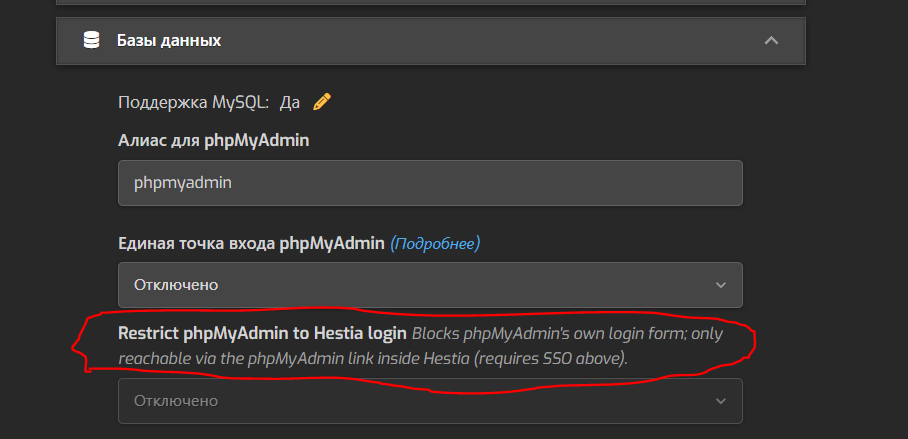
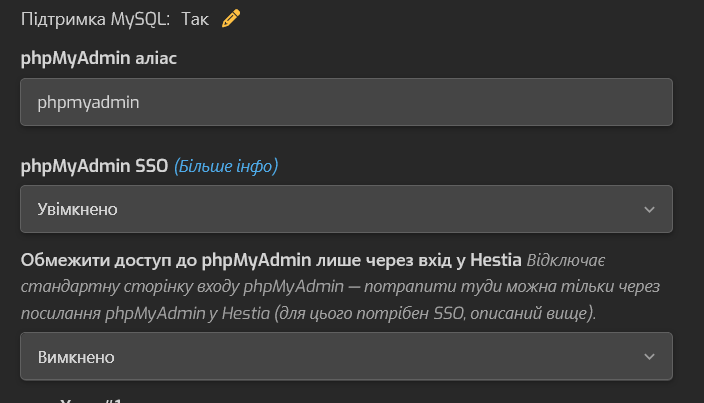
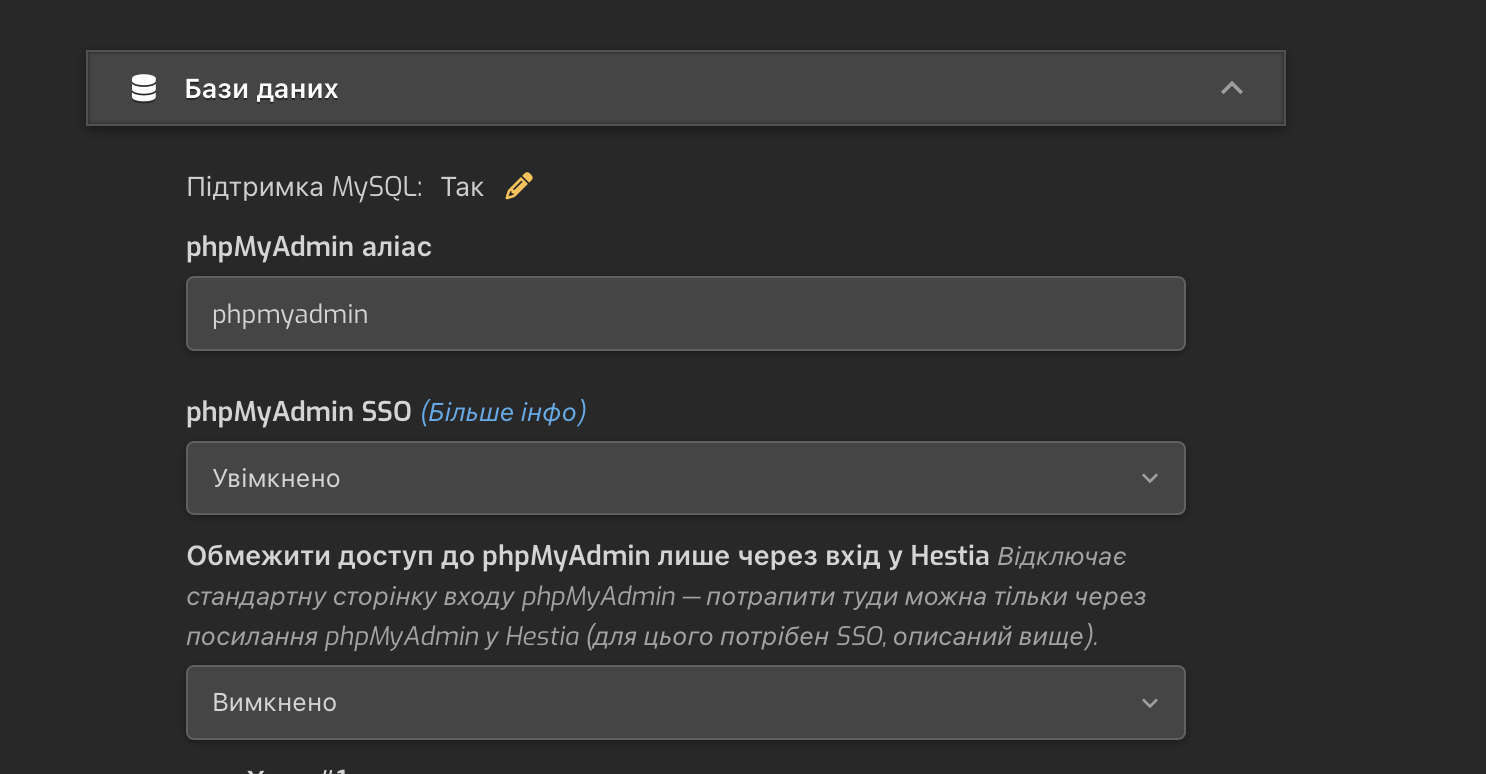
I’ve tested Ukrainian and it is translated:

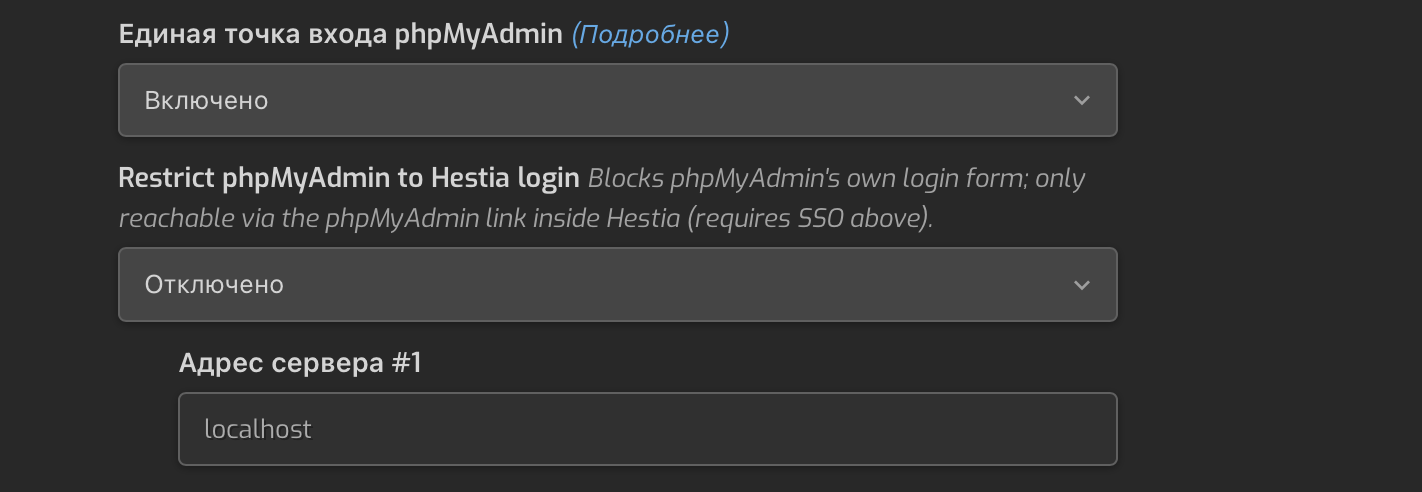
I changed the language. Unfortunately, it does not display. It may not be included in the update.

I did a test installation on hetzner vps. Clean server on debian 13, without ipv6

It is, the screenshot I posted above is from a fresh install of Hestia 1.10.0~rc1 on Debian 13.

I don’t know what happened but it works fine on my end, as I said, there are no changes to the steps to add the nginx repo.

This is what Hestia does (example using arch=amd64):

mkdir -p /root/.gnupg/ && chmod 700 /root/.gnupg/
echo "[ * ] NGINX"
echo "deb [arch=amd64 signed-by=/usr/share/keyrings/nginx-keyring.gpg] https://nginx.org/packages/mainline/debian/ trixie nginx" > /etc/apt/sources.list.d/nginx.list
curl -s https://nginx.org/keys/nginx_signing.key | gpg --dearmor | tee /usr/share/keyrings/nginx-keyring.gpg

I’ll try to reinstall it a little later)

As I understand it, there will be no IPv6 support in the panel?

They should be included in the translations..

Also only test server

But not in Russian

I can correct the Ukrainian and Russian translations if needed.

I will make corrections for both languages ​​and report them here.

There are few more string not 100%

Double check that you installed rc1:

v-list-sys-config json | jq -r '.[]|.VERSION'

Not yet.

I have finished the translation of the text.

It would be nice to be able to work with two email clients.

For example, roundcube or snappymail. Your choice.

And you’re stuck with just one email domain. For example, webmail.example.com.
I’m not sure how feasible this is.

Another incomprehensible moment:

I use remote backups via sftp to a remote server. When removing a user from the panel, copies on the remote server are not deleted. Why?

Is it possible to do something so that when the user is deleted, the copies are also deleted. At least a week later, for example, after the removal, so that there would be an opportunity if something else was restored.
It is clear that you can do it somehow with custom scripts, look at which user is not in the panel and delete the backup if there is one left. But this is not a very convenient option (