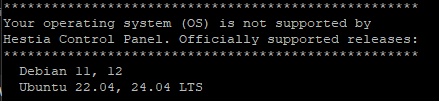
Updating currently installed packages, please wait… E: The repository ‘https://apt.hestiacp.com trixie Release’ does not have a Release file.
E: The repository ‘https://dlm.mariadb.com/repo/mariadb-server/11.4/repo/debian trixie Release’ does not have a Release file.
The installer is now downloading and installing all required packages.
NOTE: This process may take 10 to 15 minutes to complete, please wait…
E: Unable to locate package hestia
E: Unable to locate package hestia-nginx
E: Unable to locate package hestia-php
[ * ] Configuring system settings…
cp: cannot stat ‘/usr/local/hestia/install/deb/logrotate/httpd-prerotate/': No such file or directory
[ * ] Configuring Hestia Control Panel…
cp: cannot stat ‘/usr/local/hestia/install/common/sudo/hestiaweb’: No such file or directory
chmod: cannot access ‘/etc/sudoers.d/hestiaweb’: No such file or directory
cp: cannot stat ‘/usr/local/hestia/install/deb/logrotate/hestia’: No such file or directory
ln: failed to create symbolic link ‘/usr/local/hestia/log’: No such file or directory
touch: cannot touch ‘/usr/local/hestia/log/system.log’: No such file or directory
touch: cannot touch ‘/usr/local/hestia/log/nginx-error.log’: No such file or directory
touch: cannot touch ‘/usr/local/hestia/log/auth.log’: No such file or directory
touch: cannot touch ‘/usr/local/hestia/log/backup.log’: No such file or directory
chmod: cannot access ‘/usr/local/hestia/log’: No such file or directory
chmod: cannot access '/var/log/hestia/’: No such file or directory
cp: cannot stat ‘/usr/local/hestia/install/common/packages’: No such file or directory
sed: can’t read /usr/local/hestia/data/packages/.pkg: No such file or directory
cp: cannot stat ‘/usr/local/hestia/install/deb/templates’: No such file or directory
cp: cannot stat ‘/usr/local/hestia/install/common/templates/web/’: No such file or directory
cp: cannot stat ‘/usr/local/hestia/install/common/templates/dns/’: No such file or directory
cp: cannot stat ‘/usr/local/hestia/install/common/templates/web/unassigned/index.html’: No such file or directory
cp: cannot stat '/usr/local/hestia/install/common/templates/web/skel/document_errors/': No such file or directory
cp: cannot stat ‘/usr/local/hestia/install/common/firewall’: No such file or directory
cp: cannot stat ‘/usr/local/hestia/install/common/api’: No such file or directory
[ * ] Configuring OpenSSL to improve TLS performance…
[ * ] Generating default self-signed SSL certificate…
hst-install-debian.sh: line 1503: /usr/local/hestia/bin/v-generate-ssl-cert: No such file or directory
Error: failed to parse generated SSL certificate
So question: Until the Release to Debian 13 and Ubuntu 26.04 what is the upgrade path? Or is there one? Is there a nifty way to incorporate patches and updates into the build from main?
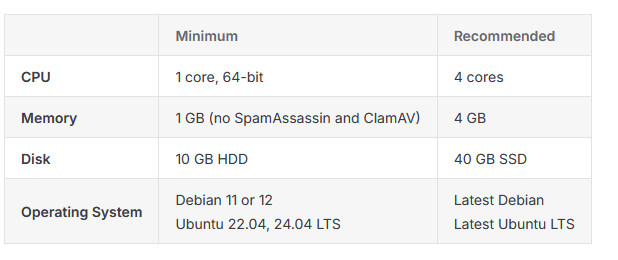
documentation says “latest” is the recommended version for Debian / Ubuntu, however when you try to install latest debian / ubuntu the installer fails…
why dont you fix documentation? it is not true that latest will work… so you should not recoment latest.
The point isn’t that Debian 13 isn’t supported. The point is that the documentation should be updated, and that’s a fair suggestion.
What isn’t fair is the attitude. Hestia is developed and maintained by volunteers in their free time and provided completely free of charge. Nobody is obligated to support every new OS release on day one.
If the current supported versions don’t meet your requirements, you’re absolutely free to use another open-source or commercial control panel. Complaining is easy. Contributing code, testing, documentation updates, or even just reporting issues respectfully is what actually helps the project.
In fact I tested with both Ubuntu Latest and Debian Latest… both same error.. Just reporting the problem… I am no sure if it is possible to anyone to pull requests directly to the documentation, so, only reporting something I experienced… got latest operating system version as recommeded on documentation and found the issue…
I am sorry for being rude on last mesage, but would like to try hestiacp on latest stable version… so will try it now on Debian 12… (still setting up the enviornment)..
If you want to install on Debian 13 you can use the main branch, google how, it does a build and works very well, I believe I outlined how I did it in another recent thread. All the best!
I didn’t see the main branch installation instructions so I am pasting them here. This is what I followed on a couple installations so far:
To install the main branch of HestiaCP, you must clone the repository, compile the packages from source, and then run the installer using those local builds.
Step 1: Clone and Compile Log in as root via SSH and run the following commands to clone the repository and build the necessary packages:
git clone https://github.com/hestiacp/hestiacp.git
cd ./hestiacp/
git checkout main
cd ./src/
./hst_autocompile.sh --all --noinstall --keepbuild '~localsrc'
Step 2: Install from Local Builds Navigate to the install directory and execute the installation script, pointing it to the compiled .deb packages:
cd ../install
bash hst-install-{os}.sh --with-debs /tmp/hestiacp-src/deb/
Replace {os} with your operating system (e.g., ubuntu or debian). You can specify additional installation flags (such as --apache yes, --mysql yes) as needed during this step.
Note: It is highly recommended to perform this installation on a fresh operating system to avoid conflicts with existing server software. If you encounter dependency errors during the dpkg installation phase, run apt install -f to resolve them.