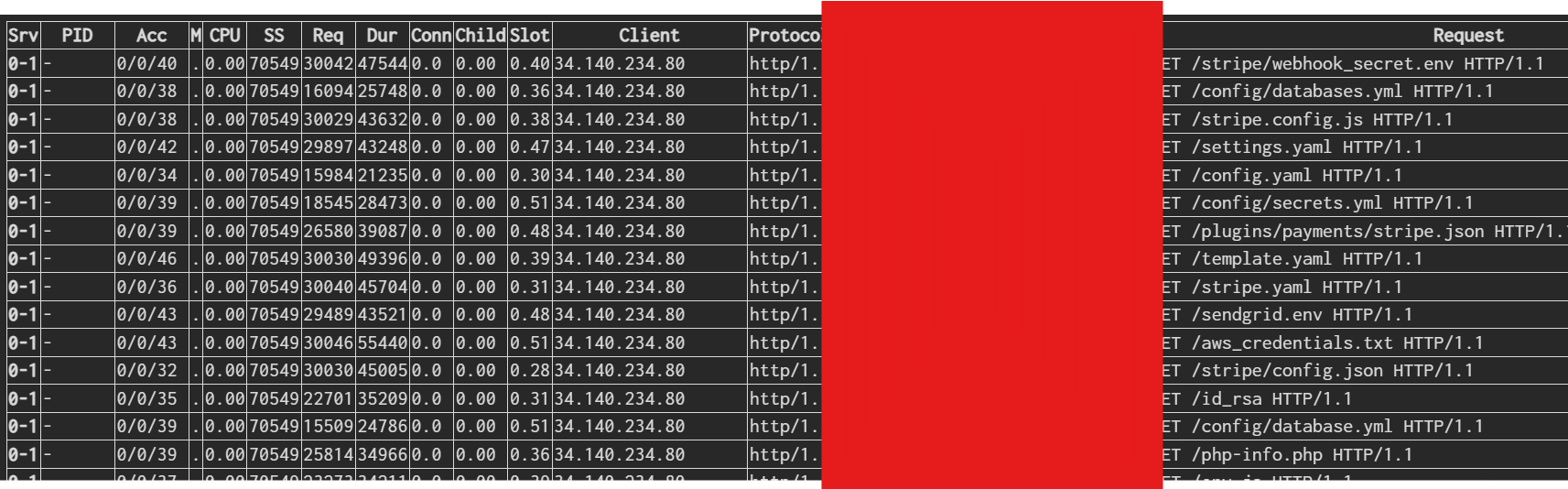
this is the “Advanced Details” section of the task monitor. I know the apache / nginx logs are updated real time.
Does this report also get updated real time?
this is the “Advanced Details” section of the task monitor. I know the apache / nginx logs are updated real time.
Does this report also get updated real time?
When you show it, yes, but it is not refreshed automatically.
Thanks, how do I get it to refresh automatically whenever I view it?
Click again on Web tab or F5
Thanks for the reply. It looks like refreshing the browser does not pull the most recent logs entries. Initially thought a batch job updates the report at different intervals hence the delay in the report.
Every time you reload the page, Hestia executes this command:
v-list-sys-web-status
In your case, basically executes this command:
wget -qO- http://localhost:8081/server-status/ | egrep -v "html|DOCTYPE|h1>|title|head"
But keep in mind that the server-status doesn’t show the logs, so I don’t understand why you’re saying there’s a delay in the log entries.
@sahsanu thanks for you feedback. I appreciate. Maybe I am not getting something correctly. I believe these report below if extracted from the log entries correct? If yes, I know the apache log entries are updated real time. This implies that this report below too should be updated with real time data from there? Or I am missing something?
Apache log entries are written to the log files in real time as requests are processed. However, server-status is provided by mod_status and shows Apache’s current runtime status, it does not read the log files or use them as its data source.
So, even though the Apache logs are updated in real time, that does not mean that the data shown in server-status is coming from or being updated based on those log entries. They are two separate sources of information.