cosmos
July 22, 2025, 9:46am
1
think as linux administrator
open() “/var/log/nginx/domains/webmail.mydomain.info.log” failed (24: Too many open files)
How to fix this error?
Nginx has nest config now:
cat /proc/$(pidof apache2 | awk ‘{print $1}’)/limits | grep “Max open files”
sudo systemctl show apache2 | grep -i limitnofile
cat /etc/nginx/nginx.conf
# Server globals
user                 www-data;
worker_processes     auto;
worker_rlimit_nofile 65535;
error_log            /var/log/nginx/error.log;
pid                  /run/nginx.pid;
include              /etc/nginx/conf.d/main/*.conf;
include              /etc/nginx/modules-enabled/*.conf;

# Worker config
events {
	worker_connections 512;
	use                epoll;
	multi_accept       on;
}

http {
	# Main settings
	sendfile                        on;
	tcp_nopush                      on;
	tcp_nodelay                     on;
	client_header_timeout           180s;
	client_body_timeout             180s;
	client_header_buffer_size       2k;
	client_body_buffer_size         256k;
	client_max_body_size            1024m;
	large_client_header_buffers     4 8k;
	send_timeout                    60s;
	keepalive_timeout               30s;
	keepalive_requests              1000;
	reset_timedout_connection       on;
	server_tokens                   off;
	server_name_in_redirect         off;
	server_names_hash_max_size      512;
	server_names_hash_bucket_size   512;
	charset                         utf-8;
	# FastCGI settings
	fastcgi_buffers                 512 4k;
	fastcgi_buffer_size             256k;
	fastcgi_busy_buffers_size       256k;
	fastcgi_temp_file_write_size    256k;
	fastcgi_connect_timeout         30s;
	fastcgi_read_timeout            300s;
	fastcgi_send_timeout            180s;
	fastcgi_cache_lock              on;
	fastcgi_cache_lock_timeout      5s;
	fastcgi_cache_background_update on;
	fastcgi_cache_revalidate        on;
	# Proxy settings
	proxy_redirect                  off;
	proxy_set_header                Host $host;
	proxy_set_header                Early-Data $rfc_early_data;
	proxy_set_header                X-Real-IP $remote_addr;
	proxy_set_header                X-Forwarded-For $proxy_add_x_forwarded_for;
	proxy_pass_header               Set-Cookie;
	proxy_buffers                   256 4k;
	proxy_buffer_size               32k;
	proxy_busy_buffers_size         32k;
	proxy_temp_file_write_size      256k;
	proxy_connect_timeout           30s;
	proxy_read_timeout              300s;
	proxy_send_timeout              180s;
	# Log format
	log_format                      main '$remote_addr - $remote_user [$time_local] $request "$status" $body_bytes_sent "$http_referer" "$http_user_agent" "$http_x_forwarded_for"';
	log_format                      bytes '$body_bytes_sent';
	log_not_found                   off;
	access_log                      off;
        # access_log /var/log/nginx/combined.log;
        error_log /var/log/nginx/error.log crit;
	# Mime settings
	include                         /etc/nginx/mime.types;
	default_type                    application/octet-stream;
	# Compression
	gzip                            on;
	gzip_vary                       on;
	gzip_static                     on;
	gzip_comp_level                 6;
	gzip_min_length                 1024;
	gzip_buffers                    128 4k;
	gzip_http_version               1.1;
	gzip_types                      text/css text/javascript text/js text/plain text/richtext text/shtml text/x-component text/x-java-source text/x-markdown text/x-script text/xml image/bmp image/svg+xml image/vnd.microsoft.icon image/x-icon font/otf font/ttf font/x-woff multipart/bag multipart/mixed application/eot application/font application/font-sfnt application/font-woff application/javascript application/javascript-binast application/json application/ld+json application/manifest+json application/opentype application/otf application/rss+xml application/ttf application/truetype application/vnd.api+json application/vnd.ms-fontobject application/wasm application/xhtml+xml application/xml application/xml+rss application/x-httpd-cgi application/x-javascript application/x-opentype application/x-otf application/x-perl application/x-protobuf application/x-ttf;
	gzip_proxied                    any;
	# Cloudflare IPs
	include                         /etc/nginx/conf.d/cloudflare.inc;
	# SSL PCI compliance
	ssl_buffer_size                 1369;
	ssl_ciphers                     "ECDHE-ECDSA-AES128-GCM-SHA256:ECDHE-RSA-AES128-GCM-SHA256:DHE-RSA-AES128-GCM-SHA256:ECDHE-ECDSA-CHACHA20-POLY1305:ECDHE-RSA-CHACHA20-POLY1305:DHE-RSA-CHACHA20-POLY1305:ECDHE-ECDSA-AES256-GCM-SHA384:ECDHE-RSA-AES256-GCM-SHA384:DHE-RSA-AES256-GCM-SHA384:ECDHE-ECDSA-AES128-SHA256:ECDHE-RSA-AES128-SHA256:DHE-RSA-AES128-SHA256:ECDHE-ECDSA-AES256-SHA384:ECDHE-RSA-AES256-SHA384:DHE-RSA-AES256-SHA256";
	ssl_dhparam                     /etc/ssl/dhparam.pem;
	ssl_early_data                  on;
	ssl_ecdh_curve                  auto;
	ssl_prefer_server_ciphers       on;
	ssl_protocols                   TLSv1.2 TLSv1.3;
	ssl_session_cache               shared:SSL:20m;
	ssl_session_tickets             on;
	ssl_session_timeout             7d;
	resolver                        127.0.0.53 valid=300s ipv6=off;
	resolver_timeout                5s;
	# Error pages
	error_page                      403 /error/404.html;
	error_page                      404 /error/404.html;
	error_page                      410 /error/410.html;
	error_page                      500 501 502 503 504 505 /error/50x.html;
	# Proxy cache
	proxy_cache_path                /var/cache/nginx levels=2 keys_zone=cache:10m inactive=60m max_size=1024m;
	proxy_cache_key                 "$scheme$request_method$host$request_uri";
	proxy_temp_path                 /var/cache/nginx/temp;
	proxy_ignore_headers            Cache-Control Expires;
	proxy_cache_use_stale           error timeout invalid_header updating http_502;
	proxy_cache_valid               any 1d;
	# FastCGI cache
	fastcgi_cache_path              /var/cache/nginx/micro levels=1:2 keys_zone=microcache:10m inactive=30m max_size=1024m;
	fastcgi_cache_key               "$scheme$request_method$host$request_uri";
	fastcgi_ignore_headers          Cache-Control Expires Set-Cookie;
	fastcgi_cache_use_stale         error timeout invalid_header updating http_500 http_503;
	add_header                      X-FastCGI-Cache $upstream_cache_status;

	# Cache bypass
	map $http_cookie $no_cache {
		default              0;
		~SESS                1;
		~wordpress_logged_in 1;
	}

	# File cache (static assets)
	open_file_cache                 max=10000 inactive=30s;
	open_file_cache_valid           60s;
	open_file_cache_min_uses        2;
	open_file_cache_errors          off;
	# Wildcard include
	include                         /etc/nginx/conf.d/*.conf;
	include                         /etc/nginx/conf.d/domains/*.conf;
}
cosmos
July 22, 2025, 9:47am
2
I suppose that too much error logs files trying to open /var/log/nginx/domains/webmail.mydomain.info.log
nu01
July 22, 2025, 10:47am
3
Open files are limited to 1024. Suggest to set it to a higher limit of say 65535.
Set it for your PHP version (example PHP8.2):
mkdir -p /etc/systemd/system/php8.2-fpm.service.d/
echo -e "[Service]\nLimitNOFILE=65535" > /etc/systemd/system/php8.2-fpm.service.d/override.conf
systemctl daemon-reload
systemctl restart php8.2-fpm.service
Check again that open files limit has been raised:
cat /proc/$(pgrep -f 'master.*php\/8\.2' | head -n1)/limits
cosmos
July 22, 2025, 11:37am
4
well I had tried as your wrote but with no luck
cat /proc/$(pgrep -f ‘master.*php/8.1’ | head -n1)/limits262144 262144 files
The major thing was this limit
ulimit -S -n 66048
but is it permanent solution?
nu01
July 22, 2025, 12:12pm
5
cosmos:
ulimit -Sn
Your All-in-One Learning Portal: GeeksforGeeks is a comprehensive educational platform that empowers learners across domains-spanning computer science and programming, school education, upskilling, commerce, software tools, competitive exams, and...
Your All-in-One Learning Portal: GeeksforGeeks is a comprehensive educational platform that empowers learners across domains-spanning computer science and programming, school education, upskilling, commerce, software tools, competitive exams, and...
https://www.baeldung.com/linux/ulimit-tutorial
Set the soft limit as say 65576 with sysctl -w fs.file-max=65576
cosmos
August 8, 2025, 9:48am
6
Sorry, I dont know why but again I should back with the same error
Still cant change 1024 value:
sudo nginx -T
How to increase SOFT LIMIT for Max open files?
cosmos
August 8, 2025, 10:02am
7
:/etc/nginx# cat /proc/$(pgrep -f ‘master.*php/8.1’ | head -n1)/limits | grep “Max open file”
As I see for current php version used on my server 8.1
As root:
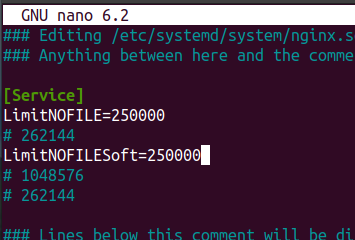
systemctl edit nginx.service
This will open the file /etc/systemd/system/nginx.service.d/override.conf so you need to add two lines between the comments, as shown below:
### Editing /etc/systemd/system/nginx.service.d/override.conf
### Anything between here and the comment below will become the new contents of the file

[Service]
LimitNOFILE=250000

### Lines below this comment will be discarded

### /etc/systemd/system/nginx.service
Save the file and restart nginx
systemctl restart nginx.service
Check again the limits and also nginx:
cat /proc/$(cat /var/run/nginx.pid)/limits | grep -i 'Max open files'
nginx -t
cosmos
August 8, 2025, 11:27am
9
I 've changed the file
and restart nginx
nginx t
It doesnt change
ps: Can I nurn off webmail.test.com.log logs, to decrease number of open files?
this is my /etc/nginx/nginx.conf
[details="Спойлер"]


# Server globals
user                 www-data;
worker_processes     auto;
worker_rlimit_nofile 262144;
error_log            /var/log/nginx/error.log;
pid                  /run/nginx.pid;
include              /etc/nginx/conf.d/main/*.conf;
include              /etc/nginx/modules-enabled/*.conf;

# Worker config
events {
	worker_connections 512;
	use                epoll;
	multi_accept       on;
}

http {
	# Main settings
	sendfile                        on;
	tcp_nopush                      on;
	tcp_nodelay                     on;
	client_header_timeout           180s;
	client_body_timeout             180s;
	client_header_buffer_size       2k;
	client_body_buffer_size         256k;
	client_max_body_size            1024m;
	large_client_header_buffers     4 8k;
	send_timeout                    60s;
	keepalive_timeout               30s;
	keepalive_requests              1000;
	reset_timedout_connection       on;
	server_tokens                   off;
	server_name_in_redirect         off;
	server_names_hash_max_size      512;
	server_names_hash_bucket_size   512;
	charset                         utf-8;
	# FastCGI settings
	fastcgi_buffers                 512 4k;
	fastcgi_buffer_size             256k;
	fastcgi_busy_buffers_size       256k;
	fastcgi_temp_file_write_size    256k;
	fastcgi_connect_timeout         30s;
	fastcgi_read_timeout            300s;
	fastcgi_send_timeout            180s;
	fastcgi_cache_lock              on;
	fastcgi_cache_lock_timeout      5s;
	fastcgi_cache_background_update on;
	fastcgi_cache_revalidate        on;
	# Proxy settings
	proxy_redirect                  off;
	proxy_set_header                Host $host;
	proxy_set_header                Early-Data $rfc_early_data;
	proxy_set_header                X-Real-IP $remote_addr;
	proxy_set_header                X-Forwarded-For $proxy_add_x_forwarded_for;
	proxy_pass_header               Set-Cookie;
	proxy_buffers                   256 4k;
	proxy_buffer_size               32k;
	proxy_busy_buffers_size         32k;
	proxy_temp_file_write_size      256k;
	proxy_connect_timeout           30s;
	proxy_read_timeout              300s;
	proxy_send_timeout              180s;
	# Log format
	log_format                      main '$remote_addr - $remote_user [$time_local] $request "$status" $body_bytes_sent "$http_referer" "$http_user_agent" "$http_x_forwarded_for"';
	log_format                      bytes '$body_bytes_sent';
	log_not_found                   off;
	access_log                      off;
        # access_log /var/log/nginx/combined.log;
        error_log /var/log/nginx/error.log crit;
	# Mime settings
	include                         /etc/nginx/mime.types;
	default_type                    application/octet-stream;
	# Compression
	gzip                            on;
	gzip_vary                       on;
	gzip_static                     on;
	gzip_comp_level                 6;
	gzip_min_length                 1024;
	gzip_buffers                    128 4k;
	gzip_http_version               1.1;
	gzip_types                      text/css text/javascript text/js text/plain text/richtext text/shtml text/x-component text/x-java-source text/x-markdown text/x-script text/xml image/bmp image/svg+xml image/vnd.microsoft.icon image/x-icon font/otf font/ttf font/x-woff multipart/bag multipart/mixed application/eot application/font application/font-sfnt application/font-woff application/javascript application/javascript-binast application/json application/ld+json application/manifest+json application/opentype application/otf application/rss+xml application/ttf application/truetype application/vnd.api+json application/vnd.ms-fontobject application/wasm application/xhtml+xml application/xml application/xml+rss application/x-httpd-cgi application/x-javascript application/x-opentype application/x-otf application/x-perl application/x-protobuf application/x-ttf;
	gzip_proxied                    any;
	# Cloudflare IPs
	include                         /etc/nginx/conf.d/cloudflare.inc;
	# SSL PCI compliance
	ssl_buffer_size                 1369;
	ssl_ciphers                     "ECDHE-ECDSA-AES128-GCM-SHA256:ECDHE-RSA-AES128-GCM-SHA256:DHE-RSA-AES128-GCM-SHA256:ECDHE-ECDSA-CHACHA20-POLY1305:ECDHE-RSA-CHACHA20-POLY1305:DHE-RSA-CHACHA20-POLY1305:ECDHE-ECDSA-AES256-GCM-SHA384:ECDHE-RSA-AES256-GCM-SHA384:DHE-RSA-AES256-GCM-SHA384:ECDHE-ECDSA-AES128-SHA256:ECDHE-RSA-AES128-SHA256:DHE-RSA-AES128-SHA256:ECDHE-ECDSA-AES256-SHA384:ECDHE-RSA-AES256-SHA384:DHE-RSA-AES256-SHA256";
	ssl_dhparam                     /etc/ssl/dhparam.pem;
	ssl_early_data                  on;
	ssl_ecdh_curve                  auto;
	ssl_prefer_server_ciphers       on;
	ssl_protocols                   TLSv1.2 TLSv1.3;
	ssl_session_cache               shared:SSL:20m;
	ssl_session_tickets             on;
	ssl_session_timeout             7d;
	resolver                        127.0.0.53 valid=300s ipv6=off;
	resolver_timeout                5s;
	# Error pages
	error_page                      403 /error/404.html;
	error_page                      404 /error/404.html;
	error_page                      410 /error/410.html;
	error_page                      500 501 502 503 504 505 /error/50x.html;
	# Proxy cache
	proxy_cache_path                /var/cache/nginx levels=2 keys_zone=cache:10m inactive=60m max_size=1024m;
	proxy_cache_key                 "$scheme$request_method$host$request_uri";
	proxy_temp_path                 /var/cache/nginx/temp;
	proxy_ignore_headers            Cache-Control Expires;
	proxy_cache_use_stale           error timeout invalid_header updating http_502;
	proxy_cache_valid               any 1d;
	# FastCGI cache
	fastcgi_cache_path              /var/cache/nginx/micro levels=1:2 keys_zone=microcache:10m inactive=30m max_size=1024m;
	fastcgi_cache_key               "$scheme$request_method$host$request_uri";
	fastcgi_ignore_headers          Cache-Control Expires Set-Cookie;
	fastcgi_cache_use_stale         error timeout invalid_header updating http_500 http_503;
	add_header                      X-FastCGI-Cache $upstream_cache_status;

	# Cache bypass
	map $http_cookie $no_cache {
		default              0;
		~SESS                1;
		~wordpress_logged_in 1;
	}

	# File cache (static assets)
	open_file_cache                 max=10000 inactive=30s;
	open_file_cache_valid           60s;
	open_file_cache_min_uses        2;
	open_file_cache_errors          off;
	# Wildcard include
	include                         /etc/nginx/conf.d/*.conf;
	include                         /etc/nginx/conf.d/domains/*.conf;
}

[/details]
cosmos:
It doesnt change
It doesn’t change because Nginx can’t restart.
killall nginx or restart the server and the change should be done.
cosmos
August 8, 2025, 11:57am
11
Unfortinally killall nginx doesnt help,
By the way can I decrease max open files if I cant inc max open limits?
Force the kill:
killall -9 nginx
You don’t need to rebuild the server. If the above command doesn’t work, reboot the server.