The panel does not allow me to create users or domains containing the letter ‘ñ’. ‘.es’ domains permit the use of this letter—which is used in my country—and allow such domains to be created. How can I go about this?
You need to type it in in punycode.
You can convert from Unicode to Punycode with services like this one.
To add to Reddy’s answer, the domain and the user behave differently:
Domain: enter the punycode (ACE) form. For example españa.es becomes xn--espaa-rta.es. You can convert it on the server itself with idn2 españa.es (from the idn2 package) or python3 -c "print('españa.es'.encode('idna').decode())". Use the same xn-- form for the mail domain and DNS zone too; the Let’s Encrypt certificate will be issued for the xn-- name and browsers still display the ñ to visitors.
User: Hestia users are real Linux system accounts, so the username is limited to plain ASCII letters, digits and a few separators. There’s no way to use ñ there, so pick an ASCII name (e.g. espana). The username is never shown to visitors, so it doesn’t affect the website or email addresses.
As stated, usernames can’t contain ñ, but Hestia allows domains containing ñ without requiring you to convert them to punycode manually. Hestia handles the conversion automatically when configuring the different services.
What error do you get when trying to add a domain containing ñ?
this is error apache2:
AH00526: Syntax error on line 9 of /etc/apache2/conf.d/domains/excavacionsvi\xc3\xb1a.es.conf:
ServerName takes one argument, The hostname and port of the server
I had to remove the domain so it could start up; the ‘ñ’ causes this issue.
Now I’ll try doing what was suggested.
I have seen the problem… if it creates the .es domain but in the apache file it does not fill in the ServerName field
ServerAlias
because of this error, I added it manually and now apache2 starts with this domain included.. so I don’t know if in the future hestiacp will subscribe to this file again and leave it blank again
That’s strange, I can’t reproduce the issue.
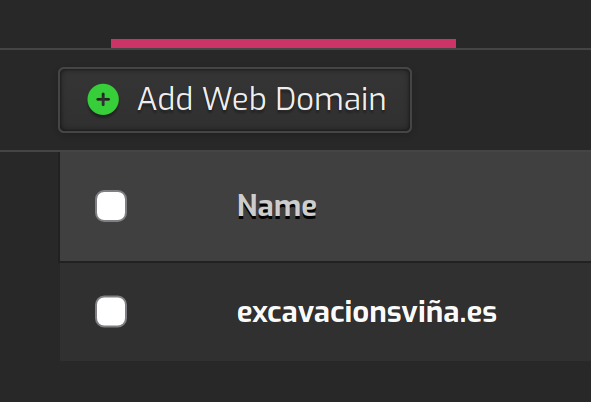
Generated nginx conf:
❯ cat /etc/nginx/conf.d/domains/excavacionsviña.es.conf
#=========================================================================#
# Default Web Domain Template                                             #
# DO NOT MODIFY THIS FILE! CHANGES WILL BE LOST WHEN REBUILDING DOMAINS   #
# https://hestiacp.com/docs/server-administration/web-templates.html      #
#=========================================================================#

server {
        listen      192.168.2.204:80;
        server_name xn--excavacionsvia-2nb.es www.xn--excavacionsvia-2nb.es;
        error_log   /var/log/apache2/domains/excavacionsviña.es.error.log error;

        include /home/test/conf/web/excavacionsviña.es/nginx.forcessl.conf*;

        location ~ /\.(?!well-known\/|file) {
                deny all;
                return 404;
        }

        location / {
                proxy_pass http://192.168.2.204:8080;

                location ~* ^.+\.(css|htm|html|js|mjs|json|xml|apng|avif|bmp|cur|gif|ico|jfif|jpg|jpeg|pjp|pjpeg|png|svg|tif|tiff|webp|aac|caf|flac|m4a|midi|mp3|ogg|opus|wav|3gp|av1|avi|m4v|mkv|mov|mpg|mpeg|mp4|mp4v|webm|otf|ttf|woff|woff2|doc|docx|odf|odp|ods|odt|pdf|ppt|pptx|rtf|txt|xls|xlsx|7z|bz2|gz|rar|tar|tgz|zip|apk|appx|bin|dmg|exe|img|iso|jar|msi|webmanifest)$ {
                        try_files  $uri @fallback;

                        root       /home/test/web/excavacionsviña.es/public_html;
                        access_log /var/log/apache2/domains/excavacionsviña.es.log combined;
                        access_log /var/log/apache2/domains/excavacionsviña.es.bytes bytes;

                        expires    max;
                }
        }

        location @fallback {
                proxy_pass http://192.168.2.204:8080;
        }

        location /error/ {
                alias /home/test/web/excavacionsviña.es/document_errors/;
        }

        include /home/test/conf/web/excavacionsviña.es/nginx.conf_*;
}
Generated Apache2 conf:
❯ cat /etc/apache2/conf.d/domains/excavacionsviña.es.conf
#=========================================================================#
# Default Web Domain Template                                             #
# DO NOT MODIFY THIS FILE! CHANGES WILL BE LOST WHEN REBUILDING DOMAINS   #
# https://hestiacp.com/docs/server-administration/web-templates.html      #
#=========================================================================#

<VirtualHost 192.168.2.204:8080>

    ServerName xn--excavacionsvia-2nb.es
    ServerAlias www.xn--excavacionsvia-2nb.es
    ServerAdmin info@excavacionsviña.es
    DocumentRoot /home/test/web/excavacionsviña.es/public_html
    ScriptAlias /cgi-bin/ /home/test/web/excavacionsviña.es/cgi-bin/
    Alias /vstats/ /home/test/web/excavacionsviña.es/stats/
    Alias /error/ /home/test/web/excavacionsviña.es/document_errors/
    #SuexecUserGroup test test
    CustomLog /var/log/apache2/domains/excavacionsviña.es.bytes bytes
    CustomLog /var/log/apache2/domains/excavacionsviña.es.log combined
    ErrorLog /var/log/apache2/domains/excavacionsviña.es.error.log

    IncludeOptional /home/test/conf/web/excavacionsviña.es/apache2.forcessl.conf*

    <Directory /home/test/web/excavacionsviña.es/stats>
        AllowOverride All
    </Directory>
    <Directory /home/test/web/excavacionsviña.es/public_html>
        AllowOverride All
        Options +Includes -Indexes +ExecCGI
    </Directory>

    <FilesMatch \.php$>
        SetHandler "proxy:unix:/run/php/php8.5-fpm-excavacionsviña.es.sock|fcgi://localhost"
    </FilesMatch>
    SetEnvIf Authorization .+ HTTP_AUTHORIZATION=$0

    IncludeOptional /home/test/conf/web/excavacionsviña.es/apache2.conf_*
    IncludeOptional /etc/apache2/conf.d/*.inc
</VirtualHost>
If you rebuild the domain or in the next update, yes, it possibly will override your changes.
Could you plese show the output of this command? Replace HereTheUser with the actual user:
cat -A /usr/local/hestia/data/users/HereTheUser/web.conf | grep excavacion
they also give an error when creating the DNS zone
/etc/bind/named.conf:30: zone ‘’: is not a valid name
I deleted everything from the panel, when creating again excavacionsviña.es it gave an apache2 error:
AH00526: Syntax error on line 9 of /etc/apache2/conf.d/domains/excavacionsvi\xc3\xb1a.es.conf:
ServerName takes one argument, The hostname and port of the server
and I had the option to create DNS and mail zone checked and it didn’t create them either
cat:
DOMAIN=‘excavacionsviM-CM-1a.es’ IP=‘10.10.11.99’ IP6=‘’ CUSTOM_DOCROOT=‘’ ALIAS=‘www.excavacionsviM-CM-1a.es’ TPL=‘default’ SSL=‘no’ SSL_FORCE=‘no’ SSL_HOME=‘same’ LETSENCRYPT=‘no’ FTP_USER=‘’ FTP_MD5=‘’ BACKEND=‘PHP-7_4’ PROXY=‘default’ PROXY_EXT=‘css,htm,html,js,mjs,json,xml,apng,avif,bmp,cur,gif,ico,jfif,jpg,jpeg,pjp,pjpeg,png,svg,tif,tiff,webp,aac,caf,flac,m4a,midi,mp3,ogg,opus,wav,3gp,av1,avi,m4v,mkv,mov,mpg,mpeg,mp4,mp4v,webm,otf,ttf,woff,woff2,doc,docx,odf,odp,ods,odt,pdf,ppt,pptx,rtf,txt,xls,xlsx,7z,bz2,gz,rar,tar,tgz,zip,apk,appx,bin,dmg,exe,img,iso,jar,msi,webmanifest’ STATS=‘’ STATS_USER=‘’ STATS_CRYPT=‘’ U_DISK=‘0’ U_BANDWIDTH=‘0’ SUSPENDED=‘no’ TIME=‘11:41:30’ DATE=‘2026-10-26’$
The output of web.conf is correct.
Here the mail and bind conf was created correctly too:
❯ cat /etc/bind/named.conf
// This is the primary configuration file for the BIND DNS server named.
//
// Please read /usr/share/doc/bind9/README.Debian.gz for information on the
// structure of BIND configuration files in Debian, *BEFORE* you customize
// this configuration file.
//
// If you are just adding zones, please do that in /etc/bind/named.conf.local

include "/etc/bind/named.conf.options";
include "/etc/bind/named.conf.local";
include "/etc/bind/named.conf.root-hints";

zone "xn--excavacionsvia-2nb.es" {type master; file "/home/test/conf/dns/excavacionsviña.es.db";};
What’s you OS?
Could you please show the output of this command?
locale-gen
Generating locales (this might take a while)…
es_ES.UTF-8… done
Generation complete.
I’ll test it later in a VM using only that locale.
Do you have the same problem when adding it from command line? Create a test domain with your user:
v-add-web-domain HereYourUser testñdomain.com '' yes 'www.testñdomain.com'
It worked—there were no errors and the domain has been created—but when trying to set up SSL via the panel, an error occurs:
Error: DNS record for doesn’t exist
Furthermore, it failed to create the DNS BIND zone and the domain’s email setup.
The above command only creates the web domain.
v-add-dns-domain HereYourUser testñdomain.com HereThePublicIP
v-add-mail-domain HereYourUser testñdomain.com
But I would like to test this first.
sed -Ei 's/^#\s+en_US.UTF-8/en_US.UTF-8/' /etc/locale.gen
locale-gen
systemctl restart hestia
Once done, try to create a test domain containing ñ from the Control Panel.
I executed the command:

Generating locales (this might take a while)...
  en_US.UTF-8... done
  es_ES.UTF-8... done
Complete generation.

now I have the domain brrado por completo desde el manel. what do you want me to do, create it from the panel and add that it has DNS support and email or do you want me to run some command to create it all?
Create it from the panel adding also DNS and mail support.
They did a good job and set up the website, DNS, and email… but when trying to add SSL, this error appears:
Error: DNS record for xn–excavacionsvia-2nb.es doesn’t exist

(post deleted by author)