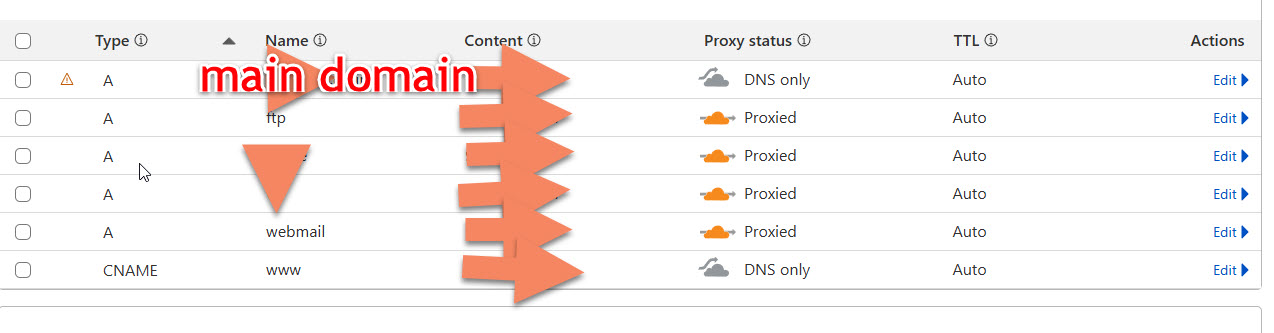
hello
i need urgent help please my all website get stop showing error. Invalid SSL certificate
what i did try to install Install UFW (simpler)
sudo apt update
sudo apt install ufw -y
sudo ufw allow 25461/tcp
sudo ufw allow 8000:8080/tcp
sudo ufw enable
sudo ufw status
sudo iptables -I INPUT -p tcp --dport 25461 -j ACCEPT
sudo iptables -I INPUT -p tcp --dport 8000:8080 -j ACCEPT
sudo iptables-save
sudo apt update && sudo apt upgrade -y
sudo apt install curl -y
im run these steps and after restart all website showing error. Invalid SSL certificateError: Let's Encrypt validation status 400 (domain.online). Details: 403:"2606:4700:3037::ac43:ad61: Invalid response from http://domain.online/.well-known/acme-challenge/ZU9Gi8KpjWfZXtPeFABt0UcXRcOrxVPzqtpbYxbfUio: 404"
please help me what to do how to fix this issue all domain are down.
linkp
August 13, 2025, 7:15pm
2
You should not be using UFW on HestiaCP. It is not supported. You appear to have added firewall rules that are blocking HTTP access on port 80. Don’t do that.
oh oky i did mistake, actually i was try to install Xtream UI panel on my server and was using AI. i make mess how to go back to work all , my all domain get stop please help me how to fix it.
i have UFW disabled here is my firewall detail,
still not working ssl please help
take backups, whipe the server, reinstall hestia and restore backups. Also do not trust AI, if you do not know, what you’re doing.
1 Like
ya thats what i was thinking but i have alot of websites. around 12 user name, can u please tell me easy way to take all backup ?
Your domain resolves to an IPv6 address, so Let’s Encrypt is trying to validate the challenge using that IP. However, it seems your server cannot respond correctly to the challenge for that domain (Hestia doesn’t support IPV6 yet). Remove the AAAA records for your domain, keep only the A records and try again.
1 Like
sahsanu:
Your domain resolves to an IPv6 address, so Let’s Encrypt is trying to validate the challenge using that IP. However, it seems your server cannot respond correctly to the challenge for that domain (Hestia doesn’t support IPV6 yet). Remove the AAAA records for your domain, keep only the A records and try again.
Error: Let’s Encrypt validation status 400 (domain.online). Details: 403:“98.101.253.24: Invalid response from http://domain.online/.well-known/acme-challenge/bHHeq5cNa0Z638Ss64zWJAn0yqOtBge2-4ecWPcAJ38: 404”
If you have disabled CDN and your domain is using the right IPv4 then you should check the web conf.
Below command should return a 200 response and the word test + dot + several characters , If you didn’t get that answer, don’t try to issue a new certificate.
curl -ikL http://HEREYOURDOMAIN/.well-known/acme-challenge/test
I don’t want to debug a certificate/dns issue without the actual domain name.
1 Like
its show this
:~# curl -ikL http://domain.com/.well-known/acme-challenge/test
HTTP/1.1 404 Not Found
Date: Wed, 13 Aug 2025 22:11:08 GMT
Content-Type: text/html
Transfer-Encoding: chunked
Connection: keep-alive
Server: cloudflare
Nel: {"report_to":"cf-nel","success_fraction":0.0,"max_age":604800}
Last-Modified: Fri, 07 Feb 2025 09:13:31 GMT
Report-To: {"group":"cf-nel","max_age":604800,"endpoints":[{"url":"https://a.nel.cloudflare.com/report/v4?s=uo9rdxGomsZS52uQqgIIknBj9mB6TPxe6O4W8O3Um3YpptrcFEfv9Mn3v9oCmijx4mtTZ7XxdLsAwNWv8In22pS04I55YDMVWriRdNRupT4%3D"}]}
Accept-Ranges: bytes
Cf-Cache-Status: DYNAMIC
CF-RAY: 96eb8be95a50d351-FRA
alt-svc: h3=":443"; ma=86400

<!doctype html>
<html lang="en">
        <head>
                <meta charset="utf-8" />
                <meta name="viewport" content="width=device-width, initial-scale=1" />
                <title>Page Not Found</title>
                <style>
                        body {
                                background-color: #f5f5f5;
                                margin-top: 8%;
                                color: #5d5d5d;
                                font-family: -apple-system, BlinkMacSystemFont, "Segoe UI", Roboto, "Helvetica Neue", Arial,
                                        "Noto Sans", sans-serif, "Apple Color Emoji", "Segoe UI Emoji", "Segoe UI Symbol",
                                        "Noto Color Emoji";
                                text-shadow: 0px 1px 1px rgba(255, 255, 255, 0.75);
                                text-align: center;
                        }

                        h1 {
                                font-size: 2.45em;
                                font-weight: 700;
                                color: #5d5d5d;
                                letter-spacing: -0.02em;
                                margin-bottom: 30px;
                                margin-top: 30px;
                        }

                        .container {
                                width: 100%;
                                margin-right: auto;
                                margin-left: auto;
                        }

                        .animate__animated {
                                animation-duration: 1s;
                                animation-fill-mode: both;
                        }

                        .animate__fadeIn {
                                animation-name: fadeIn;
                        }

                        .info {
                                color: #5594cf;
                                fill: #5594cf;
                        }

                        .error {
                                color: #c92127;
                                fill: #c92127;
                        }

                        .warning {
                                color: #ffcc33;
                                fill: #ffcc33;
                        }

                        .success {
                                color: #5aba47;
                                fill: #5aba47;
                        }

                        .icon-large {
                                height: 132px;
                                width: 132px;
                        }

                        .description-text {
                                color: #707070;
                                letter-spacing: -0.01em;
                                font-size: 1.25em;
                                line-height: 20px;
                        }

                        .footer {
                                margin-top: 40px;
                                font-size: 0.7em;
                        }

                        @keyframes fadeIn {
                                from {
                                        opacity: 0;
                                }
                                to {
                                        opacity: 1;
                                }
                        }
                </style>
        </head>
        <body>
                <div class="container">
                        <div class="row">
                                <div class="col">
                                        <div class="animate__animated animate__fadeIn">
                                                <svg
                                                        class="info icon-large fa-question-circle"
                                                        xmlns="http://www.w3.org/2000/svg"
                                                        viewBox="0 0 512 512"
                                                >
                                                        <path
                                                                d="M504 256c0 136.997-111.043 248-248 248S8 392.997 8 256C8 119.083 119.043 8 256 8s248 111.083 248 248zM262.655 90c-54.497 0-89.255 22.957-116.549 63.758-3.536 5.286-2.353 12.415 2.715 16.258l34.699 26.31c5.205 3.947 12.621 3.008 16.665-2.122 17.864-22.658 30.113-35.797 57.303-35.797 20.429 0 45.698 13.148 45.698 32.958 0 14.976-12.363 22.667-32.534 33.976C247.128 238.528 216 254.941 216 296v4c0 6.627 5.373 12 12 12h56c6.627 0 12-5.373 12-12v-1.3210-28.462 83.186-29.647 83.186-106.667 0-58.002-60.165-102-116.531-102zM256 338c-25.365 0-46 20.635-46 46 0 25.364 20.635 46 46 46s46-20.636 46-46c0-25.365-20.635-46-46-46z"
                                                        ></path>
                                                </svg>
                                        </div>
                                        <h1 class="animate__animated animate__fadeIn">Page Not Found</h1>
                                        <div class="description-text animate__animated animate__fadeIn">
                                                <p>Oops! We couldn't find the page that you're looking for.</p>
                                                <p>Please check the address and try again.</p>
                                                <section class="footer"><strong>Error Code:</strong> 404</section>
                                        </div>
                                </div>
                        </div>
                </div>
        </body>
</html>
sahsanu
August 13, 2025, 10:20pm
10
That domain still uses Cloudflare as CDN.
im checking an other domain this domain already active on ssl,
# curl -ikL http://domain.com/.well-known/acme-challenge/test
HTTP/1.1 404 Not Found
Server: nginx/1.29.1
Date: Wed, 13 Aug 2025 22:44:26 GMT
Content-Type: text/html
Content-Length: 2893
Connection: keep-alive
Last-Modified: Fri, 07 Feb 2025 09:13:31 GMT
ETag: "b4d-62d89c5b56733"
Accept-Ranges: bytes

<!doctype html>
<html lang="en">
        <head>
                <meta charset="utf-8" />
                <meta name="viewport" content="width=device-width, initial-scale=1" />
                <title>Page Not Found</title>
                <style>
                        body {
                                background-color: #f5f5f5;
                                margin-top: 8%;
                                color: #5d5d5d;
                                font-family: -apple-system, BlinkMacSystemFont, "Segoe UI", Roboto, "Helvetica Neue", Arial,
                                        "Noto Sans", sans-serif, "Apple Color Emoji", "Segoe UI Emoji", "Segoe UI Symbol",
                                        "Noto Color Emoji";
                                text-shadow: 0px 1px 1px rgba(255, 255, 255, 0.75);
                                text-align: center;
                        }

                        h1 {
                                font-size: 2.45em;
                                font-weight: 700;
                                color: #5d5d5d;
                                letter-spacing: -0.02em;
                                margin-bottom: 30px;
                                margin-top: 30px;
                        }

                        .container {
                                width: 100%;
                                margin-right: auto;
                                margin-left: auto;
                        }

                        .animate__animated {
                                animation-duration: 1s;
                                animation-fill-mode: both;
                        }

                        .animate__fadeIn {
                                animation-name: fadeIn;
                        }

                        .info {
                                color: #5594cf;
                                fill: #5594cf;
                        }

                        .error {
                                color: #c92127;
                                fill: #c92127;
                        }

                        .warning {
                                color: #ffcc33;
                                fill: #ffcc33;
                        }

                        .success {
                                color: #5aba47;
                                fill: #5aba47;
                        }

                        .icon-large {
                                height: 132px;
                                width: 132px;
                        }

                        .description-text {
                                color: #707070;
                                letter-spacing: -0.01em;
                                font-size: 1.25em;
                                line-height: 20px;
                        }

                        .footer {
                                margin-top: 40px;
                                font-size: 0.7em;
                        }

                        @keyframes fadeIn {
                                from {
                                        opacity: 0;
                                }
                                to {
                                        opacity: 1;
                                }
                        }
                </style>
        </head>
        <body>
                <div class="container">
                        <div class="row">
                                <div class="col">
                                        <div class="animate__animated animate__fadeIn">
                                                <svg
                                                        class="info icon-large fa-question-circle"
                                                        xmlns="http://www.w3.org/2000/svg"
                                                        viewBox="0 0 512 512"
                                                >
                                                        <path
                                                                d="M504 256c0 136.997-111.043 248-248 248S8 392.624 8 256C8 119.083 119.043 8 256 8s248 111.083 248 248zM262.655 90c-54.497 0-89.255 22.957-116.549 63.758-3.536 5.286-2.353 12.415 2.715 16.258l34.699 26.31c5.205 3.947 12.621 3.008 16.665-2.122 17.864-22.658 30.113-35.797 57.303-35.797 20.429 0 45.698 13.148 45.698 32.958 0 14.976-12.363 22.667-32.534 33.976C247.128 238.528 216 254.941 216 296v4c0 6.627 5.373 12 12 12h56c6.627 0 12-5.373 12-12v-1.333c0-28.462 83.186-29.647 83.186-106.667 0-58.002-60.165-102-116.531-102zM256 338c-25.365 0-46 20.635-46 46 0 25.364 20.635 46 46 46s46-20.636 46-46c0-25.365-20.635-46-46-46z"
                                                        ></path>
                                                </svg>
                                        </div>
                                        <h1 class="animate__animated animate__fadeIn">Page Not Found</h1>
                                        <div class="description-text animate__animated animate__fadeIn">
                                                <p>Oops! We couldn't find the page that you're looking for.</p>
                                                <p>Please check the address and try again.</p>
                                                <section class="footer"><strong>Error Code:</strong> 404</section>
                                        </div>
                                </div>
                        </div>
                </div>
        </body>
</html>
not working i think its f… i need to reinstall it, i will take backup ,then i will reinstall panel
from start i need to install Xstream panel for iptv setup its need separate port (like 8080, 8000, 8888, or whatever XStream suggests) how i do that
second . im using apache as main server and nginx as proxy my mostly sites used apache…
3rd i also using nodejs on this server. was some sites run on nodejs react.