Issue file manager

What link? Is in my previous post, anyways, here are the commands:

cd /usr/local/hestia/install/upgrade/manual
sed -E -i.ori 's|\tmysql -u|\t/usr/bin/mariadb -u|' migrate_phpmyadmin.sh
./migrate_phpmyadmin.sh
chown -R hestiamail:hestiamail /usr/share/phpmyadmin/tmp

root@server:~# cd /usr/local/hestia/install/upgrade/manual
root@server:/usr/local/hestia/install/upgrade/manual# sed -E -i.ori ‘s|\tmysql -u|\t/usr/bin/mariadb -u|’ migrate_phpmyadmin.sh
root@server:/usr/local/hestia/install/upgrade/manual# ./migrate_phpmyadmin.sh
To remove phpMyAdmin you will need use the root password. Password can be found in /usr/local/hestia/conf/mysql.conf
Would you like to continue? [y/n]y

PMA Hestia-SSO plugin has been successfully removed/disabled
[ * ] Backing up old configuration files…
[ * ] Marking phpmyadmin as held in apt…
phpmyadmin was already set on hold.
[ * ] Removing old folders…
[ * ] Creating new folders…
[ * ] Installing phpMyAdmin version v5.2.2…
[ * ] Creating localhost configuration…
[ * ] Dropping database (could throw an error if successful)…
PMA Hestia-SSO plugin has been successfully installed
root@server:/usr/local/hestia/install/upgrade/manual# chown -R hestiamail:hestiamail /usr/share/phpmyadmin/tmp
root@server:/usr/local/hestia/install/upgrade/manual# exit

Is everything alright?

I want to express my sincere gratitude and apologize for any inconvenience. Thank you for your support.

Yes, seems so.

You’re welcome.

Just a last question, how you switch to user root from ssh?

I didn’t switch users inside the session. I logged in directly as root from my terminal using this command:

You didn’t paste the command :slight_smile:

Sorry, my bad! Here is the exact command I used to login directly as root: :smiling_face_with_tear:

ssh root@ip -p 2526

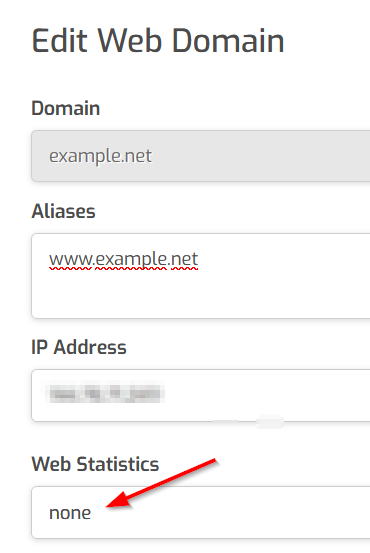
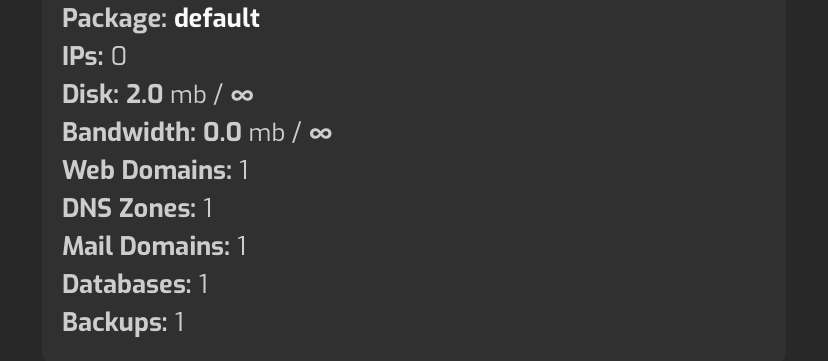
Could you tell me how to activate the statistics and why the hard drive numbers aren’t reading correctly?

Okay, I was trying to understand why the mysql command didn’t work, because it looks like mysql wasn’t in the PATH.

Edit the web domain and select awstats in Web Statistics.

They are, but size is rounded.

I didn’t understand stand

2 mb but i already uploaded 1.5 giga

Sorry, I read 1.5 MB

Disk usage is updated every 24 hours. If you want to update it right now:

sudo /usr/local/hestia/bin/v-update-sys-queue disk

I want to thank you very much. I had lost hope and the server had been rebuilt more than once, but thank you for your support and patience. :heart::heart:

There’s no way we can enlarge the header logo; it’s just a small thing. :smiling_face_with_tear:

Send me the svg here or via private message and I’ll take a look.

done check private please

I’ve sent a modified svg, check it.