LE update cleared my custom nginx.conf

2026-05-10 06:53:05 v-restart-service  'bind9'
2026-05-10 06:53:05 v-delete-dns-record  'www-root' 'domain.com' '25'
2026-05-10 06:53:08 v-restart-service  'bind9'
2026-05-10 06:53:05 v-add-dns-record  'www-root' 'domain.com' '@' 'CAA' '0 issue "letsencrypt.org"'
2026-05-10 06:53:12 v-restart-service  'nginx'
2026-05-10 06:53:24 v-restart-service  'nginx'
2026-05-10 06:53:35 v-generate-ssl-cert  'domain.com' '[email protected]' 'US' 'California' 'San Francisco' 'Hestia' 'IT' 'www.domain.com'
2026-05-10 06:53:38 v-delete-web-domain-ssl-force  'www-root' 'domain.com' 'no' 'yes'
2026-05-10 06:53:40 v-restart-service  'nginx'
2026-05-10 06:53:40 v-delete-web-domain-ssl  'www-root' 'domain.com'
2026-05-10 06:53:41 v-add-web-domain-ssl  'www-root' 'domain.com' '/tmp/tmp.p82QdV8kpw' 'same' 'updatessl'
2026-05-10 06:53:43 v-restart-service  'nginx'
2026-05-10 06:53:44 v-add-web-domain-ssl-force  'www-root' 'domain.com'
2026-05-10 06:53:44 v-add-letsencrypt-domain  'www-root' 'domain.com' 'www.domain.com'

I have custom nginx template set in settings (i’ve copied ready template, made it custom and set, as recommended). but few days ago i’ve found that my custom conf was modified and reversed to “clear“ version, all my changes were removed.

Do you think it’s a similar issue to this one?

in my case they are modified, namely: nginx.ssl.conf, nginx.forcessl.conf, nginx.conf_letsencrypt

That file shouldn’t be modified by LE update. How did you create the template? What’s the template name?

in /usr/local/hestia/data/templates/web/nginx/php-fpm

image

06:53:41 the exact modification time

I see nothing in script v-add-web-domain-ssl that could modify nginx.ssl.conf during LE update. Removing letsencrypt and forcessl yes, but not the main conf.

Could you please show the output of your cron jobs?

crontab -l -u hestiaweb

crontab: user `hestiaweb’ unknown

If the hestiaweb user doesn’t exist, you’re not using the latest Hestia version (1.9.x). What’s your Hestia and OS version?

yes i have old hestia version 1.4.15

Ubuntu 20.04.3 LTS

Wow, that’s pretty old. Then, I’m sorry, but I can’t help. I don’t know what bugs in that version could be causing the issue.

turned updates off long ago because of conf files replacement on updates (didn’t get into templates settings and other) and forgot, but replacements are still here) ok i’ll update, will see, thx

Make backups, if you can do a snapshot of your server do it. Also, you should also upgrade Ubuntu, version 20.04 is not supported anymore either by Sury’s PHP packages or Hestia.

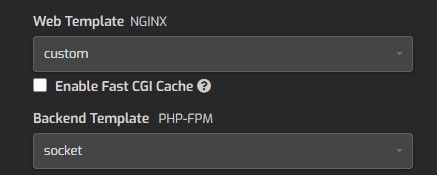
upgraded to latest v1.9.6. again yesterday nginx.ssl.conf cleared. i had block on top of / loctaion and now it’s gone. why smth touches custom configs?!

2026-05-30 06:24:24 v-change-sys-config-value ‘VERSION’ ‘1.9.5’
2026-05-30 06:24:27 v-add-sys-roundcube
2026-05-30 06:24:28 v-add-sys-dependencies
2026-05-30 06:24:28 v-change-sys-config-value ‘VERSION’ ‘1.9.6’
2026-05-30 06:24:29 v-change-sys-config-value ‘RELEASE_BRANCH’ ‘release’
2026-05-30 06:24:29 v-update-user-counters ‘admin’
2026-05-30 06:24:29 v-rebuild-web-domains ‘admin’ ‘no’
2026-05-30 06:24:29 v-rebuild-dns-domains ‘admin’ ‘no’
2026-05-30 06:24:29 v-rebuild-mail-domains ‘admin’ ‘no’
2026-05-30 06:24:30 v-update-user-counters ‘admin’
2026-05-30 06:24:30 v-update-user-stats ‘admin’
2026-05-30 06:24:30 v-rebuild-user ‘admin’ ‘no’
2026-05-30 06:24:31 v-add-web-domain-backend ‘www-root’ ‘``domain.com``’ ‘socket’ ‘no’
2026-05-30 06:24:32 v-delete-web-domain-ssl-force ‘www-root’ ‘``domain.com``’ ‘no’ ‘yes’
2026-05-30 06:24:32 v-add-web-domain-ssl-force ‘www-root’ ‘``domain.com``’ ‘no’ ‘yes’
2026-05-30 06:24:32 v-delete-web-domain-ssl-hsts ‘www-root’ ‘``domain.com``’ ‘no’ ‘yes’
2026-05-30 06:24:32 v-add-web-domain-ssl-hsts ‘www-root’ ‘``domain.com``’ ‘no’ ‘yes’
2026-05-30 06:24:33 v-update-user-counters ‘www-root’
2026-05-30 06:24:33 v-rebuild-web-domains ‘www-root’ ‘no’

Please, show the output of these commands (replace YourUser and YourDomain with the actual data):

v-list-web-domain YourUser YourDomain json
ls -l /usr/local/hestia/data/templates/web/nginx/php-fpm/custom.*
cat -A /usr/local/hestia/data/templates/web/nginx/php-fpm/custom.stpl
{
“domain.com”: {
“IP”: “***”,
“IP6”: “”,
“DOCUMENT_ROOT”: “/home/www-root/web/domain.com/public_html/”,
“U_DISK”: “98924”,
“U_BANDWIDTH”: “196999”,
“TPL”: “custom”,
“ALIAS”: “www.domain.com”,
“STATS”: “”,
“STATS_USER”: “”,
“SSL”: “yes”,
“SSL_FORCE”: “yes”,
“SSL_HSTS”: “yes”,
“SSL_HOME”: “same”,
“LETSENCRYPT”: “yes”,
“FTP_USER”: “”,
“FTP_PATH”: “”,
“AUTH_USER”: “”,
“BACKEND”: “socket”,
“PROXY”: “default”,
“PROXY_EXT”: “”,
“FASTCGI_CACHE”: “”,
“FASTCGI_DURATION”: “”,
“REDIRECT”: “domain.com”,
“REDIRECT_CODE”: “301”,
“CUSTOM_DOCROOT”: “”,
“SUSPENDED”: “no”,
“TIME”: “13:20:42”,
“DATE”: “2021-08-22”
}
}

-rw-r–r-- 1 root root 2023 Apr  4 17:20 /usr/local/hestia/data/templates/web/nginx/php-fpm/custom.stpl
-rw-r–r-- 1 root root 1893 Apr  4 17:20 /usr/local/hestia/data/templates/web/nginx/php-fpm/custom.tpl

#=======================================================================#$

^I^I^I^I^I^I^I^ICUSTOM^I^I^I^I^I^I^I^I^I#$

#=======================================================================#$
$
server {$
listen      %ip%:%web_ssl_port% ssl http2;$
server_name %domain_idn% %alias_idn%;$
root        %sdocroot%;$
index       index.php index.html index.htm;$
access_log  /var/log/nginx/domains/%domain%.log combined;$
access_log  /var/log/nginx/domains/%domain%.bytes bytes;$
error_log   /var/log/nginx/domains/%domain%.error.log error;$
$
ssl_certificate      %ssl_pem%;$
ssl_certificate_key  %ssl_key%;$
ssl_stapling on;$
ssl_stapling_verify on;$
$
include %home%/%user%/conf/web/%domain%/nginx.hsts.conf*;$
$
location / {$
try_files $uri $uri/ @opencart;$
location ~* ^.+.(jpeg|jpg|png|gif|bmp|ico|svg|css|js)$ {$
expires     max;$
fastcgi_hide_header “Set-Cookie”;$
}$
$
location ~ [^/].php(/|$) {$
fastcgi_param SCRIPT_FILENAME $document_root$fastcgi_script_name;$
if (!-f $document_root$fastcgi_script_name) {$
return  404;$
}$
$
fastcgi_pass    %backend_lsnr%;$
fastcgi_index   index.php;$
include /etc/nginx/fastcgi_params;$
include     %home%/%user%/conf/web/%domain%/nginx.fastcgi_cache.conf*;$
}$
}$
$
location @opencart {$
rewrite ^/(.+)$ /index.php?route=$1 last;$
}$
$
location /storage/ {$
deny    all;$
return  404;$
}$
$
location /vstats/ {$
alias   %home%/%user%/web/%domain%/stats/;$
include %home%/%user%/web/%domain%/stats/auth.conf*;$
}$
$
location /error/ {$
alias   %home%/%user%/web/%domain%/document_errors/;$
}$
$
location ~ /.(?!well-known/) { $
deny all; $
return 404;$
}$
$
include     /etc/nginx/conf.d/phpmyadmin.inc*;$
include     /etc/nginx/conf.d/phppgadmin.inc*;$
include     %home%/%user%/conf/web/%domain%/nginx.ssl.conf_*;$
}$

Ok, and what’s the section of that template that is being removed from nginx.ssl.conf?

but may be it was totally overwritten, i dont know

But the include of my_cnf.inc is not in your custom template…???