Lets encrypt ssl on second ip address fails

Hi,

i’ve added a second ip address (using the ip im using for NS2), ive added a new domain to resolve its dns on the this second ip address (propagated it fully after 48 hours). http and https resolve correctly with a success page.

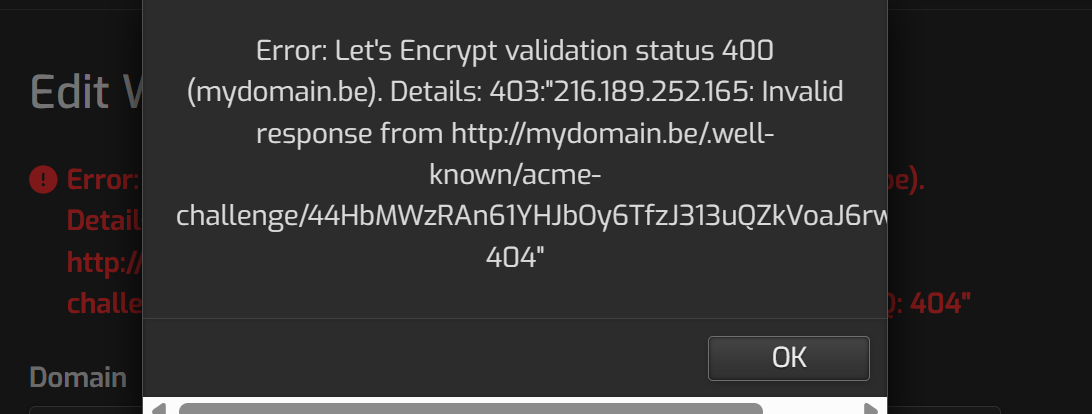
But when adding letsencrypt it gives me an error, tried many manual hacks (and reverted them) but not getting it to work. what am i missing?;

v-add-letsencrypt-domain main mydomainname.be Error: Let’s Encrypt validation status 400 (mydomainname.be). Details: 403:“201.189.252.165: Invalid response from http://mydomainname.be/.well-known/acme-challenge/q87fpquI3bu6KMWIZv9EdC-AV_TH8anrADZbtN8joMQ: 404”

Hi,

Did you add that new ip to your server and Hestia? If the answer is yes, is your web domain configured in Hestia to use that ip?

yes correct.

  • added in /etc/netplan/01-netcfg.yaml
    under addresses: myip/32
  • added ip under network in hestia
  • selected the ip under the domainname

Show the nginx conf for your domain.

cat /etc/nginx/conf.d/domains/YourDomain.conf
#=========================================================================#

# Default Web Domain Template

# DO NOT MODIFY THIS FILE! CHANGES WILL BE LOST WHEN REBUILDING DOMAINS

# 

https://hestiacp.com/docs/server-administration/web-templates.html

#=========================================================================#

server {
listen      205.189.241.156:80;
server_name mydomain.be www.mydomain.be;
root        /home/main/web/mydomain.be/public_html;
index       index.php index.html index.htm;
access_log  /var/log/nginx/domains/mydomain.be.log combined;
access_log  /var/log/nginx/domains/mydomain.be.bytes bytes;
error_log   /var/log/nginx/domains/mydomain.be.error.log error;

    include /home/main/conf/web/mydomain.be/nginx.forcessl.conf*;

    location = /favicon.ico {
            log_not_found off;
            access_log off;
    }

    location = /robots.txt {
            try_files $uri $uri/ /index.php?$args;
            log_not_found off;
            access_log off;
    }

    location ~ /\.(?!well-known\/) {
            deny all;
            return 404;
    }

    location / {
            try_files $uri $uri/ /index.php?$args;

            location ~* ^.+\.(ogg|ogv|svg|svgz|swf|eot|otf|woff|woff2|mov|mp3|mp4|webm|flv|ttf|rss|atom|jpg|jpeg|gif|png|webp|ico|bmp|mid|midi|wav|rtf|css|js|jar)$ {
                    expires 30d;
                    fastcgi_hide_header "Set-Cookie";
            }

            location ~* /(?:uploads|files)/.*.php$ {
                    deny all;
                    return 404;
            }

            location = /xmlrpc.php {
                            deny all;
                            access_log off;
                            log_not_found off;
                            return 403;
            }

            location ~ [^/]\.php(/|$) {
                    try_files $uri =404;

                    include /etc/nginx/fastcgi_params;

                    fastcgi_index index.php;
                    fastcgi_param SCRIPT_FILENAME $document_root$fastcgi_script_name;

                    fastcgi_pass unix:/run/php/php8.2-fpm-mydomain.be.sock;

                    include /home/main/conf/web/mydomain.be/nginx.fastcgi_cache.conf*;

                    if ($request_uri ~* "/wp-admin/|/wp-json/|wp-.*.php|xmlrpc.php|index.php|/store.*|/cart.*|/my-account.*|/checkout.*") {
                            set $no_cache 1;
                    }

                    if ($http_cookie ~* "comment_author|wordpress_[a-f0-9]+|wp-postpass|wordpress_no_cache|wordpress_logged_in|woocommerce_items_in_cart|woocommerce_cart_hash|PHPSESSID") {
                            set $no_cache 1;
                    }
            }
    }

    location /error/ {
            alias /home/main/web/mydomain.be/document_errors/;
    }

    location /vstats/ {
            alias   /home/main/web/mydomain.be/stats/;
            include /home/main/web/mydomain.be/stats/auth.conf*;
    }

    include /etc/nginx/conf.d/phpmyadmin.inc*;
    include /etc/nginx/conf.d/phppgadmin.inc*;
    include /home/main/conf/web/mydomain.be/nginx.conf_*;
}

And 205.189.241.156 is the new ip?

yes, i edited it in here but thats the correct new ip.

As I don’t know the actual domain and ip I can’t test it and it’s hard to help you out.

Did you restart nginx?

What happens when you try to reach this page:

http://yourdomain/.well-known/acme-challenge/test

If you add to your public_html directory a file like testing.txt with any text inside and try to reach it (http://YourDomain/testing.txt, what happens?

alright ive send you PM, ill post solution here when we get to it.

1 Like

added testing.txt, still get succes page

Success!

Your new web server is ready to use.

1 Like

Just for the record.

The OP is using DigitalOcean and the IP they get is not a normal public IP but a reserved IP. The OP assigned this new reserved IP to the server and to the web domains. The problem is that DigitalOcean does not assign reserved IPs directly to the server. Instead, the reserved IP is a NATed IP that forwards all connections on the reserved IP to the internal “anchor IP” assigned to the server.

Because of this, any connection to their domains using the reserved IP was being redirected to the internal anchor IP 10.x.y.z. That anchor IP was configured in Nginx, but no websites were actually using it, so regardless of the request, it always returned the default success page or a 404.

To fix it, we did the following:

1.- Removed the new reserved IP added to Hestia.
2.- Modified /etc/netplan/50-cloud-init.yaml to use the anchor IP’s gateway.
3.- Configured in Hestia the anchor IP to use the reserved IP as its NAT IP.
4.- Reassigned the web domains to use this IP.
5.- Rebuilt the web and mail domains.

More info:

2 Likes

o, same case as me. Also thanks to @sahsanu for very promptly help…..appreciate him so much

@aardappeltje FYI, you also need to add something at your Apache templates to correctly log the incoming IP at Apache logs. Also got some help from @sahsanu , you need to add the following inside :

# added for getting IP behind NAT of Digitalocean
	RemoteIPHeader X-Real-IP
	RemoteIPInternalProxy {YOUR ANCHOR IP HERE (NOT GATEWAY}

@sahsanu ,this is after researching a bit on HestiaCP default remoteip.conf. It’s actually using X-Real-IP but not X-Forwarded-For, so I follow using the same. Correct me if I am doing something wrong. Thanks
1 Like

In this case @aardappeltje is not using Apache but thanks for sharing it.

It’s OK :wink: