t1kilo
December 8, 2025, 11:22pm
1
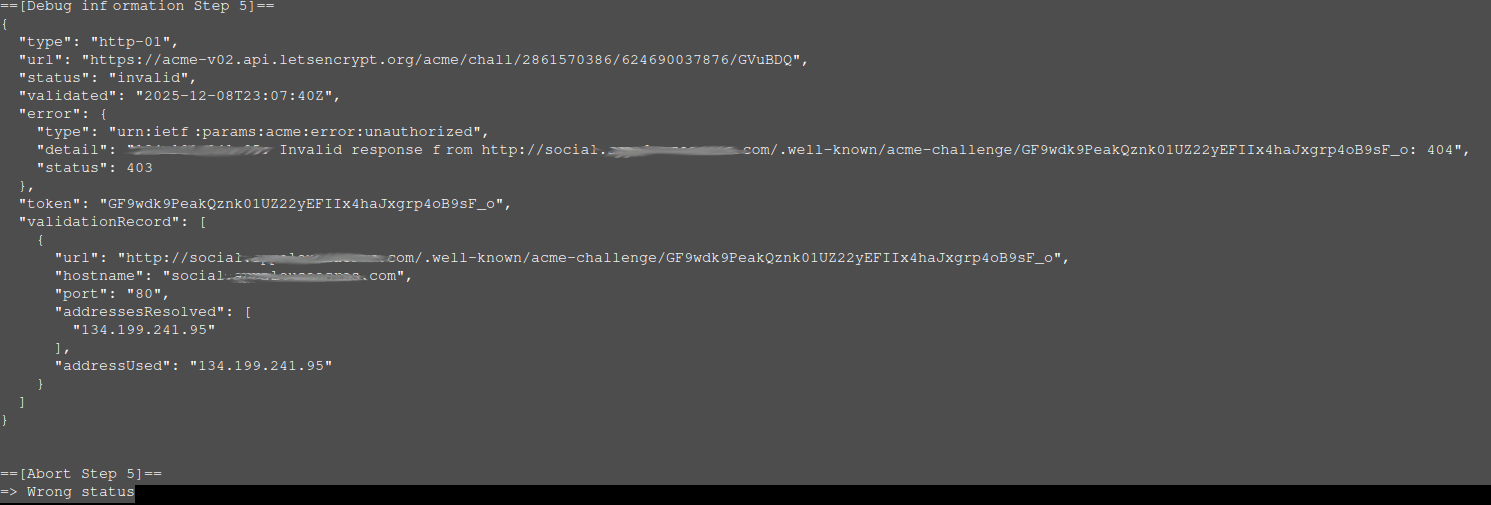
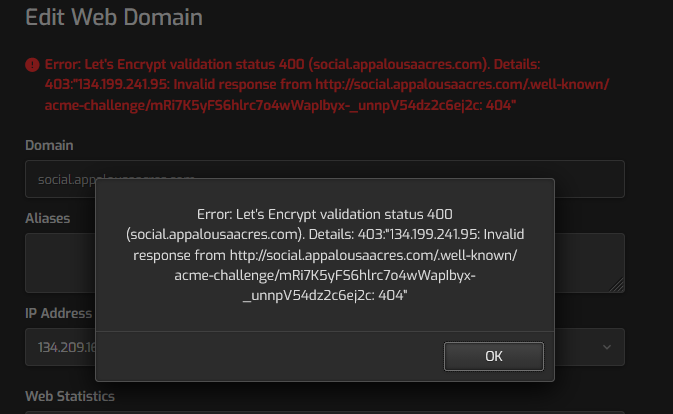
I’ve spent most of the day today trying to get a Let’s Encrypt certificate working. I see lots of folks with similar issues and have tried different suggestions, all to no avail. The host server is a VPS running Ubuntu 22.04. DNS is provided through name.com , which is where the domain is registered. There are no IPv6 DNS records in use. I’ve tried creating new templates (copy of default.tpl and default.stpl) with additional location information specifically for the .well-known/acme-challenge folder and applying those to the domain I’m working with. I’ve tried getting the certificate with and without automatic HTTPS redirection, but nothing has worked. Here is the output from the latest attempts to get a certificate issued.
Any suggestions would be greatly appreciated.
sahsanu
December 8, 2025, 11:34pm
2
Show the output of these commands (replace YourUser and YourDomain with the actual data):
cat /home/YourUser/conf/web/YourDomain/nginx.conf
cat /home/YourUser/conf/web/YourDomain/nginx.conf_letsencrypt
1 Like
t1kilo
December 9, 2025, 12:10am
3
Thanks for the quick reply!
cat /home/webadmin/conf/web/social.appalousaacres.com/nginx.conf
#=========================================================================#
# Default Web Domain Template                                             #
# DO NOT MODIFY THIS FILE! CHANGES WILL BE LOST WHEN REBUILDING DOMAINS   #
# https://hestiacp.com/docs/server-administration/web-templates.html      #
#=========================================================================#

server {
        listen      134.209.166.60:80;
        server_name social.appalousaacres.com ;
        error_log   /var/log/apache2/domains/social.appalousaacres.com.error.log error;

        # include /home/webadmin/conf/web/social.appalousaacres.com/nginx.forcessl.conf*; #

    # Serve Let's Encrypt ACME challenge files locally to allow certificate issuance
        location ^~ /.well-known/acme-challenge/ {
                default_type "text/plain";
                root /home/webadmin/web/social.appalousaacres.com/public_html;
                try_files $uri =404;
        }

        location ~ /\.(?!well-known\/|file) {
                deny all;
                return 404;
        }

        location / {
                proxy_pass http://134.209.166.60:8080;

                location ~* ^.+\.(css|htm|html|js|mjs|json|xml|apng|avif|bmp|cur|gif|ico|jfif|jpg|jpeg|pjp|pjpeg|png|svg|tif|tiff|webp|aac|caf|flac|m4a|midi|mp3|ogg|opus|wav|3gp|av1|avi|m4v|mkv|mov|mpg|mpeg|mp4|mp4v|webm|otf|ttf|woff|woff2|doc|docx|odf|odp|ods|odt|pdf|ppt|pptx|rtf|txt|xls|xlsx|7z|bz2|gz|rar|tar|tgz|zip|apk|appx|bin|dmg|exe|img|iso|jar|msi|webmanifest)$ {
                        try_files  $uri @fallback;

                        root       /home/webadmin/web/social.appalousaacres.com/public_html;
                        access_log /var/log/apache2/domains/social.appalousaacres.com.log combined;
                        access_log /var/log/apache2/domains/social.appalousaacres.com.bytes bytes;

                        expires    max;
                }
        }

        location @fallback {
                proxy_pass http://134.209.166.60:8080;
        }

        location /error/ {
                alias /home/webadmin/web/social.appalousaacres.com/document_errors/;
        }

        include /home/webadmin/conf/web/social.appalousaacres.com/nginx.conf_*;
}
root@hcp:~#
cat /home/webadmin/conf/web/social.appalousaacres.com/nginx.conf_letsencrypt
location ~ "^/\.well-known/acme-challenge/([-_A-Za-z0-9]+)$" {
    default_type text/plain;
    return 200 "$1.-3jI_hlaMUs5AFBh9zhBXJo0GXK70cbJUR_PVWDb4EM";
}
1 Like
sahsanu
December 9, 2025, 12:26am
4
You must remove that block from the conf. Once done, restart nginx and try again.
1 Like
t1kilo
December 9, 2025, 12:47am
5
No sir. Same thing.
I will go back to the default template since it doesn’t have that snippet of code in it, but it gives me the same problem.
1 Like
sahsanu
December 9, 2025, 12:58am
6
Are you aware that the IP used in the nginx.conf is not the same as the IP used by your domain?
Nginx conf:  134.209.166.60
Your domain: 134.199.241.95
You must fix that.
2 Likes
t1kilo
December 9, 2025, 1:34am
7
I did not realize that. I’m using Digital Ocean for my VPS and their setup has both of those IPs associated with my account. I’m going to change my DNS to point to 134.209.166.60 and will let you know what the outcome is.
2 Likes
t1kilo
December 9, 2025, 1:42am
8
That got it. You are good. I really appreciate your help. A donation will be headed your way!
Thanks!
2 Likes
system
January 8, 2026, 1:43am
9
This topic was automatically closed 30 days after the last reply. New replies are no longer allowed.