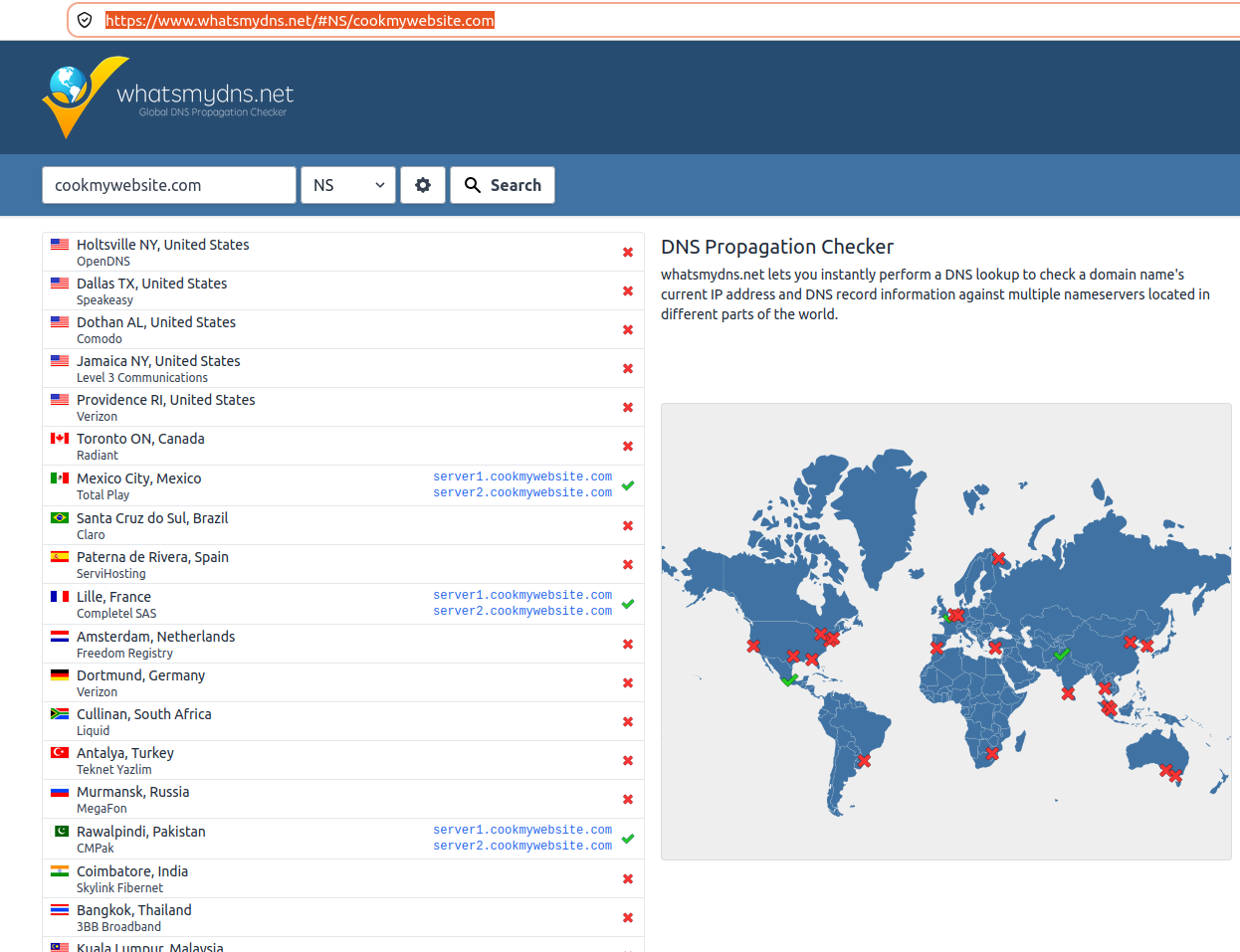
Just installed hestiacp for very first time, hostname sub domain working but main domain which hostname is using does not work and dns checker also says that there is no dns record?!
cannot install SSL on main domain … however subdomain is working!
Just installed hestiacp for very first time, hostname sub domain working but main domain which hostname is using does not work and dns checker also says that there is no dns record?!
cannot install SSL on main domain … however subdomain is working!
how do you manage your dns?
DNS is managed by domain registrar, added child names also.. added new domains to hestiacp, they all are working fine, but only main domain of the hostname is not working
To help here is important to know the actual domain name.
domain name is cookmywebsite.com
Tell us exactly your steps, which is your registrar and what do you have in registrar. Some pictures will help us, from registrar and from your dns through the cp.
You should start registering your nameservers correctly in your domain name registrar panel.
Look for options like “Child Name Servers” / “Glue Records” / “Host Records” to enter your name servers IP manually.
server1.cookmywebsite.com and server2.cookmywebsite.com are the servers that are set in your whois data, but they do not point to anywhere, surely because you forgot to set the “glue records” in your registrar.
Once done, maybe you should wait a little to try again.
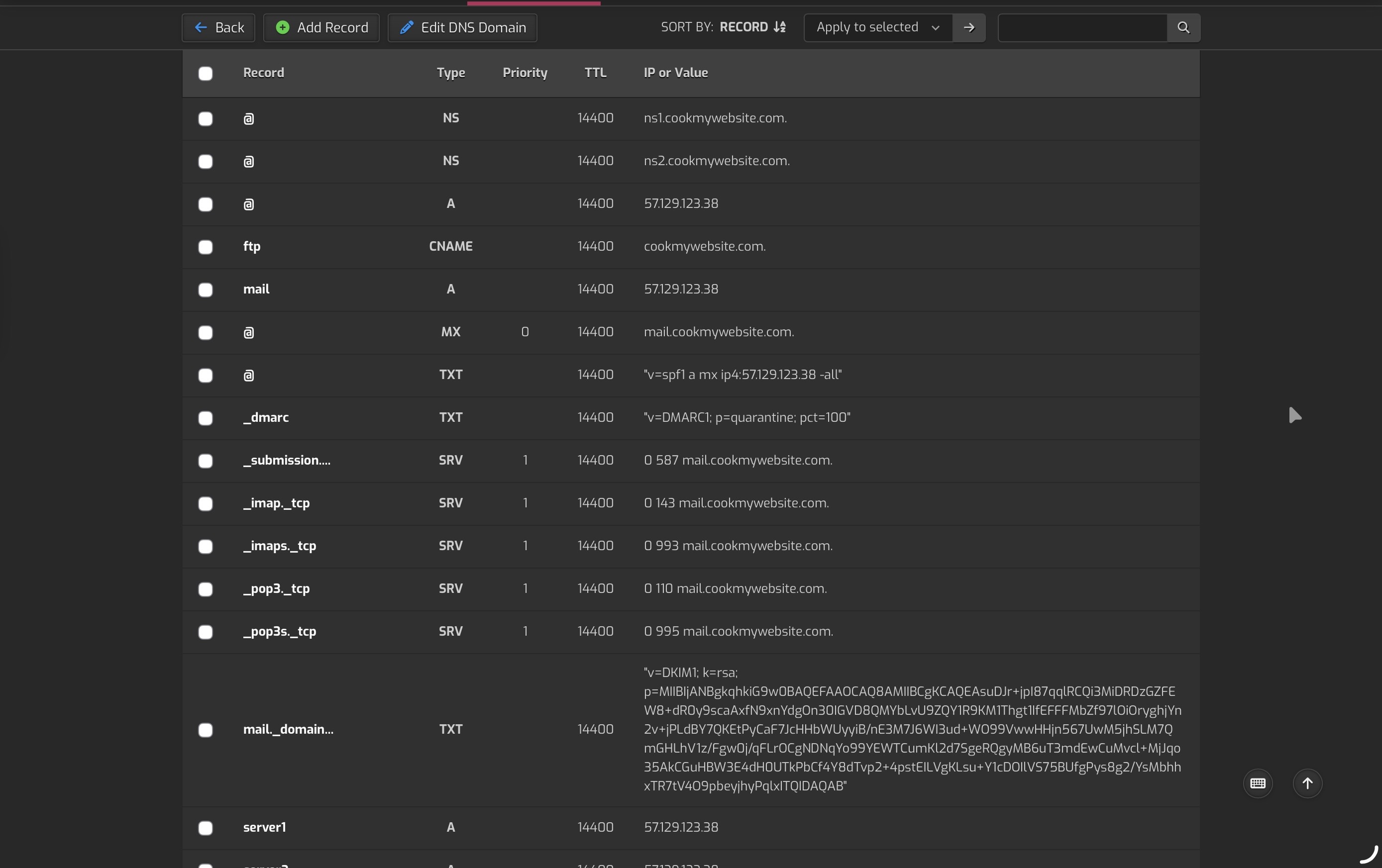
Child Name Servers are set properly, other domains added to hestiacp are working just fine.. even the hostname subdomain is working.. just this domain is not working .. i have done everything.. tried editing dns records, resolve cnf to 8.8.8.8 , everything imaginable.. still can’t decide what is going on with this specific domain name in hestiacp.. manually added A and NS also in hestiacp.. still didnt work
Maybe you set them recently and still not propagated in all root servers (and for this reason my “dig” command didn’t resolved them yet):
I’ve added this domain like a month ago.. but yesterday I had changed /etc/resolv.conf to 8.8.8.8 and 8.8.4.4 , maybe it’s that
Well you have to add A records for the ns this is what is missing.
record: ns1 type: A TTL: 14400 IP: yourip
record: ns2 type: A TTL: 14400 IP: yourip
then restart your dns server.
HOLY MOLY!! That resolved it  Thanks mate!!!
No problem! Glad to hear your problem is solved!
I think you should try changing your NS records from:
ns1.cookmywebsite.com to server1.cookmywebsite.com
and
ns2.cookmywebsite.com to server2.cookmywebsite.com
to be coherent with your Name Servers set in the Whois of your domain name. They already have the A record, so they should run well too. (well, if they are the child name servers that you set in your registrar panel).
That was the issue, that’s why I didn’t set A records to ns1 and ns2, thought same thing.. but somehow it didnt work with server1 and server2 NS records, checking the configuration files, hestiacp had set default hostname records for domain to ns1 and ns2 .. creating A records made it work smoothly!
Um great, glad that got solved, ps welcome to the forum!
Actually, your setup is incomplete. You need to login where you registered your domain and setup the nameservers and ip addresses there:
http://www.publicdomainregistry.com
FAIL: The following nameservers are listed at your nameservers as nameservers for your domain, but are not listed at the parent nameservers (see RFC2181 5.4.1). You need to make sure that these nameservers are working.If they are not working ok, you may have problems!
ERROR: One or more of the nameservers listed at the parent servers are not listed as NS records at your nameservers. The problem NS records are:
This is listed as an ERROR because there are some cases where nasty problems can occur (if the TTLs vary from the NS records at the root servers and the NS records point to your own domain, for example).
ns1 and ns2 are fine, you should just use those in your dns record:
NS records got from your nameservers listed at the parent NS are:
ns2.cookmywebsite.com [‘57.129.123.38’] [TTL=14400]
ns1.cookmywebsite.com [‘57.129.123.38’] [TTL=14400]
Also you might setup a cname for www.cookmywebsite.com pointing to cookmywebsite.com so that works as well.