Hello!
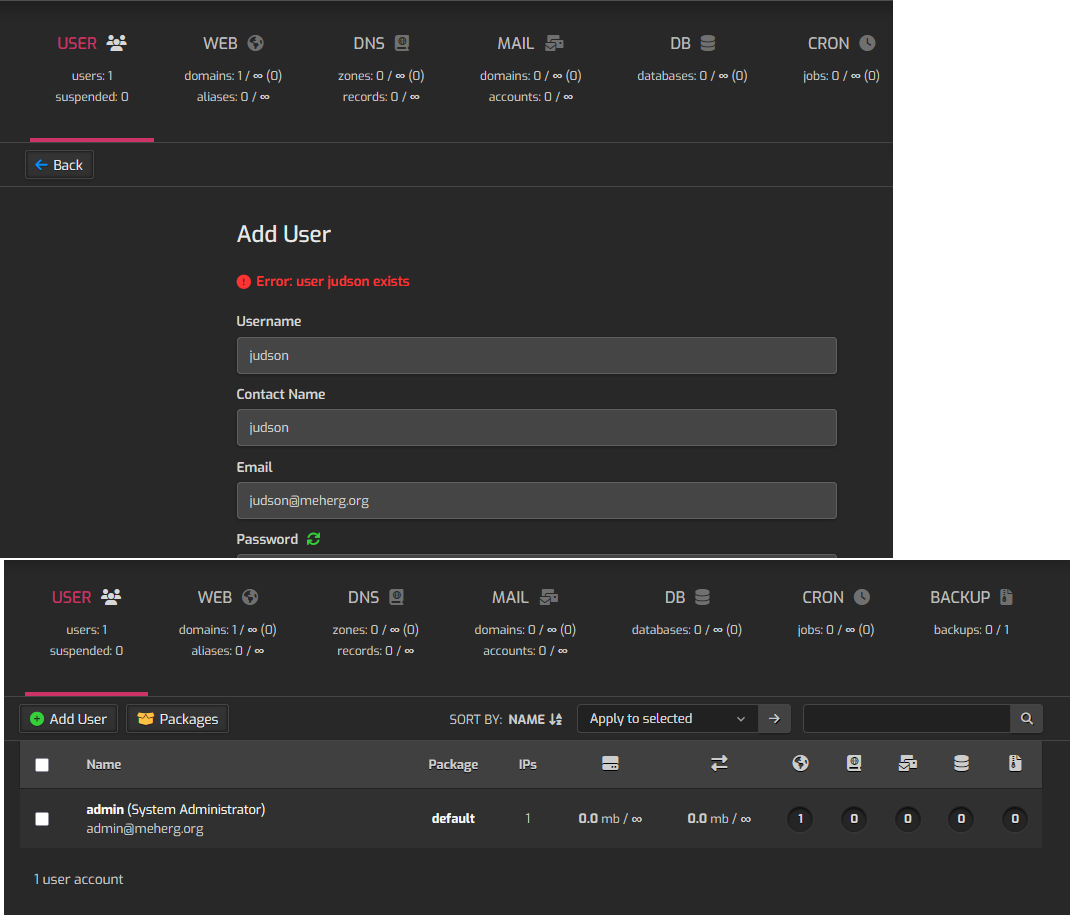
I just did a fresh install on a Ubuntu 20.04 server VM. I got logged and created admin account then went to create a regular user. The user said it created so I logged out and tried to log back in with the new user and could not with the error that the user name and password is wrong.
I logged back in with the admin and the user I just created is not in the list. I try to create the user again, but I get an error saying the user is already created.
I put two screenshots in one image to get around the embedding limit for new users.
Hi @makerjud
Maybe it’s a typo, but Ubuntu 20.04 is no longer supported by Hestia.
Does user judson already exist as a system user?
Can you delete it from command line?
v-delete-user judson yes
Thank you for the response @sahsanu! I will apologize for my ignorance in advance.
Sorry yes, its 24.04.
How can I tell if judson is a system user? I would have thought any user added would show in the user list?
I will try to delete the user after I learn more about this system user you mentioned above. Maybe I am just unaware of the place this user should be listed and managed.
All users are system users, but what I actually asked was whether the user was created outside of Hestia’s control.
As root, show the output of these commands
ls -la /usr/local/hestia/data/users/judson/
grep judson /etc/passwd
OHHHHH I see the problem now! judson is my Ubuntu super user.
judson@hestia:~$ sudo ls -la /usr/local/hestia/data/users/judson/
grep judson /etc/passwd
[sudo] password for judson:
ls: cannot access '/usr/local/hestia/data/users/judson/': No such file or directory
judson:x:1000:1000:judson:/home/judson:/bin/bash
So yes, it was created outside the hestia control panel. It was created during the Ubuntu install.
I will pick a different name as the general user for the hestia control panel.
Thank you so much for this. I never would have figured that out.