I’m coming back with an answer.
The hosting provider really helped to unblock port 25.
The problem of sending mail still remains.
The RoundCube client returns a communication error with the server when trying to send a letter
And all mail messages are frozen
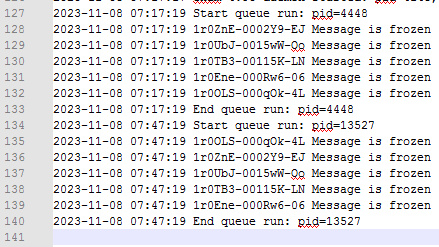
So doing a telnet to port 25 of an external mail server now works?
What is the exact error?
Let’s check one of them, show the output of this command:
exigrep 1r0ZnE-0002Y9-EJ /var/log/exim4/mainlog*
root@cp:~# exigrep 1r0ZnE-0002Y9-EJ /var/log/exim4/mainlog*
+++ 1r0ZnE-0002Y9-EJ has not completed +++
2023-11-08 07:03:52 1r0ZnE-0002Y9-EJ <= <> R=1r0ZnE-0002Y6-Ch U=Debian-exim P=local S=1771
2023-11-08 07:03:52 1r0ZnE-0002Y9-EJ ** [email protected] R=nonlocal: Mailing to remote domains not supported
2023-11-08 07:03:52 1r0ZnE-0002Y9-EJ Frozen (delivery error message)
2023-11-08 07:17:19 1r0ZnE-0002Y9-EJ Message is frozen
2023-11-08 07:47:19 1r0ZnE-0002Y9-EJ Message is frozen
2023-11-08 07:53:05 1r0ZnE-0002Y9-EJ Message is frozen
2023-11-08 08:23:05 1r0ZnE-0002Y9-EJ Message is frozen
2023-11-08 08:53:06 1r0ZnE-0002Y9-EJ Message is frozen
2023-11-08 09:23:06 1r0ZnE-0002Y9-EJ Message is frozen
root@cp:~# telnet alt2.aspmx.l.google.com smtp
Trying 173.194.202.27…
Connected to alt2.aspmx.l.google.com.
Escape character is ‘^]’.
220 mx.google.com ESMTP r20-20020a170902e3d400b001cc3397aa27si1407741ple.62 - gsmtp
1 Like
ls -l /etc/exim4/domains/
RoundCube


Thank you for your work and effort, I really appreciate your help. A lot of information to absorb in a short time. I haven’t slept at night, I’m completely confused. This makes me feel confused.
Your help is very empowering and encouraging. A breath of fresh hope comes again
1 Like
Are you sure you copied the right conf to exim and restarted the service?
1 Like
I followed your instructions and followed all the steps sequentially.
I received no error messages.
Therefore, I think all configurations were transferred correctly.
If necessary, I’m ready to repeat it again.
If it helps the cause, let’s try it?
It may be possible to reinstall the HCP Exim4 component
At this point I don’t know whether it would be better to reinstall the server from scratch.
Show the output of these commands:
lsof -Pn -i:25,465,587 -sTCP:LISTEN
systemctl status exim4
root@cp:~# lsof -Pn -i:25,465,587 -sTCP:LISTEN
COMMAND  PID        USER   FD   TYPE DEVICE SIZE/OFF NODE NAME
exim4   4148 Debian-exim    4u  IPv4  52097      0t0  TCP 127.0.0.1:25 (LISTEN)
exim4   4148 Debian-exim    5u  IPv6  52098      0t0  TCP [::1]:25 (LISTEN)

root@cp:~# systemctl status exim4
● exim4.service - LSB: exim Mail Transport Agent
     Loaded: loaded (/etc/init.d/exim4; generated)
     Active: active (running) since Wed 2023-11-08 07:17:17 MSK; 3h 15min ago
       Docs: man:systemd-sysv-generator(8)
    Process: 3551 ExecStart=/etc/init.d/exim4 start (code=exited, status=0/SUCCESS)
    Process: 14719 ExecReload=/etc/init.d/exim4 reload (code=exited, status=0/SUCCESS)
      Tasks: 1 (limit: 2221)
     Memory: 14.3M
        CPU: 3.638s
     CGroup: /system.slice/exim4.service
             └─4148 /usr/sbin/exim4 -bd -q30m

Nov 08 07:17:15 cp.artwebsite.ru systemd[1]: Starting LSB: exim Mail Transport Agent...
Nov 08 07:17:15 cp.artwebsite.ru exim4[3551]:  * Starting MTA
Nov 08 07:17:17 cp.artwebsite.ru exim4[3551]:    ...done.
Nov 08 07:17:17 cp.artwebsite.ru systemd[1]: Started LSB: exim Mail Transport Agent.
Nov 08 07:53:04 cp.artwebsite.ru systemd[1]: Reloading LSB: exim Mail Transport Agent...
Nov 08 07:53:04 cp.artwebsite.ru exim4[14719]:  * Reloading exim4 configuration files
Nov 08 07:53:04 cp.artwebsite.ru exim4[14719]:    ...done.
Nov 08 07:53:04 cp.artwebsite.ru systemd[1]: Reloaded LSB: exim Mail Transport Agent.
It’s weird that it is only listening on localhost and only for port 25. Looks like it is still configured to use local mail, dpkg-reconfigure command seems is doing more things… don’t know the reason exim is not using our conf.
Show me the files in /etc/exim4/ because maybe there are other conf files and exim seems is using them.
ls -l /etc/exim4/
root@cp:~# ls -l /etc/exim4/
total 52
drwxr-xr-x 9 root root         4096 Mar 28  2023 conf.d
-rw-r--r-- 1 root root           32 Nov  8 01:14 dnsbl.conf
drwxr-xr-x 2 root root         4096 Nov  7 05:39 domains
-rw-r----- 1 root root        20129 Nov  8 01:19 exim4.conf.template
-rw-r--r-- 1 root root            3 Nov  8 01:14 limit.conf
-rw-r----- 1 root Debian-exim   204 Nov 23  2022 passwd.client
-rw-r--r-- 1 root root            0 Nov  8 01:14 spam-blocks.conf
-rw-r----- 1 root Debian-exim    17 Nov  8 01:15 srs.conf
-rw-r--r-- 1 root root          442 Nov  8 01:14 system.filter
-rw-r--r-- 1 root root         1055 Nov  8 06:57 update-exim4.conf.conf
-rw-r--r-- 1 root root            0 Nov  8 01:14 white-blocks.conf
Yes, hosting provider support said so
Nothing is listening on port 587. Therefore, the RoundCub client cannot connect to the server.
But this is a client.
Why doesn’t the mail go away?
Here’s the same question
Because Roundcube is configured to use port 587:
$config["smtp_host"] = "localhost:587";
Because seems your exim4 conf is saying that it will only deliver mail locally.
Why is that file updated? Did you run again dpkg-reconfigure or reinstalled exim?
dpkg-reconfigure or reinstalled exim This is out of the question.
After the message at the beginning of the thread that this resets the configuration, I am afraid of harming our work with you. It is hard work.
I save your time because I understand that careless actions will have consequences, and you will have to redo everything all over again.
Now I remember
Perhaps I opened it to view the configuration in Notepad++ and closed it and saved it.
When I was looking for the reason why RoundCube does not work
dpkg-reconfigure was running just before I asked for help.
Let’s check the configured ports.
grep smtp_ports /etc/exim4/exim4.conf.template
grep smtp_ports /var/lib/exim4/config.autogenerated
Restart exim and check again the ports in exim real conf:
systemctl restart exim4
grep smtp_ports /var/lib/exim4/config.autogenerated