vps
September 9, 2025, 8:43am
1
I have build my react app and is running using pm2.
I added firewall to allow my app on port 3000. Now when I access my app on my ip_address : 3000 it’s working fine
But when I visit my domain name (domain.com ) I get access denied.
I created nginx template to run proxy pass
With this
server {
listen 80;

server_name yourdomain.com;

location / {

    proxy_pass http://127.0.0.1:3000;

    proxy_http_version 1.1;

    proxy_set_header Upgrade $http_upgrade;

    proxy_set_header Connection 'upgrade';

    proxy_set_header Host $host;

    proxy_cache_bypass $http_upgrade;

}
}
But still getting access denied on domain please help me fix this, I m new to react on hestia
The issue I want to fix it , when I visit my domain.com I should be able to see my react app showing on my domain. After the build I have .next in my files
My file are all in the public_html
eris
September 9, 2025, 8:51am
3
Create a custom template with the correct info
1 Like
vps
September 9, 2025, 6:56pm
4
Hello admin thank you so much for your reply on this you are helpful. I have been working around it so much that I m really exhausted, I know it’s might not be something out of a big deal to do but since I m that exhausted I even read it and still do not understand. Can you please give me a clue or create an example for me to follow up getting this done if you can please. I will appreciate this, my rules are in the custom template in the tpl I don’t no if I should add same proxy pass in the stpl as well.
My react or .next whth node_modules with all its filles are all under public_html.
Any clue or example type I will appreciate. Thanks once again.
Add two new nginx templates (.tpl and .stpl), for example
# /usr/local/hestia/data/templates/web/nginx/react-3000.stpl
#=========================================================================#
# Default Web Domain Template                                             #
# DO NOT MODIFY THIS FILE! CHANGES WILL BE LOST WHEN REBUILDING DOMAINS   #
# https://hestiacp.com/docs/server-administration/web-templates.html      #
#=========================================================================#

server {
        listen      %ip%:%proxy_ssl_port% ssl;
        server_name %domain_idn% %alias_idn%;
        root        %sdocroot%;
        index     index.php index.html index.htm;
        access_log  /var/log/%web_system%/domains/%domain%.log combined;
        access_log  /var/log/%web_system%/domains/%domain%.bytes bytes;
        error_log   /var/log/%web_system%/domains/%domain%.error.log error;

    ssl_certificate     %ssl_pem%;
    ssl_certificate_key %ssl_key%;
    #Commented out ssl_stapling directives due to Lets Encrypt ending OCSP support in 2025
    #ssl_stapling        on;
    #ssl_stapling_verify on;

    # TLS 1.3 0-RTT anti-replay
    if ($anti_replay = 307) { return 307 https://$host$request_uri; }
    if ($anti_replay = 425) { return 425; }

        include %home%/%user%/conf/web/%domain%/nginx.hsts.conf*;

        location ~ /\.(?!well-known\/|file) {
                deny all;
                return 404;
        }

        location / {
            proxy_ssl_server_name on;
            proxy_ssl_name $host;
            proxy_pass http://%ip%:3000;
            proxy_set_header Host $http_host;
            proxy_set_header X-Real-IP $remote_addr;
            proxy_set_header X-Forwarded-Proto $scheme;
            proxy_set_header X-Forwarded-For $proxy_add_x_forwarded_for;
        }

    location /error/ {
        alias %home%/%user%/web/%domain%/document_errors/;
    }

    location /vstats/ {
        alias   %home%/%user%/web/%domain%/stats/;
        include %home%/%user%/web/%domain%/stats/auth.conf*;
        }

    proxy_hide_header Upgrade;

    include /etc/nginx/conf.d/phpmyadmin.inc*;
    include /etc/nginx/conf.d/phppgadmin.inc*;
        include %home%/%user%/conf/web/%domain%/nginx.ssl.conf_*;
}
# /usr/local/hestia/data/templates/web/nginx/react-3000.tpl
#=========================================================================#
# Default Web Domain Template                                             #
# DO NOT MODIFY THIS FILE! CHANGES WILL BE LOST WHEN REBUILDING DOMAINS   #
# https://hestiacp.com/docs/server-administration/web-templates.html      #
#=========================================================================#

server {
        listen      %ip%:%proxy_port%;
        server_name %domain_idn% %alias_idn%;
        root        %docroot%;
        index       index.php index.html index.htm;
        access_log  /var/log/%web_system%/domains/%domain%.log combined;
        access_log  /var/log/%web_system%/domains/%domain%.bytes bytes;
        error_log   /var/log/%web_system%/domains/%domain%.error.log error;

        include %home%/%user%/conf/web/%domain%/nginx.forcessl.conf*;

        location ~ /\.(?!well-known\/|file) {
                deny all;
                return 404;
        }

        location / {
            proxy_pass http://%ip%:3000;
            proxy_set_header Host $http_host;
            proxy_set_header X-Real-IP $remote_addr;
            proxy_set_header X-Forwarded-Proto $scheme;
            proxy_set_header X-Forwarded-For $proxy_add_x_forwarded_for;
        }

    location /error/ {
        alias %home%/%user%/web/%domain%/document_errors/;
    }

    location /vstats/ {
        alias   %home%/%user%/web/%domain%/stats/;
        include %home%/%user%/web/%domain%/stats/auth.conf*;
        }

    include /etc/nginx/conf.d/phpmyadmin.inc*;
    include /etc/nginx/conf.d/phppgadmin.inc*;
        include %home%/%user%/conf/web/%domain%/nginx.conf_*;
}
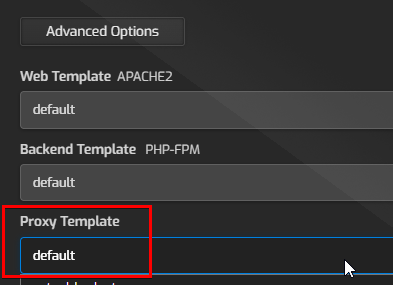
After that go into hestia > edit your domain > advanced options and select your react-3000 template there.
1 Like
vps
September 12, 2025, 9:00am
6
Thanks for your reply ,I will add it and let you no the result. I m happy you gotten time to do all that for me.
vps
September 12, 2025, 10:43pm
7
Woaw woaw woaw bro this worked like magic, thank you so much for this, now my site is working perfectly without the issues. Thank you so so much you saved me months and months for trying to figure out the real solution.
1 Like
system
October 12, 2025, 10:44pm
8
This topic was automatically closed 30 days after the last reply. New replies are no longer allowed.