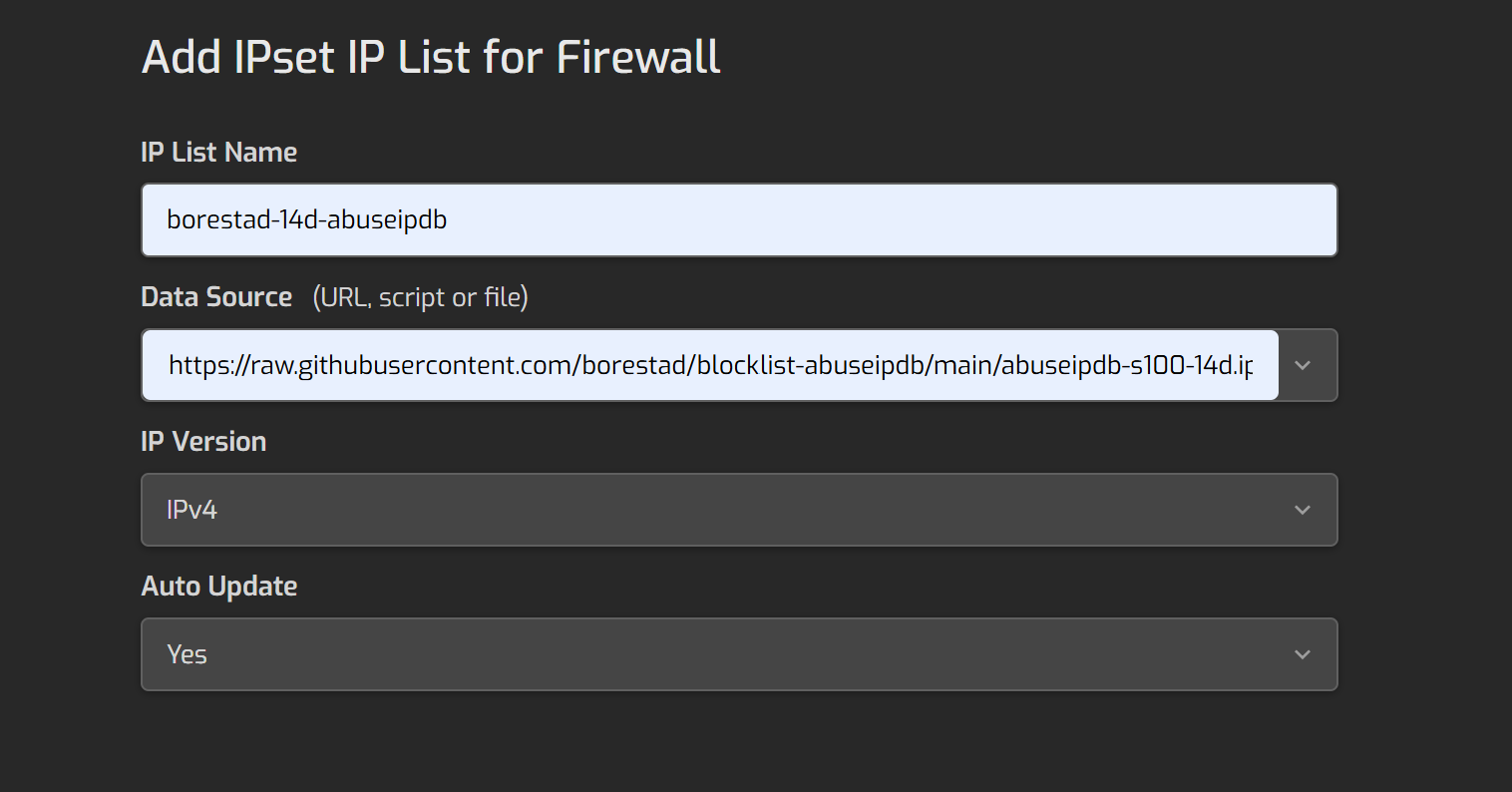
May I know if any of you are using Firehol list or other list on Hestiacp to level up a bit on security?
If using Firehol, which level you are using? As I can see level 1 also blocked some local IP subnets which maybe too strict? (as I need to have some internal app communicating with each other)
I made this script to download all the IPs from the sources, remove duplicated IPs and create 3 levels (level 3 if IPs appear in 3 or more sources, level 2 if IPs appear in 2 sources and level 1 if …)
#!/bin/bash
set -uo pipefail
# Configuration
IPSET_NAME="${1:-sahsanu}"
DEST_DIR="/usr/local/hestia/data/firewall/ipset"
# Create directories if they don't exist
mkdir -p "$DEST_DIR"
# Logging function (only if interactive)
log() {
if [ -t 1 ]; then
echo "$@"
fi
}
BLOCKLISTS=(
    "https://www.projecthoneypot.org/list_of_ips.php?t=d&rss=1"
    "https://check.torproject.org/cgi-bin/TorBulkExitList.py?ip=1.1.1.1"
    "https://danger.rulez.sk/projects/bruteforceblocker/blist.php"
    "https://www.spamhaus.org/drop/drop_v4.json"
    "https://cinsscore.com/list/ci-badguys.txt"
    "https://lists.blocklist.de/lists/all.txt"
    "https://blocklist.greensnow.co/greensnow.txt"
    "https://iplists.firehol.org/files/firehol_level1.netset"
    "https://iplists.firehol.org/files/stopforumspam_7d.ipset"
    "https://raw.githubusercontent.com/borestad/blocklist-abuseipdb/main/abuseipdb-s100-14d.ipv4"
    "https://raw.githubusercontent.com/stamparm/ipsum/master/levels/1.txt"
)
IP_BLOCKLIST_TMP=$(mktemp)
trap 'rm -f "$IP_BLOCKLIST_TMP"' EXIT
TOTAL=${#BLOCKLISTS[@]}
CURRENT=0
log "Downloading blocklists..."
for i in "${BLOCKLISTS[@]}"; do
CURRENT=$((CURRENT + 1))
# Extract a readable name from URL
if grep -q githubusercontent <<<"$i"; then
SOURCE_NAME=$(awk -F '/' '{print $5}' <<<"$i")
elif grep -q firehol <<<"$i"; then
SOURCE_NAME="Firehol: $(awk -F '/' '{print $5}' <<<"$i")"
else
SOURCE_NAME=$(sed -E 's|https?://([^/]+).*|\1|' <<<"$i")
fi
#log "[$CURRENT/$TOTAL] Fetching $SOURCE_NAME..."
IP_TMP=$(mktemp)
HTTP_RC=$(curl -L --connect-timeout 10 --max-time 10 -o "$IP_TMP" -s -w "%{http_code}" "$i")
#if [[ $HTTP_RC == "200" || $HTTP_RC == "302" || $HTTP_RC == "000" ]]; then
if [[ $HTTP_RC == "200" ]]; then
IP_COUNT=$(grep -Po '(?:\d{1,3}\.){3}\d{1,3}(?:/\d{1,2})?' "$IP_TMP" | wc -l)
log "[$(printf '%02d' $CURRENT)/$TOTAL] Downloaded $IP_COUNT IPs from $SOURCE_NAME"
grep -Po '(?:\d{1,3}\.){3}\d{1,3}(?:/\d{1,2})?' "$IP_TMP" |
sed -r 's/^0*([0-9]+)\.0*([0-9]+)\.0*([0-9]+)\.0*([0-9]+)(.*)$/\1.\2.\3.\4\5/' >>"$IP_BLOCKLIST_TMP"
elif [[ $HTTP_RC == "503" ]]; then
echo >&2 "[$(printf '%02d' $CURRENT)/$TOTAL] **Unavailable** (503): $SOURCE_NAME"
else
echo >&2 "[$(printf '%02d' $CURRENT)/$TOTAL] **Error** downloading IP list:HTTP $HTTP_RC for $SOURCE_NAME"
fi
rm -f "$IP_TMP"
done
# Create temporary files
IP_COUNT=$(mktemp)
IP_LV1=$(mktemp)
IP_LV2=$(mktemp)
IP_LV3=$(mktemp)
trap 'rm -f "$IP_COUNT" "$IP_LV1" "$IP_LV2" "$IP_LV3"' EXIT
IPSET_LV1="${IPSET_NAME}-LV1.v4.iplist"
IPSET_LV2="${IPSET_NAME}-LV2.v4.iplist"
IPSET_LV3="${IPSET_NAME}-LV3.v4.iplist"
# Filter private IPs, multicast and single-digit subnets (/0-/9)
# This prevents excessively broad ranges that could block half the internet
log "Processing and filtering IPs..."
sed -r -e '/^(0\.0\.0\.0|10\.|127\.|172\.1[6-9]\.|172\.2[0-9]\.|172\.3[0-1]\.|192\.168\.|22[4-9]\.|23[0-9]\.)/ d' \
-e '/\/[0-9]$/ d' "$IP_BLOCKLIST_TMP" |
sort -V | uniq -c >"$IP_COUNT"
# Classify by appearance level
awk '$1 >= 3' "$IP_COUNT" | awk '{print $2}' >"$IP_LV3"
awk '$1 == 2' "$IP_COUNT" | awk '{print $2}' >"$IP_LV2"
awk '$1 == 1' "$IP_COUNT" | awk '{print $2}' >"$IP_LV1"
# Count IPs by level (only show in interactive mode)
if [ -t 1 ]; then
LV3_COUNT=$(wc -l <"$IP_LV3")
LV2_COUNT=$(wc -l <"$IP_LV2")
LV1_COUNT=$(wc -l <"$IP_LV1")
echo "Processed IPs:"
{
echo "Level 3 (≥3 occurrences): $LV3_COUNT"
echo "Level 2 (2 occurrences): $LV2_COUNT"
echo "Level 1 (1 occurrence): $LV1_COUNT"
} | column -t -s ':' -R 2 | sed 's/^/ /'
fi
# Move to Hestia directory
mv "$IP_LV3" "$DEST_DIR/$IPSET_LV3" && log "Created LV3 list: $DEST_DIR/$IPSET_LV3"
mv "$IP_LV2" "$DEST_DIR/$IPSET_LV2" && log "Created LV2 list: $DEST_DIR/$IPSET_LV2"
mv "$IP_LV1" "$DEST_DIR/$IPSET_LV1" && log "Created LV1 list: $DEST_DIR/$IPSET_LV1"
log "Blocklists updated successfully"
No, I use all of them but in iptables I set LV3 first then LV2 and finally LV1:
❯ iptables -S | grep sahsanu-LV
-N LOG_DROP_sahsanu-LV1
-N LOG_DROP_sahsanu-LV2
-N LOG_DROP_sahsanu-LV3
-A INPUT -m set --match-set sahsanu-LV3 src -j LOG_DROP_sahsanu-LV3
-A INPUT -m set --match-set sahsanu-LV2 src -j LOG_DROP_sahsanu-LV2
-A INPUT -m set --match-set sahsanu-LV1 src -j LOG_DROP_sahsanu-LV1
-A LOG_DROP_sahsanu-LV1 -j LOG --log-prefix "iptables:drop:sahsanu-LV1 "
-A LOG_DROP_sahsanu-LV1 -j DROP
-A LOG_DROP_sahsanu-LV2 -j LOG --log-prefix "iptables:drop:sahsanu-LV2 "
-A LOG_DROP_sahsanu-LV2 -j DROP
-A LOG_DROP_sahsanu-LV3 -j LOG --log-prefix "iptables:drop:sahsanu-LV3 "
-A LOG_DROP_sahsanu-LV3 -j DROP
Then use only the block lists you want, I’m just showing what I use as an example
Yes, but remember that you need to add those files to Hestia so it can create or update the actual ipsets used by iptables.
thanks so much for your explanation. You put level 3 at first is because of the performance concern or?
And your script also does some clearing of local IP (e.g. 192.168, 172.xx etc), May I know if it’s safe to say that it may cause less false positives and can put on production server?
and also, may I know why need to drop twice?
-A INPUT -m set --match-set sahsanu-LV3 src -j LOG_DROP_sahsanu-LV3
-A LOG_DROP_sahsanu-LV3 -j LOG --log-prefix "iptables:drop:sahsanu-LV3 "
Yes, I prefer not to maintain an excessively large ipset, so I organize the entries based on the probability that an IP could reach my server.
Yes, my script filters private IPs, multicast and single-digit subnets (0-9).
I use it on my server.
I’m not dropping it twice, the first one uses action LOG_DROP_sahsanu-LV3, and in this chain, I log the ip that is being dropped and then I actually drop it. I use it that way to log the blocked ips.
thanks, if I did generate 3 lists like you and using GUI to DROP the connections, I think I cannot set the sequence? so i need to do it in SH script way to add to iptables?
Yes, I add them using /usr/local/hestia/data/firewall/custom.sh (remember to give execution permissions to this script if you want to use it) script loaded by Hestia when updating firewall.
#!/usr/bin/env bash
ipt="/usr/sbin/iptables"

ipset="i5 portspoof sahsanu-LV1 sahsanu-LV2 sahsanu-LV3 permaban"
chain_prefix="LOG_DROP"
action="DROP"
for i in $ipset; do
    "$ipt" -F "$chain_prefix"_"$i"
    "$ipt" -X "$chain_prefix"_"$i"
    "$ipt" -N "$chain_prefix"_"$i"
    "$ipt" -A "$chain_prefix"_"$i" -j LOG --log-level 4 --log-prefix "iptables:drop:$i "
    "$ipt" -A "$chain_prefix"_"$i" -j "$action"
    "$ipt" -I INPUT -m set --match-set "$i" src -j "$chain_prefix"_"$i"
done
For your safe to play with doing IP block with github ipset list. You may want to always add yourself to ACCEPT at iptables
You may refer to this script inspired from @sahsanu at Here
I’ve modified the script to use iptables instead of v-update-firewall to make sure it’s stay at the top of iptables list and avoid overriding by previous rules, also granting to ALL ports and both TCP/UDP on your own IP (if you want to add back TCP, and specific port number, you can modify referring to @sahsanu ‘s post)
You can run this using cronjob every 5 mins, this will also be restored if restarted (when cronjob performed)
For example, if you are using testing.domain.ltd which will reflect your own IP.
crontab -e (at root account)
*/5 * * * * /root/dynip testing.domain.ltd
Put the following file to your /root/ directory, make it executable.
#!/usr/bin/env bash
set -o pipefail

if [[ $EUID -ne 0 ]]; then
        echo "Script must be executed as root user" >&2
        exit 1
fi

basedir="/root/dyniplist"
host="$1"
#port="$2"
iplist="$basedir/${host}.iplist"
cur_ip=""
saved_ip=""

if [[ -z $host ]]; then
        echo "Usage $0 domainname"
        exit 1
fi

#if [[ -z $port ]]; then
#        echo "Usage $0 domainname port"
#        exit 1
#fi

if [[ ! -d $basedir ]]; then
        mkdir -p "$basedir"
fi

if ! cur_ip="$(dig +short A "$host" | tail -n1)"; then
        echo "Error resolving domain $host"
        exit 2
fi

if [[ -z $cur_ip ]]; then
        echo "Error, host $host is not resolving"
        exit 3
fi

if [[ -f $iplist ]]; then
        saved_ip="$(head -n1 "$iplist")"
fi

if [[ "$cur_ip" != "$saved_ip" ]]; then
        if [[ -n $saved_ip ]]; then
                # Delete old rule for previous IP
                iptables -D INPUT -s "$saved_ip" -j ACCEPT 2>/dev/null
        fi
fi

# Check if rule for current IP exists, add if not
if ! iptables -C INPUT -s "$cur_ip" -j ACCEPT 2>/dev/null; then
    iptables -I INPUT -s "$cur_ip" -j ACCEPT
    echo "$cur_ip" >"$iplist"
fi
Restart Fail2Ban to apply the change and that’s all. Fail2Ban will always resolve the domain to get the current IP, so there’s no need to restart Fail2Ban when the IP changes.
@sahsanu Am I correct in assuming that, due to the use of multiple blacklists in your script above, we cannot add these blacklists via the HestiaCP web interface, but must use your custom.sh script for this?
There is no need to add rules in custom.sh script, indeed you must add those ipsets in Hestia and create your own rules in Hestia to block incoming connections based on those ipsets.