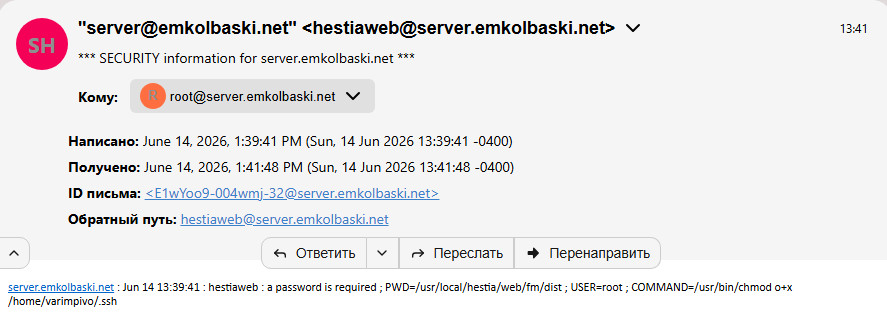
Hi guys I get today email ftom my VPS server about SECURITY information for server. Want problem? Please help.
chris
June 14, 2026, 10:01pm
2
The PR to fix this has not been integrated. You can manually fix it by following this guide:
Try this.
Edit file /usr/local/hestia/web/fm/configuration.php and replace this:
shell_exec("sudo chmod o+x " . quoteshellarg("/home/" . basename($v_user) . "/.ssh"));
by this:
shell_exec("sudo /usr/local/hestia/bin/v-change-fs-file-permission " . quoteshellarg(basename($v_user)) . " " . quoteshellarg("/home/" . basename($v_user) . "/.ssh" . " 0755"));
I’ve just merged the PR that fixes this issue:
main ← amongiardo:fix/filemanager-sftp-key-traversal
opened 10:48PM - 06 Mar 26 UTC
## Summary
This PR fixes a File Manager SFTP failure that can surface as `U… nknown error` in the UI (`/fm/?r=/getdir` returning 500).
## Problem
In File Manager config, when key is missing, it runs:
- `sudo /usr/local/hestia/bin/v-add-user-sftp-key ...`
- `sudo chmod o+x /home/<user>/.ssh`
But default Hestia sudoers for `hestiaweb` allows only `/usr/local/hestia/bin/*`, so `sudo chmod ...` is denied (`command not allowed`), and SFTP login may fail.
## Changes
1. Removed blocked sudo call from:
- `install/deb/filemanager/filegator/configuration.php`
- removed `shell_exec("sudo chmod o+x ...")`
2. Moved traversal permission handling into Hestia script:
- `bin/v-add-user-sftp-key`
- after key creation/ownership:
- use `setfacl -m u:hestiaweb:--x "$HOMEDIR/$user/.ssh"` when available
- fallback to `chmod o+x "$HOMEDIR/$user/.ssh"` when ACL tool is unavailable
## Why this is safer
- Keeps privilege changes inside Hestia-managed scripts (already allowed by sudoers).
- Grants minimum traverse permission for `hestiaweb` to reach the FM key path.
- Avoids runtime sudo failures from File Manager PHP code.
## Validation
- Bash syntax check passed for `v-add-user-sftp-key`.
- Runtime verification: SFTP login succeeds with FM key; directory listing works where it previously failed with 500.
Th…you for more information, but I already edited the file /usr/local/hestia/web/fm/configuration.php after no more emails . How I can check all good and work or … TH…YOU
Then you’re good, there’s no need to worry about it anymore.
Th..you! Love support HestiaCP