Note that the report was generated with the help of AI. It took me several hours to find a fix after researching the web and finally using AI.
TL;DR
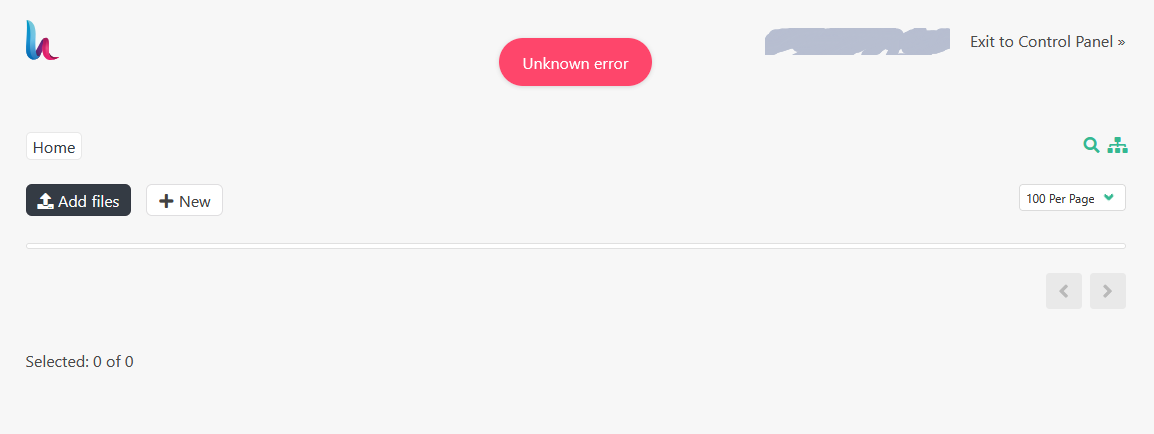
After upgrading Ubuntu 24.04 → 26.04, the HestiaCP File Manager shows a red “Unknown error” and an empty file listing, for all users (admin and regular). Root cause: the File Manager connects to the local SSH daemon over SFTP using Hestia’s bundled phpseclib, which only speaks classic diffie-hellman-* key exchange — while Ubuntu 26.04’s OpenSSH has dropped all diffie-hellman-* algorithms from its default KexAlgorithms. The handshake fails before login, so no files can be listed. Workaround below (sshd drop-in); proper fix is an updated phpseclib in Hestia’s web/fm/vendor/.
Environment
- HestiaCP 1.10.5-1+ubuntu26.04 (current release at time of writing — no newer version fixes this)
- Ubuntu 26.04 (aarch64 / Oracle Cloud), upgraded from 24.04
- Symptom reproduces for every panel user
Symptoms
- File Manager opens but shows “Unknown error” and no files, both as admin and as a normal user.
/var/log/hestia/nginx-error.logshows, on every directory listing (POST /fm/?r=/getdir):
PHP Notice:  No compatible key exchange algorithms found in
  /usr/local/hestia/web/fm/vendor/phpseclib/phpseclib/phpseclib/Net/SSH2.php on line 1758
PHP message: League\Flysystem\Sftp\ConnectionErrorException: Could not login with
  username: <user>, host: 127.0.0.1 in
  /usr/local/hestia/web/fm/vendor/league/flysystem-sftp/src/SftpAdapter.php:244
Stack trace:
#0 .../SftpAdapter.php(207): League\Flysystem\Sftp\SftpAdapter->login()
#1 .../AbstractFtpAdapter.php(650): ...->connect()
...
#4 .../Filesystem.php(272): ...->listContents()
- Regular SSH access to the server works perfectly — which is what makes this confusing.
Root cause
The File Manager does not read the filesystem directly. It logs into the local sshd over SFTP (host: 127.0.0.1) as the panel user, using the PHP SSH library phpseclib bundled under /usr/local/hestia/web/fm/vendor/.
Ubuntu 26.04’s OpenSSH offers only modern key-exchange algorithms:
$ sudo sshd -T | grep -i kexalgorithms
kexalgorithms mlkem768x25519-sha256,sntrup761x25519-sha512,[email protected],
curve25519-sha256,[email protected],ecdh-sha2-nistp256,ecdh-sha2-nistp384,ecdh-sha2-nistp521
Note there is not a single diffie-hellman-* entry — they are gone from the defaults. (The system OpenSSH client still negotiates fine because it supports the modern algorithms — e.g. kex: algorithm: mlkem768x25519-sha256 — which is why nothing else looks broken.)
Hestia’s bundled phpseclib is an older generation that only implements classic DH key exchange. Client list ∩ server list = empty → No compatible key exchange algorithms found → the SFTP login fails at the handshake → the panel surfaces it as “Unknown error”. Nothing is wrong with users, keys, or permissions.
(Same genre as phpseclib’s known “No compatible server to client message authentication algorithms found” / “No compatible key exchange algorithms found” reports against modern servers: old client library vs. new server algorithm set.)
Workaround: re-enable the legacy algorithms in sshd
Important: KexAlgorithms, Macs and HostKeyAlgorithms are global-only sshd directives — putting them in a Match block fails with:
Directive 'KexAlgorithms' is not allowed within a Match block
(so you cannot scope them to Match Address 127.0.0.1 — I tried, and sshd -t rejects it. They must go in globally.)
Create a drop-in:
sudo nano /etc/ssh/sshd_config.d/90-hestia-fm-kex.conf
# Legacy algorithms required by HestiaCP File Manager (old bundled phpseclib)
# against Ubuntu 26.04's OpenSSH, which dropped diffie-hellman from defaults.
# Remove this file once Hestia ships an updated phpseclib in the FM vendor tree.

KexAlgorithms +diffie-hellman-group-exchange-sha256,diffie-hellman-group14-sha1
Macs +hmac-sha1,hmac-sha2-256
HostKeyAlgorithms +ssh-rsa
PubkeyAcceptedAlgorithms +ssh-rsa
Then:
sudo sshd -t          # MUST print nothing before you restart!
sudo systemctl restart ssh
Notes on the contents:
+is additive — the modern algorithms remain first in the list; modern clients (your own SSH) still negotiate exactly what they did before (verified: stillmlkem768x25519-sha256).- Kept minimal on purpose:
diffie-hellman-group-exchange-sha256+group14-sha1cover old phpseclib without re-enabling the truly brokendiffie-hellman-group1-sha1/ssh-dss. If the FM still fails after this, add those two to the same lines. - The
MacsandHostKeyAlgorithms/PubkeyAcceptedAlgorithmslines preempt the next errors you’d hit after KEX succeeds — old phpseclib typically trips onhmac-sha1/SHA-1 RSA signatures next (“No compatible … MAC algorithms” is the sibling error).
Verification
- Open the File Manager — directories and file editing work again (checked with both
adminand a normal user). - Log forensics: every
getdirfailure innginx-error.logis timestamped before the restart; afterwards the log stays silent while browsing/editing. Quick check:
sudo awk '/^20[0-9][0-9]\//{ts=$0} /getdir/{print NR" -> "ts}' /var/log/hestia/nginx-error.log
sudo sshd -T | grep kexalgorithms— modern list intact for remote clients.
Security caveat
Since sshd can’t scope these by source address, the legacy algorithms are offered to all SSH clients while the file exists. Modern clients never select them (the modern algorithms are listed first), so practical exposure is limited to legacy-only clients — but do delete the drop-in once Hestia ships an updated phpseclib in web/fm/vendor/. A quick re-test after each Hestia update: move the file away, restart ssh, open the FM — if it works, retire the file.
Request to maintainers
This will hit every Hestia install on Ubuntu 26.04, since the distro dropped diffie-hellman-* from sshd defaults. The durable fix is updating the bundled phpseclib in /usr/local/hestia/web/fm/vendor/ to a current generation (phpseclib 3.x handles modern KEX). Repro material: version 1.10.5-1+ubuntu26.04, the Net/SSH2.php:1758 + SftpAdapter.php:244 pair quoted above, and the sshd -T output.