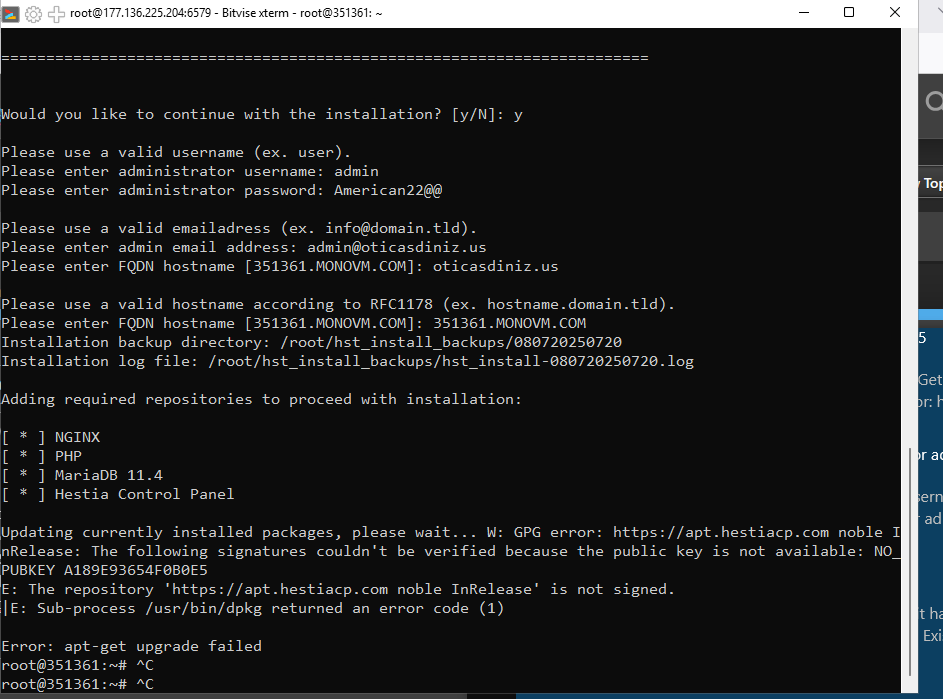
I am facing challenges to install Hestia via bitvise terminal. see the error i’m showing .
Adding required repositories to proceed with installation:
[ * ] NGINX
[ * ] PHP
[ * ] MariaDB 11.4
[ * ] Hestia Control
Panel
Updating currently installed packages, please wait… W: GPG error: https://apt.hestiacp.com noble InRelease: The following signatures couldn’t be verified because the public key is not available: NO_PUBKEY A189E93654F0B0E5
E: The repository ‘https://apt.hestiacp com noble InRelease’ is not signed.
Error: apt-get upgrade failed
I see no problem, it works fine on my end. Maybe you can’t reach the Ubuntu key server. Show the output of this command:
gpg --no-default-keyring --keyring /usr/share/keyrings/hestia-keyring.gpg --keyserver hkp://keyserver.ubuntu.com:80 --recv-keys A189E93654F0B0E5
I’m getting the same error on Ubuntu 24.04.3 LTS (GNU/Linux 6.8.0-90-generic x86_64)
This command fails:
gpg --no-default-keyring --keyring /usr/share/keyrings/hestia-keyring.gpg --keyserver hkp://keyserver.ubuntu.com:80 --recv-keys A189E93654F0B0E5
but if I do:
mkdir -p /root/.gnupg
chmod 700 /root/.gnupg
I end up with:
gpg: key A189E93654F0B0E5: "Hestia Control Panel <[email protected]>" not changed gpg: Total number processed: 1 gpg: unchanged: 1
Still, regardless of whether I do that or not the problem keeps repeating. Tried over and over on a fresh install.
Gemini recommended this, then downloading binaries instead and whatnot:
sudo -i
curl -fsSL https://gpg.hestiacp.com/deb_signing.key | gpg --dearmor | sudo tee /usr/share/keyrings/hestia-keyring.gpg > /dev/null
curl -fsSL https://nginx.org/keys/nginx_signing.key | gpg --dearmor | sudo tee /usr/share/keyrings/nginx-keyring.gpg > /dev/null
curl -fsSL https://mariadb.org/mariadb_release_signing_key.asc | gpg --dearmor | sudo tee /usr/share/keyrings/mariadb-keyring.gpg > /dev/null

ls -l /usr/share/keyrings/ | grep -E 'hestia|nginx|mariadb'

# Map Hestia
echo "deb [arch=$(dpkg --print-architecture) signed-by=/usr/share/keyrings/hestia-keyring.gpg] https://apt.hestiacp.com/ noble main" | sudo tee /etc/apt/sources.list.d/hestia.list
# Map Nginx
echo "deb [arch=$(dpkg --print-architecture) signed-by=/usr/share/keyrings/nginx-keyring.gpg] https://nginx.org/packages/mainline/ubuntu noble main" | sudo tee /etc/apt/sources.list.d/nginx.list
# Map MariaDB
echo "deb [arch=$(dpkg --print-architecture) signed-by=/usr/share/keyrings/mariadb-keyring.gpg] https://dlm.mariadb.com/repo/mariadb-server/11.4/repo/ubuntu noble main" | sudo tee /etc/apt/sources.list.d/mariadb.list
At this point I no longer need to try to install HestiaCP. The failure is already in apt-get update:
sudo apt-get update
Hit:1 http://archive.ubuntu.com/ubuntu noble InRelease
Hit:2 http://archive.ubuntu.com/ubuntu noble-updates InRelease
Hit:3 http://archive.ubuntu.com/ubuntu noble-backports InRelease
Hit:4 http://security.ubuntu.com/ubuntu noble-security InRelease
Get:5 https://nginx.org/packages/mainline/ubuntu noble InRelease [3,278 B]
Get:6 https://apt.hestiacp.com noble InRelease [12.7 kB]
Hit:8 https://esm.ubuntu.com/cis/ubuntu noble InRelease
Err:6 https://apt.hestiacp.com noble InRelease
  The following signatures couldn't be verified because the public key is not available: NO_PUBKEY A189E93654F0B0E5
Hit:9 https://esm.ubuntu.com/apps/ubuntu noble-apps-security InRelease
Err:5 https://nginx.org/packages/mainline/ubuntu noble InRelease
  The following signatures couldn't be verified because the public key is not available: NO_PUBKEY 2FD21310B49F6B46
Hit:10 https://esm.ubuntu.com/apps/ubuntu noble-apps-updates InRelease
Get:7 https://dlm.mariadb.com/repo/mariadb-server/11.4/repo/ubuntu noble InRelease [7,764 B]
Hit:11 https://esm.ubuntu.com/infra/ubuntu noble-infra-security InRelease
Hit:12 https://esm.ubuntu.com/infra/ubuntu noble-infra-updates InRelease
Err:7 https://dlm.mariadb.com/repo/mariadb-server/11.4/repo/ubuntu noble InRelease
  The following signatures couldn't be verified because the public key is not available: NO_PUBKEY F1656F24C74CD1D8
Reading package lists... Done
W: GPG error: https://apt.hestiacp.com noble InRelease: The following signatures couldn't be verified because the public key is not available: NO_PUBKEY A189E93654F0B0E5
E: The repository 'https://apt.hestiacp.com noble InRelease' is not signed.
N: Updating from such a repository can't be done securely, and is therefore disabled by default.
N: See apt-secure(8) manpage for repository creation and user configuration details.
W: GPG error: https://nginx.org/packages/mainline/ubuntu noble InRelease: The following signatures couldn't be verified because the public key is not available: NO_PUBKEY 2FD21310B49F6B46
E: The repository 'https://nginx.org/packages/mainline/ubuntu noble InRelease' is not signed.
N: Updating from such a repository can't be done securely, and is therefore disabled by default.
N: See apt-secure(8) manpage for repository creation and user configuration details.
W: GPG error: https://dlm.mariadb.com/repo/mariadb-server/11.4/repo/ubuntu noble InRelease: The following signatures couldn't be verified because the public key is not available: NO_PUBKEY F1656F24C74CD1D8
E: The repository 'https://dlm.mariadb.com/repo/mariadb-server/11.4/repo/ubuntu noble InRelease' is not signed.
N: Updating from such a repository can't be done securely, and is therefore disabled by default.
N: See apt-secure(8) manpage for repository creation and user configuration details.
What’s the error?
Show the output of these commands:
iptables -S
ip6tables -S
ls -la /etc/apt/sources.list.d/
cat -A /etc/apt/sources.list.d/hestia.list
cat -A /etc/apt/sources.list.d/nginx.list
cat -A /etc/apt/sources.list.d/mariadb.list
gpg --no-default-keyring --keyring /usr/share/keyrings/hestia-keyring.gpg --list-keys --keyid-format LONG
gpg --no-default-keyring --keyring /usr/share/keyrings/nginx-keyring.gpg --list-keys --keyid-format LONG
gpg --no-default-keyring --keyring /usr/share/keyrings/mariadb-keyring.gpg --list-keys --keyid-format LONG
Just in case, try to update packages forcing the use of IPv4:
apt -o Acquire::ForceIPv4=true update
Thanks for your reply!
root@manage:~# iptables -S
-P INPUT ACCEPT
-P FORWARD ACCEPT
-P OUTPUT ACCEPT
root@manage:~# ip6tables -S
-P INPUT ACCEPT
-P FORWARD ACCEPT
-P OUTPUT ACCEPT
root@manage:~# ls -la /etc/apt/sources.list.d/
total 36
drwxr-xr-x 2 root root 4096 Jan 23 05:06 .
drwxr-xr-x 8 root root 4096 Aug 22  2024 ..
-rw-r----- 1 root root   94 Jan 23 05:00 hestia.list
-rw-r----- 1 root root   91 Jan 23 05:06 mariadb.list
-rw-r----- 1 root root   92 Jan 23 05:06 nginx.list
-rw-r--r-- 1 root root  163 Jan 22 04:51 ubuntu-cis.sources
-rw-r--r-- 1 root root  202 Jan 22 04:48 ubuntu-esm-apps.sources
-rw-r--r-- 1 root root  206 Jan 22 04:48 ubuntu-esm-infra.sources
-rw-r--r-- 1 root root 2552 Aug 22  2024 ubuntu.sources
root@manage:~# cat -A /etc/apt/sources.list.d/hestia.list
deb [signed-by=/usr/share/keyrings/hestiacp-keyring.gpg] https://apt.hestiacp.com/ noble main$

root@manage:~# cat -A /etc/apt/sources.list.d/nginx.list
deb [signed-by=/usr/share/keyrings/nginx-archive-keyring.gpg] https://nginx.org noble nginx$

root@manage:~# cat -A /etc/apt/sources.list.d/mariadb.list
deb [signed-by=/usr/share/keyrings/mariadb-keyring.gpg] https://dlm.mariadb.com noble main$
root@manage:~# gpg --no-default-keyring --keyring /usr/share/keyrings/hestia-keyring.gpg --list-keys --keyid-format LONG

root@manage:~# gpg --no-default-keyring --keyring /usr/share/keyrings/nginx-keyring.gpg --list-keys --keyid-format LONG

root@manage:~# gpg --no-default-keyring --keyring /usr/share/keyrings/mariadb-keyring.gpg --list-keys --keyid-format LONG
/usr/share/keyrings/mariadb-keyring.gpg
---------------------------------------
pub   rsa4096/F1656F24C74CD1D8 2016-03-30 [SC]
      177F4010FE56CA3336300305F1656F24C74CD1D8
uid                 [ unknown] MariaDB Signing Key <[email protected]>
sub   rsa4096/C0F47944DE8F6914 2016-03-30 [E]
root@manage:~# apt -o Acquire::ForceIPv4=true update
Hit:1 http://security.ubuntu.com/ubuntu noble-security InRelease
Hit:2 http://archive.ubuntu.com/ubuntu noble InRelease
Hit:3 http://archive.ubuntu.com/ubuntu noble-updates InRelease
Hit:4 http://archive.ubuntu.com/ubuntu noble-backports InRelease
Ign:5 https://dlm.mariadb.com noble InRelease
Get:6 https://apt.hestiacp.com noble InRelease [12.7 kB]
Ign:7 https://nginx.org noble InRelease
Err:8 https://nginx.org noble Release
  404  Not Found [IP: 52.58.199.22 443]
Err:9 https://dlm.mariadb.com noble Release
  404  Not Found [IP: 104.18.135.24 443]
Hit:10 https://esm.ubuntu.com/cis/ubuntu noble InRelease
Hit:11 https://esm.ubuntu.com/apps/ubuntu noble-apps-security InRelease
Err:6 https://apt.hestiacp.com noble InRelease
  The following signatures couldn't be verified because the public key is not available: NO_PUBKEY A189E93654F0B0E5
Hit:12 https://esm.ubuntu.com/apps/ubuntu noble-apps-updates InRelease
Hit:13 https://esm.ubuntu.com/infra/ubuntu noble-infra-security InRelease
Hit:14 https://esm.ubuntu.com/infra/ubuntu noble-infra-updates InRelease
Reading package lists... Done
E: The repository 'https://nginx.org noble Release' does not have a Release file.
N: Updating from such a repository can't be done securely, and is therefore disabled by default.
N: See apt-secure(8) manpage for repository creation and user configuration details.
E: The repository 'https://dlm.mariadb.com noble Release' does not have a Release file.
N: Updating from such a repository can't be done securely, and is therefore disabled by default.
N: See apt-secure(8) manpage for repository creation and user configuration details.
W: GPG error: https://apt.hestiacp.com noble InRelease: The following signatures couldn't be verified because the public key is not available: NO_PUBKEY A189E93654F0B0E5
E: The repository 'https://apt.hestiacp.com noble InRelease' is not signed.
N: Updating from such a repository can't be done securely, and is therefore disabled by default.
N: See apt-secure(8) manpage for repository creation and user configuration details.
You were asking about the error. Tried to reproduce it here, but not sure if I have to try again with a fresh install?
root@manage:~# gpg --no-default-keyring --keyring /usr/share/keyrings/hestia-keyring.gpg --keyserver hkp://keyserver.ubuntu.com:80 --recv-keys A189E93654F0B0E5
gpg: key A189E93654F0B0E5: "Hestia Control Panel <[email protected]>" not changed
gpg: Total number processed: 1
gpg:              unchanged: 1

root@manage:~# rm -r /root/.gnupg/
root@manage:~# gpg --no-default-keyring --keyring /usr/share/keyrings/hestia-keyring.gpg --keyserver hkp://keyserver.ubuntu.com:80 --recv-keys A189E93654F0B0E5
gpg: failed to create temporary file '/root/.gnupg/.#1k...': No such file or directory
gpg: can't connect to the dirmngr: No such file or directory
gpg: keyserver receive failed: No dirmngr
curl -fsSL https://apt.hestiacp.com/ | gpg --dearmor | sudo tee /usr/share/keyrings/hestiacp-keyring.gpg > /dev/null
gpg: no valid OpenPGP data found.
Edit: After a fresh install this command produced the same output, except that the keybox was created.
gpg --no-default-keyring --keyring /usr/share/keyrings/hestia-keyring.gpg --keyserver hkp://keyserver.ubuntu.com:80 --recv-keys A189E93654F0B0E5
gpg: keybox '/usr/share/keyrings/hestia-keyring.gpg' created
Execute this command and show the output:
curl -fsSLm30 https://deve.dev/scripts/r/repos-hestia.sh | sudo bash -s --
You should see an output like this:
❯ curl -fsSLm30 https://deve.dev/scripts/r/repos-hestia.sh | sudo bash -s --
Adding required repositories to proceed with installation:

[ * ] NGINX
[ + ] Checking key
gpg: /root/.gnupg/trustdb.gpg: trustdb created
/usr/share/keyrings/nginx-keyring.gpg
-------------------------------------
pub   rsa4096/2FD21310B49F6B46 2024-05-29 [SC]
      8540A6F18833A80E9C1653A42FD21310B49F6B46
uid                 [ unknown] nginx signing key <[email protected]>

pub   rsa2048/ABF5BD827BD9BF62 2011-08-19 [SC] [expires: 2027-05-24]
      573BFD6B3D8FBC641079A6ABABF5BD827BD9BF62
uid                 [ unknown] nginx signing key <[email protected]>

pub   rsa4096/BCDCD8A38D88A2B3 2024-05-29 [SC]
      9E9BE90EACBCDE69FE9B204CBCDCD8A38D88A2B3
uid                 [ unknown] nginx signing key <[email protected]>


[ + ] Checking repo
deb [arch=amd64 signed-by=/usr/share/keyrings/nginx-keyring.gpg] https://nginx.org/packages/mainline/debian/ bookworm nginx$

[ * ] MariaDB 11.4
[ + ] Checking key
/usr/share/keyrings/mariadb-keyring.gpg
---------------------------------------
pub   rsa4096/F1656F24C74CD1D8 2016-03-30 [SC]
      177F4010FE56CA3336300305F1656F24C74CD1D8
uid                 [ unknown] MariaDB Signing Key <[email protected]>
sub   rsa4096/C0F47944DE8F6914 2016-03-30 [E]


[ + ] Checking repo
deb [arch=amd64 signed-by=/usr/share/keyrings/mariadb-keyring.gpg] https://dlm.mariadb.com/repo/mariadb-server/11.4/repo/debian bookworm main$

[ * ] Hestia Control Panel
gpg: keybox '/usr/share/keyrings/hestia-keyring.gpg' created
gpg: key A189E93654F0B0E5: public key "Hestia Control Panel <[email protected]>" imported
gpg: Total number processed: 1
gpg:               imported: 1
[ + ] Checking key
/usr/share/keyrings/hestia-keyring.gpg
--------------------------------------
pub   rsa4096/A189E93654F0B0E5 2020-03-11 [SC] [expires: 2030-03-09]
      159F0BD6EC2656F183BFD07BA189E93654F0B0E5
uid                 [ unknown] Hestia Control Panel <[email protected]>
sub   rsa4096/B4076BA7BD8E32D3 2020-03-11 [E] [expires: 2030-03-09]


[ + ] Checking repo
deb [arch=amd64 signed-by=/usr/share/keyrings/hestia-keyring.gpg] https://apt.hestiacp.com/ bookworm main

[ * ] Updating sources
Hit:1 http://deb.debian.org/debian bookworm InRelease
Hit:2 http://security.debian.org/debian-security bookworm-security InRelease
Hit:3 http://deb.debian.org/debian bookworm-updates InRelease
Hit:5 https://apt.hestiacp.com bookworm InRelease
Hit:6 https://nginx.org/packages/mainline/debian bookworm InRelease
Hit:4 https://dlm.mariadb.com/repo/mariadb-server/11.4/repo/debian bookworm InRelease
Reading package lists... Done
I ended up installing Debian instead. Now Hestia is installed!
It’s really a great welcome into the community how much you’re helping! Even the Ubuntu community couldn’t help me, with what seems like an Ubuntu issue to me.
Maybe something was corrupt with my installation. I had a snapshot of an Ubuntu installation that had only ssh and ufw taken care of. After many hours of re-installing it I noticed something was wrong with ufw. Although it was possible to uninstall, it was not activated, like I had set it up. But I did uninstall ufw before my Hestia installation attempts.
My guess is that the snapshot was broken.
Thanks a lot!
For anyone having this issue on Ubuntu just use this method it works perfectly
for whatever reason the keyserver cant be the domain trust me I tried however the IP works
gpg --no-default-keyring --keyring /usr/share/keyrings/hestia-keyring.gpg --keyserver hkp://185.125.188.26 --recv-keys A189E93654F0B0E5
or
gpg --no-default-keyring --keyring /usr/share/keyrings/hestia-keyring.gpg --keyserver 185.125.188.26 --recv-keys A189E93654F0B0E5