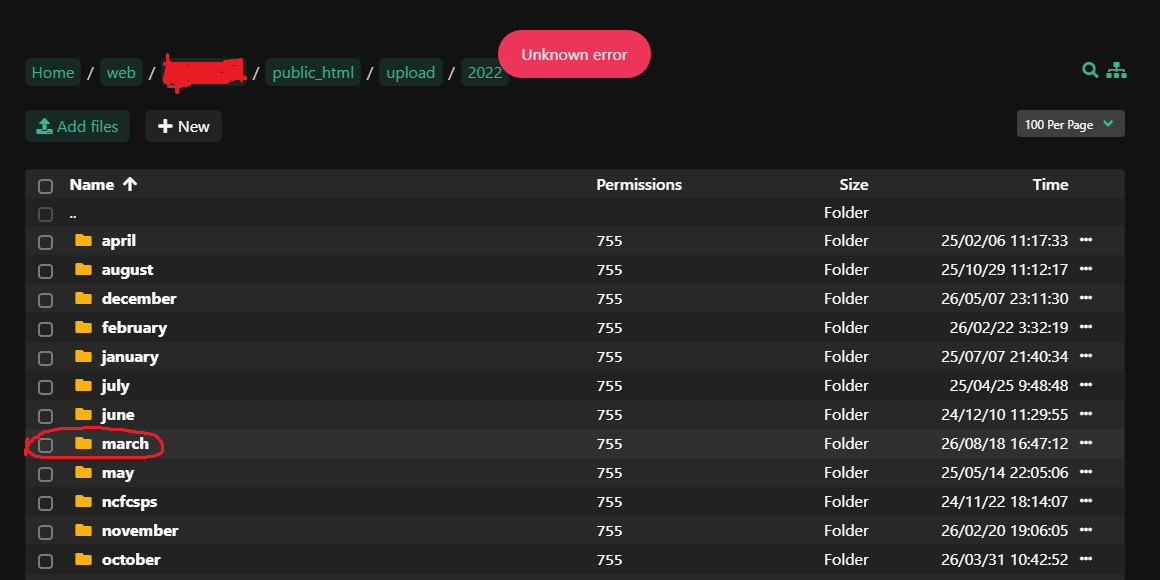
Hi,
I’ve encountered a perplexing issue with my file manager after updating it to the latest version yesterday. Whenever I try to open a specific folder, I receive an error message stating “unknown error.” This problem seems to be isolated to that particular folder, as I can access all other folders and files without any issues. I’m not sure what could be causing this problem or how to resolve it. Has anyone experienced a similar issue or have any suggestions on how to fix it? I would greatly appreciate any guidance or troubleshooting steps you could provide. Thank you!
I have highlighted the folder name here. Would you like me to share any further details?
Hi,
Try to access the folder again and check this log to see the error /var/log/hestia/nginx-error.log
2026/08/18 10:52:56 \[error\] 2822537#0: \*45 FastCGI sent in stderr: "PHP message: UnexpectedValueException: The stream or file "/usr/local/hestia/web/fm/private/logs/app.log" could not be opened in append mode: Failed to open stream: Permission denied in /usr/local/hestia/web/fm/vendor/monolog/monolog/src/Monolog/Handler/StreamHandler.php:115
Stack trace:
#0 /usr/local/hestia/web/fm/vendor/monolog/monolog/src/Monolog/Handler/AbstractProcessingHandler.php(39): Monolog\\Handler\\StreamHandler->write()
#1 /usr/local/hestia/web/fm/vendor/monolog/monolog/src/Monolog/Logger.php(344): Monolog\\Handler\\AbstractProcessingHandler->handle()
#2 /usr/local/hestia/web/fm/vendor/monolog/monolog/src/Monolog/Logger.php(614): Monolog\\Logger->addRecord()
#3 /usr/local/hestia/web/fm/vendor/monolog/monolog/src/Monolog/ErrorHandler.php(160): Monolog\\Logger->log()
#4 /usr/local/hestia/web/fm/vendor/monolog/monolog/src/Monolog/ErrorHandler.php(123): Monolog\\ErrorHandler->handleError()
#5 /usr/local/hestia/web/fm/vendor/monolog/monolog/src/Monolog/ErrorHandler.php(92): Monolog\\ErrorHandler->defaultEr" while reading response header from upstream, client: 117.247.105.10, server: \_, request: "GET /fm/ HTTP/2.0", upstream: "fastcgi://unix:/run/hestia-php.sock:"
Don’t you have any other errors? Because that monolog error doesn’t look like the problem.
Anyway, show the output of this command:
namei -mo /usr/local/hestia/web/fm/private/logs/app.log
Found the error.
One file in that folder has a filename containing an invalid UTF-8 byte:
Byte 0x96 is the Windows-1252 en-dash (–). It’s a valid byte in a Linux filename but illegal on its own in UTF-8.
‘A Fuzzy Probabilistic Neural Network for Student’$‘\222’‘s Academic Performance Prediction.html’
‘Stress Concentration at Openings in Pressure Vessels ‘$’\226’’ A Review.html’
I have changed the filename without special characters and i can access the folder now.
Glad you find and fixed the issue 
Anyway, could you please show the output of namei command?