Hello,
I performed two installations yesterday:
a.) Debian 12
b.) Ubuntu 24.04
The installation was done using the script generator.
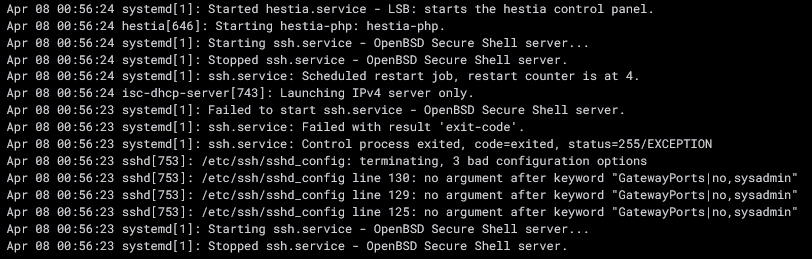
After a while, I noticed that the SSH service was regularly stopping and the configuration was being overwritten.
The cause was that the “sshd_config” file in the #Hestia SFTP Chroot section was being overwritten.
Original:
# Hestia SFTP Chroot

GatewayPorts no
AllowTcpForwarding yes
ClientAliveInterval 0
TCPKeepAlive no
GatewayPorts no
GatewayPorts no
Match user sftp_dummy99
ForceCommand internal-sftp -d /home/%u
Incorrect:
# Hestia SFTP Chroot

GatewayPorts|no,sysadmin
AllowTcpForwarding yes
ClientAliveInterval 0
TCPKeepAlive no
GatewayPorts|no,sysadmin
GatewayPorts|no,sysadmin
Match User sftp_dummy99,sysadmin
ForceCommand internal-sftp -d /home/%u
The GatewayPorts|no,sysadmin entry causes the SSH server to fail to start.
The short-term solution:
The # Hestia SFTP Chroot section was moved to a user.conf file located at /etc/ssh/sshd_config.d.
The port configuration was being regularly overwritten. Since I use a non-standard port for SSH, it was repeatedly being reset to port 22.
The relevant section was also moved to the user.conf file.
Best regards
Tom
Hi,
Why do you have those GatewayPorts directives in the original conf?
Hestia should respect your port. Show the output of these commands:
for i in /etc/ssh/sshd_config /etc/ssh/sshd_config.d/*; do echo -e "#### Checking $i\n";grep -Ev '^#|^$' "$i"; echo; done
v-list-sys-sshd-port plain
root@xxxxxx:\~# Include /etc/ssh/sshd_config.d/*.conf
Port 58222
AddressFamily inet
ListenAddress 0.0.0.0:58222
PermitRootLogin no
KbdInteractiveAuthentication no
UsePAM yes
X11Forwarding yes
PrintMotd no
DebianBanner no
AcceptEnv LANG LC\_*
Subsystem sftp internal-sftp-server

#### Checking /etc/ssh/sshd_config.d/user.conf

GatewayPorts no
AllowTcpForwarding yes
ClientAliveInterval 0
TCPKeepAlive no
GatewayPorts no
GatewayPorts no
Match User sftp_dummy99
ForceCommand internal-sftp -d /home/%u
58222
Hello sahsanu,
thank you for your follow-up question.
I have the same line in the config of my production environment (Ubuntu 18.04. LTS PRO) and the ssh.services works fine.
Line GatewayPorts no
# override default of no subsystems

#Subsystem sftp server
GatewayPorts no
AllowTcpForwarding yes
KeepAlive yes
Protocol 1.2
Port 58222
AllowUsers root
IgnoreRhosts yes
IgnoreUserKnownHosts no
StrictModes yes
PubkeyAuthentication yes
PermitRootLogin yes
PermitEmptyPasswords no
PasswordAuthentication yes

# Example of overriding settings on a per-user basis

#Match User anoncvs
#X11Forwarding no

# AllowTcpForwarding no

# PermitTTY no

# ForceCommand cvs server

# Hestia SFTP Chroot

Match users sftp_dummy99, AND user_accounts
ChrootDirectory %h
X11Forwarding no
AllowTCPForwarding no
ForceCommand internal sftp
But why do you have GatewayPorts inside the Hestia’s block?
Move the user.conf content to the end of sshd_config again and remove the GatewayPorts directives from that block.
It should look like this (including the comment):
# Hestia SFTP Chroot
Match User sftp_dummy99
    ChrootDirectory /srv/jail/%u
    X11Forwarding no
    AllowTCPForwarding no
    ForceCommand internal-sftp -d /home/%u
Also remove the suffix -server from Subsystem directive:
Subsystem sftp internal-sftp
Hello sahsanu,
I’ve adjusted the configuration.
# override default of no subsystems
Subsystem sftp internal-sftp

# Hestia SFTP Chroot

AllowTcpForwarding yes
ClientAliveInterval 0
TCPKeepAlive no
Match User sftp_dummy99
ForceCommand internal-sftp -d /home/%u
The “GatewayPorts” entry is included by default in all my installations. No manual entry was made.
No, your conf should look like this:
[Other options]

# override default of no subsystems
Subsystem sftp internal-sftp

# Hestia SFTP Chroot
Match User sftp_dummy99
    ChrootDirectory /srv/jail/%u
    X11Forwarding no
    AllowTCPForwarding no
    ForceCommand internal-sftp -d /home/%u
It’s important that you don’t add or modify anything below # Hestia SFTP Chroot. It’s also very important that the Match User directive is placed directly below the comment, with no blank lines between them.
Hi sahsanu,
I’ll create two more base installations in virtual machines this weekend (Debian/Ubuntu) to have a direct comparison between a base installation and an installation using HCP.
Thanks for your help.
1 Like