I’m wondering if I can use SMTP in HestiaCP for all system emails, including WordPress etc. Currently, I’m using HestiaCP 1.9.4, but unfortunately, my Ubuntu system is quite old (I haven’t update the system for 7-8 months).
Here’s the guide I want to test with:
Do you think that the script will work with my Ubuntu system if it’s quite old?
What do you mean by quite old? Which Ubuntu version is it?
It should still work, though. Keep in mind that configuring mail with that script will only affect emails sent directly by Hestia. System emails, such as those sent by cron jobs, won’t work with that setup.
For that case, I always recommend adding a mail domain for your hostname and creating a postmaster account with at least root as alias.
No, I mean just a postmaster account for your mail domain.
For example, if your server name is server.example.net, you should add it in Hestia as a mail domain. Once added, create the account [email protected] and add the alias root to that account.
Instead of postmaster, you can use any name you want.
You can add as many aliases as you want, but root must be one of them in order to receive system messages.
The final goal is to forward those messages to an account you regularly check, where you will be able to see them. This can be a mail account on another domain hosted in Hestia or an external mail service such as Gmail, etc.
If you use an external DNS service like Cloudflare, it doesn’t matter, but you must configure the appropriate DNS records for it to work.
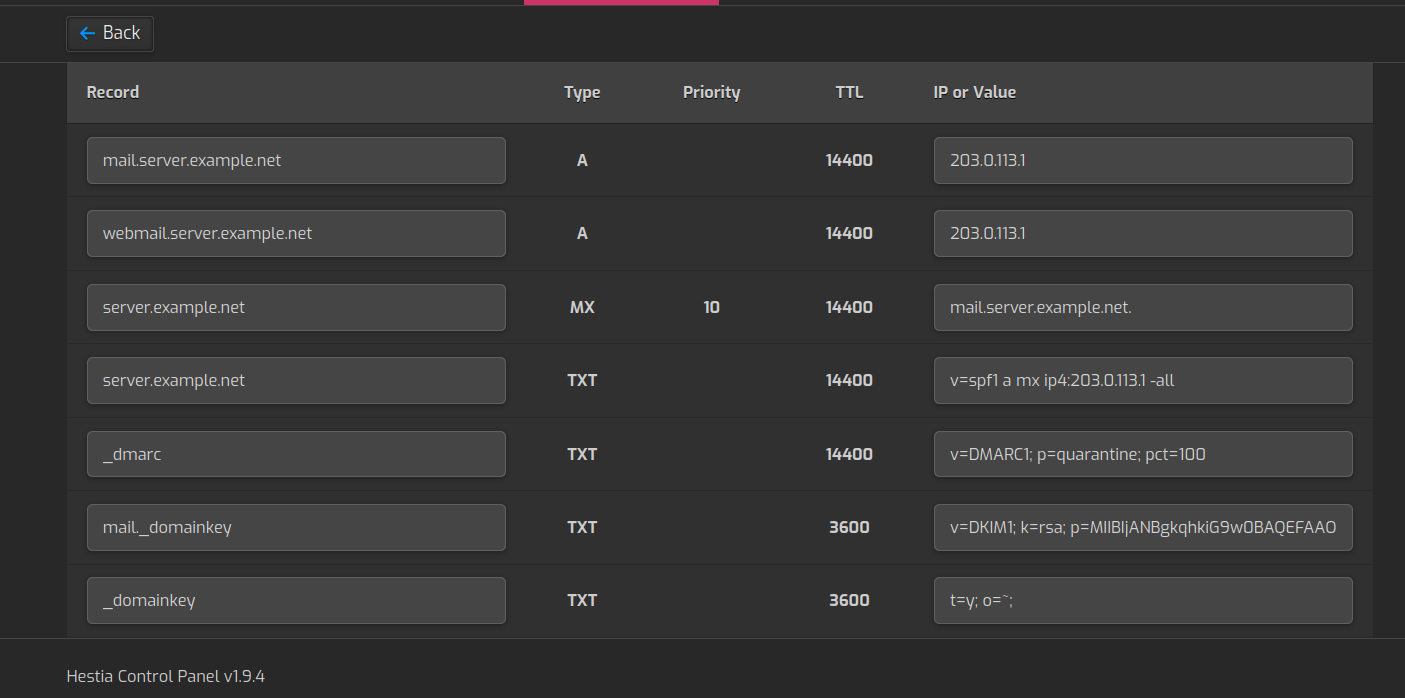
Once you create a mail domain for server.example.net in Hestia, you can see the DNS records that need to be created.
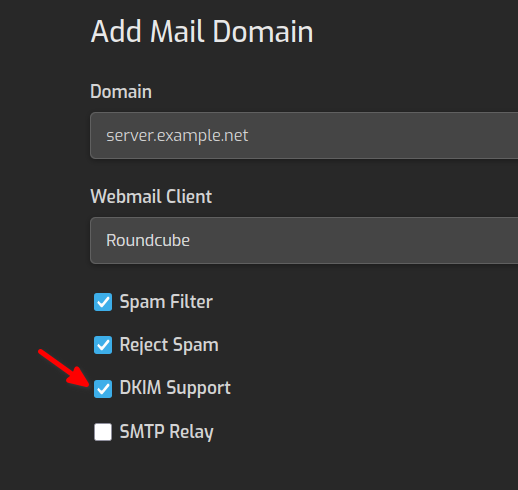
For example, when you add the mail domain server.example.net (remember to enable DKIM support):
Thank you so much for your time once again, I really appreciate it!
I already have a mail domain - domain.eu without DKIM. I’m using SMTP relay with Brevo to send emails form my domain, e.g. [email protected], [email protected] I have added the TXT Brevo records in Cloudflare, but I don’t have the SPF TXT record e.g. - v=spf1 a mx ip4:92.92.92.92 -all
In this case, shall I add the SPF txt record in Cloudflare DNS zone? As far as I understand, I have to create a postmaster email - e.g. [email protected] and I have to add allases - root. And if I understand correctly, I will receive all system emails to this email [email protected], right? But who will send this emails - the default email functionality in the server via the SPF record or?
Thank you once again for everything you have done for me!
It would be less confusing if we use the actual server name and the actual domain name.
If your server name is server.domain.eu, you must create a mail domain for server.domain.eu in Hestia. Then create the postmaster account for that mail domain ([email protected]) and add the root alias to it.
If you are using Brevo as an smtp relay and want to send emails from server.domain.eu, you must add this domain to Brevo. They will then provide the DNS records required for SPF and DKIM.
However, you can simply create a forward from [email protected] to one of your accounts under the domain.eu mail domain. In that case, the email will be delivered locally, without using any smtp relay, and there is no need for SPF or DKIM records.
No, the mail account should be [email protected] or .com… that’s because I said to use the actual names…
If you use what I said and forward the email to another mail domain configured in Hestia, the emails will be delivered locally.
SPF doesn’t specify how emails are sent, it defines which mail servers are authorized to send emails for your domain.
Let’s say I have one primary domain - domain.eu and several subdomains - staging1.domain.eu etc
If I want to have one system postmaster for my primary domain with server subdomain - server.domain.eu, I have to add the root aliases in the email domain settings, right? Also, I have to create a postmaster email - [email protected], right? I finally - I have to add all the necessary records from the domain DNS zone to Cloudflare if I want the system to sends these emails (the server IP instead of Brevo). I hope I understand this correctly so far.
In this case, the system will send emails to postmaster@ from postmaster@, right? And I can forward this emails to my Gmail or any other email I want to receive these emails in.
Yes, but his part is the first one, once you have created the [email protected] account, you add there the alias and if you want, the forward.
Yes, that’s correct.
I’m not sure what you mean. The system (for example, cron) sends emails to [email protected]. Because root is an alias of postmaster, the message is delivered to [email protected]. If you have forwarding configured, the email will then be sent to that address (Gmail, etc.).
I mean the allies is the system user or the email user? If I add root, I will receive the system root user messages to [email protected] - is that correct?