gamage
June 14, 2026, 7:48am
1
I have Moldova VPS, 4GB Ram, 40GB SSD, 2 Core CPU,
Debian 12, HestiaCP, Php8.3 nginx
My VPS and all service up but every 1/2 minutes website down, Cloudflare error 521
i installed VPS with Claude AI, All configuration done with AI, But website always down, show alers, even i work on site down every 2/3 minuts, down keep 1/2 minutes then Up again, this happen 24hrs.
Im trying fix 2 weeks, still fail, can anyone tell me how to fix and where should i change and fix
Show the output of these commands (one by one):
curl -fsSLm15 https://7j.gg/hcpver | bash
uptime
df -h
free -h
systemctl status nginx --no-pager -l
cat /proc/"$(ps -ef | grep -E '[n]ginx -c' | awk '{print $2}')"/limits
tail -n30 /var/log/nginx/error.log
dmesg | grep -Ei "oom|killed process" | tail -20
Show also this output:
curl -fsSLm15 https://7j.gg/chknof | bash
gamage
June 14, 2026, 9:33am
4
here is results, this is big problem for me, working 2 weeks, no solution . if you can help appreciate

root@cp:~# curl -fsSLm15 https://7j.gg/hcpver | bash
Software           Version


OS            Debian 12.14
Hestia               1.9.6
Hestia-nginx        1.30.2
Hestia-php          8.4.21
FileGator           7.14.3
Nginx               1.31.1
PHP8.3              8.3.31
Awstats                7.8
Exim4                 4.96
Dovecot           2.3.19.1
Roundcube           1.6.16
Bind9              9.18.49
Mariadb           10.11.14
phpMyAdmin           5.2.3
Fail2ban             1.0.2
root@cp:~#

root@cp:~# uptime
09:24:58 up 1 day, 23:54,  1 user,  load average: 0.50, 0.37, 0.23
root@cp:~#

root@cp:~# df -h
Filesystem      Size  Used Avail Use% Mounted on
udev            1.9G     0  1.9G   0% /dev
tmpfs           392M  608K  391M   1% /run
/dev/sda1        40G   11G   27G  29% /
tmpfs           2.0G     0  2.0G   0% /dev/shm
tmpfs           5.0M     0  5.0M   0% /run/lock
/dev/sda15      124M   12M  113M  10% /boot/efi
tmpfs           392M     0  392M   0% /run/user/0
root@cp:~#

root@cp:~# free -h
total        used        free      shared  buff/cache   available
Mem:           3.8Gi       1.3Gi       203Mi       264Mi       2.8Gi       2.5Gi
Swap:          2.0Gi       237Mi       1.8Gi
root@cp:~#

root@cp:~# systemctl status nginx --no-pager -l
● nginx.service - nginx - high performance web server
Loaded: loaded (/lib/systemd/system/nginx.service; enabled; preset: enabled)
Active: active (running) since Fri 2026-06-12 09:30:33 UTC; 1 day 23h ago
Docs:

Process: 495 ExecStart=/usr/sbin/nginx -c ${CONFFILE} (code=exited, status=0/SUCCESS)
Process: 527014 ExecReload=/bin/sh -c /bin/kill -s HUP $(/bin/cat /run/nginx.pid) (code=exited, status=0/SUCCESS)
Main PID: 539 (nginx)
Tasks: 4 (limit: 4651)
Memory: 66.7M
CPU: 8min 46.474s
CGroup: /system.slice/nginx.service
├─   539 “nginx: master process /usr/sbin/nginx -c /etc/nginx/nginx.conf”
├─527062 “nginx: worker process”
├─527063 “nginx: worker process”
└─527064 “nginx: cache manager process”

Jun 12 10:03:21 cp.domain.com systemd[1]: Reloading nginx.service - nginx - high performance web server…
Jun 12 10:03:21 cp.domain.com systemd[1]: Reloaded nginx.service - nginx - high performance web server.
Jun 13 05:53:02 cp.domain.com systemd[1]: Reloading nginx.service - nginx - high performance web server…
Jun 13 05:53:02 cp.domain.com systemd[1]: Reloaded nginx.service - nginx - high performance web server.
Jun 13 19:19:16 cp.domain.com systemd[1]: Reloading nginx.service - nginx - high performance web server…
Jun 13 19:19:16 cp.domain.com systemd[1]: Reloaded nginx.service - nginx - high performance web server.
Jun 13 20:15:13 cp.domain.com systemd[1]: Reloading nginx.service - nginx - high performance web server…
Jun 13 20:15:13 cp.domain.com systemd[1]: Reloaded nginx.service - nginx - high performance web server.
Jun 14 05:53:02 cp.domain.com systemd[1]: Reloading nginx.service - nginx - high performance web server…
Jun 14 05:53:02 cp.domain.com systemd[1]: Reloaded nginx.service - nginx - high performance web server.
root@cp:~#

Jun 14 05:53:02 cp.domain.com systemd[1]: Reloaded nginx.service - nginx - high performacat /proc/“$(ps -ef | grep -E ‘[n]ginx -c’ | awk ‘{print $2}’)”/limits cat /proc/“$(ps -ef | grep -E ‘[n]ginx -c’ | awk ‘{print $2}’)”/limits
Limit                     Soft Limit           Hard Limit           Units
Max cpu time              unlimited            unlimited            seconds
Max file size             unlimited            unlimited            bytes
Max data size             unlimited            unlimited            bytes
Max stack size            8388608              unlimited            bytes
Max core file size        0                    unlimited            bytes
Max resident set          unlimited            unlimited            bytes
Max processes             15503                15503                processes
Max open files            1024                 524288               files
Max locked memory         8388608              8388608              bytes
Max address space         unlimited            unlimited            bytes
Max file locks            unlimited            unlimited            locks
Max pending signals       15503                15503                signals
Max msgqueue size         819200               819200               bytes
Max nice priority         0                    0
Max realtime priority     0                    0
Max realtime timeout      unlimited            unlimited            us
root@cp:~#

root@cp:~# tail -n30 /var/log/nginx/error.log
root@cp:~#

root@cp:~# dmesg | grep -Ei “oom|killed process” | tail -20
root@cp:~#

root@cp:~# curl -fsSLm15 https://7j.gg/chknof | bash
root@cp:~#
All looks good but you should raise the number of files limit for nginx (execute these commands as root).
mkdir -p /etc/systemd/system/nginx.service.d
echo -e "[Service]\nLimitNOFILE=65535" > /etc/systemd/system/nginx.service.d/override.conf
systemctl daemon-reload
systemctl restart nginx
The last command didn’t show any output?
curl -fsSLm15 https://7j.gg/chknof | bash
If you disable Cloudflare proxy for your domain, do you have the same issue?
gamage
June 14, 2026, 10:14am
6
Your script timeout then claude give script run as follows, its give following results.
root@cp:~# bash << ‘EOF’
pct=80
services=“nginx”
pids=“$(pidof $services)”
if [[ -z $pids ]]; then
echo “No pids found for $services”
exit 1
fi
echo “Checking service: nginx”
echo “Open files limit threshold: ${pct}%”
echo “”
for i in $pids; do
pname=“$(ps -ef | grep -E “^\S+\s+$i\s” | awk ‘{print $8}’)”
pcount=“$(lsof -p “$i” 2>/dev/null | wc -l)”
lcount=“$(grep ‘Max open files’ /proc/$i/limits | awk ‘{print $4}’)”
percent=“$((lcount * pct / 100))”
echo “PID $i :: $pname”
echo "  Open files:  $pcount"
echo "  Limit:       $lcount"
echo "  80% of limit: $percent"
if [[ $pcount -ge $percent ]]; then
echo "  STATUS: WARNING - approaching limit!"
else
echo "  STATUS: OK"
EOFeecho “”
Checking service: nginx
Open files limit threshold: 80%

PID 614675 :: nginx:
Open files:  48
Limit:       65535
80% of limit: 52428
STATUS: OK

PID 614674 :: nginx:
Open files:  51
Limit:       65535
80% of limit: 52428
STATUS: OK

PID 614673 :: nginx:
Open files:  59
Limit:       65535
80% of limit: 52428
STATUS: OK

PID 614672 :: nginx:
Open files:  50
Limit:       65535
80% of limit: 52428
STATUS: OK

root@cp:~#
even now website show error on cloudflare, but after minutes it back to normal. repeated.
i turned off cloudflare. didnt removed, wait and see whats happen.
i turned off cloudflare,
gamage
June 14, 2026, 10:23am
7
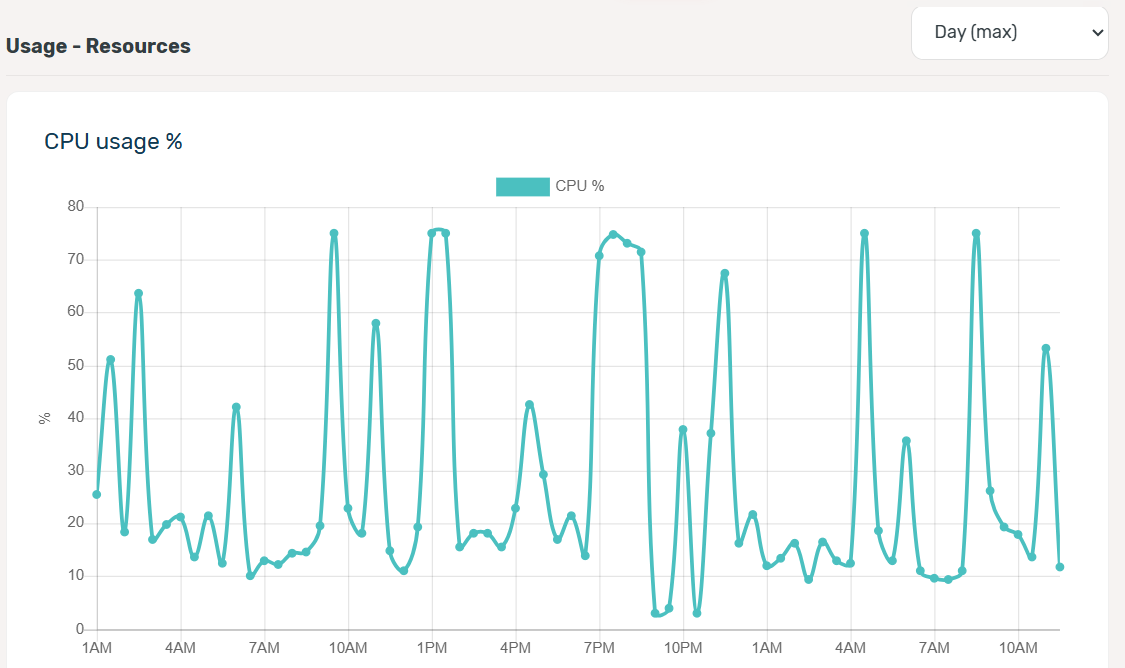
claude put 2 script to server monitor and keep cpu ram up when hike, is that ok
Services running 24/7:
vps-autorecovery — auto-restarts PHP-FPM/Nginx when CPU/RAM spikes
vps_monitor.sh — logs all server stats every 30 seconds
php8.3-fpm — 15 persistent workers across 4 sites
nginx — with 65535 file limit + FastCGI cache enabled
What auto-recovery does automatically:
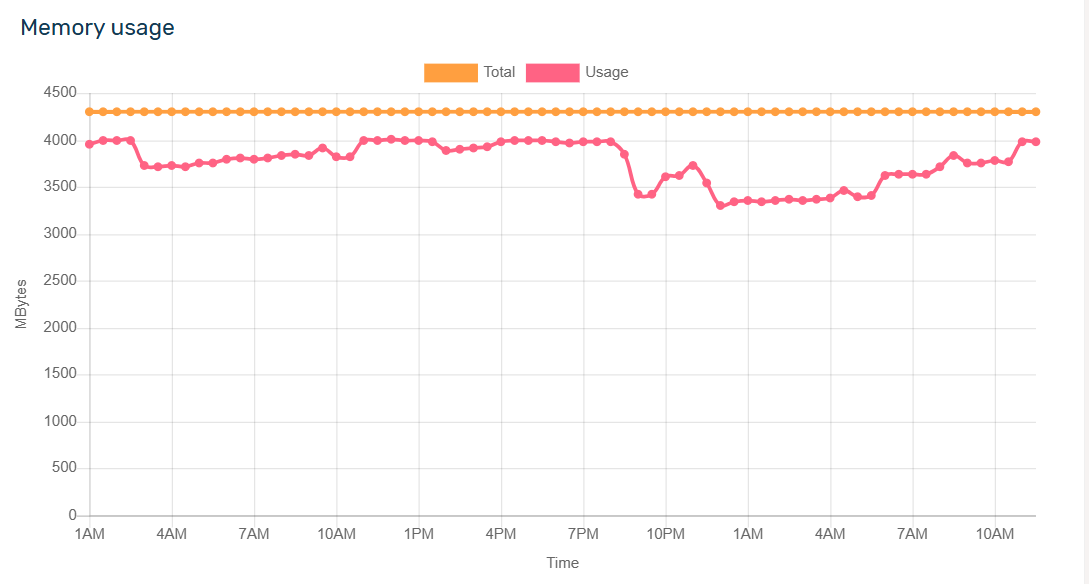
CPU > 85% → kills zombie PHP workers, restarts PHP-FPM
RAM > 88% → drops caches, kills oversized workers
PHP-FPM workers < 8 → restarts PHP-FPM + reloads Nginx
Sites returning non-200 → attempts full service recovery
Check recovery logs anytime:
bash
bash /root/vps_autorecovery.sh logs
Check recovery status:
bash
bash /root/vps_autorecovery.sh status
gamage
June 14, 2026, 10:53am
8
this setting changed
Nginx connections from 1,024 to 8,192
4 wp sites, now sites loead, but need check 24hrs
gamage
June 14, 2026, 3:39pm
9
web sites and Cpannel still down as early. i don’t know reason.
only 10 minutes were up after my last configuration
One thing is that they are down or not running, and another is that they are not accessible via their public IP address.
Could you please share the domain name and public IP address? You can send it to me in a private message.
Show the output of this command:
iptables -S
gamage
June 14, 2026, 4:52pm
11
i can’t find way to private message, i searched lot, on profile and my profile, can’t find private message option, my account 1 day old,
can you msg me, i can share my sever details