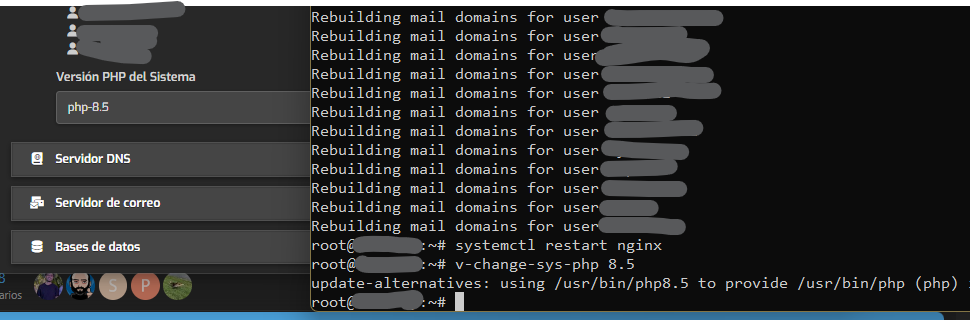
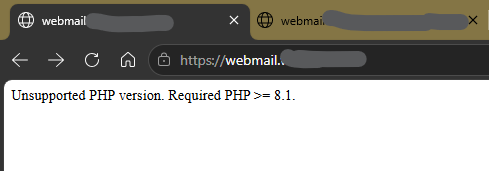
You need to change the default php to 8.1 or higher.
Example:
v-change-sys-php 8.4
You need to change the default php to 8.1 or higher.
Example:
v-change-sys-php 8.4
Now install new roundcube version:
v-add-sys-roundcube
v-add-sys-roundcube
Error: Installed version (1.7.3) is equal to the available version (1.7.3)
Show this output:
sudo -i
source /usr/local/hestia/conf/hestia.conf
COMPOSER_ALLOW_SUPERUSER=1 "/usr/bin/php" "-d disable_functions=" "/home/$ROOT_USER/.composer/composer" --working-dir="/var/lib/roundcube" update --no-dev --no-interaction --optimize-autoloader
# COMPOSER_ALLOW_SUPERUSER=1 "/usr/bin/php" "-d disable_functions=" "/home/$ROOT_USER/.composer/composer" --working-dir="/var/lib/roundcube" update --no-dev --no-interaction --optimize-autoloader
composer fund command to find out more!That’s ok.
Restart all php services:
for i in $(v-list-sys-php plain); do echo "Restarting PHP $i"; systemctl restart php$i-fpm; done
Also check whether the default version is php:
php -version | head -n1
# for i in $(v-list-sys-php plain); do echo "Restarting PHP $i"; systemctl restart php$i-fpm; done
# php -version | head -n1
Did you restart nginx and apache?
systemctl restart nginx apache2
If it doesn’t work yet after the restart.
sed -i 's/1\.7\.3/1.7.2/' /var/lib/roundcube/program/include/iniset.php
v-add-sys-roundcube
yes yes, I do it.
# for i in $(v-list-sys-php plain); do echo "Restarting PHP $i"; systemctl restart php$i-fpm; done
# php -version | head -n1
# systemctl restart nginx apache2
# sed -i 's/1\.7\.3/1.7.2/' /var/lib/roundcube/program/include/iniset.php
# v-add-sys-roundcube
not work and I do again for check:
# COMPOSER_ALLOW_SUPERUSER=1 "/usr/bin/php" "-d disable_functions=" "/home/$ROOT_USER/.composer/composer" --working-dir="/var/lib/roundcube" update --no-dev --no-interaction --optimize-autoloader
composer fund command to find out more!# systemctl restart nginx apache2
# systemctl reboot
and still doesn’t work.
Just for the record, the user had mpm_prefork and using mpm_php7.4. We have disabled them and enabled mpm_event and this fixed the issue.
systemctl stop apache2
a2dismod php7.4
a2dismod mpm_prefork
a2enmod mpm_event
systemctl restart apache2
I’m having same problem with webmail, was this issue resolved?
What’s the exact problem?
Anyway, first execute this as root and if doesn’t work, show the output and give more details.
mv /var/lib/roundcube/composer.json /var/lib/roundcube/composer.json.bak
mv /var/lib/roundcube/composer.lock /var/lib/roundcube/composer.lock.bak
mv /var/lib/roundcube/composer.json-dist /var/lib/roundcube/composer.json
source /usr/local/hestia/conf/hestia.conf
COMPOSER_ALLOW_SUPERUSER=1 "/usr/bin/php" "-d disable_functions=" "/home/$ROOT_USER/.composer/composer" --working-dir="/var/lib/roundcube" update --no-dev --no-interaction --optimize-autoloader