It always says that is my password is incorrect but I have change it already 2 time before…
root user have the same trouble.

Browser console do not show eny trouble…
But now I changed password over ssh with
passwd admin
and login now works well… 
It always says that is my password is incorrect but I have change it already 2 time before…
root user have the same trouble.
But now I changed password over ssh with
passwd admin
and login now works well…
You should change the password with v-change-user-password admin yourpass, not with passwd. We also don’t touch any passwords on upgrade, so maybe typo while entering the pw? 

/usr/local/hestia/bin/v-change-password
Should work fine
nope, it’s not working too
root@hosting /home/dengolius # /usr/local/hestia/bin/v-change-password admin
bash: /usr/local/hestia/bin/v-change-password: No such file or directory
/usr/local/hestia/bin/v-change-user-password
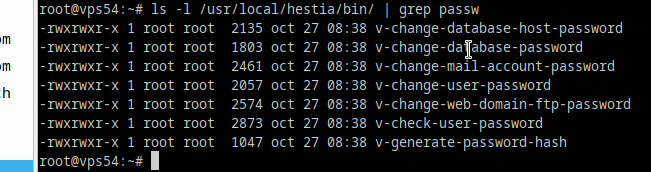
nope
there is no file
ls -la /usr/local/hestia/bin/ | grep v-change-password - give me NULL
v-change-user-password, not v-change-password, please stick to the cli docs @Lupu sent  .
.
It’s working only with full path
/usr/local/hestia/bin/v-change-user-password admin
Probaly then there is something wrong with the binary load, should be triggered from the installer, maybe you want to check it: