Gmail mails not received - TLS handshake error

Subject: Gmail mails not received - TLS handshake error

Hello,

After manually renewing/replacing Let’s Encrypt certificates, emails sent from Gmail are no longer delivered.

Current status:

- Outgoing mail works

- Mail from Microsoft/Outlook and other providers is received correctly

- Only Gmail delivery fails

- MX records are correct

- SSL certificates are valid

- Exim and Dovecot are running normally

Exim logs show:

TLS error on connection from mail-*.google.com

(gnutls_handshake): (unknown error code)

Has anyone seen Gmail-specific TLS handshake failures with Exim on HestiaCP after certificate renewal?

Any suggestions would be appreciated.

Thanks.

Hi,

What’s the affected domain name?

The MX record of your domain points to mail.omargaiani.com, and this is correct. But when connecting to Exim or Dovecot using TLS, the certificate only shows omargaiani.com domain as the only domain covered by that certificate, when the certificate must cover domains webmail.omargaiani.com and mail.omargaiani.com.

How did you add the mail domain to Hestia? How did you issued the certificate for the mail domain?

On October 27, I had a problem with the automatic SSL certificate renewal on my HestiaCP server. After that, I manually reinstalled the certificates using commands suggested by Copilot.

Could I have accidentally changed or misconfigured something related to the mail services, DNS records, Exim, Dovecot, or the SSL configuration?

Since then, I have noticed issues with email delivery to Gmail, and some sent messages do not appear in the Sent folder. I am wondering whether the manual certificate renewal process may have altered any configuration files or settings that could affect email delivery or authentication.

Any suggestions on what logs, configuration files, or settings I should check would be greatly appreciated.

Bad move.

Yes, but I need the exact commands/steps you followed to know what’s happening.

Initially, I believe I only had mail.omargaiani.com configured. Later, I followed some commands suggested by Copilot, and since then I no longer have the previous configuration. The issue may have started after those changes.

I could revert the machine to a backup from before the certificate renewal, but I’m not sure if that might cause any issues

Remove that web domain mail.omargaiani.com, you don’t need it, Hestia already uses it when adding the mail domain.

I still don’t know what you did but you should disable ssl for the mail domain omargaiani.com and add it again.

But I do it on  web access the hestia via admin and  for certificates—how do I renew them later?

Yes, do it from Web UI and certificates will be renewed automatically.

i have done and then

I don’t see a new certificate for your mail domain. Did you disabled it and enabled it again to obtain a new certificate? Did you modify any conf file manually?

Show me the output of these commands :

v-list-web-domain userhestia omargaiani.com json
v-list-web-domain userhestia mail.omargaiani.com json
v-list-mail-domain userhestia omargaiani.com json
v-list-mail-domain userhestia mail.omargaiani.com json
openssl x509 -in /etc/exim4/domains/omargaiani.com/ssl/omargaiani.com.crt -noout -dates -subject -ext subjectAltName | sed -E 's/^\s+//g'
cat /etc/dovecot/conf.d/domains/omargaiani.com.conf

Web console: https://hcp.omargaiani.com:9090/ or https://10.0.10.141:9090/

Last login: Thu Oct 29 09:28:23 2026 from 188.152.5.125
ubuntu@hcp:~$ sudo su
root@hcp:/home/ubuntu# ^[[200~v-list-web-domain userhestia omargaiani.com json
v-list-web-domain userhestia mail.omargaiani.com json
v-list-mail-domain userhestia omargaiani.com json
v-list-mail-domain userhestia mail.omargaiani.com json
openssl x509 -in /etc/exim4/domains/omargaiani.com/ssl/omargaiani.com.crt -noout -dates -subject -ext subjectAltName | sed -E ‘s/^\s+//g’
cat /etc/dovecot/conf.d/domains/omargaiani.com.conf^[[201~v-list-web-domain: com mand not found
root@hcp:/home/ubuntu# v-list-web-domain userhestia mail.omargaiani.com json
v-list-web-domain: command not found
root@hcp:/home/ubuntu# v-list-mail-domain userhestia omargaiani.com json
v-list-mail-domain: command not found
root@hcp:/home/ubuntu# v-list-mail-domain userhestia mail.omargaiani.com json
v-list-mail-domain: command not found
root@hcp:/home/ubuntu# openssl x509 -in /etc/exim4/domains/omargaiani.com/ssl/om argaiani.com.crt -noout -dates -subject -ext subjectAltName | sed -E ‘s/^\s+//g’
notBefore=Oct 27 06:43:32 2026 GMT
notAfter=Jan 25 06:43:31 2027 GMT
subject=CN = mail.omargaiani.com
X509v3 Subject Alternative Name:
DNS:mail.omargaiani.com
root@hcp:/home/ubuntu# cat /etc/dovecot/conf.d/domains/omargaiani.com.conf~

Instead of sudo su use sudo -i and execute the commands again.

ubuntu@hcp:~$ sudo -i
root@hcp:~# v-list-web-domain userhestia omargaiani.com json
v-list-web-domain userhestia mail.omargaiani.com json
v-list-mail-domain userhestia omargaiani.com json
v-list-mail-domain userhestia mail.omargaiani.com json
openssl x509 -in /etc/exim4/domains/omargaiani.com/ssl/omargaiani.com.crt -noout -dates -subject -ext subjectAltName | sed -E 's/^\s+//g'
cat /etc/dovecot/conf.d/domains/omargaiani.com.conf
{
    "omargaiani.com": {
        "IP": "10.0.10.141",
        "IP6": "",
        "DOCUMENT_ROOT": "/home/userhestia/web/omargaiani.com/public_html/",
        "U_DISK": "1",
        "U_BANDWIDTH": "36",
        "TPL": "default",
        "ALIAS": "www.omargaiani.com",
        "STATS": "",
        "STATS_USER": "",
        "SSL": "yes",
        "SSL_FORCE": "yes",
        "SSL_HSTS": "yes",
        "SSL_HOME": "same",
        "LETSENCRYPT": "yes",
        "FTP_USER": "",
        "FTP_PATH": "",
        "AUTH_USER": "",
        "BACKEND": "PHP-8_1",
        "PROXY": "default",
        "PROXY_EXT": "jpeg,jpg,png,gif,bmp,ico,svg,tif,tiff,css,js,htm,html,ttf,otf,webp,woff,txt,csv,rtf,doc,docx,xls,xlsx,ppt,pptx,odf,odp,ods,odt,pdf,psd,ai,eot,eps,ps,zip,tar,tgz,gz,rar,bz2,7z,aac,m4a,mp3,mp4,ogg,wav,wma,3gp,avi,flv,m4v,mkv,mov,mpeg,mpg,wmv,exe,iso,dmg,swf",
        "FASTCGI_CACHE": "no",
        "FASTCGI_DURATION": "0s",
        "REDIRECT": "",
        "REDIRECT_CODE": "",
        "CUSTOM_DOCROOT": "",
        "SUSPENDED": "no",
        "TIME": "19:28:40",
        "DATE": "2022-12-16"
    }
}
Error: web domain mail.omargaiani.com doesn't exist
{
    "omargaiani.com": {
        "ANTIVIRUS": "yes",
        "ANTISPAM": "yes",
        "DKIM": "yes",
        "CATCHALL": "",
        "ACCOUNTS": "2",
        "RATE_LIMIT": "",
        "REJECT": "yes",
        "U_DISK": "646",
        "SSL": "yes",
        "LETSENCRYPT": "yes",
        "SUSPENDED": "no",
        "TIME": "19:32:44",
        "DATE": "2022-12-16",
        "WEBMAIL_ALIAS": "webmail.omargaiani.com",
        "WEBMAIL":"roundcube",
        "U_SMTP_RELAY":"",
        "U_SMTP_RELAY_HOST":"",
        "U_SMTP_RELAY_PORT":"",
        "U_SMTP_RELAY_USERNAME":""
        }
}
Error: mail domain mail.omargaiani.com doesn't exist
notBefore=Oct 27 06:43:32 2026 GMT
notAfter=Jan 25 06:43:31 2027 GMT
subject=CN = mail.omargaiani.com
X509v3 Subject Alternative Name:
DNS:mail.omargaiani.com

local_name mail.omargaiani.com {
  ssl_cert = </home/userhestia/conf/mail/omargaiani.com/ssl/omargaiani.com.pem
  ssl_key = </home/userhestia/conf/mail/omargaiani.com/ssl/omargaiani.com.key
}
root@hcp:~#
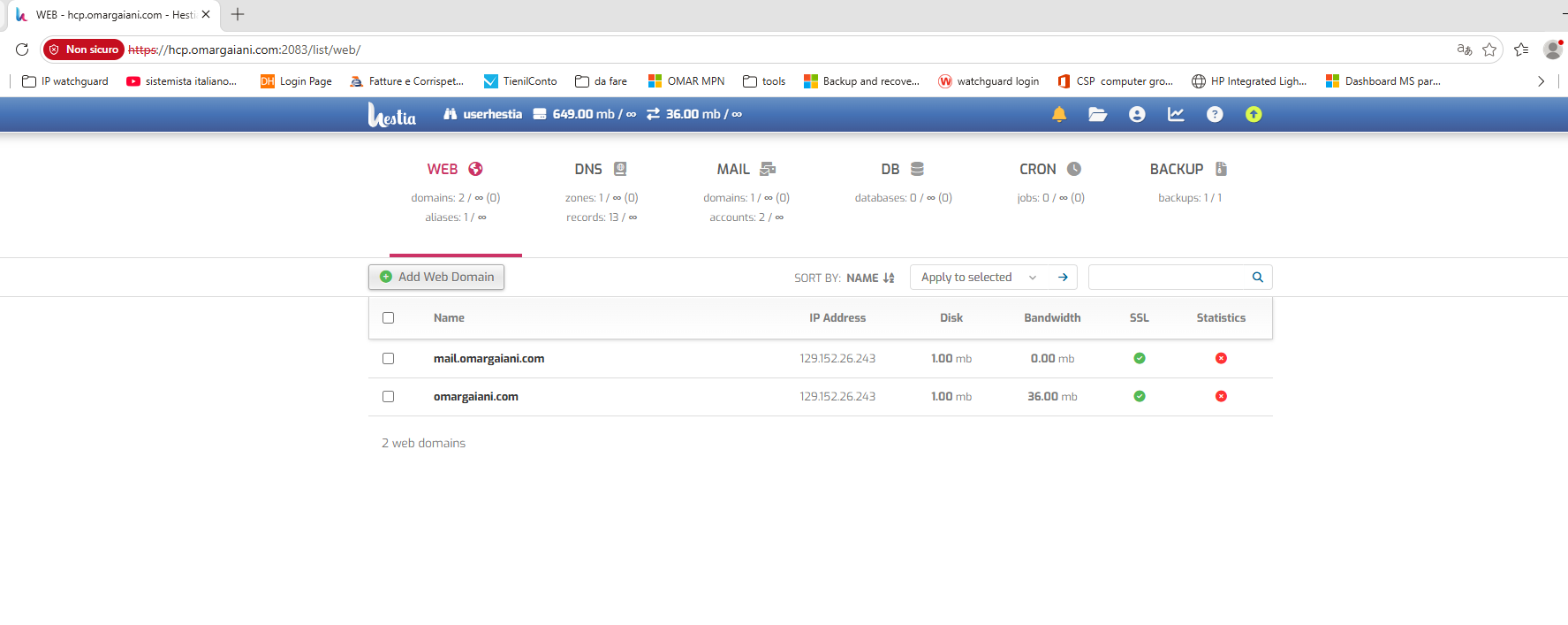
Surely some command sent by the artificial intelligence messed up the certificates and EXIM

i’m going to go eat; thanks for everything, anyway. We’ll talk later

Ok, remove ssl and add it again:

v-delete-mail-domain-ssl userhestia omargaiani.com

If no error:

v-add-letsencrypt-domain userhestia omargaiani.com '' yes

Once finished, show again the output of this command:

openssl x509 -in /etc/exim4/domains/omargaiani.com/ssl/omargaiani.com.crt -noout -dates -subject -ext subjectAltName | sed -E 's/^\s+//g'

root@hcp:~# v-delete-mail-domain-ssl userhestia omargaiani.com
root@hcp:~# v-add-letsencrypt-domain userhestia omargaiani.com ‘’ yes
root@hcp:~# openssl x509 -in /etc/exim4/domains/omargaiani.com/ssl/omargaiani.com.crt -noout -dates -subject -ext subjectAltName | sed -E ‘s/^\s+//g’
notBefore=Oct 29 10:54:51 2026 GMT
notAfter=Jan 27 10:54:50 2027 GMT
subject=CN = mail.omargaiani.com
X509v3 Subject Alternative Name:
DNS:mail.omargaiani.com, DNS:webmail.omargaiani.com
root@hcp:~#

Ok, now it should work fine. Test it again.