That whole long write out what you have above with Isos and all kinds of stuff That’s crazy. There’s a way to do this within Linux to just expand the Partition It’s just a few commands.
Kind of sad AI is destroying search for everything Everything I come up with now when I search for it is terrible nothing to do with what I’m looking for. Wow thank you AI for destroying everything I’ve ever ever looked for.
Yeah not one good piece of information coming up searching for how to do that anymore so sad AI took over and all the information they’re giving regarding drawing a partition in Linux is totally not usable.
AI is killing us. Debian 11 extend partition AI takes over it’s so sad
I don’t want to provide possible harmful processes in a production server when it is online and that’s because I said to use GParted, because it is visual and it won’t allow to do some things due it could break the partitions.
That said. Let’s say the partition you want to grow is /dev/sda1
apt install cloud-guest-utils
growpart /dev/sda 1
resize2fs /dev/sda1
You must be sure that the partition is the right one. Before doing anything, show me the output of this command:
lsblk -fM
It just cracks me up everything they’re doing now shows everything gooey well of course it’s so easy gooey I wouldn’t be asking!
I’ve done this before in the past I can’t find all any of my notes. And now everything I search for is gone because AI took over everything.
What I posted should do the job if there are no other partitions behind sda1.
No worries I can’t find all my notes from before and unfortunately search engines don’t work anymore with AI. Used to be some really good information on doing this.
I would think there would be a ton of information on Expanding a Partition on Linux. Unfortunately everything our search shows it how to do it on the Gooey OS, and I would need help doing it on a gooey OS!!!
But did you realize that I posted the 3 commands you must use? Show me the output of lsblk -fM and I’ll told you if that will work on your OS.
root@webserver:\~# lsblk -fM
NAME   FSTYPE FSVER LABEL UUID                                 FSAVAIL FSUSE% MOUNTPOINTS
sda
├─sda1 ext4   1.0         b6d273cb-969e-43a5-a4dd-04cb16faaee5     24G    45% /srv/jail/admin/home/admin
│                                                                             /
├─sda2
└─sda5 swap   1           343a7995-a6a2-4c99-bfee-88ddc14cd59a                \[SWAP\]
root@webserver:\~#
Mmmm, you have 2 partitions behind sda1, an empty sda2 and sda5 as the swap and that won’t allow you to grown sda1..
What’s the size of sda2? Because you could delete it and grow sda1 over the unallocated space after removing sda2.
fdisk -l /dev/sda2
Yeah I think I had to grow this once before and I followed Youtube video to do it so may have not been the best?
I’ve been doing IT for 34 years but mainly Windows stuff. I have had my own company doing cabling work and IT work for 34 years I just started getting into Linux stuff a few years ago. I love it but I don’t know much about it. I’m trying.
Device Boot Start End Sectors Size Id Type
/dev/sda2p1 2 1996801 1996800 975M 82 Linux swap / Solaris
root@webserver:~#
So I just added 50 gigs to the drive for the web server so it should be there somewhere.
I have my own screen connect / ConnectWise server, you can remote in and look at things? I can make a connection.
I mean it’s really not a big deal I’m just trying to expand a partition, I’m sure I can figure it out. but I really do love all your help.
Yes, it’s there but unallocated.
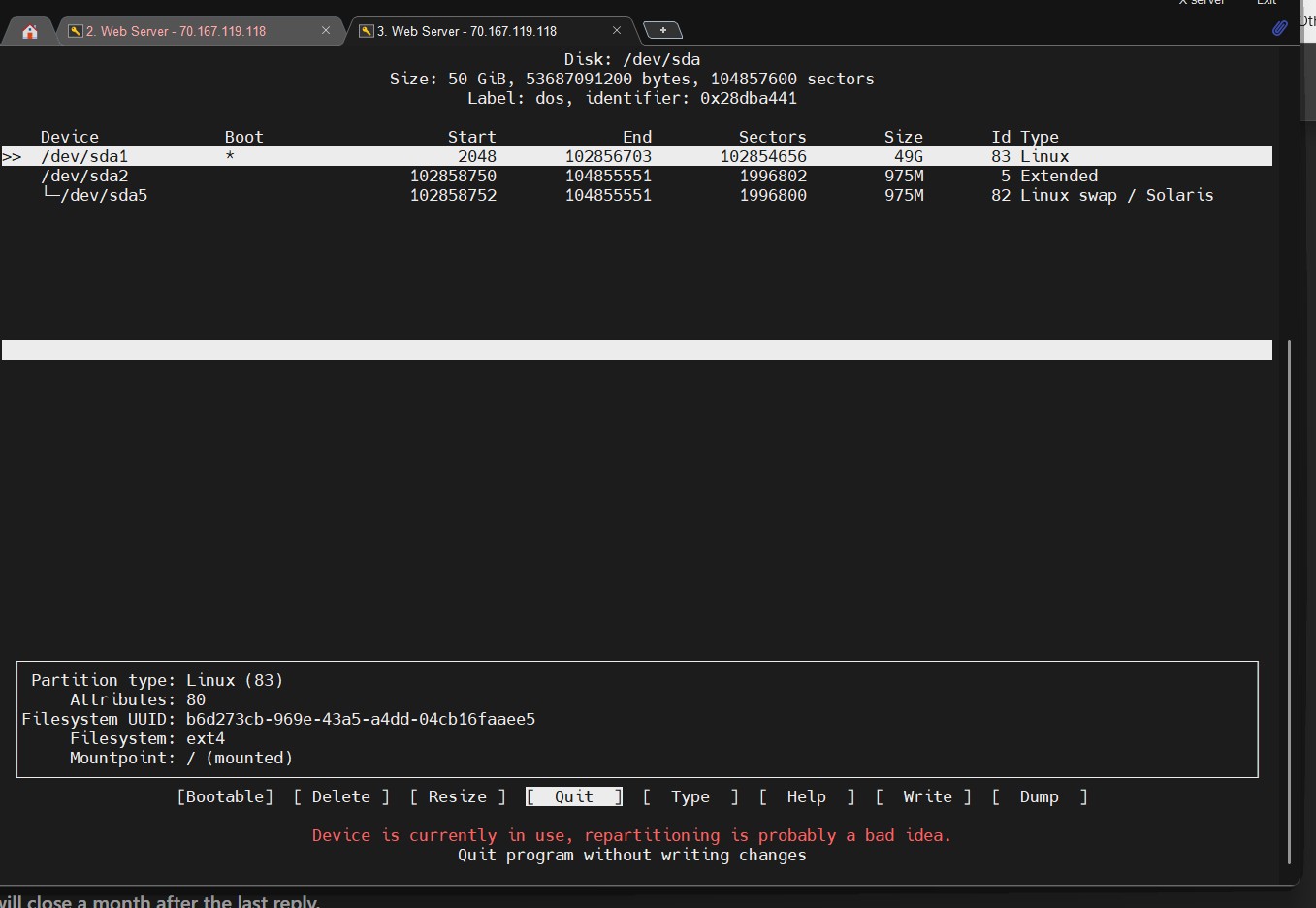
Using cfdisk /dev/sda you will see the partitions and the free space.
The main problem is this: when you add free space to an existing disk, it gets added to the end of the disk. You can only grow a partition if the unallocated space is contiguous to the partition you want to grow. In your case, after sda1 you have sda2 and sda5, so you can’t grow sda1 directly.
In your case, you would need to move sda2 and sda5 to the end of the disk to grow sda1. However, I don’t want to guide you through that process because I don’t want to be responsible for any potential data loss.