Hello everyone,
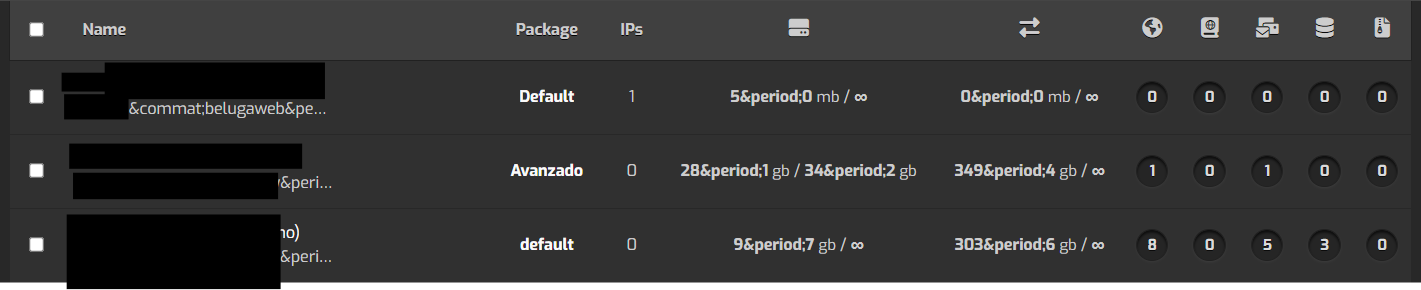
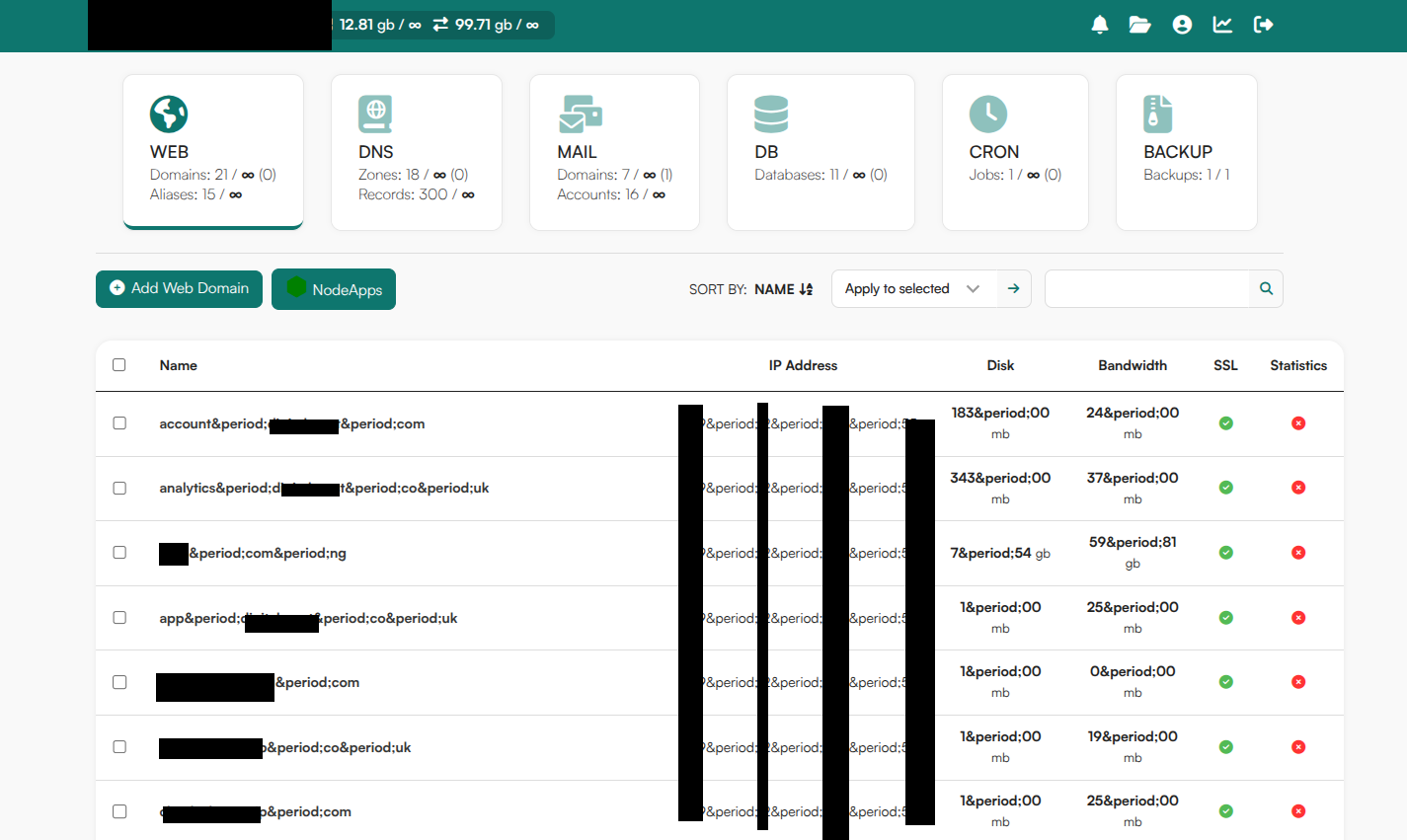
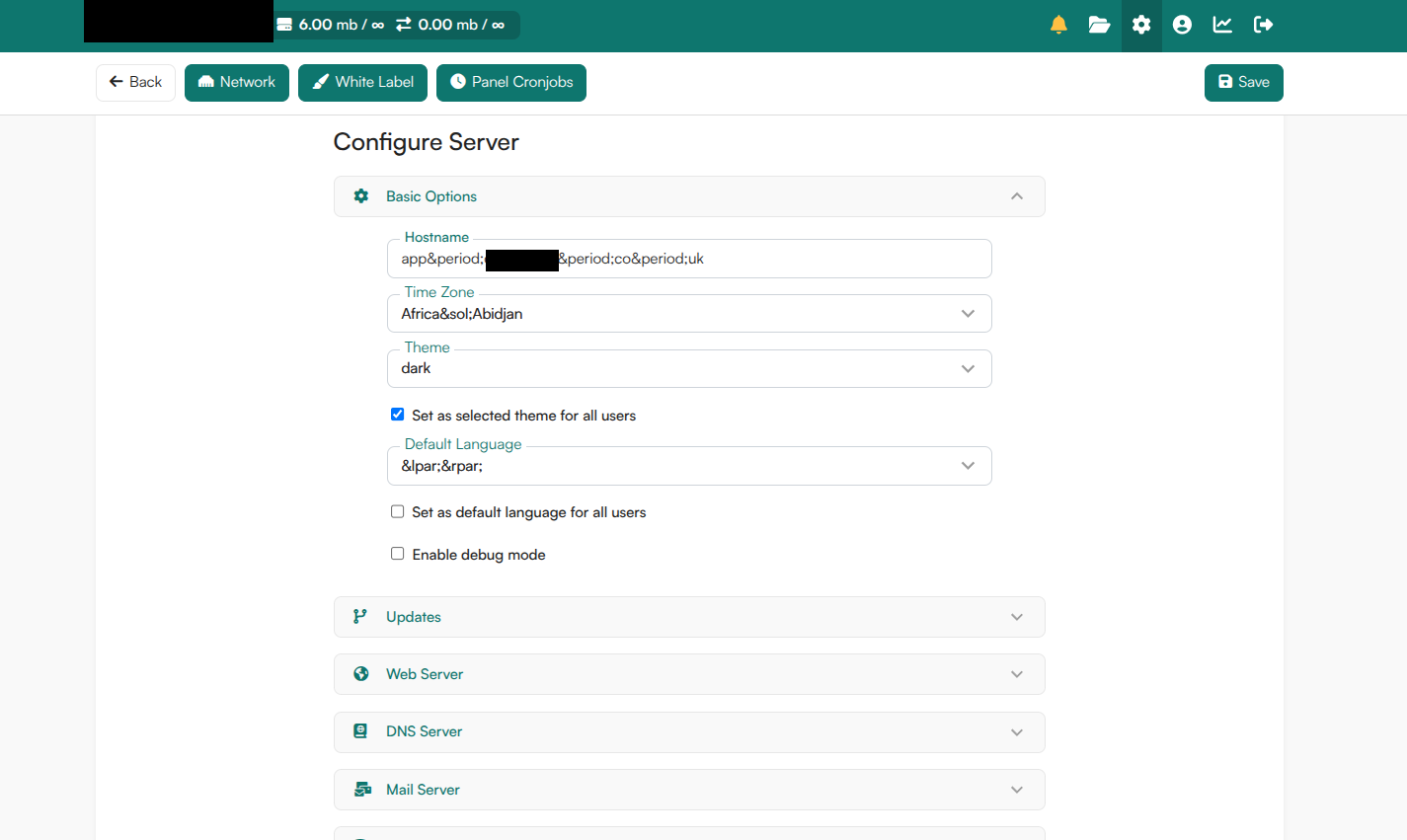
After updating to version 1.9.6, I am experiencing a UI bug where special characters are being rendered as raw HTML entities across the panel instead of their actual symbols.
For example, dots show up as . and the equals sign shows up as =.
While this is mostly a visual annoyance in the domain/user lists, it completely breaks the “Login as user” (SSO) button from the admin account. The autogenerated URL contains = instead of = (e.g., [``https://panel.mydomain.com:8585/login/?loginas=myuser&token``](``https://panel.mydomain.com:8585/login/?loginas=myuser&token``)...), which causes the login token to fail and drops the session.
If I manually edit the URL in the browser and replace = with =, the login works perfectly.
Things I have already tried without success:
Cleared browser cache and tested in Incognito mode.
Regenerated system locales (locale-gen) and forced UI language changes.
Restarted hestia and hestia-php services.
Forced a clean reinstall via apt-get --reinstall install hestia.
Logs note: I’m also seeing this in the Nginx error logs constantly: PHP message: PHP Warning: Undefined array key "LC_MESSAGES" in /usr/local/hestia/web/inc/i18n.php
Has anyone else run into this template escaping issue, or is there a hotfix available to correct the URL generation?
Thanks in advance!
Hi,
To fix that:
cd /usr/local/hestia/web/locale/
mkdir ar
mv LC_MESSAGES ar
What’s the default language you use in Hestia (seems English but I need to confim it)?
Show the output of these commands:
locale
locale-gen
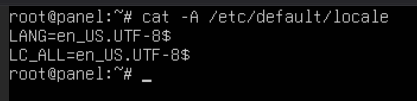
cat -A /etc/default/locale
Hi @sahsan , thanks for the guidance.
To follow up, I have confirmed that my system default language is en_US.UTF-8 (as shown in my previous terminal outputs).
Regarding the fix you suggested, I have verified that the LC_MESSAGES directory structure actually already exists for all languages, including en_US and es, at /usr/local/hestia/web/locale/[lang]/LC_MESSAGES.
Here is a summary of what I have tested so far based on this:
Verified Locale files: I confirmed that /usr/local/hestia/web/locale/es/LC_MESSAGES/hestiacp.mo (and others) are present and readable.
Clean Reinstall: I ran apt-get --reinstall install hestia to ensure no corrupted files, but the issue persists.
i18n.php check: I inspected /usr/local/hestia/web/inc/i18n.php and tried commenting out the forced setlocale(LC_ALL, 'en_US.UTF-8'); line, but it didn’t change the UI behavior.
Even with the files in place, the panel continues to render raw HTML entities like . and = throughout the UI, and the “Login as” feature remains broken due to the = issue in the generated URL.
Is it possible that the Hestia core is failing to initialize the gettext library correctly despite the files being present? Any further insights on how to force the panel to correctly parse these locale files would be greatly appreciated.
I dug deeper into the core files and found the root cause of the issue. In /usr/local/hestia/web/inc/helpers.php (around line 43), the tohtml() function is using the ENT_HTML5 flag inside htmlentities().
This specific flag is aggressively converting standard structural URL characters (like . and =) into . and = globally across the entire panel UI, breaking features like the “Login As” button.
Removing | ENT_HTML5 from that line completely fixes the UI and restores normal functionality without compromising the other security flags (ENT_QUOTES | ENT_DISALLOWED). I hope this helps patch it for the next release!
Hi,
The tohtml function is there for a reason.
The strange thing is that you’re the only one experiencing these issues. I can’t reproduce them on my servers either.
Could you please provide the output I asked for?
locale
locale-gen
cat -A /etc/default/locale
Did you try it with a different browser?
Hi @sahsan , thanks for following up.
Here are the outputs you requested. My locale configuration seems completely standard and clean (the $ shows there are no hidden Windows CRLF characters corrupting the file):
LANG=en_US.UTF-8
LC_ALL=en_US.UTF-8
(All other locale variables output as en_US.UTF-8 as well).
Regarding the browser, I am using Brave (Chromium-based).
However, I kept digging into the core files and found the exact root cause of the issue.
While I understand the tohtml() function is crucial for XSS security, the problem in version 1.9.6 is specifically the ENT_HTML5 flag inside that function, located in /usr/local/hestia/web/inc/helpers.php (around line 43).
Because ENT_HTML5 is so aggressive, it converts standard structural characters like = and . into = and .. Since tohtml() is wrapping http_build_query() in template files like list_user.php, it’s taking perfectly valid URLs like ?loginas=user&token=123 and mutating them into ?loginas=user&token=123. When strict browsers like Brave try to execute that GET request, it fails completely.
As a test, I manually removed | ENT_HTML5 from line 43, leaving only: ENT_QUOTES | ENT_SUBSTITUTE | ENT_DISALLOWED,
After saving, the entire UI and the “Login As” buttons immediately returned to normal functionality. It seems like applying tohtml() to full URL strings instead of just the variables is what’s breaking the panel.
I hope this debugging helps the team reproduce it and implement a patch!
tutibit:
Because ENT_HTML5 is so aggressive, it converts standard structural characters like = and . into = and .. Since tohtml() is wrapping http_build_query() in template files like list_user.php, it’s taking perfectly valid URLs like ?loginas=user&token=123 and mutating them into ?loginas=user&token=123. When strict browsers like Brave try to execute that GET request, it fails completely.
Looks like the AI has been smoking too much today!
I’ve tested it with both Firefox and Brave, and I can’t reproduce the issue. We also haven’t received any other reports regarding this problem, so there’s currently no identifiable issue for us to patch.
Thank you so much for this.
I had similar issue, I manually removed | ENT_HTML5 from line 43, leaving only: ENT_QUOTES | ENT_SUBSTITUTE | ENT_DISALLOWED,
And it worked immediately after saving the file. No restart needed.
Thanks mate
@peterdy what’s the browser you use? did you try another browser? what’s the language of Hestia? Could you please share an screenchot of the issue?
@tutibit @peterdy
Could you help us reproduce this issue? Please follow these steps:
1.- Navigate to the Hestia page where the bug appears.2.- Press Ctrl+U to open the page source.3.- Copy the full source code.4.- Paste it here in the forum, select it and click on button </>
This will help determine whether the issue is happening on the server side or the browser side.
Hi @sahsanu , no problem, glad we can help get to the bottom of this!
And thanks @peterdy for validating the fix, I’m glad it helped you get your access back instantly!
To get this source code for you, @sahsanu , I temporarily reverted my helpers.php file back to the original state (adding the ENT_HTML5 flag back) so the bug would trigger again.
Here is the full raw source code (Ctrl+U) generated by the server while the bug is active on the Users page. (Note: I have replaced personal data like IPs, tokens, emails, and usernames with [HIDE] for security reasons, but the HTML structure is untouched).
As you will see in the code below, the server is literally outputting = and . right into the href attributes, proving that this is definitely happening on the server side before the browser even attempts to parse it:
<!DOCTYPE html><html class="no-js" lang="es">
<head><meta charset="utf-8"><title>USER - [HIDE] - Hestia Control Panel</title><meta name="viewport" content="width=device-width, initial-scale=1"><link rel="alternate icon" href="/images/favicon.png" type="image/png"><link rel="icon" href="/images/logo.svg" type="image/svg+xml"><link rel="stylesheet" href="/css/themes/default.min.css?v=1.9.6">
<link rel="stylesheet" href="/css/themes/dark.min.css?v=1.9.6"><script defer src="/js/dist/main.min.js?v=1.9.6"></script><script defer src="/js/dist/alpinejs-collapse.min.js?v=1.9.6"></script><script defer src="/js/dist/alpinejs.min.js?v=1.9.6"></script><script> document.documentElement.classList.replace('no-js', 'js'); document.addEventListener('alpine:init', () => { Alpine.store('globals', { USER_PREFIX: 'admin_', UNLIMITED: 'Unlimited', NOTIFICATIONS_EMPTY: 'No notifications', NOTIFICATIONS_DELETE_ALL: 'Delete all notifications', CONFIRM_LEAVE_PAGE: 'Are you sure you want to leave the page?', ERROR_MESSAGE: '', BLACKLIST: 'BLACKLIST', IPVERSE: 'IPVERSE' }); })</script>
<script src="/js/dist/jquery-3.7.1.min.js"></script></head>
<body class="page-user lang-es"> <div class="app"><div id="token" token="[HIDE]"></div>
<header class="app-header">
<div class="top-bar"> <div class="container top-bar-inner">
<!-- Logo / Usage Statistics wrapper --> <div class="top-bar-left">
<!-- Logo / Home Button --> <a href="/" class="top-bar-logo" title="Hestia Control Panel"> <img src="/images/logo-header.svg" alt="Hestia Control Panel" width="54" height="29"> </a>
<!-- Usage Statistics --> <div class="top-bar-usage"> <div class="top-bar-usage-inner"> <span class="top-bar-usage-item"> <i class="fas fa-user-tie" title="Logged in as: System Administrator"></i> <span class="u-text-bold"> [HIDE] </span> </span> <span class="top-bar-usage-item"> <i class="fas fa-hard-drive" title="Disk: 5.00 mb"></i> <span class="u-text-bold"> 5.00 </span> mb / <span class="u-text-bold"> ∞ </span> </span> <span class="top-bar-usage-item"> <i class="fas fa-right-left" title="Bandwidth: 0.00 mb"></i> <span class="u-text-bold"> 0.00 </span> mb / <span class="u-text-bold"> ∞ </span> </span> </div> </div>
</div>
<!-- Notifications / Menu wrapper --> <div class="top-bar-right">
<!-- Notifications --> <div x-data="notifications" class="top-bar-notifications"> <button x-on:click="toggle()" x-bind:class="open && 'active'" class="top-bar-menu-link" type="button" title="Notifications"> <i x-bind:class="{ 'animate__animated animate__swing icon-orange': (!initialized && true) || notifications.length != 0, 'fas fa-bell': true }"></i> <span class="u-hidden">Notifications</span> </button> <div x-cloak x-show="open" x-on:click.outside="open = false" class="top-bar-notifications-panel"> <template x-if="!initialized"> <div class="top-bar-notifications-empty"> <i class="fas fa-circle-notch fa-spin icon-dim"></i> <p>Loading...</p> </div> </template> <template x-if="initialized && notifications.length == 0"> <div class="top-bar-notifications-empty"> <i class="fas fa-bell-slash icon-dim"></i> <p>No notifications</p> </div> </template> <template x-if="initialized && notifications.length > 0"> <ul> <template x-for="notification in notifications" :key="notification.ID"> <li x-bind:id="`notification-${notification.ID}`" x-bind:class="notification.ACK && 'unseen'" class="top-bar-notification-item" x-data="{ open: true }" x-show="open" x-collapse> <div class="top-bar-notification-inner"> <div class="top-bar-notification-header"> <p x-text="notification.TOPIC" class="top-bar-notification-title"></p> <button x-on:click="open = false; setTimeout(() => remove(notification.ID), 300);" type="button" class="top-bar-notification-delete" title="Delete notification"> <i class="fas fa-xmark"></i> <span class="u-hidden-visually">Delete notification</span> </button> </div> <div class="top-bar-notification-content" x-html="notification.NOTICE"></div> <p class="top-bar-notification-timestamp"> <time :datetime="`${notification.TIMESTAMP_ISO}`" x-bind:title="`${notification.TIMESTAMP_TITLE}`" x-text="`${notification.TIMESTAMP_TEXT}`"></time> </p> </div> </li> </template> </ul> </template> <template x-if="initialized && notifications.length > 2"> <button x-on:click="removeAll()" type="button" class="top-bar-notifications-delete-all"> <i class="fas fa-check"></i> Delete all notifications </button> </template> </div> </div> <!-- Menu --> <nav x-data="{ open: false }" class="top-bar-menu">
<button type="button" class="top-bar-menu-link u-hide-tablet" x-on:click="open = !open"> <i class="fas fa-bars"></i> <span class="u-hidden" x-text="open ? 'Close menu' : 'Open menu'"> Open menu </span> </button>
<div x-cloak x-show="open" x-on:click.outside="open = false" class="top-bar-menu-panel"> <ul class="top-bar-menu-list">
<!-- File Manager --> <li class="top-bar-menu-item"> <a title="File manager" class="top-bar-menu-link " href="/fm/"> <i class="fas fa-folder-open"></i> <span class="top-bar-menu-link-label u-hide-desktop">File manager</span> </a> </li> <!-- Web Terminal --> <!-- Server Settings --> <li class="top-bar-menu-item"> <a title="Server settings" class="top-bar-menu-link " href="/list/server/"> <i class="fas fa-gear"></i> <span class="top-bar-menu-link-label u-hide-desktop">Server settings</span> </a> </li> <!-- Edit User --> <li class="top-bar-menu-item"> <a title="[HIDE] (System Administrator)" class="top-bar-menu-link" href="/edit/user/?user=[HIDE]&token=[HIDE]"> <i class="fas fa-circle-user"></i> <span class="top-bar-menu-link-label u-hide-desktop">[HIDE] (System Administrator)</span> </a> </li> <!-- Statistics --> <li class="top-bar-menu-item"> <a title="Statistics" class="top-bar-menu-link " href="/list/stats/"> <i class="fas fa-chart-line"></i> <span class="top-bar-menu-link-label u-hide-desktop">Statistics</span> </a> </li> <!-- Help / Documentation --> <li class="top-bar-menu-item"> <a title="Help" class="top-bar-menu-link" href="https://hestiacp.com/docs/" target="_blank" rel="noopener"> <i class="fas fa-circle-question"></i> <span class="top-bar-menu-link-label u-hide-desktop">Help</span> </a> </li> <!-- Logout --> <li class="top-bar-menu-item"> <a title="Log out" class="top-bar-menu-link top-bar-menu-link-logout" href="/logout/?token=[HIDE]"> <i class="fas fa-right-from-bracket"></i> <span class="top-bar-menu-link-label u-hide-desktop">Log out</span> </a> </li> </ul> </div> </nav>
</div>
</div> </div>
<nav x-data="{ open: false }" class="main-menu"> <div class="container"> <button x-on:click="open = !open" type="button" class="main-menu-toggle"> <i class="fas fa-bars"></i> <span x-text="open ? 'Collapse main menu' : 'Expand main menu'" class="main-menu-toggle-label"> Expand main menu </span> </button> <ul x-cloak x-show="open" class="main-menu-list">
<!-- Users tab --> <li class="main-menu-item"> <a class="main-menu-item-link active" href="/list/user/" title="Users: 3Suspended: 0"> <p class="main-menu-item-label">USER<i class="fas fa-users"></i></p> <ul class="main-menu-stats"> <li> Users: 3 </li> <li> Suspended: 0 </li> </ul> </a> </li> <!-- Web tab --> <li class="main-menu-item"> <a class="main-menu-item-link " href="/list/web/" title="Domains: 0Aliases: 0Limit: ∞Suspended: 0"> <p class="main-menu-item-label">WEB<i class="fas fa-earth-americas"></i></p> <ul class="main-menu-stats"> <li> Domains: 0 / <span class="u-text-bold">∞</span> (0) </li> <li> Aliases: 0 / <span class="u-text-bold">∞</span> </li> </ul> </a> </li> <!-- DNS tab --> <li class="main-menu-item"> <a class="main-menu-item-link " href="/list/dns/" title="Domains: 0Limit: ∞Suspended: 0"> <p class="main-menu-item-label">DNS<i class="fas fa-book-atlas"></i></p> <ul class="main-menu-stats"> <li> Zones: 0 / <span class="u-text-bold">∞</span> (0) </li> <li> Records: 0 / <span class="u-text-bold">∞</span> </li> </ul> </a> </li> <!-- Mail tab --> <li class="main-menu-item"> <a class="main-menu-item-link " href="/list/mail/" title="Domains: 0Limit: ∞Suspended: 0"> <p class="main-menu-item-label">MAIL<i class="fas fa-envelopes-bulk"></i></p> <ul class="main-menu-stats"> <li> Domains: 0 / <span class="u-text-bold">∞</span> (0) </li> <li> Accounts: 0 / <span class="u-text-bold">∞</span> </li> </ul> </a> </li> <!-- Databases tab --> <li class="main-menu-item"> <a class="main-menu-item-link " href="/list/db/" title="Databases: 0Limit: ∞Suspended: 0"> <p class="main-menu-item-label">DB<i class="fas fa-database"></i></p> <ul class="main-menu-stats"> <li> Databases: 0 / <span class="u-text-bold">∞</span> (0) </li> </ul> </a> </li> <!-- Cron tab --> <li class="main-menu-item"> <a class="main-menu-item-link " href="/list/cron/" title="Jobs: 0Limit: ∞Suspended: 0"> <p class="main-menu-item-label">CRON<i class="fas fa-clock"></i></p> <ul class="main-menu-stats"> <li> Jobs: 0 / <span class="u-text-bold">∞</span> (0) </li> </ul> </a> </li> <!-- Backups tab --> </ul> </div> </nav>
</header>
<main class="app-content"><!-- Begin toolbar --><div class="toolbar"> <div class="toolbar-inner"> <div class="toolbar-buttons"> <a href="/add/user/" class="button button-secondary js-button-create"> <i class="fas fa-circle-plus icon-green"></i>Add User </a> <a href="/list/package/" class="button button-secondary"> <i class="fas fa-box-open icon-orange"></i>Packages </a> </div> <div class="toolbar-right"> <div class="toolbar-sorting"> <button class="toolbar-sorting-toggle js-toggle-sorting-menu" type="button" title="Sort items"> Sort by: <span class="u-text-bold"> Name <i class="fas fa-arrow-down-a-z"></i> </span> </button> <ul class="toolbar-sorting-menu js-sorting-menu u-hidden"> <li data-entity="sort-bandwidth" data-sort-as-int="1"> <span class="name">Bandwidth <i class="fas fa-arrow-down-a-z"></i></span><span class="up"><i class="fas fa-arrow-up-a-z"></i></span> </li> <li data-entity="sort-date" data-sort-as-int="1"> <span class="name ">Date <i class="fas fa-arrow-down-a-z"></i></span><span class="up"><i class="fas fa-arrow-up-a-z"></i></span> </li> <li data-entity="sort-disk" data-sort-as-int="1"> <span class="name">Disk <i class="fas fa-arrow-down-a-z"></i></span><span class="up"><i class="fas fa-arrow-up-a-z"></i></span> </li> <li data-entity="sort-package"> <span class="name">Package <i class="fas fa-arrow-down-a-z"></i></span><span class="up"><i class="fas fa-arrow-up-a-z"></i></span> </li> <li data-entity="sort-name"> <span class="name active">Name <i class="fas fa-arrow-down-a-z"></i></span><span class="up"><i class="fas fa-arrow-up-a-z"></i></span> </li> </ul> <form x-data x-bind="BulkEdit" action="/bulk/user/" method="post"> <input type="hidden" name="token" value="[HIDE]"> <select class="form-select" name="action"> <option value="">Apply to selected</option> <option value="rebuild">Rebuild All</option> <option value="rebuild user">Rebuild User Profile</option> <option value="rebuild web">Rebuild Web Domains</option> <option value="rebuild dns">Rebuild DNS Zones</option> <option value="rebuild mail">Rebuild Mail Domains</option> <option value="rebuild db">Rebuild Databases</option> <option value="rebuild cron">Rebuild Cron Jobs</option> <option value="update counters">Update Usage Counters</option> <option value="suspend">Suspend</option> <option value="unsuspend">Unsuspend</option> <option value="delete">Delete</option> </select> <button type="submit" class="toolbar-input-submit" title="Apply to selected"> <i class="fas fa-arrow-right"></i> </button> </form> </div> <div class="toolbar-search"> <form action="/search/" method="get"> <input type="hidden" name="token" value="[HIDE]"> <input type="search" class="form-control js-search-input" name="q" value="" title="Search"> <button type="submit" class="toolbar-input-submit" title="Search"> <i class="fas fa-magnifying-glass"></i> </button> </form> </div> </div> </div></div><!-- End toolbar -->
<div class="container">
<h1 class="u-text-center u-hide-desktop u-mt20 u-pr30 u-mb20 u-pl30">Users</h1>
<div class="units-table js-units-container"> <div class="units-table-header"> <div class="units-table-cell"> <input type="checkbox" class="js-toggle-all-checkbox" title="Select all"> </div> <div class="units-table-cell">Name</div> <div class="units-table-cell"></div> <div class="units-table-cell u-text-center">Package</div> <div class="units-table-cell u-text-center">IPs</div> <div class="units-table-cell u-text-center"> <i class="fas fa-hard-drive" title="Disk"></i> <span class="u-hidden-visually">Disk</span> </div> <div class="units-table-cell u-text-center"> <i class="fas fa-right-left" title="Bandwidth"></i> <span class="u-hidden-visually">Bandwidth</span> </div> <div class="units-table-cell compact u-text-center"> <i class="fas fa-earth-americas" title="Web Domains"></i> <span class="u-hidden-visually">Web Domains</span> </div> <div class="units-table-cell compact u-text-center"> <i class="fas fa-book-atlas" title="DNS Zones"></i> <span class="u-hidden-visually">DNS Zones</span> </div> <div class="units-table-cell compact u-text-center"> <i class="fas fa-envelopes-bulk" title="Mail Domains"></i> <span class="u-hidden-visually">Mail Domains</span> </div> <div class="units-table-cell compact u-text-center"> <i class="fas fa-database" title="Databases"></i> <span class="u-hidden-visually">Databases</span> </div> <div class="units-table-cell compact u-text-center"> <i class="fas fa-file-zipper" title="Backups"></i> <span class="u-hidden-visually">Backups</span> </div> </div>
<!-- Begin user list item loop --> <div class="units-table-row js-unit " data-sort-date="1754257323" data-sort-name="[HIDE]" data-sort-package="default" data-sort-bandwidth="0" data-sort-disk="5"> <div class="units-table-cell"> <div> <input id="check1" class="js-unit-checkbox" type="checkbox" title="Select" name="user[]" value="[HIDE]"> <label for="check1" class="u-hide-desktop">Select</label> </div> </div> <div class="units-table-cell units-table-heading-cell"> <span class="u-hide-desktop u-text-bold">Name:</span> <a href="/edit/user/?user=[HIDE]&token=[HIDE]" title="Edit User"> <span class="u-text-bold"> [HIDE] </span> (System Administrator) </a> <p class="u-max-width200 u-text-truncate"> <span class="u-hide-desktop u-text-bold">Email:</span> <span title="[HIDE]">[HIDE]</span> </p> </div> <div class="units-table-cell"> <ul class="units-table-row-actions"> <li class="units-table-row-action"> <i class="fas fa-user-check" title="[HIDE] (System Administrator)"></i> <span class="u-hide-desktop">[HIDE] (System Administrator)</span> </li> <li class="units-table-row-action shortcut-enter" data-key-action="href"> <a class="units-table-row-action-link" href="/edit/user/?user&equals;[HIDE]&token&equals;[HIDE]" title="Edit User"> <i class="fas fa-pencil icon-orange"></i> <span class="u-hide-desktop">Edit User</span> </a> </li> </ul> </div> <div class="units-table-cell u-text-bold u-text-center-desktop"> <span class="u-hide-desktop">Package:</span> <a href="/edit/package/?package&equals;Default&token&equals;[HIDE]" title="Edit Package"> Default </a> </div> <div class="units-table-cell u-text-center-desktop"> <span class="u-hide-desktop u-text-bold">IPs:</span> 1 </div> <div class="units-table-cell u-text-center-desktop u-text-no-wrap"> <span class="u-hide-desktop u-text-bold">Disk:</span> <span class="u-text-bold"> 5&period;0 </span> <span class="u-text-small"> mb </span> / <span class="u-text-bold"> ∞ </span> <span class="u-text-small"> </span> </div> <div class="units-table-cell u-text-center-desktop u-text-no-wrap"> <span class="u-hide-desktop u-text-bold">Bandwidth:</span> <span class="u-text-bold"> 0&period;0 </span> <span class="u-text-small"> mb </span> / <span class="u-text-bold"> ∞ </span> <span class="u-text-small"> </span> </div> <div class="units-table-cell compact u-text-center-desktop"> <span class="u-hide-desktop u-text-bold">Web Domains:</span> <span class="units-table-badge"> 0 </span> </div> <div class="units-table-cell compact u-text-center-desktop"> <span class="u-hide-desktop u-text-bold">DNS Zones:</span> <span class="units-table-badge"> 0 </span> </div> <div class="units-table-cell compact u-text-center-desktop"> <span class="u-hide-desktop u-text-bold">Mail Domains:</span> <span class="units-table-badge"> 0 </span> </div> <div class="units-table-cell compact u-text-center-desktop"> <span class="u-hide-desktop u-text-bold">Databases:</span> <span class="units-table-badge"> 0 </span> </div> <div class="units-table-cell compact u-text-center-desktop"> <span class="u-hide-desktop u-text-bold">Backups:</span> <span class="units-table-badge"> 0 </span> </div> </div> <div class="units-table-row js-unit " data-sort-date="1754260211" data-sort-name="[HIDE]" data-sort-package="avanzado" data-sort-bandwidth="362064" data-sort-disk="28822"> <div class="units-table-cell"> <div> <input id="check2" class="js-unit-checkbox" type="checkbox" title="Select" name="user[]" value="[HIDE]"> <label for="check2" class="u-hide-desktop">Select</label> </div> </div> <div class="units-table-cell units-table-heading-cell"> <span class="u-hide-desktop u-text-bold">Name:</span> <a href="/login/?loginas=[HIDE]&token=[HIDE]" title="Log in as [HIDE]"> <span class="u-text-bold"> [HIDE] </span> ([HIDE]) </a> <p class="u-max-width200 u-text-truncate"> <span class="u-hide-desktop u-text-bold">Email:</span> <span title="[HIDE]">[HIDE]</span> </p> </div> <div class="units-table-cell"> <ul class="units-table-row-actions"> <li class="units-table-row-action"> <a class="units-table-row-action-link" href="/login/?loginas&equals;[HIDE]&token&equals;[HIDE]" title="Log in as [HIDE]"> <i class="fas fa-right-to-bracket icon-green"></i> <span class="u-hide-desktop">Log in as [HIDE]</span> </a> </li> <li class="units-table-row-action shortcut-enter" data-key-action="href"> <a class="units-table-row-action-link" href="/edit/user/?user&equals;[HIDE]&token&equals;[HIDE]" title="Edit User"> <i class="fas fa-pencil icon-orange"></i> <span class="u-hide-desktop">Edit User</span> </a> </li> <li class="units-table-row-action shortcut-s" data-key-action="js"> <a class="units-table-row-action-link data-controls js-confirm-action" href="/suspend/user/?user&equals;[HIDE]&token&equals;[HIDE]" title="Suspend" data-confirm-title="Suspend" data-confirm-message="Are you sure you want to suspend user [HIDE]&quest;"> <i class="fas fa-pause icon-highlight"></i> <span class="u-hide-desktop">Suspend</span> </a> </li> <li class="units-table-row-action shortcut-delete" data-key-action="js"> <a class="units-table-row-action-link data-controls js-confirm-action" href="/delete/user/?user&equals;[HIDE]&token&equals;[HIDE]" title="Delete" data-confirm-title="Delete" data-confirm-message="Are you sure you want to delete user [HIDE]&quest;"> <i class="fas fa-trash icon-red"></i> <span class="u-hide-desktop">Delete</span> </a> </li> </ul> </div> <div class="units-table-cell u-text-bold u-text-center-desktop"> <span class="u-hide-desktop">Package:</span> <a href="/edit/package/?package&equals;Avanzado&token&equals;[HIDE]" title="Edit Package"> Avanzado </a> </div> <div class="units-table-cell u-text-center-desktop"> <span class="u-hide-desktop u-text-bold">IPs:</span> 0 </div> <div class="units-table-cell u-text-center-desktop u-text-no-wrap"> <span class="u-hide-desktop u-text-bold">Disk:</span> <span class="u-text-bold"> 28&period;1 </span> <span class="u-text-small"> gb </span> / <span class="u-text-bold"> 34&period;2 </span> <span class="u-text-small"> gb </span> </div> <div class="units-table-cell u-text-center-desktop u-text-no-wrap"> <span class="u-hide-desktop u-text-bold">Bandwidth:</span> <span class="u-text-bold"> 353&period;6 </span> <span class="u-text-small"> gb </span> / <span class="u-text-bold"> ∞ </span> <span class="u-text-small"> </span> </div> <div class="units-table-cell compact u-text-center-desktop"> <span class="u-hide-desktop u-text-bold">Web Domains:</span> <span class="units-table-badge"> 1 </span> </div> <div class="units-table-cell compact u-text-center-desktop"> <span class="u-hide-desktop u-text-bold">DNS Zones:</span> <span class="units-table-badge"> 0 </span> </div> <div class="units-table-cell compact u-text-center-desktop"> <span class="u-hide-desktop u-text-bold">Mail Domains:</span> <span class="units-table-badge"> 1 </span> </div> <div class="units-table-cell compact u-text-center-desktop"> <span class="u-hide-desktop u-text-bold">Databases:</span> <span class="units-table-badge"> 0 </span> </div> <div class="units-table-cell compact u-text-center-desktop"> <span class="u-hide-desktop u-text-bold">Backups:</span> <span class="units-table-badge"> 0 </span> </div> </div> <div class="units-table-row js-unit " data-sort-date="1754258046" data-sort-name="[HIDE]" data-sort-package="default" data-sort-bandwidth="313500" data-sort-disk="1111"> <div class="units-table-cell"> <div> <input id="check3" class="js-unit-checkbox" type="checkbox" title="Select" name="user[]" value="[HIDE]"> <label for="check3" class="u-hide-desktop">Select</label> </div> </div> <div class="units-table-cell units-table-heading-cell"> <span class="u-hide-desktop u-text-bold">Name:</span> <a href="/login/?loginas=[HIDE]&token=[HIDE]" title="Log in as [HIDE]"> <span class="u-text-bold"> [HIDE] </span> ([HIDE]) </a> <p class="u-max-width200 u-text-truncate"> <span class="u-hide-desktop u-text-bold">Email:</span> <span title="[HIDE]">[HIDE]</span> </p> </div> <div class="units-table-cell"> <ul class="units-table-row-actions"> <li class="units-table-row-action"> <a class="units-table-row-action-link" href="/login/?loginas&equals;[HIDE]&token&equals;[HIDE]" title="Log in as [HIDE]"> <i class="fas fa-right-to-bracket icon-green"></i> <span class="u-hide-desktop">Log in as [HIDE]</span> </a> </li> <li class="units-table-row-action shortcut-enter" data-key-action="href"> <a class="units-table-row-action-link" href="/edit/user/?user&equals;[HIDE]&token&equals;[HIDE]" title="Edit User"> <i class="fas fa-pencil icon-orange"></i> <span class="u-hide-desktop">Edit User</span> </a> </li> <li class="units-table-row-action shortcut-s" data-key-action="js"> <a class="units-table-row-action-link data-controls js-confirm-action" href="/suspend/user/?user&equals;[HIDE]&token&equals;[HIDE]" title="Suspend" data-confirm-title="Suspend" data-confirm-message="Are you sure you want to suspend user [HIDE]&quest;"> <i class="fas fa-pause icon-highlight"></i> <span class="u-hide-desktop">Suspend</span> </a> </li> <li class="units-table-row-action shortcut-delete" data-key-action="js"> <a class="units-table-row-action-link data-controls js-confirm-action" href="/delete/user/?user&equals;[HIDE]&token&equals;[HIDE]" title="Delete" data-confirm-title="Delete" data-confirm-message="Are you sure you want to delete user [HIDE]&quest;"> <i class="fas fa-trash icon-red"></i> <span class="u-hide-desktop">Delete</span> </a> </li> </ul> </div> <div class="units-table-cell u-text-bold u-text-center-desktop"> <span class="u-hide-desktop">Package:</span> <a href="/edit/package/?package&equals;default&token&equals;[HIDE]" title="Edit Package"> default </a> </div> <div class="units-table-cell u-text-center-desktop"> <span class="u-hide-desktop u-text-bold">IPs:</span> 0 </div> <div class="units-table-cell u-text-center-desktop u-text-no-wrap"> <span class="u-hide-desktop u-text-bold">Disk:</span> <span class="u-text-bold"> 1&period;1 </span> <span class="u-text-small"> gb </span> / <span class="u-text-bold"> ∞ </span> <span class="u-text-small"> </span> </div> <div class="units-table-cell u-text-center-desktop u-text-no-wrap"> <span class="u-hide-desktop u-text-bold">Bandwidth:</span> <span class="u-text-bold"> 306&period;2 </span> <span class="u-text-small"> gb </span> / <span class="u-text-bold"> ∞ </span> <span class="u-text-small"> </span> </div> <div class="units-table-cell compact u-text-center-desktop"> <span class="u-hide-desktop u-text-bold">Web Domains:</span> <span class="units-table-badge"> 8 </span> </div> <div class="units-table-cell compact u-text-center-desktop"> <span class="u-hide-desktop u-text-bold">DNS Zones:</span> <span class="units-table-badge"> 0 </span> </div> <div class="units-table-cell compact u-text-center-desktop"> <span class="u-hide-desktop u-text-bold">Mail Domains:</span> <span class="units-table-badge"> 5 </span> </div> <div class="units-table-cell compact u-text-center-desktop"> <span class="u-hide-desktop u-text-bold">Databases:</span> <span class="units-table-badge"> 1 </span> </div> <div class="units-table-cell compact u-text-center-desktop"> <span class="u-hide-desktop u-text-bold">Backups:</span> <span class="units-table-badge"> 0 </span> </div> </div> </div>
<div class="units-table-footer"> <p> 3 user accounts </p> </div>
</div> </main> <footer class="app-footer"> <div class="container"> <p> <a href="https://hestiacp.com/" class="app-footer-link" target="_blank"> Hestia Control Panel </a> v1.9.6 </p> </div></footer> </div> <div class="spinner-overlay js-spinner"> <i class="fas fa-circle-notch fa-spin"></i> </div>
<div x-data> <dialog x-ref="dialog" class="shortcuts"> <div class="shortcuts-header"> <div class="shortcuts-title">Shortcuts</div> <div x-on:click="$refs.dialog.close()" class="shortcuts-close"> <i class="fas fa-xmark"></i> </div> </div> <div class="shortcuts-inner"> <ul class="shortcuts-list"> <li><span class="key">a</span>Add new object</li> <li><span class="key">Ctrl + Enter</span>Save form</li> <li class="u-mb20"><span class="key">Ctrl + Backspace</span>Unsave form</li> <li><span class="key">1</span>Go to WEB list</li> <li><span class="key">2</span>Go to DNS list</li> <li><span class="key">3</span>Go to MAIL list</li> <li><span class="key">4</span>Go to DB list</li> <li><span class="key">5</span>Go to CRON list</li> <li><span class="key">6</span>Go to BACKUP list</li> </ul> <ul class="shortcuts-list"> <li class="u-mb20"><span class="key">f</span>Focus on search</li> <li class="u-mb20"><span class="key">h</span>Display / Hide shortcuts</li> <li><span class="key bigger">←</span>Move backward through top menu</li> <li><span class="key bigger">→</span>Move forward through top menu</li> <li class="u-mb20"><span class="key">Enter</span>Enter focused element</li> <li><span class="key bigger">↑</span>Move up through elements list</li> <li><span class="key bigger">↓</span>Move down through elements list</li> </ul> </div> </dialog>
<button x-on:click="$refs.dialog.showModal()" type="button" class="button button-secondary button-circle button-floating button-floating-shortcuts" title="Shortcuts"> <i class="fas fa-keyboard"></i> <span class="u-hidden">Shortcuts</span> </button> </div>
<a href="#top" class="button button-secondary button-circle button-floating button-floating-top" title="Top"> <i class="fas fa-arrow-up"></i> <span class="u-hidden">Top</span></a>
</body></html>
Sorry but I can’t reproduce it.
Could you please list the addons/extensions you are using?
Hi everyone,
I do experience exact same behavior at the moment… using chrome or Firefox same behavior in private browsing. its definitely happening on the server side…
root@hcp:/home/ubuntu# cat -A /etc/default/locale
Please provide more information: which browser are you using, what extensions do you have installed, what is your browser language, what language is set in Hestia, does the issue also occur in private/incognito mode, and do you see the same behavior when using a different browser?
Will attach screenshots below.
I had the problem in both chrome and firefox; did not try incognito; disabling my ublock origin extension did not work.
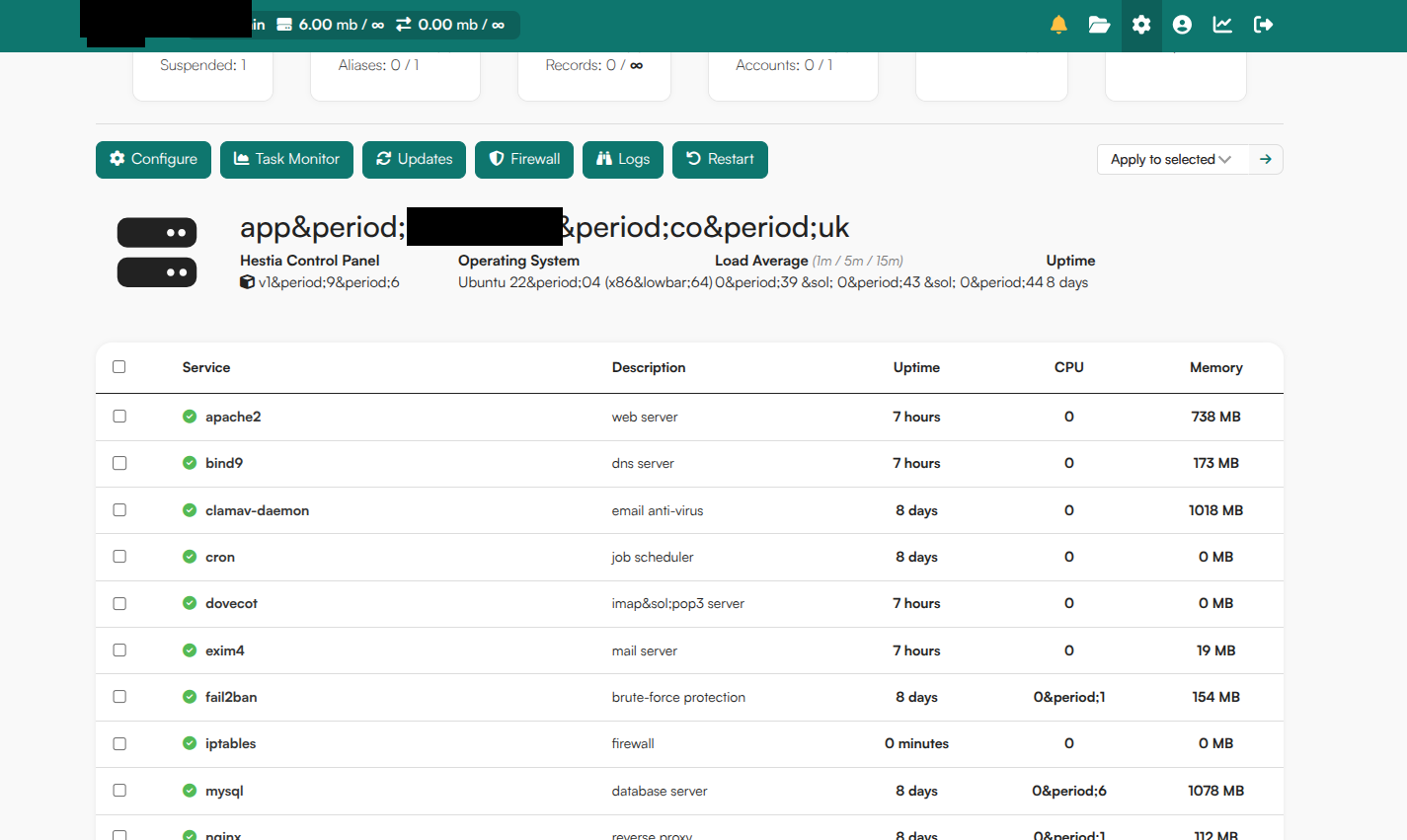
Hestia language is English (ignore what you see in the screenshot, that was me changing everything to try solve the problem.
VPS with htezner if that helps.
I use hestiacp-pluginable and hcpp-nodeapp for NodeJs, and Max-theme custom theme. Disabling the theme did not help.
Only thing that worked was removing ENT_HTML5 from line 43.
The screenshots of the problem.
I’ve installed hestiacp-pluginable, hcpp-nodeapp and MaxTheme and all works fine on my end.
I see you are using Ubuntu 22.04, I’ll try that OS version tomorrow.
I’ve tested it again and the problem is with hestiacp-pluginable
Yesterday I didn’t reboot the server, but today, just after installing the plugin and rebooting, the problem appeared. The plugin is modifying the Hestia pages. This issue is unrelated to Hestia, so I won’t investigate it further. You should contact the plugin creator to check the issue.