Hey all,
So I was seeing a few other people reporting issues after their control panel auto-updated, maybe it’s related to that, but…
I have two separate instances of Hestia, and on each instance there are 1-2 sites that are constantly timing out.
Some stuff I’ve ruled out:
Both are behind Cloudflare, so it’s not bot traffic
Both have unlimited bandwidth allocated
Other sites on the server are unaffected
Neither have received any recent code changes (so it’s not on the website end)
Tried increasing php-fpm settings for the site with a custom template (didn’t change anything)
Checked for any long-running scripts, like a broken php artisan schedule:run or w/e (didn’t see anything)
The servers are both Hetzner VPSs with 4 vCPUs, 16 GB RAM, 2 TB traffic so I really don’t think it’s resources
The error.log is amazingly vague (all my sites use NGINX):
[error] 1287#1287: *20612 connect() to unix:/run/php/php8.3-fpm-DOMAINNAMEHERE.net.sock failed (11: Resource temporarily unavailable)
I have no idea where to go from here. I don’t want to just increase the timeout limit because that’s not really a solution, it’s more of a bandaid. (and I think cloudflare has their own timeout limit anyways) Does anyone have any suggestions? Thanks!
Hi,
Are you sure? Take a look to this topic just in case:
I seem to be getting spammed by these
57.141.16.24 - - [20/Apr/2026:04:00:50 +0800] "GET /cart/?remove_item=bfd2308e9e75263970f8079115edebbd&_wpnonce=87af8e445c&add-to-cart=4571 HTTP/2.0" 200 1452108 "-" "meta-externalagent/1.1 (+https://developers.facebook.com/docs/sharing/webmasters/crawler)"
57.141.16.45 - - [20/Apr/2026:04:00:50 +0800] "GET /cart/?remove_item=a927541d74113c53810fb0b383a649ac&_wpnonce=c5368d0313&add-to-cart=4571 HTTP/2.0" 200 1452108 "-" "meta-externalagent/1.1 (+https://dev…
It looks like those sites are exhausting the pm workers.
What did you try and what is the current php-fpm conf for those sites?
Did you see any max_children message in the logs?
journalctl -u php8.3-fpm | grep max_children
Yeah, I scrolled through the nginx logs and I didn’t see any unexpected traffic or user agents. I have a very thorough robots.txt on top of cloudflare “under attack” mode on – all the requests look pretty legitimate.
The php-fpm conf was previously: (this should be hestia default because I haven’t touched it before now)
pm = ondemand
pm.max_children = 8
pm.max_requests = 4000
pm.process_idle_timeout = 10s
Some pm settings I’ve successfully used outside of Hestia for higher traffic sites was this, so I tried changing it to that:
pm = ondemand
pm.max_children = 80
pm.max_requests = 200
pm.process_idle_timeout = 10s
I’m definitely not a ondemand config wizard so if you have a better idea of settings to try, let me know!
No, I ran that command and it came back empty. I looked at the journalctl for php8.3-fpm in general and I didn’t see any abnormal messages.
perabyte:
pm = ondemand
pm.max_children = 80
pm.max_requests = 200
pm.process_idle_timeout = 10s
I’m definitely not a ondemand config wizard so if you have a better idea of settings to try, let me know!
The right conf will depend on the RAM used by each of the php workers and the traffic on those sites.
Show the output of these commands:
ps --no-headers -e -o "pid,rss,cmd" | grep -E "[p]hp-fpm: pool" | awk '{printf "PID %s: %.1f MB RSS\n", $1, $2/1024}'
To this one, replace example.net by the pool name of your site:
ps --no-headers -e -o "pid,rss,cmd" | grep -E "[p]hp-fpm: pool example.net" | awk '{printf "PID %s: %.1f MB RSS\n", $1, $2/1024}'
If you don’t have such messages… could you please show the output of this command to check the limits used by nginx?
curl -fsSLm30 https://7j.gg/chknof | sudo bash -s --
Fascinatingly, I just did a fail2ban-client unban --all as a sort of crapshoot attempt and the sites are magically alive again?
I don’t know if this is just temporary though. Let me follow these steps just in case…
Server one, first command:
PID 5623: 67.2 MB RSS
PID 6048: 62.0 MB RSS
PID 6337: 63.1 MB RSS
Server one, second command (for the site that was being dodgy):
PID 6644: 67.8 MB RSS
Server two, first command:
PID 7508: 67.6 MB RSS
PID 7512: 57.9 MB RSS
PID 7513: 61.6 MB RSS
Server two, second command (same situation):
PID 8164: 56.5 MB RSS
First server:
Checking services nginx apache2
The open files limit threshold has been set at 80%

Process 1423 :: nginx: master process /usr/sbin/nginx -c /etc/nginx/nginx.conf
Current open files:   88
Limit for open files: 1024

Process 1424 :: nginx: worker process
Current open files:   114
Limit for open files: 65535

Process 1425 :: nginx: worker process
Current open files:   90
Limit for open files: 65535

Process 1426 :: nginx: worker process
Current open files:   90
Limit for open files: 65535

Process 1427 :: nginx: worker process
Current open files:   91
Limit for open files: 65535

Process 1428 :: nginx: cache manager process
Current open files:   87
Limit for open files: 65535
Second server:
Checking services nginx apache2
The open files limit threshold has been set at 80%

Process 1912 :: nginx: master process /usr/sbin/nginx -c /etc/nginx/nginx.conf
Current open files:   158
Limit for open files: 1024

Process 1914 :: nginx: worker process
Current open files:   170
Limit for open files: 65535

Process 1915 :: nginx: worker process
Current open files:   160
Limit for open files: 65535

Process 1917 :: nginx: worker process
Current open files:   160
Limit for open files: 65535

Process 1918 :: nginx: worker process
Current open files:   160
Limit for open files: 65535

Process 1919 :: nginx: cache manager process
Current open files:   155
Limit for open files: 65535
Thank you so much for your help walking me through this! I know this isn’t strictly a Hestia related issue, so I really appreciate it.
Could you please send me the list of the ips so I can check them?
awk '/Unban / {print $NF}' /var/log/fail2ban.log | sort -Vu
I’ll check later your pool conf and limits.
Here’s what I got:
1.235.192.214
2.57.122.177
2.57.122.238
4.209.219.178
4.213.160.153
5.2.124.162
5.9.120.241
5.35.248.158
5.39.70.39
5.44.111.80
5.44.111.149
8.219.1.122
14.63.217.28
20.153.204.5
23.92.78.16
23.227.167.26
27.128.160.208
31.47.253.137
34.14.122.221
36.66.16.233
36.83.226.90
36.95.194.50
37.27.141.218
37.58.136.133
37.97.185.98
38.137.11.14
38.242.139.95
39.96.6.171
39.105.216.234
40.81.31.179
41.128.181.199
41.226.29.18
42.96.20.16
42.200.66.164
43.128.60.40
43.130.33.245
43.133.61.254
43.162.103.6
43.164.195.160
43.245.249.251
45.12.28.218
45.61.184.228
45.148.10.183
46.16.90.98
46.163.72.164
46.243.95.178
47.76.100.35
47.94.4.180
47.97.118.250
49.232.24.93
50.6.229.90
51.75.64.35
51.77.158.34
51.91.124.115
51.195.62.42
54.38.241.200
54.242.108.234
58.147.171.11
59.22.201.143
62.27.5.128
62.108.32.112
62.108.32.138
62.148.185.5
62.210.122.54
64.188.77.26
69.5.23.222
74.208.42.164
74.208.81.179
75.119.150.220
75.119.208.70
77.237.158.44
81.88.34.74
81.88.36.57
81.169.140.37
81.169.215.92
82.39.86.153
82.165.189.108
82.220.38.103
82.223.120.80
83.168.95.29
83.177.240.110
83.224.175.43
84.247.133.95
85.5.148.125
85.25.46.229
85.214.28.25
85.214.43.7
85.214.47.63
85.214.56.101
85.214.60.164
85.214.91.4
85.214.133.120
85.214.147.216
85.214.154.50
85.214.158.155
85.214.203.242
85.214.208.71
85.214.237.67
85.215.78.221
85.215.200.66
85.215.215.169
85.234.143.175
85.236.38.172
87.95.167.222
87.106.44.172
87.106.53.29
87.106.120.204
87.118.94.212
87.140.48.96
87.226.190.225
87.229.120.48
89.58.12.180
91.92.40.5
91.92.40.8
91.92.40.11
91.92.40.13
91.92.40.204
92.51.135.140
92.204.37.150
92.204.58.4
92.204.239.201
92.205.50.42
92.205.53.59
92.205.54.48
92.205.54.144
92.205.54.254
92.205.161.152
92.205.165.63
92.205.185.113
92.205.193.232
92.205.196.153
92.205.208.129
92.205.211.106
92.205.225.165
93.47.117.83
94.46.164.66
94.102.213.67
94.177.162.41
95.110.227.50
95.173.103.13
101.47.15.119
101.47.27.73
101.231.133.210
102.88.137.80
102.220.85.131
103.5.210.47
103.75.182.132
103.101.162.56
103.103.245.61
103.148.100.146
103.149.176.34
103.183.62.2
103.189.208.13
103.237.144.204
103.243.24.124
106.38.195.164
107.170.40.174
107.172.13.216
109.71.253.107
109.235.63.171
112.124.51.174
113.177.27.200
114.111.54.189
116.177.174.231
118.26.36.195
118.178.187.12
118.193.38.26
119.209.12.20
119.246.15.94
120.48.2.29
123.10.98.105
125.76.228.194
130.51.180.75
130.180.91.158
132.145.213.106
133.18.122.63
134.119.86.47
138.113.22.151
138.197.130.251
139.59.4.137
139.59.208.49
139.99.38.177
146.120.164.13
147.135.220.202
147.182.183.153
148.72.159.0
159.195.51.249
159.223.213.49
160.25.166.88
162.19.73.19
162.215.13.26
162.215.130.111
163.5.143.4
163.7.6.41
164.92.161.148
165.99.16.135
165.227.159.13
167.99.133.242
167.99.148.102
167.172.208.8
171.25.158.68
171.25.158.87
172.104.5.198
172.190.89.127
173.231.240.237
173.236.193.42
175.11.107.92
178.104.220.36
178.175.167.68
178.254.6.141
179.228.54.137
181.218.172.74
182.52.90.106
185.3.235.166
185.18.198.75
185.23.70.17
185.44.132.5
185.55.229.76
185.103.143.101
185.118.198.210
185.201.28.88
185.201.254.82
185.219.40.250
185.243.11.57
185.243.11.127
185.243.11.129
185.243.11.161
186.96.158.180
187.110.238.50
188.68.47.105
188.68.47.223
190.129.122.12
193.43.145.120
194.124.73.166
195.178.106.224
195.178.110.30
197.5.145.102
198.11.178.150
199.247.30.79
202.61.232.193
202.61.232.223
202.61.233.72
202.145.0.61
203.56.46.78
203.142.160.143
207.180.199.91
207.180.219.250
209.159.149.206
212.83.57.172
212.132.78.209
212.227.94.44
213.136.73.80
213.165.87.111
213.209.159.158
217.73.30.34
217.76.55.220
217.79.182.225
217.154.70.17
217.154.239.16
217.160.90.172
217.182.193.175
217.196.145.108
218.144.90.40
218.157.205.238
222.179.105.58
perabyte:
Here’s what I got:
I don’t see any IP belonging to Cloudflare:
     20 Host Europe GmbH
     16 IONOS SE
     15 Strato GmbH
     11 netcup GmbH
     11 DigitalOcean LLC
     10 OVH SAS
      7 dogado GmbH
      7 Contabo GmbH
      6 Hangzhou Alibaba Advertising Co. Ltd.
      5 Tencent Building Kejizhongyi Avenue
      5 TechTies Inc.
      5 Microsoft Corporation
      5 Korea Telecom
      4 BytePlus Pte. Ltd.
      3 PT Telekomunikasi Indonesia
      3 Hetzner Online GmbH
      3 China Telecom
      3 Alibaba (US) Technology Co. Ltd.
      2 Vautron Rechenzentrum AG
      2 Unmanaged Ltd
      2 Unified Layer
      2 UCloud Information Technology (HK) Limited
      2 Techoff SRV Limited
      2 Patrik Lagerman
      2 Oracle Corporation
      2 New Dream Network LLC
      2 Meteverse Limited.
      2 Interdigi Joint Stock Company
      2 Hivelocity Inc.
      2 Fastweb SpA
      2 comtrance service GmbH
      2 China Unicom China169 Backbone
      2 China Telecom (Group)
      2 Aruba S.p.A.
      1 Wiit AG
      1 Vodafone GmbH
      1 VNPT Corp
      1 VNET a.s.
      1 velia.net Internetdienste GmbH
      1 Velia.net
      1 Uniserver Internet B.V.
      1 TOT Public Company Limited
      1 Total Play Telecomunicaciones S.A.P.I. de C.V.
      1 TopNet
      1 Timeweb LLP
      1 TierPoint LLC
      1 The Constant Company LLC
      1 Telefonica Brasil S.A
      1 Tele2 Sverige AB
      1 Tedev Technological Development Company Limited
      1 Team Blue Carrier Limited
      1 Syrian Telecommunication Private Closed Joint Stock Company
      1 Swisscom (Schweiz) AG
      1 Studio AN-TV Srl
      1 Stiegeler Internet Service GmbH
      1 Speedbone Internet & Connectivity GmbH
      1 Soluciones Web On Line S.L.
      1 Societe Nationale Des Telecommunications (Tunisie Telecom)
      1 Skypass Solutions Sp. Z.O.O.
      1 SK Broadband Co Ltd
      1 Signet B.V.
      1 Shenzhen Tencent Computer Systems Company Limited
      1 Server Plan S.r.l.
      1 Scaleway SAS
      1 RendszerNET Kft.
      1 PT. Uninet Media Sakti (ISP)
      1 PT Smart Media Pratama
      1 PT Herza Digital Indonesia
      1 PT. Garuda Prima Internetindo
      1 PJSC Rostelecom
      1 Oliver Horscht Is Trading As SYNLINQ
      1 OC Networks Limited
      1 NhanHoa Software Company
      1 Netplus Broadband Services Private Limited
      1 MTN Nigeria Communication Limited
      1 Mobifone Corporation
      1 Matteo Martelloni Trading As DELUXHOST
      1 Long Van Soft Solution JSC
      1 LINKdotNET
      1 Keyweb AG
      1 Kagoya Japan Inc.
      1 IT Concept SRL
      1 Interserver Inc
      1 Internetx GmbH
      1 InMotion Hosting Inc.
      1 IDC China Telecommunications Corporation
      1 HostPapa
      1 Hong Kong Broadband Network Ltd
      1 HKT Limited
      1 HEXATOM s.a.r.l.
      1 Hasan Broadband Net
      1 Hanoi Telecom JSC
      1 Google LLC
      1 Gamma Telecom Holdings Ltd
      1 Frantech Solutions
      1 Feo Prest SRL
      1 Fastpath Ike
      1 Executive Service S.R.L. Societa Benefit
      1 EVANZO e-commerce GmbH
      1 Empresa Nacional de Telecomunicaciones Sociedad Anonima
      1 Ecotel Communication AG
      1 Dolphin IT-Systeme E.K.
      1 DNA Oyj
      1 Dianet Ltd.
      1 Deutsche Telekom AG
      1 Delta HighTech Ltd.
      1 DB3 Servicos de Telecomunicacoes S.A
      1 conova communications GmbH
      1 CNServers LLC
      1 Cloudie Limited
      1 Cloud Computing Corporation
      1 CloudAfrica Hosting (Pty) Ltd
      1 Claro NXT Telecomunicacoes Ltda
      1 CEZNET s.r.o.
      1 BSE Software GmbH
      1 Branch of Long Van System Solution JSC - Hanoi
      1 Brainoza Ou
      1 Beijing Baidu Netcom Science and Technology Co. Ltd.
      1 Axarnet Comunicaciones S.L.
      1 Association Librahost
      1 Amazon.com Inc.
      1 Almouroltec Servicos de Informatica e Internet Lda
      1 Akamai Connected Cloud
      1 Aftab IT Limited.
      1 AdminVPS OOO
      1 Adista SAS
      1 ABN
      1 23M GmbH
So the timeouts are a bit strange, but too many firewall rules in the incorrect order can cause a lot of network problems.
Show the output of this command (you can replace your public IP with 203.0.113.1):
iptables -S | sed 's/here.your.public.ip/203.0.113.1/'
Regarding the number of files limit, it’s ok, well nginx master process has only 1024 so it’s a bit low.
Regarding php-fpm pool conf, I would use something like this:
pm = dynamic
pm.max_children = 80
pm.start_servers = 8
pm.min_spare_servers = 4
pm.max_spare_servers = 16
pm.max_requests = 500
But keep in mind that you have more sites, as I said it will depend on the free memory, the memory you want to assign to every site, etc. Above conf is for a normal site with some peeks of traffic. It will use at most this much RAM: 80 × 65 MB ≈ 5.2 GB
For normal sites, the default conf is fine.
Here you go, relatively similar results on both servers (looks like maybe fail2ban caught some IPs overnight)
-P INPUT DROP
-P FORWARD ACCEPT
-P OUTPUT ACCEPT
-N fail2ban-FTP
-N fail2ban-HESTIA
-N fail2ban-MAIL
-N fail2ban-RECIDIVE
-N fail2ban-SSH
-N fail2ban-WEB
-N hestia
-A INPUT -p tcp -m multiport --dports 80,443 -j fail2ban-WEB
-A INPUT -p tcp -m tcp --dport 8083 -j fail2ban-HESTIA
-A INPUT -p tcp -m multiport --dports 25,465,587,110,995,143,993 -j fail2ban-MAI                                                                               L
-A INPUT -p tcp -m tcp --dport 21 -j fail2ban-FTP
-A INPUT -p tcp -m tcp --dport 22 -j fail2ban-SSH
-A INPUT -p tcp -m multiport --dports 1:65535 -j fail2ban-RECIDIVE
-A INPUT -m state --state RELATED,ESTABLISHED -j ACCEPT
-A INPUT -s 10.1.0.5/32 -j ACCEPT
-A INPUT -s 5.78.44.175/32 -j ACCEPT
-A INPUT -s 127.0.0.1/32 -j ACCEPT
-A INPUT -p tcp -m tcp --dport 22 -j ACCEPT
-A INPUT -p tcp -m multiport --dports 80,443 -j ACCEPT
-A INPUT -p tcp -m multiport --dports 21,12000:12100 -j ACCEPT
-A INPUT -p udp -m udp --dport 53 -j ACCEPT
-A INPUT -p tcp -m tcp --dport 53 -j ACCEPT
-A INPUT -p tcp -m multiport --dports 25,465,587 -j ACCEPT
-A INPUT -p tcp -m multiport --dports 110,995 -j ACCEPT
-A INPUT -p tcp -m multiport --dports 143,993 -j ACCEPT
-A INPUT -p tcp -m tcp --dport 8083 -j ACCEPT
-A INPUT -p icmp -j ACCEPT
-A fail2ban-FTP -j RETURN
-A fail2ban-HESTIA -j RETURN
-A fail2ban-MAIL -j RETURN
-A fail2ban-RECIDIVE -s 2.57.122.177/32 -j REJECT --reject-with icmp-port-unreac                                                                               hable
-A fail2ban-RECIDIVE -s 195.178.110.30/32 -j REJECT --reject-with icmp-port-unre                                                                               achable
-A fail2ban-RECIDIVE -j RETURN
-A fail2ban-SSH -j RETURN
-A fail2ban-WEB -j RETURN
-P INPUT DROP
-P FORWARD ACCEPT
-P OUTPUT ACCEPT
-N fail2ban-FTP
-N fail2ban-HESTIA
-N fail2ban-MAIL
-N fail2ban-RECIDIVE
-N fail2ban-SSH
-N fail2ban-WEB
-N hestia
-A INPUT -p tcp -m multiport --dports 80,443 -j fail2ban-WEB
-A INPUT -p tcp -m tcp --dport 8083 -j fail2ban-HESTIA
-A INPUT -p tcp -m multiport --dports 25,465,587,110,995,143,993 -j fail2ban-MAI                                                 L
-A INPUT -p tcp -m tcp --dport 21 -j fail2ban-FTP
-A INPUT -p tcp -m tcp --dport 22 -j fail2ban-SSH
-A INPUT -p tcp -m multiport --dports 1:65535 -j fail2ban-RECIDIVE
-A INPUT -m state --state RELATED,ESTABLISHED -j ACCEPT
-A INPUT -s 5.78.142.129/32 -j ACCEPT
-A INPUT -s 127.0.0.1/32 -j ACCEPT
-A INPUT -s 10.1.0.3/32 -p tcp -j ACCEPT
-A INPUT -p tcp -m tcp --dport 22 -j ACCEPT
-A INPUT -p tcp -m multiport --dports 80,443 -j ACCEPT
-A INPUT -p tcp -m multiport --dports 21,12000:12100 -j ACCEPT
-A INPUT -p udp -m udp --dport 53 -j ACCEPT
-A INPUT -p tcp -m tcp --dport 53 -j ACCEPT
-A INPUT -p tcp -m multiport --dports 25,465,587 -j ACCEPT
-A INPUT -p tcp -m multiport --dports 110,995 -j ACCEPT
-A INPUT -p tcp -m multiport --dports 143,993 -j ACCEPT
-A INPUT -p tcp -m tcp --dport 8083 -j ACCEPT
-A INPUT -p icmp -j ACCEPT
-A fail2ban-FTP -j RETURN
-A fail2ban-HESTIA -j RETURN
-A fail2ban-MAIL -j RETURN
-A fail2ban-RECIDIVE -j RETURN
-A fail2ban-SSH -j RETURN
-A fail2ban-WEB -j RETURN
Would you suggest raising it, and do you know how I’d go about that? I’m not sure what a good number would be.
Will try this out for the sites with above average traffic! Thank you!!
Regarding the firewall, Hestia doesn’t add the rules efficiently, instead of:
-A INPUT -p tcp -m multiport --dports 80,443 -j fail2ban-WEB
-A INPUT -p tcp -m tcp --dport 8083 -j fail2ban-HESTIA
-A INPUT -p tcp -m multiport --dports 25,465,587,110,995,143,993 -j fail2ban-MAI                                                                               L
-A INPUT -p tcp -m tcp --dport 21 -j fail2ban-FTP
-A INPUT -p tcp -m tcp --dport 22 -j fail2ban-SSH
-A INPUT -p tcp -m multiport --dports 1:65535 -j fail2ban-RECIDIVE
-A INPUT -m state --state RELATED,ESTABLISHED -j ACCEPT
-A INPUT -s 10.1.0.5/32 -j ACCEPT
-A INPUT -s 5.78.44.175/32 -j ACCEPT
-A INPUT -s 127.0.0.1/32 -j ACCEPT
It should look like this:
-A INPUT -s 127.0.0.1/32 -j ACCEPT
-A INPUT -s 10.1.0.5/32 -j ACCEPT
-A INPUT -s 5.78.44.175/32 -j ACCEPT
-A INPUT -m state --state RELATED,ESTABLISHED -j ACCEPT
-A INPUT -p tcp -m multiport --dports 80,443 -j fail2ban-WEB
-A INPUT -p tcp -m tcp --dport 8083 -j fail2ban-HESTIA
-A INPUT -p tcp -m multiport --dports 25,465,587,110,995,143,993 -j fail2ban-MAI                                                                               L
-A INPUT -p tcp -m tcp --dport 21 -j fail2ban-FTP
-A INPUT -p tcp -m tcp --dport 22 -j fail2ban-SSH
-A INPUT -p tcp -m multiport --dports 1:65535 -j fail2ban-RECIDIVE
When I have some free time, I’ll check it and open a PR to modify the v-update-firewall script.
65536 is a good number.
To modify it for nginx:
mkdir -p /etc/systemd/system/nginx.service.d/
echo -e '[Service]\nLimitNOFILE=65536' > /etc/systemd/system/nginx.service.d/override.conf
systemctl daemon-reload
systemctl restart nginx
You can checkt it again and instead of 1024 you will see 65536 :
curl -fsSLm30 https://7j.gg/chknof | sudo bash -s --
That’s very good to know… perhaps iptables was the source of my woes. I’ll keep an eye out for that update!
sahsanu:
65536 is a good number.
I have made the change!
Thank you again for all your help! I learned a lot from this thread.
If you want to test it:
Before doing the change, execute this and save the output (to compare it later):
iptables -S
Backup scripts and download new ones:
mv /usr/local/hestia/bin/v-update-firewall /usr/local/hestia/bin/v-update-firewall.ori
mv /usr/local/hestia/bin/v-add-firewall-ban /usr/local/hestia/bin/v-add-firewall-ban.ori
curl -fsSLm30 https://deve.dev/patch/reorgfire/v-update-firewall -o /usr/local/hestia/bin/v-update-firewall
curl -fsSLm30 https://deve.dev/patch/reorgfire/v-add-firewall-ban -o /usr/local/hestia/bin/v-add-firewall-ban
chmod +x /usr/local/hestia/bin/v-update-firewall
chmod +x /usr/local/hestia/bin/v-add-firewall-ban
Apply the new rules and check the output:
v-update-firewall
iptables -S
Alright, ran the new script and I think it looks good?
Before:
-P INPUT DROP
-P FORWARD ACCEPT
-P OUTPUT ACCEPT
-N fail2ban-FTP
-N fail2ban-HESTIA
-N fail2ban-MAIL
-N fail2ban-RECIDIVE
-N fail2ban-SSH
-N fail2ban-WEB
-N hestia
-A INPUT -p tcp -m multiport --dports 80,443 -j fail2ban-WEB
-A INPUT -p tcp -m tcp --dport 8083 -j fail2ban-HESTIA
-A INPUT -p tcp -m multiport --dports 25,465,587,110,995,143,993 -j fail2ban-MAI                                                  L
-A INPUT -p tcp -m tcp --dport 21 -j fail2ban-FTP
-A INPUT -p tcp -m tcp --dport 22 -j fail2ban-SSH
-A INPUT -p tcp -m multiport --dports 1:65535 -j fail2ban-RECIDIVE
-A INPUT -m state --state RELATED,ESTABLISHED -j ACCEPT
-A INPUT -s 5.78.142.129/32 -j ACCEPT
-A INPUT -s 127.0.0.1/32 -j ACCEPT
-A INPUT -s 10.1.0.3/32 -p tcp -j ACCEPT
-A INPUT -p tcp -m tcp --dport 22 -j ACCEPT
-A INPUT -p tcp -m multiport --dports 80,443 -j ACCEPT
-A INPUT -p tcp -m multiport --dports 21,12000:12100 -j ACCEPT
-A INPUT -p udp -m udp --dport 53 -j ACCEPT
-A INPUT -p tcp -m tcp --dport 53 -j ACCEPT
-A INPUT -p tcp -m multiport --dports 25,465,587 -j ACCEPT
-A INPUT -p tcp -m multiport --dports 110,995 -j ACCEPT
-A INPUT -p tcp -m multiport --dports 143,993 -j ACCEPT
-A INPUT -p tcp -m tcp --dport 8083 -j ACCEPT
-A INPUT -p icmp -j ACCEPT
-A fail2ban-FTP -j RETURN
-A fail2ban-HESTIA -j RETURN
-A fail2ban-MAIL -j RETURN
-A fail2ban-RECIDIVE -j RETURN
-A fail2ban-SSH -j RETURN
-A fail2ban-WEB -j RETURN
After:
-P INPUT DROP
-P FORWARD ACCEPT
-P OUTPUT ACCEPT
-N fail2ban-FTP
-N fail2ban-HESTIA
-N fail2ban-MAIL
-N fail2ban-RECIDIVE
-N fail2ban-SSH
-N fail2ban-WEB
-N hestia
-A INPUT -i lo -j ACCEPT
-A INPUT -s 5.78.142.129/32 -j ACCEPT
-A INPUT -m state --state RELATED,ESTABLISHED -j ACCEPT
-A INPUT -s 10.1.0.3/32 -p tcp -j ACCEPT
-A INPUT -p tcp -m tcp --dport 22 -j ACCEPT
-A INPUT -p tcp -m multiport --dports 80,443 -j ACCEPT
-A INPUT -p tcp -m multiport --dports 21,12000:12100 -j ACCEPT
-A INPUT -p udp -m udp --dport 53 -j ACCEPT
-A INPUT -p tcp -m tcp --dport 53 -j ACCEPT
-A INPUT -p tcp -m multiport --dports 25,465,587 -j ACCEPT
-A INPUT -p tcp -m multiport --dports 110,995 -j ACCEPT
-A INPUT -p tcp -m multiport --dports 143,993 -j ACCEPT
-A INPUT -p tcp -m tcp --dport 8083 -j ACCEPT
-A INPUT -p icmp -j ACCEPT
-A fail2ban-FTP -j RETURN
-A fail2ban-HESTIA -j RETURN
-A fail2ban-MAIL -j RETURN
-A fail2ban-RECIDIVE -j RETURN
-A fail2ban-SSH -j RETURN
-A fail2ban-WEB -j RETURN
I do have one thing to note… the site owners are reporting that as of two days ago (the 18th), their cron jobs don’t seem to be running. I haven’t changed anything outside of what we’ve done here, so could that have something to do with the changes we did?
perabyte:
I think it looks good?
No, it doesn’t
It didn’t add the rules for the chains.
Please, show the output of this command:
cat -A /usr/local/hestia/data/firewall/chains.conf
perabyte:
the site owners are reporting that as of two days ago (the 18th), their cron jobs don’t seem to be running. I haven’t changed anything outside of what we’ve done here, so could that have something to do with the changes we did?
We didn’t do anything that could affect cron jobs…
Show the output of these commands (replace HereTheUser with the actual user):
v-list-cron-jobs HereTheUser json
ls -la /var/spool/cron/crontabs
grep 'CRON.*(HereTheUser)' /var/log/syslog
I ran that command and it came back empty on the server I ran the new script on:
But it gave a result on the server that I didn’t:
CHAIN='RECIDIVE' PORT='1:65535' PROTOCOL='TCP'$
CHAIN='SSH' PORT='22' PROTOCOL='TCP'$
CHAIN='FTP' PORT='21' PROTOCOL='TCP'$
CHAIN='MAIL' PORT='25,465,587,110,995,143,993' PROTOCOL='TCP'$
CHAIN='HESTIA' PORT='8083' PROTOCOL='TCP'$
CHAIN='WEB' PORT='80,443' PROTOCOL='TCP'$
Yeah, that’s what I thought!
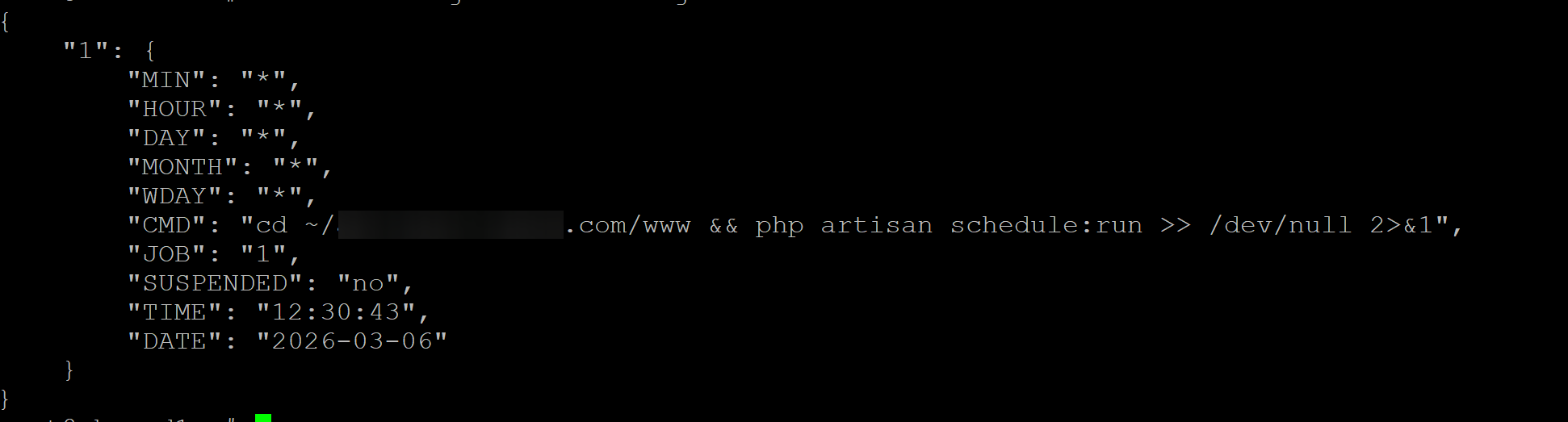
For the first command, I do see the user’s cron job listed (the cd is a symlink to a Laravel site within the public_html folder and has had no issues running until recently):
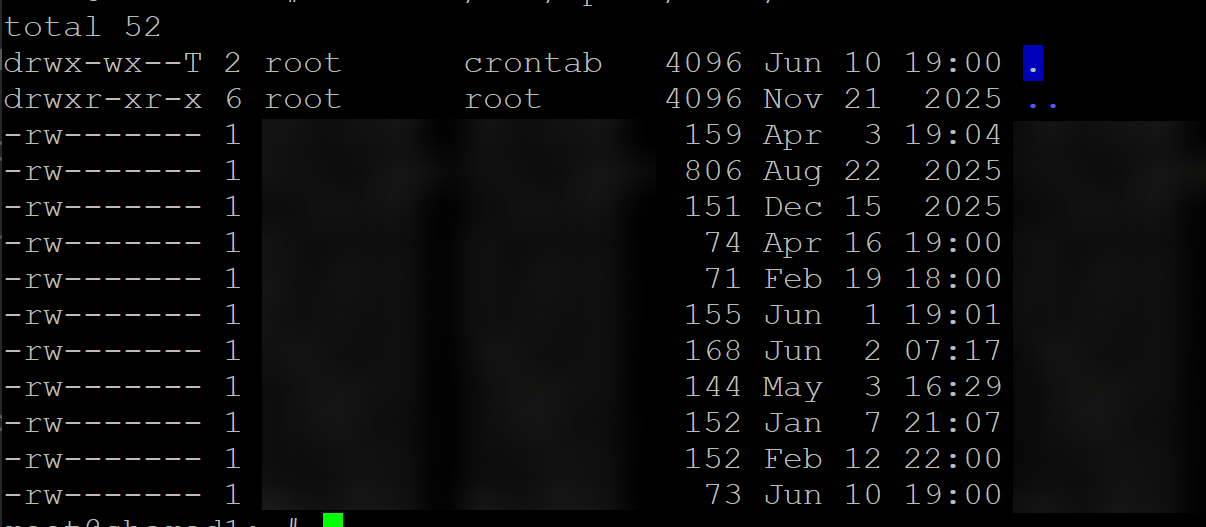
ls -la /var/spool/cron/crontabs shows all of the users, I think this is expected results:
grep 'CRON.*(HereTheUser)' /var/log/syslog results were massive but it did seem to indicate the job is running:
I did try running the schedule:run command outside of the cron and it ran without an error.
That’s really strange because the v-update-firewall script doesn’t removes any chain.
Could you please recreate the chains.conf file and run again the script?
cat > /usr/local/hestia/data/firewall/chains.conf <<EOF
CHAIN='RECIDIVE' PORT='1:65535' PROTOCOL='TCP'
CHAIN='SSH' PORT='22' PROTOCOL='TCP'
CHAIN='FTP' PORT='21' PROTOCOL='TCP'
CHAIN='MAIL' PORT='25,465,587,110,995,143,993' PROTOCOL='TCP'
CHAIN='HESTIA' PORT='8083' PROTOCOL='TCP'
CHAIN='WEB' PORT='80,443' PROTOCOL='TCP'
EOF
v-update-firewall
iptables -S
It shows that the cron job is running, another matter is whether it is doing what it’s supposed to do.
Are you sure this dir ~/*********.com/www exists? Becasue that doesn’t look like a path used by Hestia.
Please, run this command to know what’s going on (replace HereTheUser with the actual user and *******.com with the domain name):
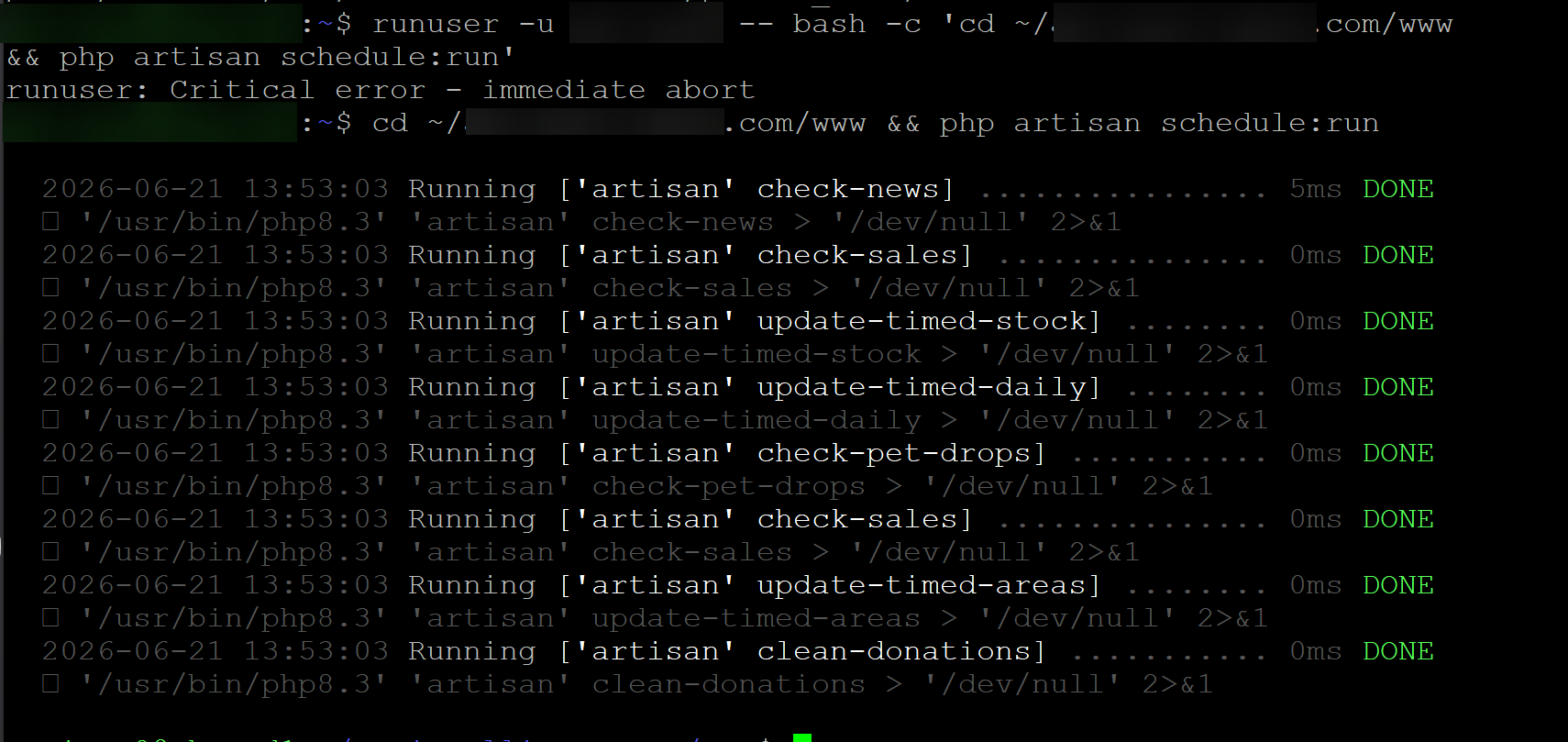
runuser -u HereTheUser -- bash -c 'cd ~/*******.com/www && php artisan schedule:run'
Ran the command and here’s the result now:
-P INPUT DROP
-P FORWARD ACCEPT
-P OUTPUT ACCEPT
-N fail2ban-FTP
-N fail2ban-HESTIA
-N fail2ban-MAIL
-N fail2ban-RECIDIVE
-N fail2ban-SSH
-N fail2ban-WEB
-N hestia
-A INPUT -i lo -j ACCEPT
-A INPUT -s 5.78.142.129/32 -j ACCEPT
-A INPUT -m state --state RELATED,ESTABLISHED -j ACCEPT
-A INPUT -p tcp -m multiport --dports 1:65535 -j fail2ban-RECIDIVE
-A INPUT -p tcp -m tcp --dport 22 -j fail2ban-SSH
-A INPUT -p tcp -m tcp --dport 21 -j fail2ban-FTP
-A INPUT -p tcp -m multiport --dports 25,465,587,110,995,143,993 -j fail2ban-MAI                                                    L
-A INPUT -p tcp -m tcp --dport 8083 -j fail2ban-HESTIA
-A INPUT -p tcp -m multiport --dports 80,443 -j fail2ban-WEB
-A INPUT -s 10.1.0.3/32 -p tcp -j ACCEPT
-A INPUT -p tcp -m tcp --dport 22 -j ACCEPT
-A INPUT -p tcp -m multiport --dports 80,443 -j ACCEPT
-A INPUT -p tcp -m multiport --dports 21,12000:12100 -j ACCEPT
-A INPUT -p udp -m udp --dport 53 -j ACCEPT
-A INPUT -p tcp -m tcp --dport 53 -j ACCEPT
-A INPUT -p tcp -m multiport --dports 25,465,587 -j ACCEPT
-A INPUT -p tcp -m multiport --dports 110,995 -j ACCEPT
-A INPUT -p tcp -m multiport --dports 143,993 -j ACCEPT
-A INPUT -p tcp -m tcp --dport 8083 -j ACCEPT
-A INPUT -p icmp -j ACCEPT
-A fail2ban-FTP -j RETURN
-A fail2ban-HESTIA -j RETURN
-A fail2ban-MAIL -j RETURN
-A fail2ban-RECIDIVE -j RETURN
-A fail2ban-SSH -j RETURN
-A fail2ban-WEB -j RETURN
Yes, it definitely exists! Like I said, it’s a symlink into a folder within the user’s web/public_html folder, where the site is actually located. It’s set up for convenience. It was also running fine for the past ~3 months without an issue.
Here’s what’s interesting. Using that runuser command I get Critical error - immediate abort – however , if I run the command as the user outside of the cron job, it’s fine and runs with no errors. So it’s not the command itself that’s wrong or failing.
Perfect, that’s the correct config.
If you can update the scripts on your other server and show the output of iptables -S before updating the scripts and after updating them and running v-update-firewall, I’d appreciate it.
You must run the runuser command as root.
No problem at all! It’s the least I can do. Here is the before:
-P INPUT DROP
-P FORWARD ACCEPT
-P OUTPUT ACCEPT
-N fail2ban-FTP
-N fail2ban-HESTIA
-N fail2ban-MAIL
-N fail2ban-RECIDIVE
-N fail2ban-SSH
-N fail2ban-WEB
-N hestia
-A INPUT -p tcp -m multiport --dports 80,443 -j fail2ban-WEB
-A INPUT -p tcp -m tcp --dport 8083 -j fail2ban-HESTIA
-A INPUT -p tcp -m multiport --dports 25,465,587,110,995,143,993 -j fail2ban-MAIL
-A INPUT -p tcp -m tcp --dport 21 -j fail2ban-FTP
-A INPUT -p tcp -m tcp --dport 22 -j fail2ban-SSH
-A INPUT -p tcp -m multiport --dports 1:65535 -j fail2ban-RECIDIVE
-A INPUT -m state --state RELATED,ESTABLISHED -j ACCEPT
-A INPUT -s 10.1.0.5/32 -j ACCEPT
-A INPUT -s 5.78.44.175/32 -j ACCEPT
-A INPUT -s 127.0.0.1/32 -j ACCEPT
-A INPUT -p tcp -m tcp --dport 22 -j ACCEPT
-A INPUT -p tcp -m multiport --dports 80,443 -j ACCEPT
-A INPUT -p tcp -m multiport --dports 21,12000:12100 -j ACCEPT
-A INPUT -p udp -m udp --dport 53 -j ACCEPT
-A INPUT -p tcp -m tcp --dport 53 -j ACCEPT
-A INPUT -p tcp -m multiport --dports 25,465,587 -j ACCEPT
-A INPUT -p tcp -m multiport --dports 110,995 -j ACCEPT
-A INPUT -p tcp -m multiport --dports 143,993 -j ACCEPT
-A INPUT -p tcp -m tcp --dport 8083 -j ACCEPT
-A INPUT -p icmp -j ACCEPT
-A fail2ban-FTP -j RETURN
-A fail2ban-HESTIA -j RETURN
-A fail2ban-MAIL -j RETURN
-A fail2ban-RECIDIVE -s 115.78.225.181/32 -j REJECT --reject-with icmp-port-unreachable
-A fail2ban-RECIDIVE -s 221.132.29.253/32 -j REJECT --reject-with icmp-port-unreachable
-A fail2ban-RECIDIVE -s 2.57.122.177/32 -j REJECT --reject-with icmp-port-unreachable
-A fail2ban-RECIDIVE -s 195.178.110.30/32 -j REJECT --reject-with icmp-port-unreachable
-A fail2ban-RECIDIVE -j RETURN
-A fail2ban-SSH -s 189.194.140.170/32 -j REJECT --reject-with icmp-port-unreachable
-A fail2ban-SSH -s 20.86.18.105/32 -j REJECT --reject-with icmp-port-unreachable
-A fail2ban-SSH -s 59.12.160.91/32 -j REJECT --reject-with icmp-port-unreachable
-A fail2ban-SSH -j RETURN
-A fail2ban-WEB -j RETURN
And the after:
-P INPUT DROP
-P FORWARD ACCEPT
-P OUTPUT ACCEPT
-N fail2ban-FTP
-N fail2ban-HESTIA
-N fail2ban-MAIL
-N fail2ban-RECIDIVE
-N fail2ban-SSH
-N fail2ban-WEB
-N hestia
-A INPUT -i lo -j ACCEPT
-A INPUT -s 10.1.0.5/32 -j ACCEPT
-A INPUT -s 5.78.44.175/32 -j ACCEPT
-A INPUT -m state --state RELATED,ESTABLISHED -j ACCEPT
-A INPUT -p tcp -m multiport --dports 1:65535 -j fail2ban-RECIDIVE
-A INPUT -p tcp -m tcp --dport 22 -j fail2ban-SSH
-A INPUT -p tcp -m tcp --dport 21 -j fail2ban-FTP
-A INPUT -p tcp -m multiport --dports 25,465,587,110,995,143,993 -j fail2ban-MAIL
-A INPUT -p tcp -m tcp --dport 8083 -j fail2ban-HESTIA
-A INPUT -p tcp -m multiport --dports 80,443 -j fail2ban-WEB
-A INPUT -p tcp -m tcp --dport 22 -j ACCEPT
-A INPUT -p tcp -m multiport --dports 80,443 -j ACCEPT
-A INPUT -p tcp -m multiport --dports 21,12000:12100 -j ACCEPT
-A INPUT -p udp -m udp --dport 53 -j ACCEPT
-A INPUT -p tcp -m tcp --dport 53 -j ACCEPT
-A INPUT -p tcp -m multiport --dports 25,465,587 -j ACCEPT
-A INPUT -p tcp -m multiport --dports 110,995 -j ACCEPT
-A INPUT -p tcp -m multiport --dports 143,993 -j ACCEPT
-A INPUT -p tcp -m tcp --dport 8083 -j ACCEPT
-A INPUT -p icmp -j ACCEPT
-A fail2ban-FTP -j RETURN
-A fail2ban-HESTIA -j RETURN
-A fail2ban-MAIL -j RETURN
-A fail2ban-RECIDIVE -s 115.78.225.181/32 -j DROP
-A fail2ban-RECIDIVE -s 221.132.29.253/32 -j DROP
-A fail2ban-RECIDIVE -s 2.57.122.177/32 -j DROP
-A fail2ban-RECIDIVE -s 195.178.110.30/32 -j DROP
-A fail2ban-RECIDIVE -s 146.120.164.13/32 -j DROP
-A fail2ban-RECIDIVE -s 91.92.40.8/32 -j DROP
-A fail2ban-RECIDIVE -j RETURN
-A fail2ban-SSH -s 212.227.99.59/32 -j DROP
-A fail2ban-SSH -s 189.194.140.170/32 -j DROP
-A fail2ban-SSH -s 20.86.18.105/32 -j DROP
-A fail2ban-SSH -s 59.12.160.91/32 -j DROP
-A fail2ban-SSH -j RETURN
-A fail2ban-WEB -j RETURN
Oh duh LOL sorry about that.
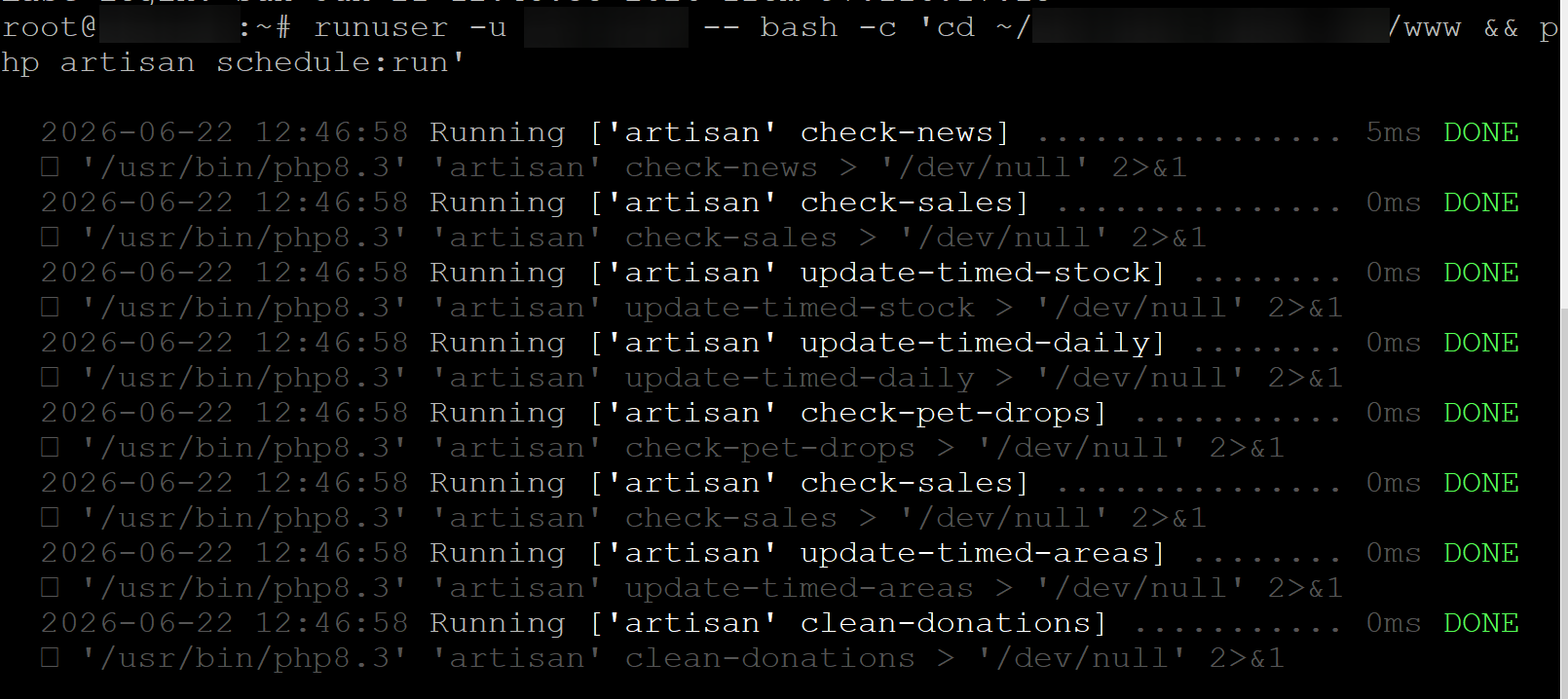
It does work when I run it as root:
Thank you, the script to update the firewall worked as expected
Then it should work fine from the cron job too.
Could you please modify the cron job to redirect the output to a file? Add this at the end of the command &>>/tmp/cronjob.debug and wait until the cron job runs and then check the file /tmp/cronjob.debug